Delivering custom payloads with Metasploit using DLL injection

I’m very interested in supporting alternative remote administration tools in Cobalt Strike. Meterpreter is awesome as an active RAT, but I need something less chatty to hold my accesses when I’m not using them. I plan to talk about about this in my upcoming Dirty Red Team Tricks II talk. In this post, I’d like to talk about how to deliver a custom payload with one of the Metasploit Framework’s existing stagers.

Problem Statement

Part of the value I offer with Cobalt Strike and Armitage is a workflow around the Metasploit Framework. As such, any third-party stuff I create has to integrate well into the framework and feel like a first-class part of the tool’s workflow.

When I sat down to look at this problem, I had the following requirements in mind:

  • I want to use my third-party payload with remote and client-side exploits
  • I’d like to use my third-party payload with generate executables (e.g., I want them to work with psexec, I want to be able to embed it in an existing executable, etc.)

My ideal integration point is Cobalt Strike’s listener management feature. Through this dialog, users may start multi/handlers for different payloads, configure them, and name them. Later, users may pick from these listeners when setting up a client-side attack or generating a social engineering package.

Solution

Matt Weeks covered a few options for using custom playloads in Metasploit 4. He talked about how to use the generic/custom option to embed your own shellcode. He also covered the EXE::Custom option.

The best solution to my problem is the dllinject payload shipped with the Metasploit Framework. dllinject allows me to specify a reflective DLL and load it using the http, https, or tcp stagers.

To use dllinject, I need to:

  • create a reflective DLL
  • patch the reflective DLL to make it compatible with the dllinject stager
  • deliver the patched reflective DLL to the dllinject stager

How to create a reflective DLL

A reflective DLL is one built with Stephen Fewer’s Reflective DLL Loader code. To build a reflective DLL, you will need Visual Studio 2008. The dllinject stager will not load an arbitrary DLL for you.

I tried Visual Studio 2010 initially, but the DLL would crash the process I injected it into when using it on versions of Windows before XP SP3. I spent some time tweaking the different compiler and linker options to mitigate this with no dice. Visual Studio 2008 Express is still available for free and it works, I recommend that you use it.

Next, create a project and import the Reflective DLL files into it.

You will also want to right-click the project, navigate to Properties -> C/C++ -> PreProcessor and define the REFLECTIVEDLLINJECTION_VIA_LOADREMOTELIBRARYR and REFLECTIVEDLLINJECTION_CUSTOM_DLLMAIN constants. You’re just defining these as true essentially.

This will allow you to use DllMain as the entry point once the DLL is reflectively loaded. See ReflectiveDLL.c.

Now you should be able to compile the project without any issues.

To test your reflective DLL, use the inject program included in the package.

Now you’re all set.

I want to deliver the DLL to the stager, myself…

To take advantage of dllinject, I have an additional problem. I plan to have my custom payload communicate to my web server running on port 80. I can stage dllinject from a different port, but this isn’t as clean. I’d like to deliver my custom payload to the stager from my web server. This introduces a few additional steps which are worth documenting if you need to do something similar.

Patch the Reflective DLL

The DLL inject stager will not accept the reflective DLL as-is. It must be patched. The payload handler for dllinject handles this step for us automatically. Since I want to host the DLL myself, I must patch it myself.

The code for this patching is in reflectivedllinject.rb. I’m opting to cheat and force the Metasploit Framework to patch my DLL for me. To do this, I will automatically launch a reverse tcp handler for the dllinject payload. Connect to it, download the patched DLL, and save it to a file I can host.

Here’s the Cortana/Sleep code that does this:

# connect to the reverse tcp dllinject handler
$handle = connect("127.0.0.1", 65002);

# read a 4-byte integer stating the size of our data. I use I- to account for the byte order
$bytes = bread($handle, "I-")[0];
$data = readb($handle, $bytes);
closef($handle);

# save to r2.dll
$h = openf(">r2.dll");
writeb($h, $data);
closef($h);

Deliver the patched Reflective DLL

Now that I have a patched reflective DLL I can host it on my web server and deliver it when the stager requests it. The stager communicates to a 4-character random URL. This random URL is hard coded in the stager when it’s generated. I wrote a regex in my web server and instructed it to deliver my hosted DLL for any requests that match /[A-Za-z0-9]{4}. One other note, the Content-Type of the delivered DLL should be application/octet-stream.

Conclusion

With that, you now know enough to deliver your own RAT or agent using the Metasploit Framework’s DLL inject payload. An eventual Cortana goal will be to create an API that allows Armitage and Cobalt Strike to act as a way to control administration tools beyond Meterpreter. I’m still deciding what that will look like, but… having an integration point to deliver a custom payload is a good start.
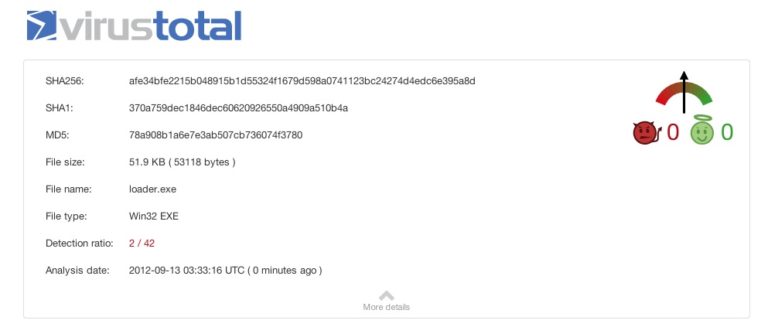
A loader for Metasploit's Meterpreter

Recently, there was an interesting discussion on the metasploit-framework mailing list about the staging protocol for Meterpreter. egypt let loose with some wisdom about what it would take to write a client to download and execute a payload from a Metasploit Framework multi/handler. mihi completed the discussion by advising where to place the socket value, so meterpreter could pick it up.

The basic process is:

  1. Connect to the multi/handler
  2. Read the length of the payload into a 4 byte unsigned integer in native byte order
  3. allocate a buffer with Read, Write, and Execute access
  4. copy the socket file descriptor from step 1 to the EDI register
  5. Read the payload from the socket into our buffer
  6. Cast the buffer to a function and call it

My ears perked up at this discussion, because it’s something I knew I’d have to dig into soon. Our friends at the anti-virus companies are doing a great job of picking up Metasploit’s stager, no matter how it’s encoded or which template executable I throw at it. Trust me, I tried. Before releasing Cobalt Strike, I had this idea to license a multi-AV engine and operate a cloud service to encode binaries again and again until they were clean. The prototype of this idea was a complete failure. Since then, I’ve been meaning to investigate writing my own client.

Armed with this guidance, I wrote a quick client for a Metasploit reverse_tcp multi/handler. The code is on GitHub.

If you’d like more information on how AV is picking up executables generated by the Metasploit Framework, read Facts and myths about antivirus evasion with Metasploit.

Covert VPN - Layer 2 Pivoting for Cobalt Strike

Currently, I’m debating a class of social engineering “packages” to force SMB requests against an attacker controlled system. Ideas include packages to generate LNK files, host a WPAD server, etc.

This created a bit of an identity crisis though. I see Cobalt Strike as a tool for a penetration tester to emulate the capabilities of a motivated external actor. Sadly, many awesome SMB attacks require a physical presence on the target’s network.

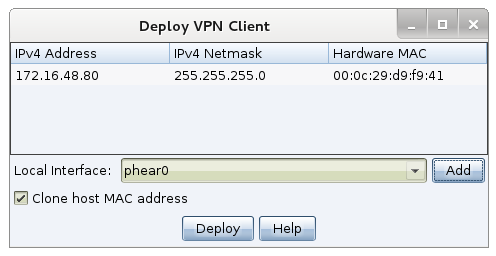
To put this issue to rest, I decided to build a feature to allow a motivated external attacker the ability to work as-if they are physically present on the target’s network. This feature is Covert VPN.

Deploy Covert VPN

Covert VPN is a layer 2 pivoting capability for Cobalt Strike. It creates a network interface on your system that is bridged into the target’s network through a channel of your choosing. Covert VPN can tunnel its traffic over UDP, TCP, or HTTP channels

Once an interface is active, you can sniff packets, start rogue services, use external scanners and attack tools–pretty much whatever you want.

Covert VPN is in the latest version of Cobalt Strike.

Cobalt Strike 1.44 Update

Cobalt Strike 1.44/16 Aug 12 is now available. Here are some of the changes:

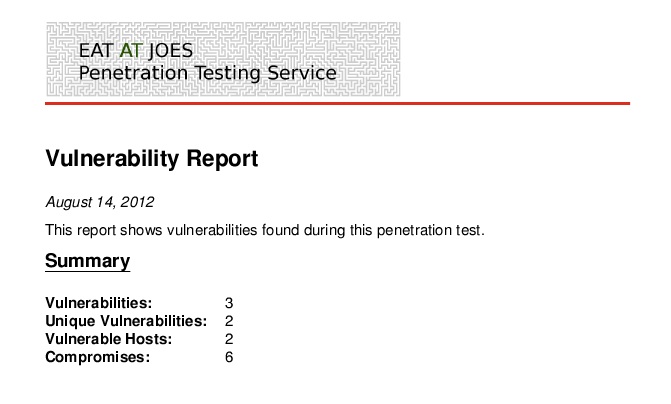
  • You may now customize Cobalt Strike’s reports with your own header image and accent color. Go to Cobalt Strike -> Preferences and look for the reporting preferences. Here’s an example of a vulnerability report with a custom header image and a red accent color:
  • The System Profiler feature now detects Apple iOS and Android operating systems. This update to Cobalt Strike also includes icons for Apple iOS and Android.

This release also fixes several bugs, improves usability for a few Metasploit(r) Framework modules, and updates Cortana. See the releasenotes.txt file for the full story.

Licensed Cobalt Strike users may update using the included update program.

Enjoy the update.

Cortana: real-time collaborative hacking... with bots

At BSides Las Vegas, I talked about Force Multipliers for Red Team Operations. In this talk, I shared several stories about how my evil bots stole passwords, instantly installed back doors, and generally wreaked havoc on college students defending (sometimes) unpatched systems. Today, I’d like to introduce you to the technology behind this havoc: Cortana.

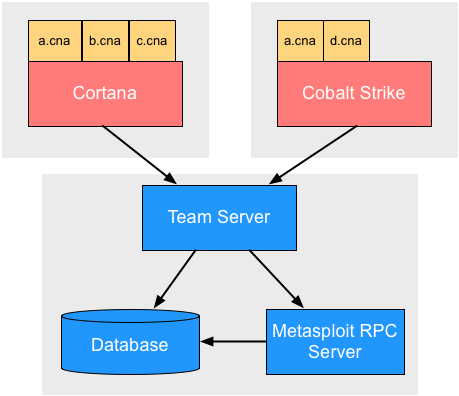
You may know Armitage: a red team collaboration tool built on the Metasploit Framework. Cobalt Strike is Armitage’s commercial big brother. Both packages include a team server. Through this team server, multiple hackers may control compromised hosts and launch attacks through one instance of the Metasploit Framework.

Inspired by my days on IRC in the 1990s, I wondered what would happen if I added bots to this collaborative hacking setup. This wondering (and a DARPA contract) led to Cortana, a scripting language for Armitage and Cobalt Strike.

What can I do?

Using Cortana, you may develop stand-alone bots that join your red team. Cortana bots scan hosts, launch exploits, and work on compromised hosts without stepping on each other or getting in the way of their human teammates. Think of this system as Google Wave Apache Wave for hacking.

Cortana scripts may also extend the Armitage and Cobalt Strike clients with new features. Cortana scripts can expose hidden Metasploit features, integrate third-party tools and agents, or control other Cortana bots.

Start Here…

If you’ve ever written scripts for an IRC client such as mIRCirssiBitchX, or even jIRCii–you’ll find yourself right at home with Cortana. The best place to start is the Cortana Tutorial. This document is a 55-page tutorial, reference, and collection of examples.

If you’d like to get involved writing Cortana scripts, head over to the Cortana Scripts Github repository. Fork the repository and start hacking away. Several example scripts are available, right now, for your copying and pasting pleasure.

Developer Support

If you have questions, join the Cortana Hackers Mailing list. Send a blank message to [email protected] and you will be subscribed. You may send a message to [email protected] to unsubscribe from the list.

If you’d like to connect on IRC with other Cortana hackers, join #armitage on irc.freenode.net.

Get It

Cortana is now available in Armitage 08.02.12 shipped in the Metasploit Framework. Type msfupdate and you have it. I hope I didn’t freak anyone out with my mega-large pull request.

The demo of Cobalt Strike has it too.

Cortana is BSD-licensed and is co-developed with Armitage. This work was made possible by a DARPA Cyber Fast Track contract.

I first announced Cortana at DEFCON 20. The slides from this presentation are available as well.

Use Armitage and Cobalt Strike on Amazon's EC2

James Webb has an interesting blog post on how to use Armitage to manage a pen test through Amazon’s Elastic Computing Cloud.

He does a good job articulating the benefits which include using Amazon’s EC2 to test your security from an outside in perspective or using it as a central point for a distributed red team to work from.

He also explains how to obtain authorization for penetration testing activities from Amazon. They do have a process for this and they’re very good about responding to these requests.

You can use Cobalt Strike or Armitage to work with Amazon’s EC2. If you use Cobalt Strike, I recommend using the quick-msf-setup script included with Cobalt Strike to quickly setup your environment. This process is described in the Cobalt Strike Linux Installation Instructions.

Also, when you run the teamserver, make sure you specify the external IP address of the EC2 node and not the private address bound to the network interface on the system. By specifying an external IP address, you’re telling the Metasploit Framework where it should send reverse connections to by default. It’s really important that this IP address is something your target systems can talk to.

Link

Cobalt Strike Video Review

Ryan Linn created a video review of Cobalt Strike for the Ethical Hacker Network. Unfortunately, I can’t embed the video into the blog post, but I encourage you to check it out. It’s 20 minutes with a well-regarded expert taking Cobalt Strike through its paces.

Overall, I enjoyed getting to learn Cobalt Strike. It’s a new release, and it wasn’t perfect. On the other hand, it did all of the things that I needed to do quickly, and it made pass-the-hash a lot easier than going through the console. Having different tables was another nice feature, so that multiple tasks could be done at once and compartmentalized so that the text wasn’t intermixed. As it continues to mature and add features, Cobalt Strike is going to be a good tool for individual testers and teams who aren’t looking to spend $100k on tools.

http://www.ethicalhacker.net/content/view/433/1/

Update 11/27/12: Don at ethicalhacker.net has put the video review on YouTube. Thanks Don! Here it is:

Meet Cobalt Strike: Adaptive Pen Testing

If you’re reading this, you’re likely aware of the Armitage project. Fed by your enthusiasm and feedback, Armitage has enjoyed a rapid pace of development since its inception. I left a security engineer role one year ago to search out how to properly nurture this project and its ideas going forward. This search led to some exciting initiatives, one that I’m announcing, right now.

I’d like to introduce you to Armitage’s big brother: Cobalt Strike

Cobalt Strike is a penetration testing suite built for threat emulation. I say suite, because it’s not just software. It’s documentation, online training, and a set of tools to help you execute an adaptive penetration test.

Cobalt Strike adds client-side reconnaissance, spear phishing, web drive-by attacks, and reporting to Armitage’s red team collaboration and post-exploitation capabilities.

Now that you’ve met Cobalt Strike, here are the next steps:

1. Watch the Cobalt Strike trailer to get a taste of Cobalt Strike

2. Get Cobalt Strike into your organization: buy online or request a quote.

Live Training at BlackHat USA

If you’re ready to add Adaptive Penetration Testing to your organization’s skill set, I recommend signing up for the BlackHat USA course run by the Veris Group. This course is a vendor neutral offering, but those who attend will have an opportunity to play with Cobalt Strike under the guidance of a seasoned instructor team.

The instructors David, Jason, and Chris are among the early adopters who helped shape this product.

And, what about Armitage?

Armitage, Cobalt Strike, and my security research initiatives are now under the banner of Strategic Cyber LLC. The formation of this company is an exciting opportunity. I can now work more formally with many of you and strengthen new and existing relationships.

Armitage will enjoy the same development pace and it will stay open source, always. Even better, I’m releasing something really big for Armitage at DEFCON 20.

I hope to see you there!

— Raphael


Raphael Mudge
Principal, Strategic Cyber LLC
http://www.advancedpentest.com/
1-888-761-7773

Bloggers and Journalists: More information about Strategic Cyber LLC and Cobalt Strike is available in our press kit.

DARPA's Cyber Fast Track: My Experience

Last week, I received a grant from DARPA through the Cyber Fast Track program. I consider this a big milestone in my personal career. If you’re an independent researcher or entrepreneur, bent on making your ideas real, then this program is for you.

This blog post will give you my experience applying and getting funded by this program. I’ve chosen a question and answer format because I had a ton of questions when I applied. I hope answering these questions encourages you to take advantage of this amazing opportunity.

Before we begin, please remember: none of this is the official word of DARPA. This blog post merely reflects my understanding. Also, if you arrived here with a Google search, my last name is Mudge, but I am not the Program Manager Mudge at DARPA.

What is Cyber Fast Track?

Cyber Fast Track is a DARPA program to fund us, the hacker community. Here’s the description from the Cyber Fast Track page:

The Defense Advanced Research Projects Agency’s Cyber Fast Track program is aimed at improving Cyber Security. This program will rely on the skills of small organizations, boutiques, hacker spaces and maker labs to address cyber security issues.

According to DARPA program manager, Peiter “Mudge” Zatko, instead of engaging in traditional programs that don’t produce results for years, we envision results within months by harnessing teams or individuals on the back of short, fixed-price DARPA contracts.

If you’re an individual who is trying to advance the security community through independent research, DARPA wants to hear from you. You don’t have to work for a big defense contractor, you don’t have to work for anyone. I applied as an individual with no formal organization behind me.

What is the process?

If you want to apply, I recommend reading the research announcement at FedBizOpps. This will give you all the details on the program.

Next, go to the Cyber Fast Track resources page and get the proposal template. I started my proposal without the template. This was a mistake. The template makes writing the proposal much easier. Plus, it’s better to give DARPA what they expect.

The technical meat of your proposal is 10-15 pages. I pushed the upper end of this. It took me about four days spread out over two weeks to create a proposal I was happy with.

Submitting the proposal is easy. I created an encrypted ZIP file with the proposal. I uploaded the proposal ZIP to a website. And I emailed the password to open the ZIP file to DARPA. The details on how to do this are in the research announcement.

I submitted my proposal on Friday, 21 Oct 11. I received a phone call of acceptance on Thursday, 3 Nov 11. I had a signed contract on Friday, 4 Nov 11. This is a mind blowingly fast turn-around to fund a program.

Do I need an LLC, DBA, C Corp, S Corp, LLP, or GmbH?

Nope. You can apply as an individual. I put down Raphael Mudge as my company.

Do I need a lawyer?

The contract is one page. My contract listed the milestones I proposed, the dates I said I would deliver them by, and the price I proposed for each milestone. Since I applied as an individual, I also had to affirm that I am an independent contractor, not an employee, and that I am responsible for all taxes on what I receive.

If you’ve dealt with contracts, you may know the pain of reading a “we own your first child” clause, raising the point, and cringing as some sleaze asserts “it’s boiler-plate, all contracts have it” while breathing their lunch cocktails in your face. There is none of that here. This is the simplest contract I have signed.

Who gets the rights to my work?

You keep all commercial rights. The Cyber Fast Track FAQ has a thorough answer to this question.

What does DARPA get?

DARPA recognizes that big contributions may come from fringe thinkers doing what they love without constraints. This program allows those who are motivated to pursue their wacky vision. Your project may not change the world, but with hundreds of these, something big is bound to happen. It’s kind of like the Y Combinator model for defense contracts. Or in short–they’re spending their money to advance the state of the art.

How much do I ask for?

This depends. How long will your effort take? I recommend that you figure out what you want to do, list several milestones, and then estimate how long each milestone will take.

Now you should have some number of hours. Make sure your time estimate is realistic. Cyber Fast Track contracts are firm-fixed price. You’re on the hook to deliver what you propose in the amount of time you claim.

Your next task is to figure out an hourly bill rate. Your bill rate must fit the government accepted rate for someone at your career level. In my last position, I worked as a Senior Security Engineer.

I used Google to search for “Senior Security Engineer” hourly rate site:gsaadvantage.gov. This yielded price lists for various defense contractors. Pick one that works for you and multiply that by the number of hours you estimated. Now you know how much to ask for.

Optionally, find someone who consults for the government or owns a defense contracting company and ask them for advice. I followed both of these approaches and they each yielded the same numbers.

Do I need a security clearance, CAGE code, or a DUNS number?

No.

What should I apply with?

The research announcement has the DARPA answer on what they’re looking for. Short answer though, they’re looking for interesting security research. Apply with what you’re interested in. Don’t worry about what the government wants or what they need. Take your thread of research, explain why it’s valuable, who it’s valuable to, and explain what’s new in your approach.

I also recommend scoping your idea as tightly as possible. I used to review proposals when I worked as a researcher and I never backed a proposal that was all over the place. The proposal reviewer should understand the problem you’re solving and your plan to solve it after they read the first paragraphs of your executive summary.

Ideally, the reviewer should understand your project from the title alone. This isn’t always possible, but do your best.

Keep in mind that Cyber Fast Track does not fund improvements to existing technologies. I have a research interest in red team organization and tactics. Armitage is my current vehicle to explore this research interest. I cut a stand-alone project out of my long-term road map. I emphasized the research questions this stand-alone project would address and this became my proposal.

What are my chances of getting funded?

DARPA has seen 30 proposals and funded 8 so far. A ~25% acceptance rate. This is better than some conferences I’ve applied to. Network World has these numbers and the titles of the current efforts.

How do I stack the odds in my favor?

Make your proposal easy to read. If your proposal is poorly written, you will torture your reviewer(s). Good proposals are short and they inform the reader.

  • Use bullets when listing several ideas. This will make them stand out.
  • Write in the active voice.
  • Use simple words over complex ones

I recommend that you visit plainlanguage.gov for Plain English writing tips. I also wrote a writing style checker that may help you. If you want to read a book, try Bill Stott’s Write to the Point. It’s my favorite book on writing.

Where to go from here

Cyber Fast Track takes away all the friction for valid ideas to receive funding. This is the first time in my career I have seen something like this. If it fits you, take advantage of it!

If you’re in New York City on November 9, go to the Cyber Fast Track Town Hall at NYU Poly. Watch the Cyber Fast Track Events page for future events.

My VirtualBox Penetration Testing Lab

Last week I taught an Advanced Threat Tactics course at the Lonestar Application Security conference. I like to provide ample hands-on opportunities in my courses. The students retain much more this way. I decided to use the class proceeds to build a killer virtual machine server for my students to hack on.

Requirements

My requirements were as follows:

  • Run a lot of virtual machines at once (this is not a very specific requirement)
  • Headless. I live in a Washington, DC apartment. I do not want to waste room providing a keyboard, monitor, and mouse to administer it. I do not want to travel with these items either.
  • Travel friendly. I used this server to teach a class. It needed to travel with me.
  • MacOS X friendly. I am not a Windows user.

Hardware

I initially built my server to run VMWare ESXi. I built my server using parts from newegg.com. I read that newegg.com has a terrible record with dead on arrival hard drives, so I bought these from staples.com.

Here’s the part list:

  • Case: Shuttle SH67H3 [ $240 ]
  • Network Card: Intel EXPI9301CTBLK 10/100/1000Mbps PCI-Express Network Adapter [ $30 ]
  • RAM: CORSAIR XMS3 16GB (4 x 4GB) [ $100 ]
  • Processor: Intel Core i7-2600 Sandy Bridge 3.4Ghz (3.7GhZ Turbo Boost) Quad-Core [ $300 ]
  • Hard drive: Two 1TB Seagate Barracuda disks, 7200 RPM with 32MB cache [ $140 ] *

Total cost? $810

  • I picked up two hard drives to allow a RAID-1 configuration

Software

The operating systems problem is an easy one. I own an MSDN subscription. This gives me access to all of Microsoft’s operating systems going back to Windows 3.x and DOS. Missing is Windows 95, 98, and 2000. I believe this is because of a court ruling related to their crippled Java many years ago. I’ve had MSDN since June and I am extremely happy with it.

VMWare ESXi

The virtual machine software was not such an easy story. I tried VMWare ESXi first. It doesn’t need a host operating system, meaning more system resources go to powering my virtual machines. I own VMWare Fusion for MacOS X and I love it. VMWare ESXi seems like the natural choice.

I installed VMWare ESXi, a process that was not without its trials. At some point it no longer recognized my USB keyboard. I found plugging my keyboard into a port in the back of the system allowed the install process to execute smoothly. I quickly learned that the best way to manage ESXi is through the vSphere client. vSphere is only available for Windows. This immediately went against my MacOS X friendly requirement.

Also, I did not know what functionality was missing from VMWare ESXi/vSphere without their paid package. I quickly learned that the missing functionality included the ability to quickly clone virtual machines. For someone setting up a penetration testing lab, this feature is a must. Many people on Twitter came to the rescue with an assortment of hacks to get around this limitation. I don’t like hacks for simple things like cloning a virtual machine.

Also, using vSphere in a Windows virtual machine was painfully slow for me. VMWare ESXi is out for me.

VMWare Workstation

Because I’m already familiar with VMWare Fusion and Workstation for Windows, I opted to try VMWare Workstation. I installed Ubuntu 10.04LTS. I tried export the user interface using X windows and I tried interacting with it through VNC. Even on my local network, both options were too slow. VMWare Workstation quickly failed the test for me.

VirtualBox

The last option I tried was Oracle’s VirtualBox. I should have tried it first. I installed VirtualBox on Ubuntu 10.04LTS server. I didn’t install X windows at all. The entire install was done while logged in remotely from Terminal.app on MacOS X. I then set up phpVirtualBox to administer the system. phpVirtualBox is fantastic. I can easily configure, make linked clones of, snapshot/restore, and start/stop my virtual machines.

Through phpVirtualBox it’s also trivial to create multiple “host-only” networks and assign them to your virtual machines. This is great for creating isolated enclaves bridged only by a dual-homed virtual machine I set up.

VirtualBox also has an RDP server built-in. phpVirtualBox exposes a flash RDP client to allow me to interact with the virtual machines in my browser. The VirtualBox Guest Additions also fixed wonky mouse issues for me.

In the end I went with VirtualBox and phpVirtualBox as my headless virtual machine solution of choice.

One tip: when running VirtualBox, make sure the kvm-intel and kvm-amd kernel modules are not loaded. These modules conflict with VirtualBox and your VMs will not start. Just because they don’t exist on one boot doesn’t mean you won’t see them later. I was bit by this. Save yourself from my pain.

Conclusion

So, with my hardware in place I set up a penetration testing lab. I had a Windows 2008 domain controller, several Windows 2003 servers, several Windows XP and Windows 7 workstations, and a garden variety of Linux boxes for various purposes. I’ve had up to 15 virtual machines running simultaneously and can go higher. This lab passed my “run lots of virtual machines test”.

Using my browser and phpVirtualBox I was able to administer every aspect of the virtual machine creation and configuration process. This system passed the headless requirement.

This box fit into my carry on luggage and TSA let me through the checkpoint with it no problem. At BWI two or three personnel looked at it quizzically, but they let it through. I was quite happy as I didn’t want to check it for fear of what that might do to the system.  So this system passed the travel requirement too.

And, thanks to the headless admin through a browser, this system is definitely MacOS X user friendly as well.

Setting up a penetration testing lab is a good way to hone your system administration skills. It’s also a lot of fun and makes a great place to experiment with different attack techniques at a greater scale.

If you have any questions, leave them in the comments.